

MCP server providing investment analysis tools backed by the okama Python library
- ✓Open-source license (MIT)
- ✓Actively maintained (<30d)
- ✓Clear description
claude mcp add okama-mcp -- uvx okama-mcp{
"mcpServers": {
"okama-mcp": {
"command": "uvx",
"args": ["okama-mcp"]
}
}
}MCP Servers overview
# okama-mcp
<!-- mcp-name: io.github.mbk-dev/okama-mcp -->
[](https://pypi.org/project/okama-mcp/)
[](https://github.com/mbk-dev/okama-mcp/actions/workflows/ci.yml)
[](https://pypi.org/project/okama-mcp/)
[](LICENSE)
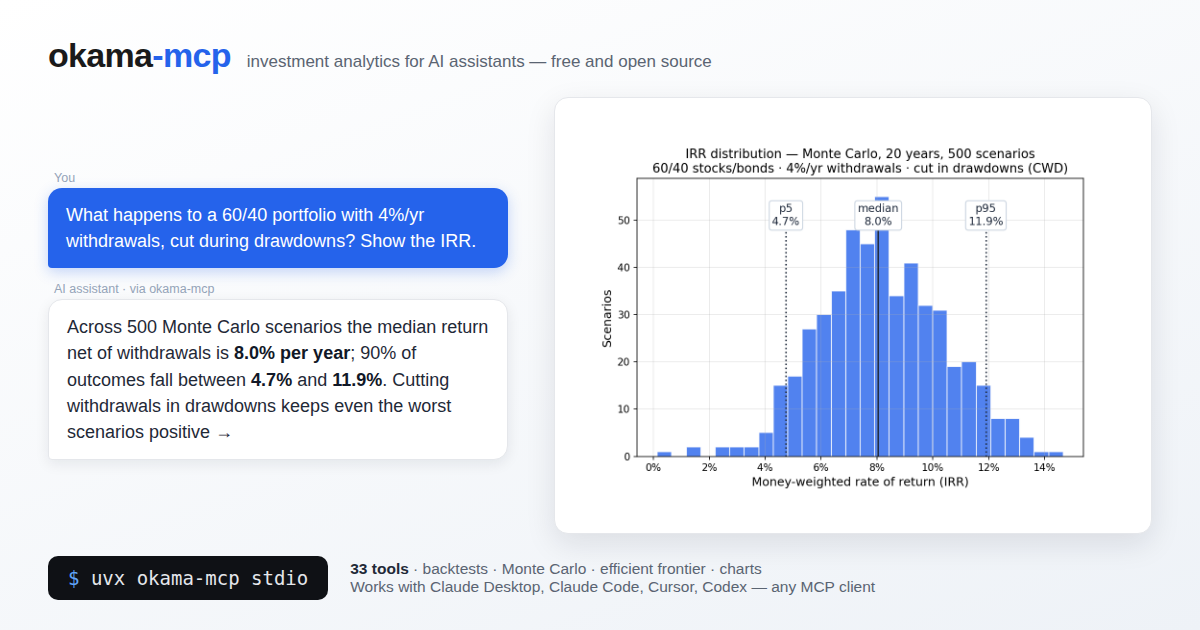
MCP (Model Context Protocol) server that exposes the [okama](https://github.com/mbk-dev/okama)
investment portfolio toolkit to AI assistants — Claude Desktop, Claude Code, Cursor, Codex,
and any other MCP-compatible client.
With okama-mcp installed, you can ask an AI things like:
> *"Backtest a portfolio of 30% gold and 70% real estate over the last 15 years."*
>
> *"Run a Monte Carlo retirement forecast on that portfolio, withdrawing $1,000/month
> indexed to inflation, over 25 years."*
>
> *"What's the tangency portfolio of SPY, BND, and GLD with a 3% risk-free rate?"*
…and the AI uses the MCP tools to call okama directly — no Python code needed.
Built on [FastMCP](https://github.com/jlowin/fastmcp). Single codebase, two transports:
`stdio` (for local clients) and `streamable-http` (for self-hosting).
okama-mcp is free and open source — no hosted service, no registration; you run it
yourself, locally or on your own server.
## Install
Requires Python ≥ 3.11 (same floor as okama itself); okama ≥ 2.2.0 is installed automatically.
The easiest way — no clone, no venv — is [uv](https://docs.astral.sh/uv/) or pipx:
```bash
uvx okama-mcp stdio # run straight from PyPI
# or
pipx install okama-mcp
```
Plain pip works too:
```bash
pip install okama-mcp
```
> [!WARNING]
> <sub>With pip, prefer a dedicated virtual environment: on most modern Linux distros the
> system Python is marked externally managed (PEP 668), so `pip install` outside a venv
> fails, and a shared environment risks dependency conflicts. In your MCP client config,
> point `command` at the absolute path of the `okama-mcp` script inside the venv — GUI
> clients don't see your shell `PATH`. `uvx` and `pipx` avoid all of this by isolating
> the install automatically.</sub>
To work on the code, install from source instead:
```bash
git clone https://github.com/mbk-dev/okama-mcp
cd okama-mcp
poetry install
```
## Run
```bash
# stdio — for Claude Desktop, Claude Code, Cursor (local IPC)
okama-mcp stdio
# streamable HTTP — for self-hosting on your own server
okama-mcp http --host 127.0.0.1 --port 8765
```
When running from a source checkout, prefix each command with `poetry run`.
## Connect a client
### Claude Desktop
Edit `~/Library/Application Support/Claude/claude_desktop_config.json` (macOS) or
`%APPDATA%\Claude\claude_desktop_config.json` (Windows):
```json
{
"mcpServers": {
"okama": {
"command": "uvx",
"args": ["okama-mcp", "stdio"]
}
}
}
```
Restart Claude Desktop; the server appears in the tools menu.
### Claude Code
To make the server available in **every** project (works from any directory):
```bash
claude mcp add --scope user okama -- uvx okama-mcp stdio
```
Developers running from a source checkout can use `claude mcp add okama -- poetry run okama-mcp stdio` from the project root instead.
Or commit a `.mcp.json` at the project root so the whole team picks it up:
```json
{
"mcpServers": {
"okama": {
"command": "uvx",
"args": ["okama-mcp", "stdio"]
}
}
}
```
### Cursor
Add the server to `.cursor/mcp.json` in your project (or `~/.cursor/mcp.json` to make
it global):
```json
{
"mcpServers": {
"okama": {
"command": "uvx",
"args": ["okama-mcp", "stdio"]
}
}
}
```
### Codex (CLI & Desktop)
Add the server with one command:
```bash
codex mcp add okama -- uvx okama-mcp stdio
```
Or declare it in `~/.codex/config.toml` (or a project-scoped `.codex/config.toml`
in trusted projects):
```toml
[mcp_servers.okama]
command = "uvx"
args = ["okama-mcp", "stdio"]
```
The Codex CLI, desktop app, and IDE extension share this configuration — set it up
once and it works in all three.
### Self-hosting (streamable HTTP)
Run okama-mcp on your own server and share it across your MCP clients:
```bash
okama-mcp http --host 127.0.0.1 --port 8765 --path /mcp
```
(From source: `poetry run okama-mcp http ...`)
Then point your MCP client at `http://<your-server>:8765/mcp`. For a production
setup put nginx + TLS in front; ready-made examples live in `deploy/`:
- `deploy/systemd/okama-mcp.service` — systemd unit (hardened, runs as a dedicated user)
- `deploy/nginx/self-hosted.conf` — nginx vhost: TLS, SSE-friendly proxying of `/mcp`
The server is open by design — free to run, no registration. If your instance must
not be public, restrict access at the nginx level (allow-list, VPN, or HTTP basic auth).
## Tool catalog
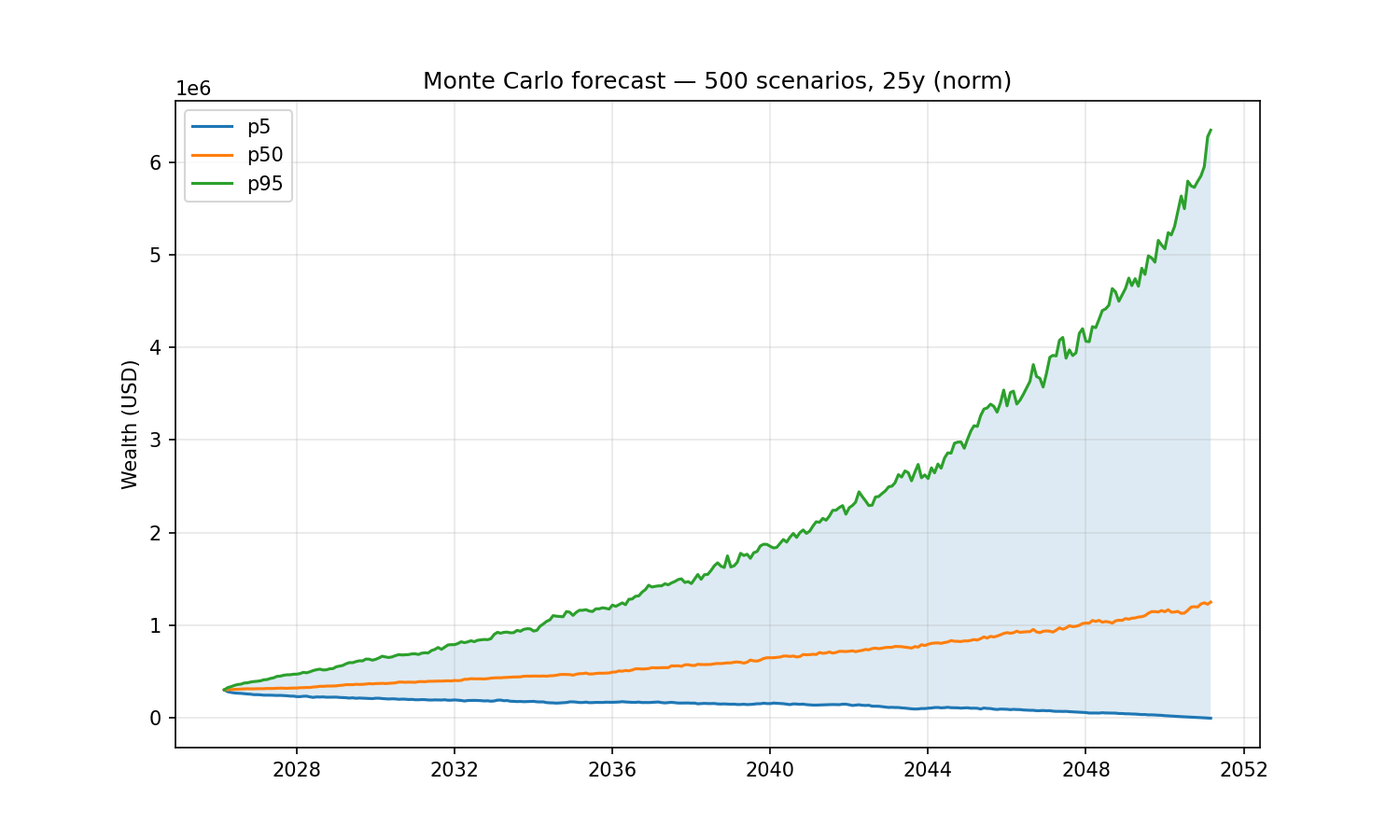
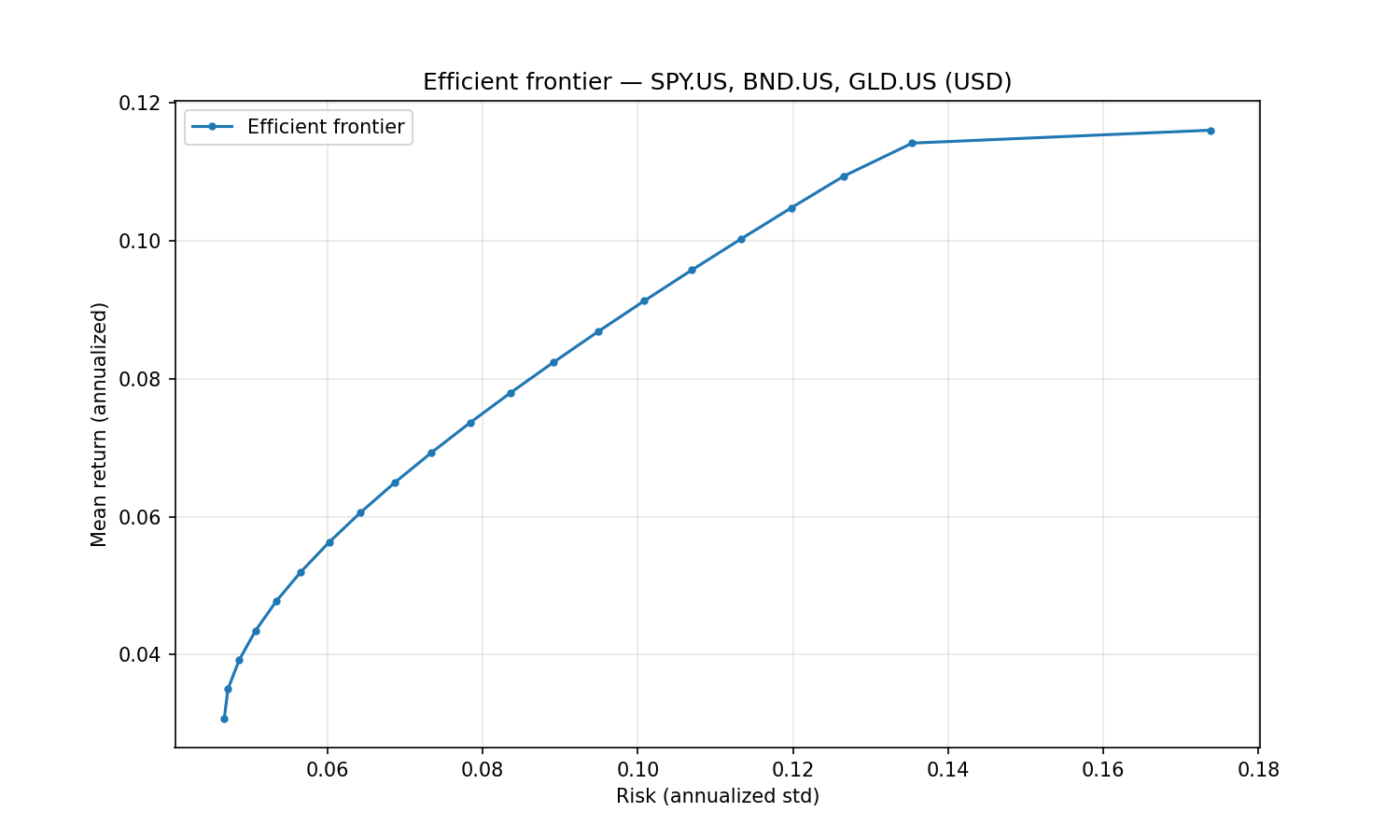
A Monte Carlo retirement forecast (30% gold / 70% real estate, withdrawing $1,000/month
indexed to inflation over 25 years) and the efficient frontier of SPY/BND/GLD — the
exact examples from the top of this page:
All tools are **stateless** — pass the full portfolio specification with every call.
The server caches expensive okama objects (`Portfolio`, `EfficientFrontier`) by content
hash, so repeated calls on the same spec are fast.
**Nested portfolios.** Wherever a list of assets is accepted — the `assets` field of
`PortfolioSpec`/`FrontierSpec`, or the `portfolios` argument on the comparison tools —
an entry may be a ticker string **or a nested portfolio object** (the same spec shape).
This lets you treat a whole portfolio as a single component: e.g. compare a 60/40
portfolio against gold, or put a sub-portfolio on the efficient frontier.
### Search & metadata
| Tool | Purpose |
|---|---|
| `search_assets(query, namespace?)` | Free-text search across all okama symbols by name / ticker / ISIN. |
| `list_namespaces(kind="all"\|"assets"\|"macro")` | Show the available okama namespaces. |
| `get_asset_info(symbol)` | Metadata for one symbol — name, country, currency, type, date range. |
### Single asset & comparisons
| Tool | Purpose |
|---|---|
| `get_asset_history(symbol, kind, first_date?, last_date?)` | Time series for one asset. `kind` ∈ {`close_monthly`, `close_daily`, `adj_close`, `ror`, `dividends`}. |
| `compare_assets(symbols, ccy, ..., portfolios?, rf_return?, t_return?)` | Side-by-side statistics (`describe()` table: CAGR, risk, drawdowns by period) plus Sharpe & Sortino per asset. |
| `get_correlations(symbols, ccy, ..., portfolios?)` | Correlation matrix of monthly returns. |
| `get_rolling_risk(symbols, ccy, window_months=12, ..., portfolios?)` | Rolling annualized risk per asset. |
| `get_asset_returns(symbols, ccy, ..., portfolios?, period?, real=False)` | Return metrics per asset: CAGR, cumulative return, mean / real mean return, monthly geometric mean, annual returns table. |
| `get_rolling_returns(symbols, ccy, window_months=12, real=False, ..., portfolios?)` | Rolling CAGR and rolling cumulative return per asset. |
| `get_benchmark_metrics(benchmark, symbols, ccy, ..., portfolios?, rolling_window?)` | Beta, correlation, annualized tracking difference and tracking error of each asset vs a benchmark/index. |
| `get_dividend_info(symbols, ccy, ...)` | LTM dividend yield, 5y mean yield, paying/growing streaks per asset. |
### Portfolio backtest
| Tool | Purpose |
|---|---|
| `analyze_portfolio(portfolio, rf_return=0, t_return=0)` | Headline metrics (CAGR, annual mean/risk, **Sharpe, Sortino**) + full `describe()` for a `PortfolioSpec`. |
| `get_portfolio_drawdowns(portfolio)` | Drawdown time series + max drawdown / recovery period. |
| `get_portfolio_var_cvar(portfolio, time_frame=12, level=1)` | Historical Value at Risk and CVaR. |
| `get_portfolio_wealth_index(portfolio, full=False)` | Wealth-index series (cumulative growth of 1000). |
| `get_rolling_cagr(portfolio, window_months=12, real=False)` | Rolling CAGR time series (optionally inflation-adjusted). |
| `get_cagr_probability(portfolio, years, cagr_target)` | Historical probability of CAGR below a target (e.g. of a loss) over N-year periods. |
### Monte Carlo DCF
| Tool | Purpose |
|---|---|
| `monte_carlo_forecast(portfolio, mc, cashflow)` | Forward simulation with one of five cash-flow strategies (`indexation`, `percentage`, `time_series`, `vanguard`, `cut_if_drawdown`). Returns percentile wealth bands, terminal-wealth stats, survival metrics. Includes the money-weighted IRR distribution (percentiles + mean). |
| `get_portfolio_irr(portfolio, cashflow)` | Historical money-weighted return (IRR) for a contribution/withdrawal plan. |
| `find_the_largest_withdrawals_size(portfolio, mc, cashflow, goal, ...)` | Largest sustainable withdrawal (Monte Carlo) for a `goal`: keep real purchasing power, keep nominal balance, or survive N years. |
| `get_monte_carlo_cash_flow(portfolio, mc, cashflow, discounting?)` | Monte Carlo distribution of future cash flows over time (percentile bands). |
The `mc` argument accepts `distribution_parameters` to override the fitted distribution (e.g. a fixed Student-t `df`); see the MCSpec shape below.
### Distribution diagnostics
| Tool | Purpose |
|---|---|
| `get_distribution_fit(portfolio, mc)` | Goodness-of-fit for the return distribution: fitted parameters, Jarque-Bera, Kolmogorov-Smirnov (chosen + all distributions), and backtesting error (theoretical vs empirical mean/VaR/CVaR). |
| `get_return_moments(portfolio, mc, rolling_windWhat people ask about okama-mcp
What is mbk-dev/okama-mcp?
+
mbk-dev/okama-mcp is mcp servers for the Claude AI ecosystem. MCP server providing investment analysis tools backed by the okama Python library It has 2 GitHub stars and was last updated today.
How do I install okama-mcp?
+
You can install okama-mcp by cloning the repository (https://github.com/mbk-dev/okama-mcp) or following the README instructions on GitHub. ClaudeWave also provides quick install blocks on this page.
Is mbk-dev/okama-mcp safe to use?
+
Our security agent has analyzed mbk-dev/okama-mcp and assigned a Trust Score of 79/100 (tier: Trusted). See the full breakdown of passed checks and flags on this page.
Who maintains mbk-dev/okama-mcp?
+
mbk-dev/okama-mcp is maintained by mbk-dev. The last recorded GitHub activity is from today, with 0 open issues.
Are there alternatives to okama-mcp?
+
Yes. On ClaudeWave you can browse similar mcp servers at /categories/mcp, sorted by popularity or recent activity.
Deploy okama-mcp to your cloud
Ship this repo to production in minutes. Each platform spins up its own environment with editable env vars.
Maintain this repo? Add a badge to your README
Drop the badge into your GitHub README to show it's tracked on ClaudeWave. Each badge links back to this page and reflects the live Trust Score.
[](https://claudewave.com/repo/mbk-dev-okama-mcp)<a href="https://claudewave.com/repo/mbk-dev-okama-mcp"><img src="https://claudewave.com/api/badge/mbk-dev-okama-mcp" alt="Featured on ClaudeWave: mbk-dev/okama-mcp" width="320" height="64" /></a>More MCP Servers

Fair-code workflow automation platform with native AI capabilities. Combine visual building with custom code, self-host or cloud, 400+ integrations.

User-friendly AI Interface (Supports Ollama, OpenAI API, ...)

An open-source AI agent that brings the power of Gemini directly into your terminal.

The fastest path to AI-powered full stack observability, even for lean teams.

🕷️ An adaptive Web Scraping framework that handles everything from a single request to a full-scale crawl!

⭐AI-driven public opinion & trend monitor with multi-platform aggregation, RSS, and smart alerts.🎯 告别信息过载,你的 AI 舆情监控助手与热点筛选工具!聚合多平台热点 + RSS 订阅,支持关键词精准筛选。AI 智能筛选新闻 + AI 翻译 + AI 分析简报直推手机,也支持接入 MCP 架构,赋能 AI 自然语言对话分析、情感洞察与趋势预测等。支持 Docker ,数据本地/云端自持。集成微信/飞书/钉钉/Telegram/邮件/ntfy/bark/slack 等渠道智能推送。