

Run MCP servers without handing them your API keys — sandboxed execution plus on-demand discovery from a public MCP registry
- ✓Open-source license (MIT)
- ✓Actively maintained (<30d)
- ✓Clear description
- ✓Topics declared
- ✓Documented (README)
claude mcp add mcp-gateway -- npx -y @mcp-rating/gateway{
"mcpServers": {
"mcp-gateway": {
"command": "npx",
"args": ["-y", "@mcp-rating/gateway"],
"env": {
"OLLAMA_HOST": "<ollama_host>"
}
}
}
}OLLAMA_HOSTMCP Servers overview
# @mcp-rating/gateway
[](https://www.npmjs.com/package/@mcp-rating/gateway)
[](./LICENSE)
[](https://modelcontextprotocol.io)
**Run MCP servers without handing them the API keys in your environment.**
Adding an MCP server to your client today spawns somebody else's code with your
entire environment attached — `AWS_SECRET_ACCESS_KEY`, `OPENAI_API_KEY`,
`DATABASE_URL`, everything in your shell. The gateway spawns them with a
constructed environment instead: `PATH`, `HOME`, and only the variables you or
its manifest name. Nothing else from your environment is there to read.
**Files are a different matter.** By default a server still runs as you, so it
can read what you can — `~/.ssh`, `~/.aws/credentials`, a project's `.env`. Only
container isolation (opt-in, needs Docker) closes that. See
[what each level protects](#security-model).
<!-- Absolute URL on purpose: relative image paths render on GitHub but break on
npmjs.com, which is where anyone arriving via `npx` reads this. -->
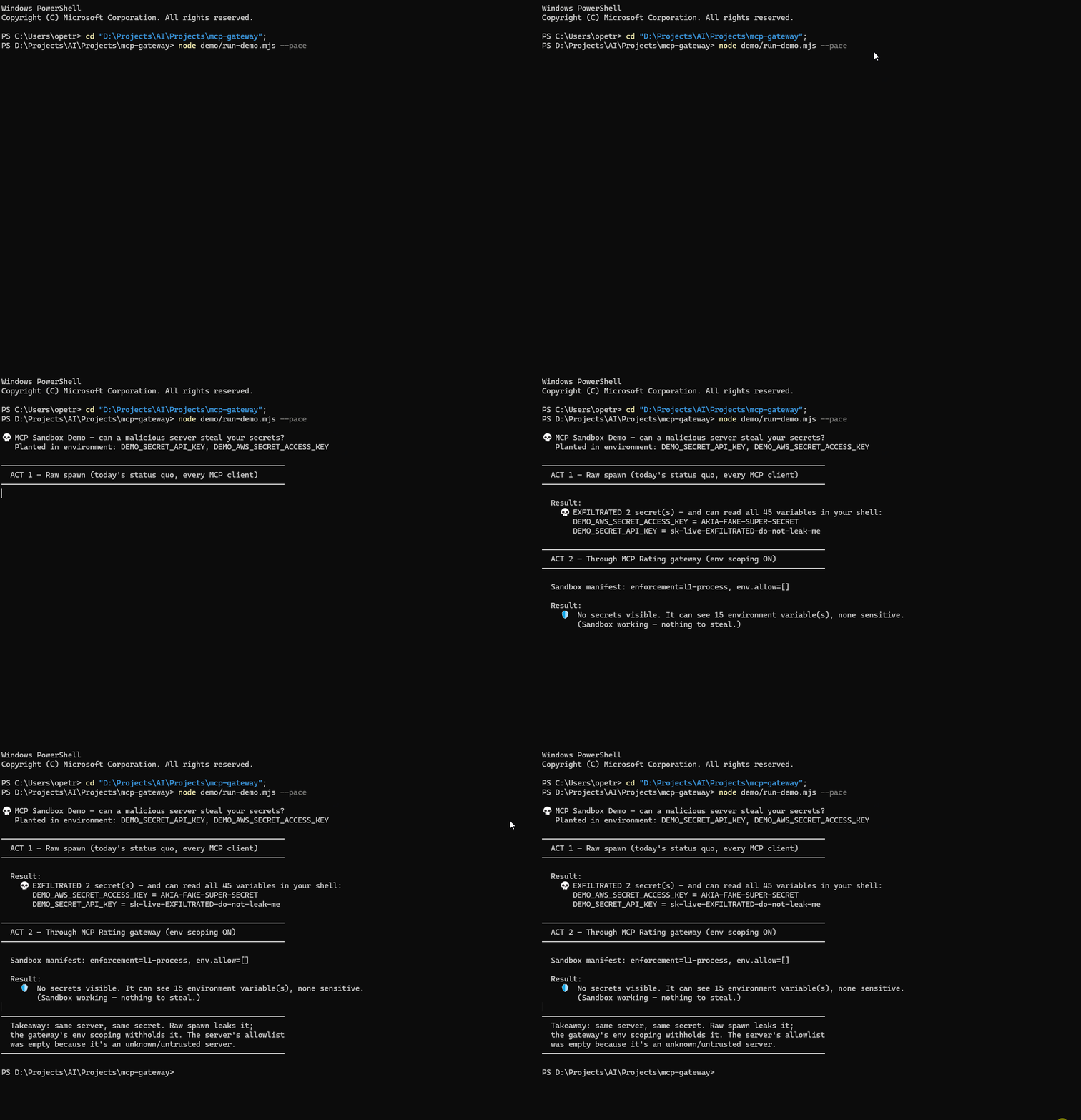
| | Raw spawn (every MCP client today) | Through the gateway |
|---|---|---|
| Environment visible to the server | **your entire shell** | `PATH`, `HOME`, and what you name |
| Credentials in environment variables | **all of them** | none you didn't name |
| Credential files (`~/.ssh`, `~/.aws`, `.env`) | readable | **still readable**, unless container isolation is on |
*Reproduce it yourself in about ten seconds — `node demo/run-demo.mjs` plants two fake
credentials, reads your real environment, and prints only the count and the planted
values. Nothing of yours is displayed.*
It is also a meta-server: one entry in your config gives you the whole registry,
connected on demand rather than pre-loaded.
```json
{ "mcpServers": { "gateway": { "command": "npx", "args": ["-y", "@mcp-rating/gateway"] } } }
```
## Why it uses less of your context
Every MCP server you configure statically injects its full tool schema into
every turn, whether you use it or not. The gateway exposes 13 meta-tools at a
fixed cost and loads a server's tools only once you connect to it.
| | measured |
|---|--:|
| Median real MCP server | **2,587 tokens** |
| 10 servers configured statically | **~25,900 tokens, every turn** |
| Gateway, flat | **2,644 tokens** |
Roughly **10× less** standing overhead at ten servers, and the gap widens with
each one you add. One median server already costs about what the entire gateway
costs.
### But standing overhead is not the bill — here is the break-even
That 10× is what *sits* in the window. It is not what a conversation costs,
because the gateway also adds turns: it has to discover a server and connect to
it before using it, every turn re-sends the whole transcript, and `mcp_discover`
output stays in that transcript afterwards.
Measured end to end on gemma-4-31B through vLLM, with the server's own tokenizer
rather than an estimate:
| | tokens | turns |
|---|--:|--:|
| Gateway, cold — discover, connect, then call a tool | **17,904** | 5 |
| Same tool call, server already configured | **6,605** | 2 |
**With one server, the gateway costs 2.7× more than just configuring it.** The
saving only appears once you have enough servers that carrying all their schemas
outweighs the setup. N configured, one actually used, after ten turns of work:
| servers | static | gateway | |
|--:|--:|--:|---|
| 1 | 25,870 | 70,524 | static wins 2.7× |
| 2 | 51,740 | 70,524 | static wins 1.4× |
| **4** | 103,480 | 70,524 | gateway wins 1.5× |
| 10 | 258,700 | 70,524 | gateway wins 3.7× |
| 20 | 517,400 | 70,524 | gateway wins 7.3× |
**Break-even is three to five servers.** Below that, a hand-written config is
genuinely cheaper and you should use one. Above it the gateway wins, and keeps
winning as you add more — but the honest figure at ten servers is about **3×**
on total tokens, not the 10× you get by counting standing overhead alone.
*Honest about the method:* measured from the tool schemas of 91 servers this
project has connected to and introspected — drawn from the 300 most-downloaded
in the registry — summing `{name, description, inputSchema}` per tool, the
payload a client actually receives from `tools/list`, sized as `chars / 4`. That
is an estimate, not a tokenizer.
**Median, not mean, and the distribution is why.** The mean is 9,965 tokens,
dragged there by a long tail: 19 of the 91 cost over 10,000 tokens and the
heaviest — a Spotify server exposing 608 tools — costs 135,666, about 68% of a
200k context window on its own. Quoting the mean would flatter this project's
numbers using servers almost nobody installs.
The saving is real precisely because most configured servers sit unused in most
conversations — but see the break-even above before assuming it applies to you.
The `chars / 4` estimate was checked against three real tokenizers and came in at
0.88×, 0.98× and 1.01× of the true count, so it never reads low.
Reproduce both: `node demo/shorts/short2-context.mjs --refresh` for the schema
corpus, and `demo/ollama-probe.mjs` for the end-to-end bill —
```bash
# gateway cold: must discover and connect first
OLLAMA_HOST=http://host:8000/v1 node demo/ollama-probe.mjs your-model
# baseline: server already attached, like a static config
PRECONNECT=everything-slim OLLAMA_HOST=... node demo/ollama-probe.mjs your-model
```
## How It Works
```
┌────────────────────┐ ┌──────────────┐ ┌──────────────────┐
│ Claude Desktop / │ stdio │ │ stdio │ MCP Server A │
│ Cursor / Windsurf │◄─────►│ MCP Gateway │◄──────►│ (e.g. filesystem)│
│ (host client) │ │ │◄──┐ └──────────────────┘
└────────────────────┘ └──────────────┘ │ ┌──────────────────┐
│ └───►│ MCP Server B │
▼ │ (e.g. github) │
┌──────────────┐ └──────────────────┘
│ MCP-Rating │
│ Registry API │
└──────────────┘
```
Instead of manually configuring each MCP server in your client, the Gateway:
1. **Discovers** servers via the MCP-Rating registry, listing first the ones it can
start right now (see below)
2. **Connects** to them on-demand: spawns local ones as child processes, and
connects hosted ones to the endpoint the registry lists
3. **Proxies** their tools through namespaced names (`servername__toolname`)
4. **Notifies** your client when tools are added/removed
## Quick Start
### With Claude Desktop
Add to your `claude_desktop_config.json`:
```json
{
"mcpServers": {
"gateway": {
"command": "npx",
"args": ["-y", "@mcp-rating/gateway"]
}
}
}
```
Then ask Claude:
- *"Search for MCP servers that work with databases"* (uses `mcp_discover`)
- *"Connect to the sqlite server"* (uses `mcp_connect`)
- *"Query my database"* (calls the proxied tool directly)
### Cursor
`~/.cursor/mcp.json` (or `.cursor/mcp.json` in a project):
```json
{
"mcpServers": {
"gateway": { "command": "npx", "args": ["-y", "@mcp-rating/gateway"] }
}
}
```
### Claude Code
```bash
claude mcp add gateway -- npx -y @mcp-rating/gateway
```
### Windsurf
`~/.codeium/windsurf/mcp_config.json`, same shape as Cursor:
```json
{
"mcpServers": {
"gateway": { "command": "npx", "args": ["-y", "@mcp-rating/gateway"] }
}
}
```
### Any other MCP client
```json
{ "command": "npx", "args": ["-y", "@mcp-rating/gateway"] }
```
Restart the client after editing its config — most read it only at startup.
## What `mcp_discover` puts first
An agent can only use a server the gateway can start, so results are ordered by
that, keeping relevance order within each group:
1. **Verified**: the registry's own harness started it and it listed its tools
(`✓ Started in our test`).
2. **Ready, untested**: installable here, or a hosted endpoint that needs no
header, and any key it declares is set.
3. **Needs setup**: a declared key isn't set, its launcher (`uvx`, `docker`) isn't
installed, or the hosted endpoint needs a header the gateway can't send yet.
4. **Failed in our test**: it didn't start when the registry tried it, with no
credentials (`✗ Didn't start in our test`).
5. **Can't start by slug**: no install command and no endpoint recorded.
"Verified" means it started and listed tools, not that every tool works without
a key. The harness supplies none. Most of the index has never been tried; that
says nothing either way.
## Meta-Tools
The gateway exposes 13 built-in tools:
| Tool | Description |
|------|-------------|
| `mcp_discover` | Search the MCP-Rating registry; servers the gateway can start now come first |
| `mcp_connect` | Connect to a server and make its tools available |
| `mcp_disconnect` | Disconnect a server and remove its tools |
| `mcp_list_active` | List connected servers and their tools |
| `mcp_server_info` | Detailed info about a server, from the registry or a live connection |
| `mcp_call_tool` | Call a tool on a connected server |
| `mcp_gateway_health` | Diagnostics: version, uptime, connection and registry status |
| `mcp_sandbox` | View or customise a server's sandbox manifest (env/network/filesystem) |
| `mcp_audit` | The safety audit trail — what sandboxed servers actually did |
| `mcp_profiles` | Named connection profiles (work, personal, …) |
| `mcp_groups` | Atomic connect/disconnect of server sets |
| `mcp_usage` | Call counts, latency and error rates for connected serverWhat people ask about mcp-gateway
What is mcprating/mcp-gateway?
+
mcprating/mcp-gateway is mcp servers for the Claude AI ecosystem. Run MCP servers without handing them your API keys — sandboxed execution plus on-demand discovery from a public MCP registry It has 1 GitHub stars and its last recorded update is dated 2026-09-28.
How do I install mcp-gateway?
+
You can install mcp-gateway by cloning the repository (https://github.com/mcprating/mcp-gateway) or following the README instructions on GitHub. ClaudeWave also provides quick install blocks on this page.
Is mcprating/mcp-gateway safe to use?
+
Our security agent has analyzed mcprating/mcp-gateway and assigned a Trust Score of 95/100 (tier: Verified). See the full breakdown of passed checks and flags on this page.
Who maintains mcprating/mcp-gateway?
+
mcprating/mcp-gateway is maintained by mcprating. The last recorded GitHub activity is dated 2026-09-28, with 0 open issues.
Are there alternatives to mcp-gateway?
+
Yes. On ClaudeWave you can browse similar mcp servers at /categories/mcp, sorted by popularity or recent activity.
Deploy mcp-gateway to your cloud
Ship this repo to production in minutes. Each platform spins up its own environment with editable env vars.
Maintain this repo? Add a badge to your README
Drop the badge into your GitHub README to show it's tracked on ClaudeWave. Each badge links back to this page and reflects the live Trust Score.
[](https://claudewave.com/repo/mcprating-mcp-gateway)<a href="https://claudewave.com/repo/mcprating-mcp-gateway"><img src="https://claudewave.com/api/badge/mcprating-mcp-gateway" alt="Featured on ClaudeWave: mcprating/mcp-gateway" width="320" height="64" /></a>More MCP Servers

Fair-code workflow automation platform with native AI capabilities. Combine visual building with custom code, self-host or cloud, 400+ integrations.

User-friendly AI Interface (Supports Ollama, OpenAI API, ...)

An open-source AI agent that brings the power of Gemini directly into your terminal.

Real-time global intelligence dashboard. AI-powered news aggregation, geopolitical monitoring, and infrastructure tracking in a unified situational awareness interface

🕷️ An adaptive Web Scraping framework that handles everything from a single request to a full-scale crawl! Don't be shy, join here: https://discord.gg/EMgGbDceNQ and follow here for daily tips and tricks: https://x.com/Scrapling_dev

The fastest path to AI-powered full stack observability, even for lean teams.