

MCP server exposing PlantCV as a measurement instrument — plant traits plus the segmentation overlay they were measured from
- ✓Open-source license (MIT)
- ✓Actively maintained (<30d)
- ✓Clear description
- ✓Topics declared
- ✓Documented (README)
claude mcp add plantcv-mcp -- uvx plantcv-mcp{
"mcpServers": {
"plantcv-mcp": {
"command": "uvx",
"args": ["plantcv-mcp"]
}
}
}MCP Servers overview
# plantcv-mcp
**Plant phenotyping over MCP — traits, plus the segmentation overlay they were measured from.**
[](https://github.com/musharna/plantcv-mcp/actions/workflows/ci.yml)
[](https://pypi.org/project/plantcv-mcp/)
[](https://pypi.org/project/plantcv-mcp/)
[](https://github.com/musharna/plantcv-mcp/blob/master/LICENSE)
[](https://glama.ai/mcp/servers/musharna/plantcv-mcp)
[](https://doi.org/10.5281/zenodo.21713516)
<!-- mcp-name: io.github.musharna/plantcv-mcp -->
[PlantCV](https://plantcv.org) as an MCP **measurement instrument**: it returns plant trait
numbers **and the picture they were computed from**, and refuses to return numbers when the
segmentation is degenerate.
> Unofficial. Not affiliated with, endorsed by, or sponsored by the Donald
> Danforth Plant Science Center or the PlantCV maintainers. See [NOTICE](https://github.com/musharna/plantcv-mcp/blob/master/NOTICE).
## Why you are handed the overlay
Both images below come from the same file and the same threshold method — the only difference
is one parameter.
| ✅ `channel="a", object_type="dark"` | ❌ `channel="s", object_type="dark"` |
| ---------------------------------------------------------------------------------------------------------------------- | ------------------------------------------------------------------------------------------------------------------------ |
| 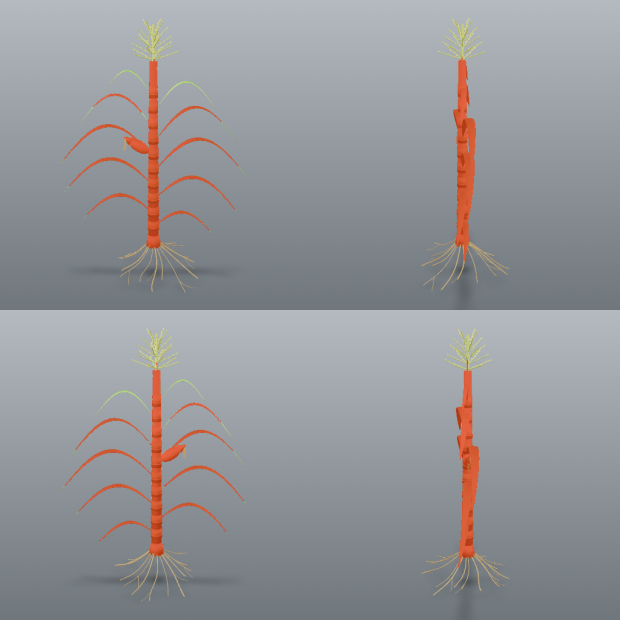 | 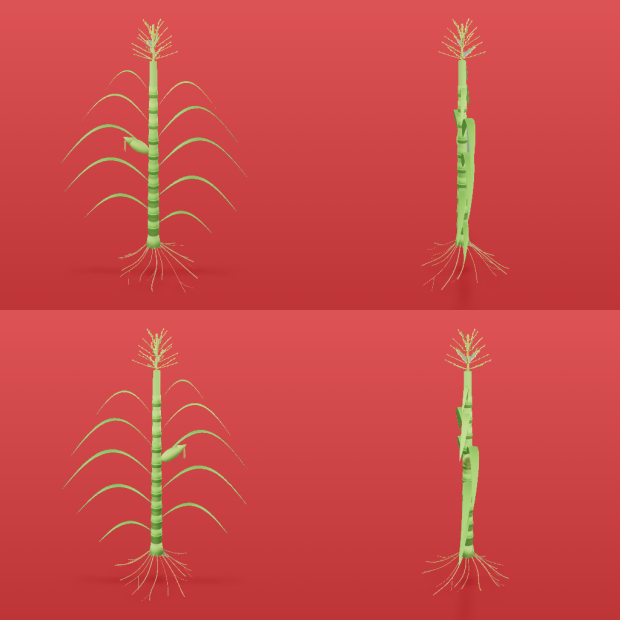 |
| Mask covers **3.1%** of the frame, 9 components. `area=32427` | Mask covers **96.1%** — it is the **background**. `area=1007829` |
The failure on the right is what this server exists to prevent. Without the picture, both
runs return seventeen traits with correct units and entirely believable magnitudes. The one
on the right is measuring the wall behind the plants.
Red marks the pixels that were measured; a cyan line traces the mask's own boundary, drawn on
the mask's edge pixels so it never touches anything unmasked (the tint alone was invisible on
a photo of red beans).
`segment()` returns the overlay and diagnostics but **no traits**. `measure()` requires the
`session_id` that `segment()` mints. You cannot get a number without first being handed the
image it came from.
That is not a style preference. Measured on real images with PlantCV 4.11.3:
| failure | what you get without the overlay |
| --------------------------------- | ----------------------------------------------------------- |
| four-view render, whole-image ROI | 17 plausible traits describing four merged plants |
| plant clipped by the frame | size traits that are silently lower bounds |
| empty mask | 17 traits of zeros, with PlantCV reporting `in_bounds=True` |
All three produce correctly-united, entirely believable numbers.
## Install
No install is needed if the host has [uv](https://docs.astral.sh/uv/): `uvx plantcv-mcp`
fetches the current release into its own environment and runs it. Otherwise:
```bash
pip install plantcv-mcp
```
Requires Python 3.11+. Installing pulls PlantCV and its scientific stack, so the first
install (or first `uvx` run) is not fast. From a checkout: `uv add /path/to/plantcv-mcp`.
## Configure your MCP client
```bash
claude mcp add plantcv -- uvx plantcv-mcp
```
Claude Desktop and other stdio hosts:
```json
{ "mcpServers": { "plantcv": { "command": "uvx", "args": ["plantcv-mcp"] } } }
```
With a pip install, use `"command": "plantcv-mcp"` (and drop `uvx` from the `claude mcp add`
line); from a checkout, `"command": "uv", "args": ["run", "--directory",
"/path/to/plantcv-mcp", "plantcv-mcp"]`. Verify with `list_methods()`.
Flags: `--root DIR` (repeatable, or `PLANTCV_MCP_ROOTS`) confines every read, and the one
write, to your imagery: `plantcv-mcp --root /data/phenotyping`. `--no-isolate` (or
`PLANTCV_MCP_ISOLATE=0`) runs analyses in-process instead of in the crash-containing worker.
## Tools
| tool | returns |
| ----------------------------------------------------------------------- | ------------------------------------------------------------------------------------------------------------------ |
| `suggest_segmentation(image_path, channel, method)` | contact sheets, and what each `object_type` would yield |
| `segment(image_path, channel, method, ...)` | overlay + diagnostics + warnings — **no traits** |
| `refine(session_id, ops)` | a NEW session with a cleaned-up mask, plus its overlay |
| `measure(session_id, analyses, px_per_mm, ...)` | traits, or a raised error on a degenerate mask |
| `calibrate_scale_from_marker(image_path, x, y, w, h, marker_length_mm)` | `px_per_mm` from a marker of known real size |
| `correct_lens_distortion(image_path, checkerboard_dir, ...)` | a fisheye/wide-angle image undistorted via checkerboard calibration, written next to the input or to `output_path` |
| `measure_regions(session_id, nrows, ncols, ...)` | one row per plant in a tray (RGB traits, thermal temperatures or HSI index stats), plus the numbered overlay |
| `measure_morphology(session_id, prune_size, tangent_size, ...)` | leaf/stem skeleton traits + the numbered-segment overlay |
| `count_leaves(session_id, min_distance, px_per_mm)` | leaf instances by watershed: an estimated count, per-instance area/centroid/bbox + the numbered overlay |
| `measure_images(image_paths, channel, method, ...)` | one recipe across many images (per plant with a grid); traits only where valid; time-budgeted |
| `segment_hyperspectral(envi_path, index, threshold, ...)` | an HSI session from a spectral-index threshold + pseudo-RGB overlay |
| `measure_spectral(session_id, indices, ...)` | index statistics (and, opt-in, per-band reflectance) |
| `segment_thermal(path, min_c, max_c, ...)` | a thermal session from a °C band + grey-frame overlay |
| `measure_thermal(session_id, ...)` | max/min/mean/median °C under the mask |
| `list_methods()` | channels, methods, object types, pinned PlantCV version |
Typical loop: `suggest_segmentation` → `segment` → **look at the overlay** → `segment` again
with a different channel, method or polarity if it is wrong (or `refine` if it is nearly
right) → `measure`. Pass `color_correct=true` to `segment` when a ColorChecker is in the
frame: colours are corrected to the reference before segmenting and measuring, and the card
itself is excluded from the mask (`exclude_color_card=true` does only the exclusion).
The call that produced the left-hand image above:
```json
{
"image_path": "multi_specimen.png",
"channel": "a",
"method": "otsu",
"object_type": "dark"
}
```
Its response — verbatim, apart from a shortened `session_id` and an elided message — with
the overlay arriving beside it as an image:
```json
{
"session_id": "9d2384c8-…",
"channel": "a",
"method": "otsu",
"object_type": "dark",
"fill_size": 200,
"color_correct": false,
"mask_fraction": 0.031,
"component_count": 9,
"major_object_count": 4,
"largest_area": 8628,
"overlay_scale": 1.0,
"overlay_png_bytes": 748233,
"warnings": [
{
"code": "multi_specimen",
"message": "4 comparably-sized objects detected (areas: [8628, 7981, 7106, 6748]). …"
}
]
}
```
## What it refuses, and why
Every guard was calibrated against a real failure and names the next action. Blocking
guards withhold numbers; advisories travel with them.
- **Inverted mask** (`implausible_coverage`) — the right-hand image above: 96% of the frame
selected, seventeen believable traits, all describing the wall.
- **Nothing selected, or `fill_size` deleted the specimen** (`empty_mask`,
`fill_erased_mask`) — PlantCV returns seventeen zeros with `in_bounds=True`.
- **Background texture** (`noisy_segmentation`) — a sorghum photo measured as one
650,000-px plant made of 118 chamber-wall specks.
- **Several plants in one mask** (`multWhat people ask about plantcv-mcp
What is musharna/plantcv-mcp?
+
musharna/plantcv-mcp is mcp servers for the Claude AI ecosystem. MCP server exposing PlantCV as a measurement instrument — plant traits plus the segmentation overlay they were measured from It has 0 GitHub stars and its last recorded update is dated 2026-09-19.
How do I install plantcv-mcp?
+
You can install plantcv-mcp by cloning the repository (https://github.com/musharna/plantcv-mcp) or following the README instructions on GitHub. ClaudeWave also provides quick install blocks on this page.
Is musharna/plantcv-mcp safe to use?
+
Our security agent has analyzed musharna/plantcv-mcp and assigned a Trust Score of 95/100 (tier: Verified). See the full breakdown of passed checks and flags on this page.
Who maintains musharna/plantcv-mcp?
+
musharna/plantcv-mcp is maintained by musharna. The last recorded GitHub activity is dated 2026-09-19, with 1 open issues.
Are there alternatives to plantcv-mcp?
+
Yes. On ClaudeWave you can browse similar mcp servers at /categories/mcp, sorted by popularity or recent activity.
Deploy plantcv-mcp to your cloud
Ship this repo to production in minutes. Each platform spins up its own environment with editable env vars.
Maintain this repo? Add a badge to your README
Drop the badge into your GitHub README to show it's tracked on ClaudeWave. Each badge links back to this page and reflects the live Trust Score.
[](https://claudewave.com/repo/musharna-plantcv-mcp)<a href="https://claudewave.com/repo/musharna-plantcv-mcp"><img src="https://claudewave.com/api/badge/musharna-plantcv-mcp" alt="Featured on ClaudeWave: musharna/plantcv-mcp" width="320" height="64" /></a>More MCP Servers

Fair-code workflow automation platform with native AI capabilities. Combine visual building with custom code, self-host or cloud, 400+ integrations.

User-friendly AI Interface (Supports Ollama, OpenAI API, ...)

An open-source AI agent that brings the power of Gemini directly into your terminal.

Real-time global intelligence dashboard. AI-powered news aggregation, geopolitical monitoring, and infrastructure tracking in a unified situational awareness interface

🕷️ An adaptive Web Scraping framework that handles everything from a single request to a full-scale crawl! Don't be shy, join here: https://discord.gg/EMgGbDceNQ

The fastest path to AI-powered full stack observability, even for lean teams.