

This repository contains the packages that make up Pipeshub’s local MCP server
- ✓Open-source license (Apache-2.0)
- ✓Actively maintained (<30d)
- ✓Clear description
- ✓Topics declared
- ✓Documented (README)
claude mcp add mcp-server -- npx -y skills{
"mcpServers": {
"mcp-server": {
"command": "npx",
"args": ["-y", "skills"],
"env": {
"MCP_CLIENT_SECRET": "<mcp_client_secret>",
"PIPESHUB_INSTANCE_URL": "<pipeshub_instance_url>"
}
}
}
}MCP_CLIENT_SECRETPIPESHUB_INSTANCE_URLMCP Servers overview
# Connecting MCP Clients to PipesHub MCP Server
This guide covers how to connect PipesHub's remote MCP server to **Cursor**, **Claude Code**, **Gemini CLI**, **Codex CLI**, **Claude.ai (Web)**, and **LibreChat** using static OAuth credentials or bearer tokens.
PipesHub exposes a remote MCP endpoint over **Streamable HTTP** at `/mcp`. MCP Clients connect to this endpoint directly -- no local npm packages or stdio processes needed.
[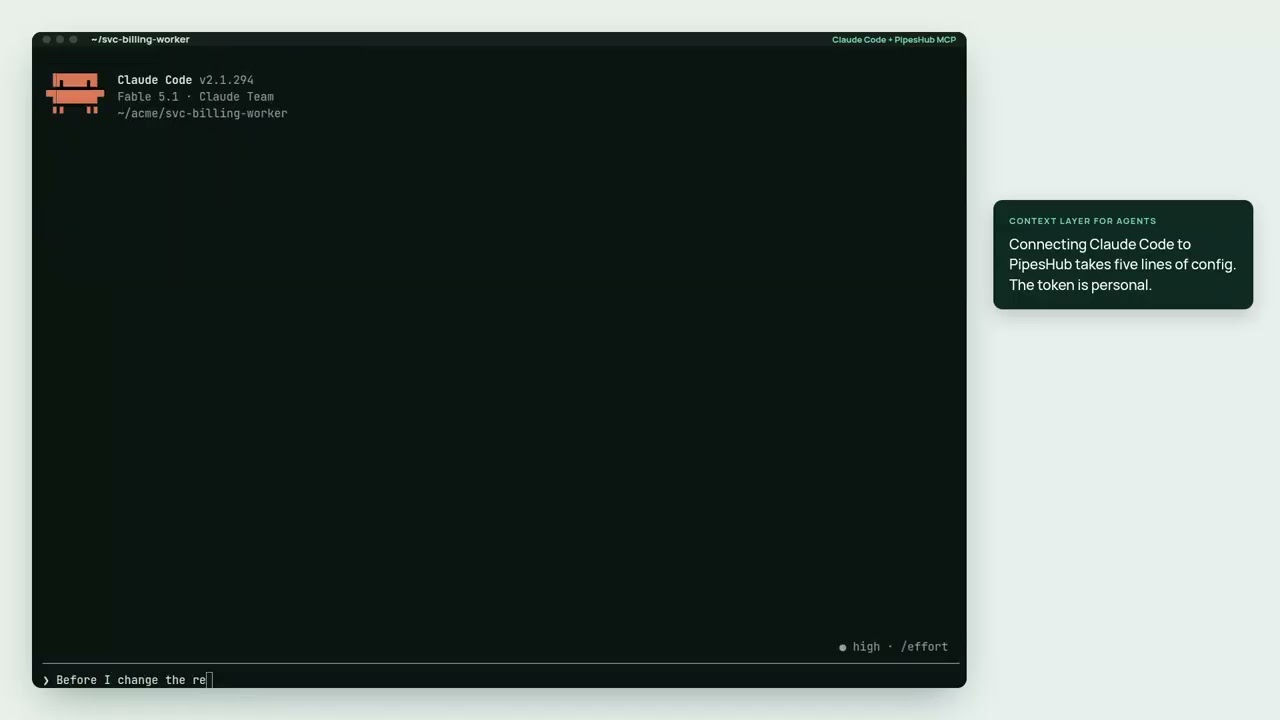](https://youtu.be/VgyND38QZ7w)
**[▶ Watch the 2½-minute demo](https://youtu.be/VgyND38QZ7w)**: Claude Code using this MCP server to answer from Jira, Slack, GitHub and Drive, with each person's own permissions.
> **Coding agent?** Start at [For coding agents](https://docs.pipeshub.com/for-agents.md). Install the skill into the *user's* repo with `npx skills add pipeshub-ai/mcp-server` (see [`skills/pipeshub`](./skills/pipeshub/SKILL.md)) and append the `AGENTS.md` snippet on that page. Listed on the [official MCP registry](https://registry.modelcontextprotocol.io) as `io.github.pipeshub-ai/mcp` and on [Cursor Directory](https://cursor.directory/plugins/mcp-server-3) as PipesHub. The listing files (`plugin.json`, `mcp.json`) default MCP to `http://localhost:3000/mcp` (Docker). Change the URL for a company instance; they contain no secrets. Contributors working in this repository: read [AGENTS.md](./AGENTS.md).
>
> **Looking for the tool reference?** See [TOOLS.md](./TOOLS.md) for descriptions, arguments, and a decision guide for each tool the MCP server exposes (`pipeshub_chat`, `pipeshub_search`, `pipeshub_get_record_content`, `pipeshub_download_record`, `pipeshub_directory`, `pipeshub_sources`, `pipeshub_agents`).
>
> **Using QM?** QM cannot attach a third-party MCP endpoint — it is an MCP *server* to its own harness, not a client. Follow [Use PipesHub with QM](./qm/docs/use-with-qm.md). The deployment-layer bundle in [`qm/`](./qm/) gives agents a `pipeshub` command inside their sandbox; this package ships that command as a second bin.
## Prerequisites
- A running PipesHub instance (self-hosted or cloud). If they have none yet, the [local Docker demo](https://docs.pipeshub.com/for-agents-local-demo.md) playbook covers install and first-run — do not scaffold LangChain. First-run (account + LLM) is still in the browser; search 500s until an LLM is configured.
- An OAuth app created in PipesHub (see [Step 1](#step-1-create-an-oauth-app-in-pipeshub))
## Step 1: Create an OAuth App in PipesHub
1. Log in to your PipesHub instance as an admin
2. Navigate to **Settings > Developer Settings > OAuth Apps**
3. Click **Create OAuth App**
4. Fill in the app details:
- **Name**: e.g., `MCP Integration`
- **Redirect URIs**: Add all the redirect URIs for the clients you plan to use:
| Client | Redirect URI |
|---|---|
| **Cursor** | `cursor://anysphere.cursor-mcp/oauth/callback` |
| **Claude Code** | `http://localhost:<PORT>/callback` (e.g., `http://localhost:8080/callback`) |
| **Claude.ai (Web)** | `https://claude.ai/api/mcp/auth_callback` |
| **Gemini CLI** | `http://localhost:7777/oauth/callback` |
| **LibreChat** | `http://localhost:3080/api/mcp/<server-identifier>/oauth/callback` |
> **Important:** The scopes in [`MCP_SCOPES`](https://github.com/pipeshub-ai/pipeshub-ai/blob/main/backend/env.template#L57) must match the scopes granted to your OAuth app — a mismatch will result in an authorization error.
5. Save the app and copy the **Client ID** and **Client Secret**
### Customizing Default Scopes
By default, PipesHub exposes some default scopes in its `/.well-known/oauth-protected-resource/mcp` discovery endpoint. You can customize which scopes are exposed by setting the [`MCP_SCOPES`](https://github.com/pipeshub-ai/pipeshub-ai/blob/main/backend/env.template#L57) environment variable on your PipesHub instance. This is useful for clients like Claude Code that automatically request all exposed scopes.
## Placeholders
Replace these in all configurations below:
| Placeholder | Description | Example |
|---|---|---|
| `PIPESHUB_INSTANCE_URL` | Your PipesHub instance URL | `https://app.pipeshub.com` |
| `YOUR_CLIENT_ID` | OAuth app client ID | `clid_abc123...` |
| `YOUR_CLIENT_SECRET` | OAuth app client secret | `clsec_xyz789...` |
The remote MCP endpoint URL is: `PIPESHUB_INSTANCE_URL/mcp`
---
## Remote MCP Setup
<details>
<summary><strong>Cursor</strong></summary>
Cursor supports static OAuth for remote MCP servers via the `auth` object in `mcp.json`.
### Configuration
Open Cursor Settings > Tools and Integrations > New MCP Server, or edit your project's `.cursor/mcp.json`:
```json
{
"mcpServers": {
"pipeshub": {
"url": "PIPESHUB_INSTANCE_URL/mcp",
"auth": {
"CLIENT_ID": "YOUR_CLIENT_ID",
"CLIENT_SECRET": "YOUR_CLIENT_SECRET",
"scopes": [
"org:read", "org:write", "org:admin",
"user:read", "user:write", "user:invite", "user:delete",
"usergroup:read", "usergroup:write",
"team:read", "team:write",
"kb:read", "kb:write", "kb:delete", "kb:upload",
"semantic:read", "semantic:write", "semantic:delete",
"conversation:read", "conversation:write", "conversation:chat",
"agent:read", "agent:write", "agent:execute",
"connector:read", "connector:write", "connector:sync", "connector:delete",
"config:read", "config:write",
"document:read", "document:write", "document:delete",
"crawl:read", "crawl:write", "crawl:delete"
]
}
}
}
}
```
Cursor will auto-discover the authorization and token endpoints via PipesHub's `/.well-known/oauth-protected-resource/mcp` metadata.
> **Note:** If the `scopes` field is omitted, Cursor fetches `/.well-known/oauth-protected-resource/mcp` and requests **all** `scopes_supported` listed there. To limit access, explicitly list only the scopes you need. You can also control which scopes are exposed server-side — see [Customizing Default Scopes](#customizing-default-scopes).
### Using Environment Variables
Use Cursor's `${env:VAR}` interpolation to keep secrets out of config files:
```json
{
"mcpServers": {
"pipeshub": {
"url": "${env:PIPESHUB_INSTANCE_URL}/mcp",
"auth": {
"CLIENT_ID": "${env:PIPESHUB_CLIENT_ID}",
"CLIENT_SECRET": "${env:PIPESHUB_CLIENT_SECRET}",
"scopes": [
"kb:read", "kb:write",
"semantic:read", "semantic:write",
"conversation:read", "conversation:write", "conversation:chat",
"agent:read", "agent:write", "agent:execute",
"connector:read", "connector:write",
"config:read", "user:read"
]
}
}
}
}
```
### Redirect URI
Cursor uses a fixed redirect URI for all MCP servers:
```
cursor://anysphere.cursor-mcp/oauth/callback
```
Register this as the allowed redirect URI when creating the OAuth app in PipesHub.
### OAuth Login Troubleshooting
If Cursor's internal browser fails to load the OAuth login page, copy the authorization URL from the internal browser and paste it into your normal browser to complete the login flow.
</details>
<details>
<summary><strong>Claude Code</strong></summary>
Claude Code supports remote HTTP MCP servers with static OAuth credentials via `--client-id`, `--client-secret`, and `--callback-port`.
PipesHub exposes discovery at `/.well-known/oauth-protected-resource/mcp`, so Claude Code auto-discovers the authorization and token endpoints.
> **Important:** Claude Code does **not** support configuring specific scopes. It fetches `/.well-known/oauth-protected-resource/mcp`, reads the `scopes_supported` list, and requests **all** of them. Your OAuth app in PipesHub **must have access to all scopes** listed in the discovery endpoint, otherwise the authorization request will fail. To limit the exposed scopes, see [Customizing Default Scopes](#customizing-default-scopes).
### Add with CLI
```bash
claude mcp add --transport http \
--client-id YOUR_CLIENT_ID \
--client-secret \
--callback-port 8080 \
pipeshub PIPESHUB_INSTANCE_URL/mcp
```
> `--client-secret` without a value prompts for masked input. To skip the prompt, set the `MCP_CLIENT_SECRET` environment variable:
>
> ```bash
> MCP_CLIENT_SECRET=YOUR_CLIENT_SECRET claude mcp add --transport http \
> --client-id YOUR_CLIENT_ID \
> --client-secret \
> --callback-port 8080 \
> pipeshub PIPESHUB_INSTANCE_URL/mcp
> ```
To make it available across all projects:
```bash
claude mcp add --transport http --scope user \
--client-id YOUR_CLIENT_ID \
--client-secret \
--callback-port 8080 \
pipeshub PIPESHUB_INSTANCE_URL/mcp
```
### Add with JSON
```bash
claude mcp add-json pipeshub '{
"type": "http",
"url": "PIPESHUB_INSTANCE_URL/mcp",
"oauth": {
"clientId": "YOUR_CLIENT_ID",
"callbackPort": 8080
}
}' --client-secret
```
### Project-Scoped (`.mcp.json`)
Create a `.mcp.json` file in your project root. This can be committed to version control (secrets stay out via env vars):
```json
{
"mcpServers": {
"pipeshub": {
"type": "http",
"url": "${PIPESHUB_INSTANCE_URL}/mcp",
"oauth": {
"clientId": "${PIPESHUB_CLIENT_ID}",
"callbackPort": 8080
}
}
}
}
```
Set environment variables before launching Claude Code:
```bash
export PIPESHUB_INSTANCE_URL="https://app.pipeshub.com"
export PIPESHUB_CLIENT_ID="your-client-id"
```
> **Note:** The client secret is stored in the system keychain, not in config files. You'll be prompted to enter it when you first authenticate via `/mcp`.
### Authenticate
After adding the server, run `/mcp` inside Claude Code and follow the browser login flow. Tokens are stored securely and refreshed automatically.
### Verify
```bash
claude mcp list
claude mcp get pipeshub
```
</details>
<details>
<summary><strong>Gemini CLI</strong>What people ask about mcp-server
What is pipeshub-ai/mcp-server?
+
pipeshub-ai/mcp-server is mcp servers for the Claude AI ecosystem. This repository contains the packages that make up Pipeshub’s local MCP server It has 7 GitHub stars and its last recorded update is dated 2026-10-14.
How do I install mcp-server?
+
You can install mcp-server by cloning the repository (https://github.com/pipeshub-ai/mcp-server) or following the README instructions on GitHub. ClaudeWave also provides quick install blocks on this page.
Is pipeshub-ai/mcp-server safe to use?
+
Our security agent has analyzed pipeshub-ai/mcp-server and assigned a Trust Score of 95/100 (tier: Verified). See the full breakdown of passed checks and flags on this page.
Who maintains pipeshub-ai/mcp-server?
+
pipeshub-ai/mcp-server is maintained by pipeshub-ai. The last recorded GitHub activity is dated 2026-10-14, with 12 open issues.
Are there alternatives to mcp-server?
+
Yes. On ClaudeWave you can browse similar mcp servers at /categories/mcp, sorted by popularity or recent activity.
Deploy mcp-server to your cloud
Ship this repo to production in minutes. Each platform spins up its own environment with editable env vars.
Maintain this repo? Add a badge to your README
Drop the badge into your GitHub README to show it's tracked on ClaudeWave. Each badge links back to this page and reflects the live Trust Score.
[](https://claudewave.com/repo/pipeshub-ai-mcp-server)<a href="https://claudewave.com/repo/pipeshub-ai-mcp-server"><img src="https://claudewave.com/api/badge/pipeshub-ai-mcp-server" alt="Featured on ClaudeWave: pipeshub-ai/mcp-server" width="320" height="64" /></a>More MCP Servers

Reverse engineer anything with agents, from app behavior down to native binaries.

Fair-code workflow automation platform with native AI capabilities. Combine visual building with custom code, self-host or cloud, 400+ integrations.

User-friendly AI Interface (Supports Ollama, OpenAI API, ...)

An open-source AI agent that brings the power of Gemini directly into your terminal.

Real-time global intelligence dashboard. AI-powered news aggregation, geopolitical monitoring, and infrastructure tracking in a unified situational awareness interface

🕷️ An adaptive Web Scraping framework that handles everything from a single request to a full-scale crawl! Don't be shy, join here: https://discord.gg/EMgGbDceNQ and follow here for daily tips and tricks: https://x.com/Scrapling_dev