

Context-aware knowledge engine for AI assistants
- ✓Open-source license (MIT)
- ✓Actively maintained (<30d)
- ✓Clear description
- ✓Topics declared
- ✓Documented (README)
claude mcp add kairn -- python -m kairn-ai{
"mcpServers": {
"kairn": {
"command": "python",
"args": ["-m", "kairn-ai"]
}
}
}MCP Servers overview
# Kairn
<video src="https://github.com/user-attachments/assets/dbaea32c-f88c-4669-935e-2912ef7d7857" controls>Watch the 30-second tour on <a href="https://github.com/primeline-ai/kairn">GitHub</a>.</video>
> Context-aware knowledge engine for AI assistants.
<!-- mcp-name: io.github.primeline-ai/kairn -->
**Status: pre-1.0.** In daily use since February 2026, with a test suite that runs on Linux, macOS and Windows (see [Development](https://github.com/primeline-ai/kairn/blob/v0.3.0/README.md#development)) and a published
[LongMemEval-S benchmark](https://github.com/primeline-ai/kairn/blob/v0.3.0/README.md#benchmarks) (measured before 0.3.0). Interfaces may still change between
releases until 1.0. Feedback and issues welcome.
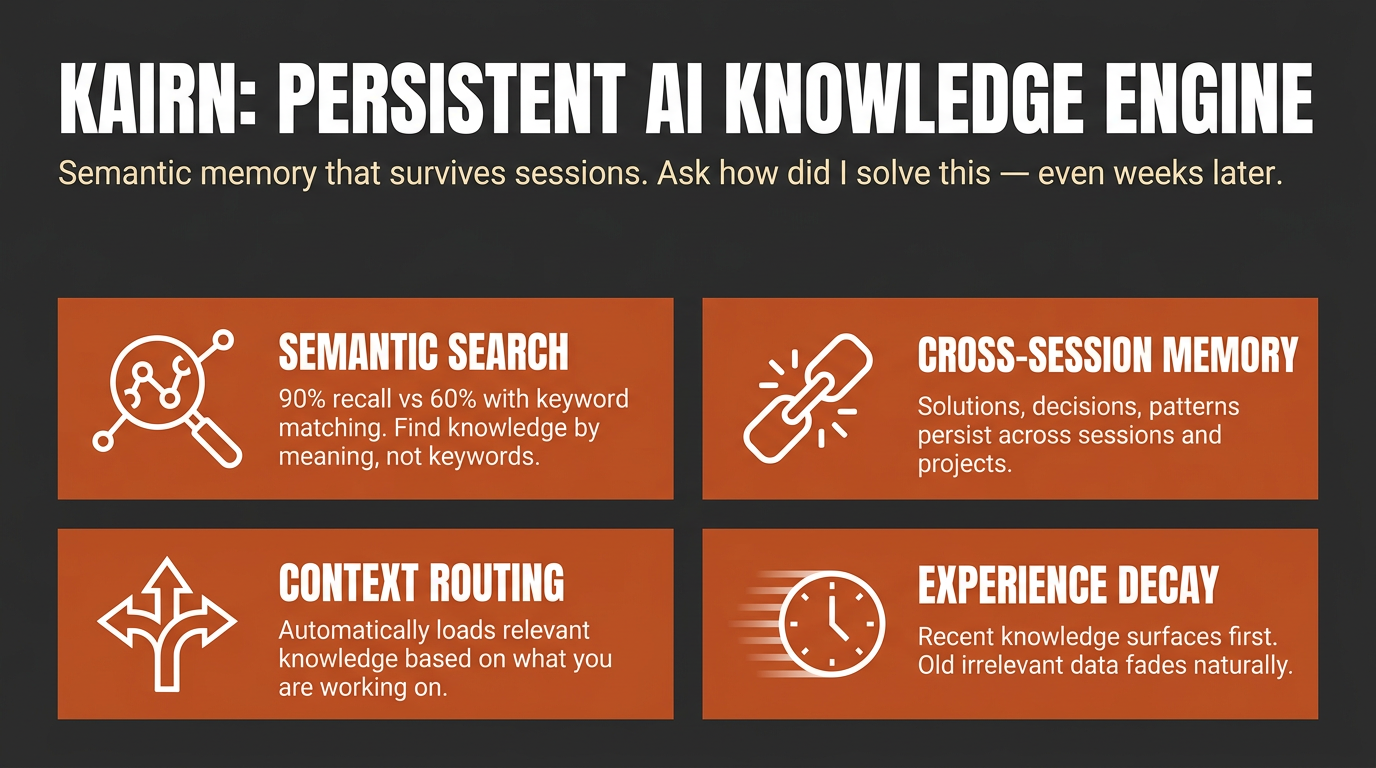
Other tools give your AI a memory. **Kairn** gives it a knowledge graph with intelligent context routing. It knows what to load, when to load it, and how much - so your AI stays focused, not overwhelmed.
```bash
pip install kairn-ai
kairn init ~/brain
kairn serve ~/brain
```
Claude Code and Codex each take one line; `--init` creates `~/brain` and its database on first start, so this works even without `kairn init`:
```bash
claude mcp add kairn -- kairn serve --init ~/brain
codex mcp add kairn -- kairn serve --init ~/brain
```
Or install it as a one-click bundle, no Python setup required: download the
`.mcpb` file from the [latest release](https://github.com/primeline-ai/kairn/releases/latest)
and open it with a bundle-aware app such as Claude Desktop.
For other clients, see [Quick Start](https://github.com/primeline-ai/kairn/blob/v0.3.0/README.md#quick-start) below. New to Kairn? Jump to [First 5 Minutes](https://github.com/primeline-ai/kairn/blob/v0.3.0/README.md#first-5-minutes).
## Install routes
| Route | Who it is for | Command |
|---|---|---|
| PyPI | anyone with Python, and every MCP client | `pip install kairn-ai` |
| MCP Bundle (`.mcpb`) | Claude Desktop and other bundle-aware apps; no Python install needed | download from [Releases](https://github.com/primeline-ai/kairn/releases) and open it |
| Claude Code | one line, uses the PyPI install | `claude mcp add kairn -- kairn serve --init ~/brain` |
| Codex | one line, uses the PyPI install | `codex mcp add kairn -- kairn serve --init ~/brain` |
The bundle carries no Kairn source of its own. It declares `kairn-ai` as a
dependency and the host resolves it with `uv`, so a bundle install and a
`pip install` run identical code. Where the database lives is configurable when
you install the bundle; it defaults to `~/.kairn` and never leaves your machine.
## Why Kairn?
Every AI conversation starts from scratch. Previous insights, decisions, and patterns - gone. Existing memory tools store flat key-value pairs that can't represent relationships or surface the *right* context at the *right* time.
Kairn is different:
- **Context Router + Progressive Disclosure** - Automatically loads relevant subgraphs based on keywords, starting with summaries and drilling into details only when needed. No other tool does this.
- **Knowledge Graph with FTS5** - Not flat storage. Typed relationships (`depends-on`, `resolves`, `causes`) between nodes with provenance tracking and full-text search across everything.
- **Experience Decay + Auto-Promotion** - Experiences lose relevance over time (biological decay model). Frequently-accessed experiences auto-promote to permanent knowledge. Your AI naturally forgets what doesn't matter.
- **22 MCP Tools** - Works with Claude Code, Codex, Claude Desktop, Cursor, VS Code, Windsurf, and any MCP client. Includes `kn_judge` for 5-verb relationship judgments and `kn_doctor` for read-only health diagnostics.
- **Per-Workspace Isolation** - Each workspace is its own isolated SQLite store. JWT auth and role-based access control (owner / maintainer / contributor / reader) ship for team deployments.
## Quick Start
### Claude Desktop
Add to `~/Library/Application Support/Claude/claude_desktop_config.json`:
```json
{
"mcpServers": {
"kairn": {
"command": "kairn",
"args": ["serve", "--init", "~/brain"]
}
}
}
```
### Cursor
Add to `.cursor/mcp.json`:
```json
{
"mcpServers": {
"kairn": {
"command": "kairn",
"args": ["serve", "--init", "~/brain"]
}
}
}
```
### VS Code
Add to `.vscode/mcp.json`:
```json
{
"servers": {
"kairn": {
"type": "stdio",
"command": "kairn",
"args": ["serve", "--init", "~/brain"]
}
}
}
```
### Windsurf
Add to `~/.codeium/windsurf/mcp_config.json`:
```json
{
"mcpServers": {
"kairn": {
"command": "kairn",
"args": ["serve", "--init", "~/brain"]
}
}
}
```
Restart your editor. Kairn's 22 tools appear in the MCP section.
## First 5 Minutes
A guided first run, end to end:
```bash
pip install kairn-ai
kairn init ~/brain # creates the workspace + database (optional: serve --init does it on first start)
```
Add the one-liner from above (or your client's Quick Start snippet), then restart the client. Once connected, ask your assistant to remember something:
> "Remember that we chose Postgres over SQLite for the analytics service because we needed concurrent writers."
That calls `kn_learn` under the hood and returns a JSON envelope like this (captured from a real run, via `kairn learn`, the CLI mirror of the tool):
```json
{"_v": "1.0", "stored_as": "node", "node_id": "002d9c22", "experience_id": "d0710c2f", "type": "decision", "confidence": "high", "namespace": "knowledge", "candidates": []}
```
Start a **new** session and ask it to recall the same thing - that calls `kn_recall` and surfaces what you just stored, no re-explaining required:
```json
{"_v": "1.0", "count": 2, "results": [
{"source": "node", "id": "002d9c22", "name": "Decision: we chose Postgres over SQLite for the analytics service beca", "type": "learned_decision", "description": "we chose Postgres over SQLite for the analytics service because we needed concurrent writers", "relevance": 1.0, "relevance_kind": "match"},
{"source": "experience", "id": "d0710c2f", "type": "decision", "content": "we chose Postgres over SQLite for the analytics service because we needed concurrent writers", "confidence": "high", "relevance": 1.0, "relevance_kind": "recency"}
]}
```
`kn_learn` stored both a permanent graph node and a decaying experience (high confidence does both, see [Confidence routing](https://github.com/primeline-ai/kairn/blob/v0.3.0/README.md#decay-model)); `kn_recall` found both from a three-word topic.
**Read `relevance_kind` before you read `relevance`.** Both rows above show `1.0` and they do not mean the same thing. `match` is lexical match strength (bm25); the experience's `recency` is time-decay - it is 1.0 because the row was created seconds ago, not because it matched well. A third value, `similarity`, is embedding cosine on the semantic-recall path, and `unscored` marks a row the surface had no ranking for and filled in with a constant. The numbers are not comparable across kinds, so do not sort a mixed result set on `relevance` alone. Same caution for `min_relevance` on `kn_recall`: it gates nodes on match strength and experiences on recency, one number against two scales. On `kn_memories` and `kn_prune`, which see experiences only, it is recency - and on `kn_prune` it **deletes**.
Run `kairn status ~/brain` any time as a smoke test - if it prints a JSON stats block (nodes/edges/experiences counts), the workspace is healthy. Want a scripted tour of every core feature instead of doing it by hand? Run `kairn demo ~/brain` - it walks through node creation, querying, experience saving, learning, recall, and context in about 30 seconds.
### Which tool when
22 tools is a lot to hold in your head on day one. Most sessions only need these:
| You want to... | Use | Why |
|---|---|---|
| Remember something new (a decision, gotcha, pattern, solution) | `kn_learn` | Default entry point - auto-routes to a permanent node (high confidence) or a decaying experience (medium/low), no need to decide yourself |
| Capture a stated user preference the moment it is expressed | `kn_preference` | Dedicated preference write path - you (the calling model) state the preference as one explicit sentence; stored with the longest half-life of any type |
| Add a permanent named concept you already know is durable | `kn_add` | Skips decay entirely - for structural knowledge, not day-to-day experience |
| Log a one-off experience with explicit confidence/decay control | `kn_save` | Lower-level primitive `kn_learn` wraps - reach for it when you want to set confidence/decay yourself |
| Search the permanent knowledge graph by text, type, tags, or namespace | `kn_query` | You're looking for nodes, not decaying experiences |
| Search saved experiences, ranked by relevance and decay | `kn_memories` | You're looking for experience content (solutions, gotchas, workarounds), not graph nodes |
| Surface everything relevant to a topic in one call | `kn_recall` (flat list) or `kn_context` (subgraph, progressive disclosure: summary first, full detail on demand) | You don't know yet whether the answer is a node or an experience - let Kairn search both |
Everything else (`kn_crossref`, `kn_related`, `kn_connect`, `kn_judge`, `kn_project`/`kn_projects`/`kn_log`, `kn_idea`/`kn_ideas`, `kn_promote_pending`, `kn_prune`, `kn_remove`, `kn_status`, `kn_doctor`) is advanced usage - see the full [22 Tools](https://github.com/primeline-ai/kairn/blob/v0.3.0/README.md#22-tools-kn_-prefix) reference below once you're past the basics.
## 22 Tools (kn_ prefix)
All tools follow MCP protocol with JSON responses.
### Graph (6)
| Tool | Description |
|------|-------------|
| `kn_add` | Add node to knowledge graph |
| `kn_connect` | Create typed edge between nodes (lax-mode vocabulary) |
| `kn_judge` | Record 5-verb judgment edge (strict mode: `conflicts_with` / What people ask about kairn
What is primeline-ai/kairn?
+
primeline-ai/kairn is mcp servers for the Claude AI ecosystem. Context-aware knowledge engine for AI assistants It has 13 GitHub stars and its last recorded update is dated 2026-10-10.
How do I install kairn?
+
You can install kairn by cloning the repository (https://github.com/primeline-ai/kairn) or following the README instructions on GitHub. ClaudeWave also provides quick install blocks on this page.
Is primeline-ai/kairn safe to use?
+
Our security agent has analyzed primeline-ai/kairn and assigned a Trust Score of 95/100 (tier: Verified). See the full breakdown of passed checks and flags on this page.
Who maintains primeline-ai/kairn?
+
primeline-ai/kairn is maintained by primeline-ai. The last recorded GitHub activity is dated 2026-10-10, with 0 open issues.
Are there alternatives to kairn?
+
Yes. On ClaudeWave you can browse similar mcp servers at /categories/mcp, sorted by popularity or recent activity.
Deploy kairn to your cloud
Ship this repo to production in minutes. Each platform spins up its own environment with editable env vars.
Maintain this repo? Add a badge to your README
Drop the badge into your GitHub README to show it's tracked on ClaudeWave. Each badge links back to this page and reflects the live Trust Score.
[](https://claudewave.com/repo/primeline-ai-kairn)<a href="https://claudewave.com/repo/primeline-ai-kairn"><img src="https://claudewave.com/api/badge/primeline-ai-kairn" alt="Featured on ClaudeWave: primeline-ai/kairn" width="320" height="64" /></a>More MCP Servers

Fair-code workflow automation platform with native AI capabilities. Combine visual building with custom code, self-host or cloud, 400+ integrations.

User-friendly AI Interface (Supports Ollama, OpenAI API, ...)

An open-source AI agent that brings the power of Gemini directly into your terminal.

Real-time global intelligence dashboard. AI-powered news aggregation, geopolitical monitoring, and infrastructure tracking in a unified situational awareness interface

🕷️ An adaptive Web Scraping framework that handles everything from a single request to a full-scale crawl! Don't be shy, join here: https://discord.gg/EMgGbDceNQ and follow here for daily tips and tricks: https://x.com/Scrapling_dev

The fastest path to AI-powered full stack observability, even for lean teams.