

The QA agent for your vibe-coded app. Apache-2.0 MCP server.
claude mcp add prufa-mcp -- python -m prufa-mcp{
"mcpServers": {
"prufa-mcp": {
"command": "python",
"args": ["-m", "prufa-mcp"],
"env": {
"PRUFA_API_TOKEN": "<prufa_api_token>"
}
}
}
}PRUFA_API_TOKENMCP Servers overview
# prufa-mcp — the QA agent for your vibe-coded app
<!-- mcp-name: io.github.prufa-dev/prufa-mcp -->
**Vibe-coded apps ship faster than anyone can review them.** In June 2026 we
audited [49 fresh Show HN launches](https://prufa.dev/blog/engineering/we-audited-49-show-hn-launches/) —
**38 had a critical bug on day one**: a broken signup, a silent console error,
analytics that never fired, a consent banner that did nothing.
Prufa is the agent that catches those before your users do. Point it at a URL
and it audits the things humans skip when they're moving fast — broken flows,
JS console errors, missing tracking, consent violations, security headers,
mobile tap targets, accessibility — and hands back machine-verified findings,
graded A–F. This repo is the open-source MCP server that wires that audit
straight into your coding agent.
## 30-second demo
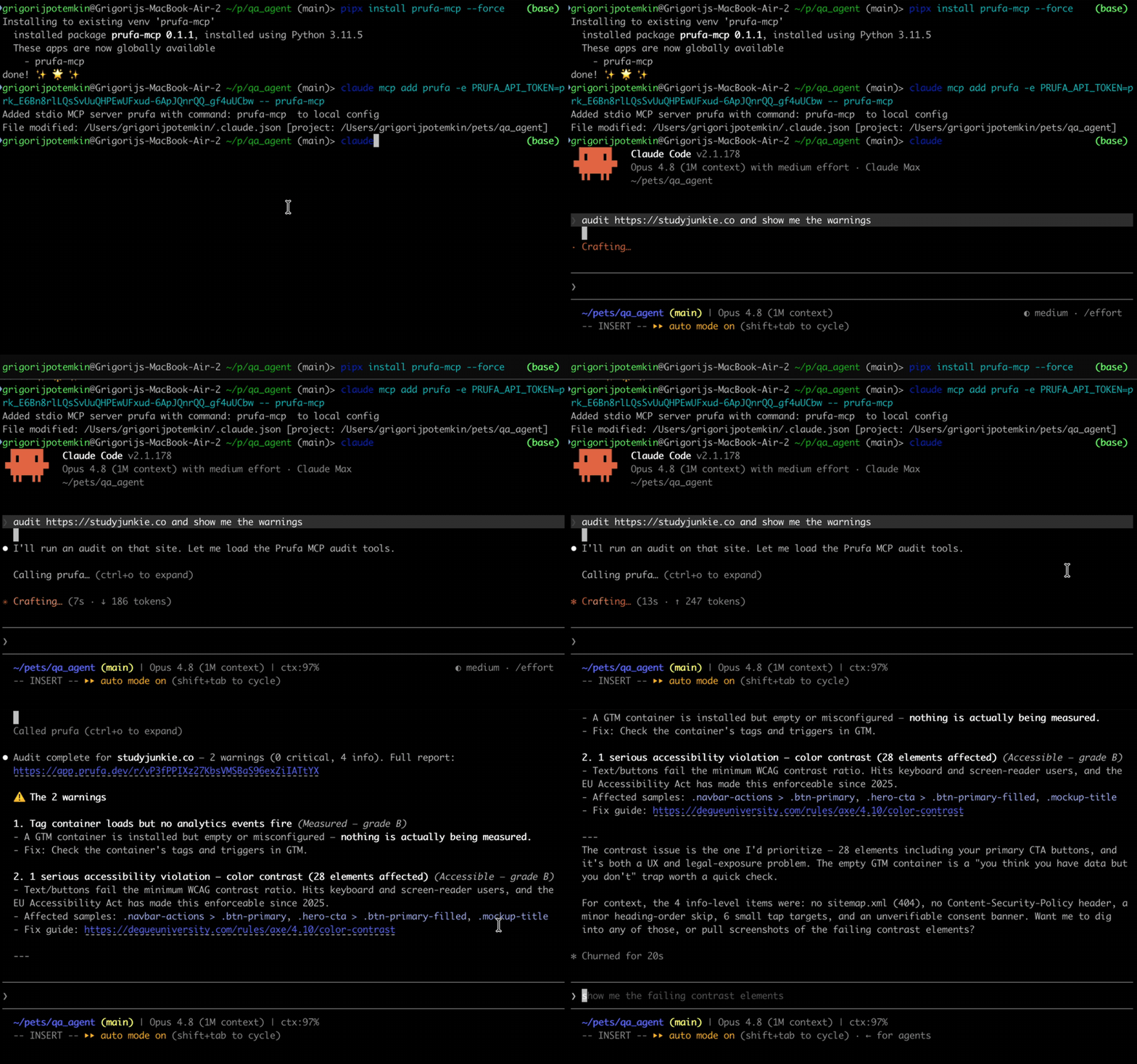
## What an audit gives you
Ask your agent to `audit https://yourapp.com` and `prufa_run_audit` returns one
JSON report. Findings are grouped into graded sections, each finding carries a
severity, the **impact** (why it matters), and a **fix hint**. Real output,
trimmed:
```jsonc
{
"url": "https://yourapp.com",
"headline": "2 warnings found",
"counts": { "critical": 0, "warning": 2, "info": 5 },
"sections": [
{ "label": "Works", "grade": "C", "counts": { "warning": 2, "info": 1 } },
{ "label": "Fast", "grade": "A" },
{ "label": "Found", "grade": "A" },
{ "label": "Compliant", "grade": "A" }
],
"check_results": [
{
"check_id": "ux",
"findings": [{
"severity": "warning",
"title": "2 javascript console error(s) during page load",
"impact": "Errors at load time often mean broken features visitors never report.",
"evidence": { "count": 2, "sample": [
"Access to XMLHttpRequest at 'https://api.fontshare.com/...' blocked by CORS policy",
"Failed to load resource: net::ERR_FAILED"
]}
}]
},
{
"check_id": "mobile",
"findings": [{
"severity": "warning",
"title": "13 tap target(s) smaller than 24px",
"impact": "Fingers are not cursors — undersized buttons mean mis-taps on exactly the elements you want pressed.",
"fix_hint": "Give interactive elements at least 24x24px of hit area (WCAG 2.5.8)."
}]
},
{
"check_id": "security",
"findings": [{
"severity": "info",
"title": "no Content-Security-Policy header",
"impact": "Without a CSP, one injected script owns the page — and every third-party tag you load is trusted completely.",
"fix_hint": "Start with a report-only CSP and tighten from real violation reports."
}]
}
],
"report_url": "/r/G82RpzTi_zn-o71_XoMLCprP7uvCQP87"
}
```
`report_url` is a shareable HTML version of the same report. The full payload
also includes `tracking`, `consent`, `seo`/`aeo`, `a11y`, `forms`, and detected
user flows — see [the OSS surface](#what-you-get-the-oss-surface) below.
## Install
The package is on [PyPI](https://pypi.org/project/prufa-mcp/). Install it
globally with `pipx` (recommended — isolated venv, exposes the `prufa-mcp`
binary on your PATH) or into a project venv with `pip`:
```bash
# Recommended — global install, isolated venv
pipx install prufa-mcp
# Or, into your project venv
pip install prufa-mcp
# Pin a specific version with ==, e.g. pipx install prufa-mcp==0.1.3
# Verify the binary is on PATH
which prufa-mcp
# Should print something like: /Users/you/.local/bin/prufa-mcp
```
You also need a free Prufa API key. **The first audit is free, no card required.**
1. Sign in at [prufa.dev](https://prufa.dev) (Google OAuth)
2. Create an API key from the dashboard
## Wire into your agent
The MCP server runs as a stdio subprocess, spawned by your agent on first use.
The cleanest way to register it is `claude mcp add` (Claude Code's built-in
command — it writes the config to `~/.claude.json` correctly, which the
`~/.claude/mcp.json` path does NOT).
### Claude Code (recommended path)
```bash
# Get the absolute path of the binary (use whatever `which prufa-mcp` returned)
PRUFA_BIN=$(which prufa-mcp)
# Add the MCP server. The token stays out of your shell history.
read -s -p "Prufa API token: " PRUFA_TOKEN && echo
claude mcp add \
--scope user \
--env "PRUFA_API_TOKEN=$PRUFA_TOKEN" \
prufa \
-- "$PRUFA_BIN"
```
Restart Claude Code (config is read at startup), then verify:
```
/mcp
```
You should see `prufa` listed as **Connected**, with `prufa_run_audit` and
`prufa_get_report` as available tools.
### Cursor / Cline / Continue (hand-edit `.mcp.json`)
In your project root or in `~/.config/Claude/` etc.:
```json
{
"mcpServers": {
"prufa": {
"command": "/Users/you/.local/bin/prufa-mcp",
"env": {
"PRUFA_API_TOKEN": "your-prufa-api-key"
}
}
}
}
```
Restart the host app. The command path must be the absolute binary path
(not `~`, not `$()`) — those don't expand in MCP config.
> Prefer config files to env vars? Drop your token in
> `~/.config/prufa/mcp.json` instead — see [ADVANCED.md](ADVANCED.md).
## Use it
In your agent:
```
> audit https://my-vibe-coded-app.com and show me the criticals
> run prufa on my staging deploy
> fetch the report for the audit I just ran
```
`prufa_run_audit` with `wait=true` (the default) **blocks** until the audit
completes and returns the JSON report directly — typically 25–60s for a public
page. If you set `wait=false`, the call returns immediately with the queued
state plus a `share_token` you can poll with `prufa_get_report`.
## What you get (the OSS surface)
| Tool | What it does |
|---|---|
| `prufa_run_audit(url, wait=true)` | Triggers a public-page audit, polls until done, returns findings JSON. The `wait` flag is honored — it actually blocks. |
| `prufa_get_report(report_id)` | Fetches a report. `report_id` is EITHER the run UUID (from `prufa_run_audit`'s `run_id` field) OR the `share_token` (the slug from `/r/<token>` in the audit creation `report_url`). The slug is what you'll see most often — use that. |
## Beyond the snapshot
A free audit is a **snapshot** — it looks at your app once. The hosted product
turns that into something that **walks your flows and watches for regressions**:
- **Deep QA flows** — describe a journey in plain language ("log in, add to cart,
check out"); Prufa compiles it to a reviewable spec and runs it end-to-end in a
real browser, asserting every step.
- **Monitors** — re-run any audit or flow on a schedule and get alerted the
moment a grade drops or a flow breaks.
- **Slack alerts, workspaces, billing, gremlin runs** — ~22 more tools (the MCP surface is 24 tools total; 2 ship here, the rest are hosted).
The audit already detects your flows for you (the `flows` check in every report).
Turn them on at **[prufa.dev](https://prufa.dev)** — free audits look, monitors walk.
## Examples
Three runnable scripts in `examples/`:
- `examples/nextjs-app/` — audit a deployed Next.js app
- `examples/vite-spa/` — audit a Vite SPA (focuses on client-side routing audits)
- `examples/stripe-checkout/` — audit a Stripe-checkout page (payment-flow verification)
Each is a copy-pasteable demo:
```bash
export PRUFA_API_TOKEN=...
python examples/nextjs-app/audit.py https://your-nextjs-app.com
```
## GitHub Action
Fail a PR when Prufa finds a critical regression:
```yaml
# .github/workflows/prufa-scan.yml
name: Prufa scan
on: [pull_request]
jobs:
audit:
runs-on: ubuntu-latest
steps:
- uses: actions/checkout@v4
- uses: actions/setup-python@v5
with:
python-version: "3.11"
- run: pip install prufa-mcp
- name: Run audit
env:
PRUFA_API_TOKEN: ${{ secrets.PRUFA_API_TOKEN }}
run: |
python -c "
import asyncio, sys
from prufa_mcp.audit import run_audit
report = asyncio.run(run_audit(url='${{ secrets.STAGING_URL }}', wait=True))
print(report.get('headline', 'audit complete'))
criticals = report.get('counts', {}).get('critical', 0)
if criticals:
print(f'::error::Prufa found {criticals} critical finding(s)', file=sys.stderr)
sys.exit(1)
"
```
See `examples/prufa-scan.yml` for the full template.
## License
Apache-2.0. See [LICENSE](LICENSE). Contributions welcome — see
[CONTRIBUTING.md](CONTRIBUTING.md).
</content>
</invoke>
What people ask about prufa-mcp
What is prufa-dev/prufa-mcp?
+
prufa-dev/prufa-mcp is mcp servers for the Claude AI ecosystem. The QA agent for your vibe-coded app. Apache-2.0 MCP server. It has 1 GitHub stars and was last updated today.
How do I install prufa-mcp?
+
You can install prufa-mcp by cloning the repository (https://github.com/prufa-dev/prufa-mcp) or following the README instructions on GitHub. ClaudeWave also provides quick install blocks on this page.
Is prufa-dev/prufa-mcp safe to use?
+
prufa-dev/prufa-mcp has not been audited yet by our security agent. Review the original repository on GitHub before using it in production.
Who maintains prufa-dev/prufa-mcp?
+
prufa-dev/prufa-mcp is maintained by prufa-dev. The last recorded GitHub activity is from today, with 0 open issues.
Are there alternatives to prufa-mcp?
+
Yes. On ClaudeWave you can browse similar mcp servers at /categories/mcp, sorted by popularity or recent activity.
Deploy prufa-mcp to your cloud
Ship this repo to production in minutes. Each platform spins up its own environment with editable env vars.
Maintain this repo? Add a badge to your README
Drop the badge into your GitHub README to show it's tracked on ClaudeWave. Each badge links back to this page and reflects the live Trust Score.
[](https://claudewave.com/repo/prufa-dev-prufa-mcp)<a href="https://claudewave.com/repo/prufa-dev-prufa-mcp"><img src="https://claudewave.com/api/badge/prufa-dev-prufa-mcp" alt="Featured on ClaudeWave: prufa-dev/prufa-mcp" width="320" height="64" /></a>More MCP Servers

Fair-code workflow automation platform with native AI capabilities. Combine visual building with custom code, self-host or cloud, 400+ integrations.

User-friendly AI Interface (Supports Ollama, OpenAI API, ...)

An open-source AI agent that brings the power of Gemini directly into your terminal.

The fastest path to AI-powered full stack observability, even for lean teams.

🕷️ An adaptive Web Scraping framework that handles everything from a single request to a full-scale crawl!

⭐AI-driven public opinion & trend monitor with multi-platform aggregation, RSS, and smart alerts.🎯 告别信息过载,你的 AI 舆情监控助手与热点筛选工具!聚合多平台热点 + RSS 订阅,支持关键词精准筛选。AI 智能筛选新闻 + AI 翻译 + AI 分析简报直推手机,也支持接入 MCP 架构,赋能 AI 自然语言对话分析、情感洞察与趋势预测等。支持 Docker ,数据本地/云端自持。集成微信/飞书/钉钉/Telegram/邮件/ntfy/bark/slack 等渠道智能推送。