

local-first temporal knowledge graph
- ✓Open-source license (Apache-2.0)
- ✓Actively maintained (<30d)
- ✓Clear description
- ✓Topics declared
- ✓Documented (README)
claude mcp add graphiti-local -- uvx --from{
"mcpServers": {
"graphiti-local": {
"command": "uvx",
"args": ["--from"]
}
}
}MCP Servers overview
 # Graphiti Local **Local memory for your agents. You approve what they learn.** Retrieve project decisions through six read-only MCP tools or the `kg` CLI. Proposed updates stay in a separate queue until a human approves and applies them. Ollama handles local inference; embedded LadybugDB stores the graph. No Docker or cloud API key is needed for the local setup. 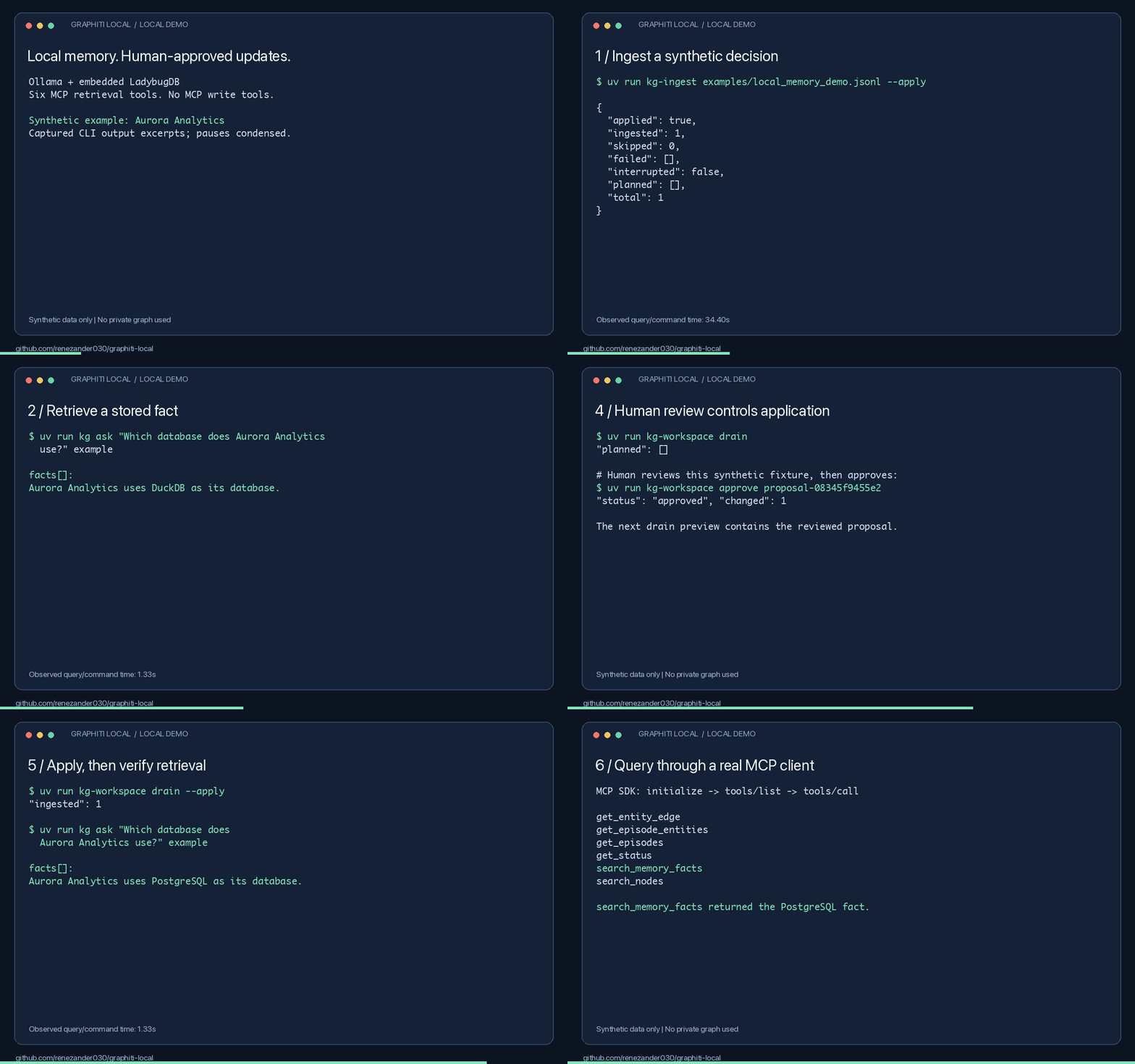 *Captured output excerpts with pauses condensed. [Measured results and limitations](docs/local-demo-results.md).* ## Try it in one command ```bash uvx --from git+https://github.com/renezander030/graphiti-local kg-demo ``` Answers a question against a small synthetic graph shipped with the package. No Ollama, no model downloads, no database setup: retrieval runs on keywords alone, so nothing contacts a model. Ask your own question by passing it as an argument. This is the read path only. Building a graph from your own text needs extraction, which needs a model, and that is the full setup below. ## Try it locally Install [uv](https://docs.astral.sh/uv/getting-started/installation/) and [Ollama](https://docs.ollama.com/quickstart), then start Ollama. Setup downloads need internet access. Run these commands in bash or zsh: ```bash git clone https://github.com/renezander030/graphiti-local.git cd graphiti-local uv sync --frozen ollama pull qwen2.5:7b ollama pull nomic-embed-text export GRAPHITI_LOCAL_CONFIG="$PWD/config/ollama.example.yaml" export KG_WORKSPACE_DIR="$PWD/workspace/local-demo" export KG_LADYBUG_PATH="$KG_WORKSPACE_DIR/graph.ladybug" uv run --frozen kg-ladybug-setup --database "$KG_LADYBUG_PATH" --apply uv run --frozen kg doctor uv run --frozen kg-ingest examples/local_memory_demo.jsonl --apply uv run --frozen kg ask "Which database does Aurora Analytics use?" example ``` The synthetic example returns **DuckDB**. Follow the [complete walkthrough](docs/local-quickstart.md) to propose PostgreSQL, review and apply that update, and retrieve it from an MCP client. Model extraction can be wrong; inspect the returned facts and validity timestamps. To review extraction before it touches the configured graph, run `kg-ingest INPUT --review-output review.jsonl`, inspect the snapshot, then use the printed restore command to promote those exact records. Searches return current facts by default; `kg ask --history` is the explicit historical view. ## Is it a fit? Use it for local agent memory with explicit human review. Skip it if you need agents to write through MCP or want a hosted service without local setup. FalkorDB and Neo4j are also supported. - [Setup and MCP configuration](docs/local-quickstart.md) - [Commands, ingestion, backups, and deployment](docs/reference.md) - [Privacy](PRIVACY.md) · [Security](SECURITY.md) · [Container discovery](docs/container.md) - [Report a successful or blocked setup](https://github.com/renezander030/graphiti-local/issues/new?template=setup-result.yml) If this helps your workflow, star the repository and share your setup result. Maintained by [René Zander](https://renezander.com/projects/graphiti-local/), who builds context layers for AI agents on temporal knowledge graphs. Independent community project built on [Graphiti](https://github.com/getzep/graphiti), not affiliated with or endorsed by Zep. [Apache-2.0](LICENSE). <!-- mcp-name: io.github.renezander030/graphiti-local -->
What people ask about graphiti-local
What is renezander030/graphiti-local?
+
renezander030/graphiti-local is mcp servers for the Claude AI ecosystem. local-first temporal knowledge graph It has 1 GitHub stars and its last recorded update is dated 2026-09-18.
How do I install graphiti-local?
+
You can install graphiti-local by cloning the repository (https://github.com/renezander030/graphiti-local) or following the README instructions on GitHub. ClaudeWave also provides quick install blocks on this page.
Is renezander030/graphiti-local safe to use?
+
Our security agent has analyzed renezander030/graphiti-local and assigned a Trust Score of 95/100 (tier: Verified). See the full breakdown of passed checks and flags on this page.
Who maintains renezander030/graphiti-local?
+
renezander030/graphiti-local is maintained by renezander030. The last recorded GitHub activity is dated 2026-09-18, with 0 open issues.
Are there alternatives to graphiti-local?
+
Yes. On ClaudeWave you can browse similar mcp servers at /categories/mcp, sorted by popularity or recent activity.
Deploy graphiti-local to your cloud
Ship this repo to production in minutes. Each platform spins up its own environment with editable env vars.
Maintain this repo? Add a badge to your README
Drop the badge into your GitHub README to show it's tracked on ClaudeWave. Each badge links back to this page and reflects the live Trust Score.
[](https://claudewave.com/repo/renezander030-graphiti-local)<a href="https://claudewave.com/repo/renezander030-graphiti-local"><img src="https://claudewave.com/api/badge/renezander030-graphiti-local" alt="Featured on ClaudeWave: renezander030/graphiti-local" width="320" height="64" /></a>More MCP Servers

Fair-code workflow automation platform with native AI capabilities. Combine visual building with custom code, self-host or cloud, 400+ integrations.

User-friendly AI Interface (Supports Ollama, OpenAI API, ...)

An open-source AI agent that brings the power of Gemini directly into your terminal.

Real-time global intelligence dashboard. AI-powered news aggregation, geopolitical monitoring, and infrastructure tracking in a unified situational awareness interface

🕷️ An adaptive Web Scraping framework that handles everything from a single request to a full-scale crawl! Don't be shy, join here: https://discord.gg/EMgGbDceNQ

The fastest path to AI-powered full stack observability, even for lean teams.