

A closed loop from parametric OpenSCAD source to G-code: two MCP servers plus the verification step neither CAD nor slicer can do.
claude mcp add cadloop -- python -m -e{
"mcpServers": {
"cadloop": {
"command": "python",
"args": ["-m", "-e"]
}
}
}MCP Servers overview
# cadloop
<!-- mcp-name: io.github.richardofortune/cadloop-openscad -->
<!-- mcp-name: io.github.richardofortune/cadloop-slicer -->
A closed loop from parametric source to G-code, with the verification step in
the middle that neither the CAD tool nor the slicer can do.
Two MCP servers and a checker. A model writes OpenSCAD, compiles it, reads
computed values back out, looks at a render, proves the parts actually work,
checks they fit the bed, slices them and pulls out the G-code. No GUI at any
point.
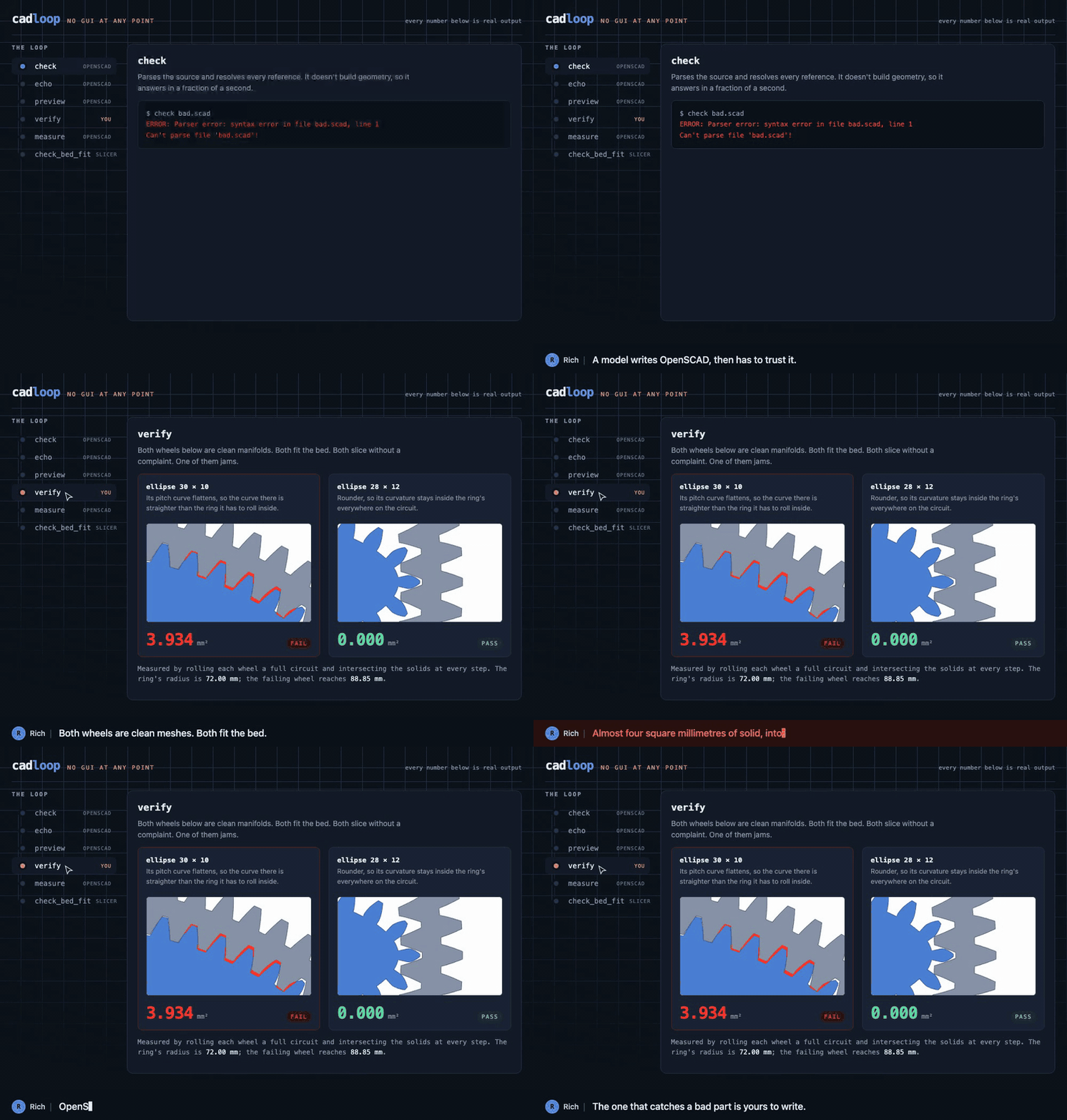
*Every number in that walkthrough is real output. The failing wheel is a real
measurement, not an illustration. How it's built and where each number comes
from is in
[docs/walkthrough](https://github.com/richardofortune/cadloop/tree/main/docs/walkthrough).*
```text
write .scad
|
check syntax and references, about a second
|
echo read computed values without rendering
|
preview look at it
|
verify does it actually work <- the part tooling usually skips
|
measure bounding box and volume
|
check_bed_fit against the machine profile's printable area
|
slice_model -> .gcode.3mf
|
extract_gcode -> .gcode
```
The ordering is the point. `check` and `echo` skip geometry evaluation
entirely, so they cost a second against models where a full render takes
minutes. Pay for the expensive steps only once the cheap ones pass.
## Install
```console
pip install "cadloop[verify]"
```
Or from a checkout, which is what you want if you intend to run the worked
example or the tests:
```console
git clone https://github.com/richardofortune/cadloop
cd cadloop
pip install -e ".[verify]"
```
Needs OpenSCAD on `PATH` or at `OPENSCAD_BIN`, and for slicing, OrcaSlicer,
Bambu Studio, ElegooSlicer or Creality Print. They share a CLI, so any of them
works, and all four are auto-detected along with the profiles they ship. Orca
and its forks are preferred over Creality Print, whose CLI is broken headless
on macOS; see testing status below. `SLICER_BIN` overrides the choice.
## Configure
Copy `mcp.json` into your client's config and fix the paths. Both servers
should point at the same workspace directory, which is the only place either
one reads or writes.
| Variable | Default | Meaning |
| --- | --- | --- |
| `OPENSCAD_BIN`, `SLICER_BIN` | auto-detected | binary paths |
| `OPENSCAD_WORKSPACE`, `SLICER_WORKSPACE` | `~/cad` | the sandbox |
| `SLICER_PROFILE_DIRS` | auto-detected | extra profile roots |
| `OPENSCAD_TIMEOUT`, `SLICER_TIMEOUT` | 300, 600 | seconds before a kill |
## The servers
**openscad** exposes `check`, `echo`, `render`, `measure`, `preview` and
workspace file access. `preview` returns the PNG as an MCP image, so the model
can look at what it built rather than inferring from numbers. `render` returns
OpenSCAD's manifold report alongside a bounding box and volume, where
`simple: yes` with a sensible volume count is the signal the mesh is printable.
**slicer** exposes `slicer_info`, `list_profiles`, `check_bed_fit`,
`slice_model`, `slice_summary` and `extract_gcode`. Call `slicer_info` first:
the Orca-family CLI is undocumented, changes between releases, and Creality's
fork diverges, so the flag list it reads off your install is more trustworthy
than anything assumed. `slice_model` has an `extra_args` escape hatch and a
`dry_run` mode.
`check_bed_fit` is where the two meet. The slicer will emit out-of-bounds
G-code without complaining, so this measures the STL, reads `printable_area`
out of the machine profile, and compares. It checks the 45 degree diagonal too,
since a part that misses square-on often fits rotated.
Reading `printable_area` back out is fiddlier than it looks. Stock profiles
write it both as a list of `"XxY"` strings and as one comma-separated string,
and most Bambu machines carry no bed of their own at all, inheriting it through
`inherits` from a common base. So the lookup parses both forms and walks the
inheritance chain. Of the 473 concrete machine profiles shipped with Creality
Print 7.1.1, 469 resolve; the remaining four define no bed anywhere in their
chain, and those report `ok: null` with a reason rather than guessing.
## The verification step
`cadloop-verify` is the reference example of the third thing you need, and the
one no general tool provides. It runs two checks. For the spirograph the first
lays each wheel's pitch curve onto the ring's pitch circle, walks a full
circuit, and measures overlap between the two solids at every position. Zero
overlap across the whole circuit at some meshing phase is the pass condition.
The second checks the parts are not laid on top of each other on the sheet.
```console
$ cadloop-verify
part teeth overlap mm2 result
24T 24 0.000000 pass
...
trefoil 23 0.000000 pass
14/14 parts mesh cleanly
group volume mm3
ring 23939.8
outer_ring 25652.8
wheels 197113.5
shapes 10078.7
sum 256784.8
sheet 256784.8
no parts overlap on the sheet
```
The second check is the same idea one level up. A sheet that lays two parts
on top of each other still renders as a clean manifold, still fits the bed,
and still slices without a word; it just prints as one fused object. So it
renders the sheet and each of its groups and compares the union against the
sum, which is the only place the collision shows up. It needs OpenSCAD and
skips without one; `--skip-layout` and `--skip-mesh` run one half alone.
## What the tooth counts decide
A pen in a wheel of `r` teeth rolling in a ring of `R` traces a figure with
`R / gcd(R, r)` lobes, closing after `r / gcd(R, r)` circuits. The pattern is
settled by the tooth counts before any geometry exists, so `cadloop-verify
--patterns` reads it straight off the set:
```console
$ cadloop-verify --patterns
main ring, 96 teeth
part teeth lobes circuits
32T 32 3 1 plain
24T 24 4 1 plain
72T 72 4 3 plain
...
trefoil 23 96 23
```
96 is 2^5 x 3, so it shares factors with most of an even wheel set and a good
half of these wheels draw eight lobes or fewer. There is no 48 in the set for
this reason: 48 is exactly half of 96, the degenerate ratio whose pen traces an
ellipse and nothing else, so it earned no slot. The outer ring, 105 = 3 x 5 x 7,
behaves far better, and the trefoil at 23 teeth is coprime to both rings, which
is what makes it the richest wheel in the set.
This is worth running before choosing tooth counts rather than after printing
them.
This is model-specific by nature, which is the honest lesson. A manifold mesh
that fits the bed and slices cleanly can still be a part that does not work.
Whatever your equivalent of "does it actually roll" is, it belongs in the loop
between preview and measure, and you have to write it yourself.
## The worked example
`models/spirograph.scad` is the model the loop was built around. A 96 tooth
internal ring in a flanged body, an outer ring, eleven circular wheels and
three non-circular ones (ellipse, egg, trefoil), all involute geared at module
1.5 with pen holes on a golden-angle spiral.
The non-circular wheels are why the verifier exists. A first attempt used
capsule and teardrop outlines built from tangent lines; those looked right,
rendered as clean manifolds, and would have sliced without complaint, but the
rolling check showed them ploughing 30 to 80 mm² into the ring teeth. A flat
section of pitch curve touches the ring at one point and stands proud of it
everywhere else. Nothing downstream of CAD would have caught that. The shapes
that shipped are smooth convex curves whose radius of curvature stays inside
the ring's everywhere.
```console
make verify # rolling interference and layout, all 14 parts
make render PART=ring
make smoke # both servers, end to end
```
## Testing status
`make smoke` drives both servers over real MCP stdio sessions and asserts on
twenty-one behaviours: tool surface, defines reaching the script, a deliberate
syntax error being caught, measured geometry matching known dimensions, an
image coming back from preview, profile classification, argument ordering,
archive parsing, G-code extraction, bed fit passing and failing, both
`printable_area` spellings and an inherited bed, and the workspace guard
rejecting traversal.
The OpenSCAD half runs against a real OpenSCAD and skips if none is installed.
The slicer half runs against a mock binary that emits an Orca-shaped help text
and a representative `.gcode.3mf`, so everything except the real slicer's own
behaviour is covered.
Against a real install, the OpenSCAD half and `check_bed_fit` are confirmed end
to end: a 24 tooth wheel rendered out of `spirograph.scad` measures 38.99 mm and
passes the K1's 220 mm bed. Every flag `slice_model` builds is present in
Creality Print 7.1.1's `--help`.
The loop is confirmed end to end against OrcaSlicer 2.4.2 on macOS: the 96
tooth ring slices to 113,808 lines of G-code over 35 layers, a 51 minute print
using 7.27 m of PLA, with every coordinate inside the bed.
**Creality Print's CLI does not work headless on macOS.** On 7.1.1.4472 under
macOS 26, every operation except `--help` segfaults, including `--info` with no
profiles loaded at all. It dies in `Slic3r::GUI::PartPlate::set_shape` called
from `Slic3r::CLI::run`, a null dereference in GUI bed setup that the headless
path never initialises, and no combination of `--datadir`, `--outputdir` or
profile arguments avoids it. Point `SLICER_BIN` at OrcaSlicer, Bambu Studio or
ElegooSlicer instead, or run Creality Print's CLI on Linux. If you do pass
`--datadir`, it must be writable: an unwritable one aborts in `set_data_dir`
rather than segfauWhat people ask about cadloop
What is richardofortune/cadloop?
+
richardofortune/cadloop is mcp servers for the Claude AI ecosystem. A closed loop from parametric OpenSCAD source to G-code: two MCP servers plus the verification step neither CAD nor slicer can do. It has 0 GitHub stars and was last updated today.
How do I install cadloop?
+
You can install cadloop by cloning the repository (https://github.com/richardofortune/cadloop) or following the README instructions on GitHub. ClaudeWave also provides quick install blocks on this page.
Is richardofortune/cadloop safe to use?
+
richardofortune/cadloop has not been audited yet by our security agent. Review the original repository on GitHub before using it in production.
Who maintains richardofortune/cadloop?
+
richardofortune/cadloop is maintained by richardofortune. The last recorded GitHub activity is from today, with 0 open issues.
Are there alternatives to cadloop?
+
Yes. On ClaudeWave you can browse similar mcp servers at /categories/mcp, sorted by popularity or recent activity.
Deploy cadloop to your cloud
Ship this repo to production in minutes. Each platform spins up its own environment with editable env vars.
Maintain this repo? Add a badge to your README
Drop the badge into your GitHub README to show it's tracked on ClaudeWave. Each badge links back to this page and reflects the live Trust Score.
[](https://claudewave.com/repo/richardofortune-cadloop)<a href="https://claudewave.com/repo/richardofortune-cadloop"><img src="https://claudewave.com/api/badge/richardofortune-cadloop" alt="Featured on ClaudeWave: richardofortune/cadloop" width="320" height="64" /></a>More MCP Servers

Fair-code workflow automation platform with native AI capabilities. Combine visual building with custom code, self-host or cloud, 400+ integrations.

User-friendly AI Interface (Supports Ollama, OpenAI API, ...)

An open-source AI agent that brings the power of Gemini directly into your terminal.

The fastest path to AI-powered full stack observability, even for lean teams.

Real-time global intelligence dashboard. AI-powered news aggregation, geopolitical monitoring, and infrastructure tracking in a unified situational awareness interface

🕷️ An adaptive Web Scraping framework that handles everything from a single request to a full-scale crawl!