

Screen Browser skill and MCP server config: narrated tutorial videos of your web app, from inside your coding agent.
- ✓Open-source license (MIT)
- ✓Actively maintained (<30d)
- ✓Clear description
- ✓Documented (README)
git clone https://github.com/screenbrowser/skill{
"mcpServers": {
"skill": {
"command": "node",
"args": ["/path/to/skill/dist/index.js"]
}
}
}MCP Servers overview
# Screen Browser skill
Narrated demo and tutorial videos of your web app, from a guide or your coding agent.
Ask the agent that knows your codebase for a tutorial video of a feature. It writes the walkthrough
in the words your buttons and fields use, [Screen Browser](https://screenbrowser.com) records a real
browser following it against your deployed app, narrates it, adds the on-screen effects, and the
agent hands you the MP4 with a GIF, subtitles and chapters. When the app changes, edit a line and
ask again.
[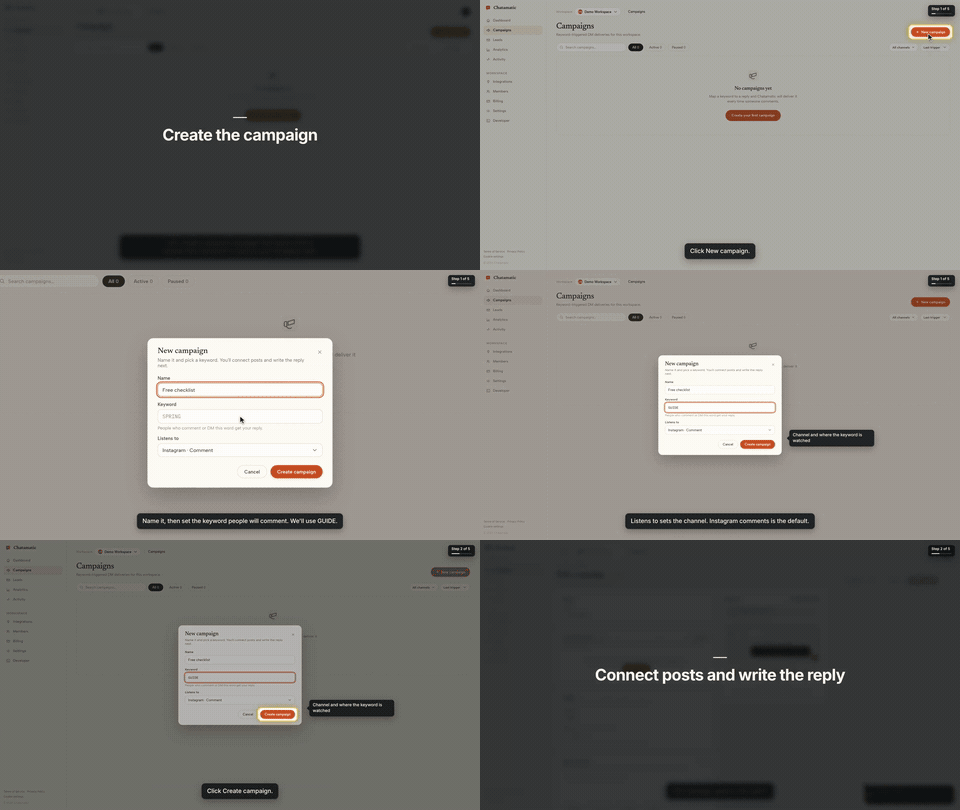](https://screenbrowser.com/guides/claude-code-demo-video/)
That is the first chapter of a 66-second video made from the request *"make a tutorial video of
creating a campaign"*. The whole session, from that sentence to the finished video with the exact
prompt and every screen along the way, is in the
[Claude Code guide](https://screenbrowser.com/guides/claude-code-demo-video/).
This repository gives your agent two things:
- **The `screenbrowser` skill** — how to read your codebase and write the two guides Screen Browser
needs (the login flow and the walkthrough), which effect fits which moment, how to check a guide
for free before recording, and how to review the video before handing it over.
- **The MCP server configuration** — the tools the agent calls: create the project, upload guides,
check them, start the run, poll it, fetch the video. The server itself is part of your Screen
Browser account at `https://mcp.screenbrowser.com`.
Claude Code, Codex, Cursor or any MCP client can use it. Sign-in happens in the browser; there is
no key to paste.
## Install (Claude Code)
Add this repository as a plugin marketplace and install the plugin:
```bash
claude plugin marketplace add screenbrowser/skill
claude plugin install screenbrowser@screenbrowser
```
The first time the agent reaches for a Screen Browser tool, Claude Code opens your browser: sign in
to Screen Browser, approve the connection, and you are done. Nothing to copy. (If it does not
prompt, run `/mcp` and pick **screenbrowser → Authenticate**.)
Without the plugin system, register the server yourself and copy the skill:
```bash
claude mcp add --transport http screenbrowser https://mcp.screenbrowser.com
cp -r skills/screenbrowser ~/.claude/skills/
```
### With an API key instead
If your agent cannot open a browser to sign in, create a key under **Settings → API keys** in
Screen Browser and pass it as a bearer token:
```bash
claude mcp add --transport http screenbrowser https://mcp.screenbrowser.com \
--header "Authorization: Bearer <your API key>"
```
Any MCP client works the same way: Streamable HTTP at `https://mcp.screenbrowser.com`, OAuth 2.1 with
dynamic client registration for interactive sign-in, or `Authorization: Bearer <key>`.
### Other agents
The skill is a plain `SKILL.md` in the open Agent Skills format, and the server is standard MCP over
HTTP, so the same two pieces work outside Claude Code.
**Cursor, VS Code, GitHub Copilot and other Agent Plugins clients** — this repository is also an
[Agent Plugins](https://agent-plugins.org/) package (`plugin.json`, `mcp.json`, `skills/`), so
install it as a plugin from the repository URL and sign in when the client offers. Cursor without
the plugin: add the server to `.cursor/mcp.json` (or the global one in Cursor settings), click
**Sign in** next to it, and copy the skill into `.cursor/skills/`:
```json
{
"mcpServers": {
"screenbrowser": { "url": "https://mcp.screenbrowser.com" }
}
}
```
```bash
mkdir -p .cursor/skills && cp -r skills/screenbrowser .cursor/skills/
```
**OpenAI Codex CLI** — add the server to `~/.codex/config.toml`, sign in once, and copy the skill
into Codex's skills folder:
```toml
[mcp_servers.screenbrowser]
url = "https://mcp.screenbrowser.com"
```
```bash
codex mcp login screenbrowser
mkdir -p ~/.codex/skills && cp -r skills/screenbrowser ~/.codex/skills/
```
**Anything else (Gemini CLI, Windsurf, a custom agent)** — register an HTTP MCP server with the URL
the way that tool documents it; a client that supports OAuth will sign you in, one that does not
takes the API key as an `Authorization: Bearer` header. Give the agent `skills/screenbrowser/SKILL.md`
as instructions (paste it, or point the tool's rules file at it). The MCP server itself also carries
the guide syntax as a resource and a `write-tutorial-guide` prompt, so a client with MCP prompts can
work without the skill file at all.
## Use
Videos can be recorded on the desktop or as a phone or tablet (`device: iphone`, `android`, `ipad`,
…), in a phone frame on a vertical 9:16 or widescreen 16:9 canvas or as the bare screen; one run is
one device.
Open your app's repository in Claude Code and ask:
> Make a tutorial video of creating a campaign.
The agent will check credits, create the project (it will ask you for the deployed URL, a demo
user, and the legal attestation), write the guides from your routes and templates, validate them,
show them to you, start the run, and give you the video link a few minutes later.
The MCP server also ships a `write-tutorial-guide` prompt that walks any client through the same
flow, and two resources: `screenbrowser://guide-syntax` and `screenbrowser://example-guides`.
## What your app needs
- A **demo user** that signs in with email and password: no OAuth, no 2FA, no captcha. Seed it with
realistic data.
- The deployed URL to record (staging is fine) and every host the app talks to (API subdomain,
auth provider, CDN).
- Confirmation that you are allowed to record the app (yours, a client's with permission, or an
internal tool).
## What it sends, and where
Everything the plugin does goes to one place: the Screen Browser MCP server at
`https://mcp.screenbrowser.com`, over HTTPS, signed in with your Screen Browser account. The
skill itself is instructions for the agent; it runs nothing on your machine and fetches nothing.
What the agent sends to Screen Browser when you ask for a video:
- the project's settings: your app's URL, the hosts it talks to, the sign-in check, narration
language and voice;
- the guides it writes from your code: plain sentences naming buttons and fields as they appear on
screen. Read them before they are saved; the agent shows them to you;
- the demo user's credentials, as project variables. Screen Browser stores them encrypted, uses
them only to sign in during a recording, and never returns them through any tool or shows them
to any model;
- run commands: start, poll, cancel, and, only if you agree, a failure report with the recorder's
screenshot and logs of a run that failed on Screen Browser's side.
It never sends your source code. The agent reads your repository locally to learn the labels; only
the guide text leaves the machine. Nothing is sent to any other service. What Screen Browser keeps,
and for how long, is in the [privacy policy](https://screenbrowser.com/legal/privacy/).
## What it costs
Plans start at $49 a month, sized in minutes of finished video. Checking a guide before recording
is free, and a run that fails is not charged. Videos are capped at five minutes; there is no free
plan. Current prices are on the [pricing page](https://screenbrowser.com/pricing/).
## Layout
```
plugin.json Agent Plugins manifest (Cursor, VS Code, Copilot, …)
mcp.json Agent Plugins MCP config (the URL; sign-in is OAuth)
.claude-plugin/plugin.json Claude Code plugin manifest
.claude-plugin/marketplace.json lets this repo act as its own Claude Code marketplace
.mcp.json Claude Code MCP server config
skills/screenbrowser/SKILL.md the skill
skills/screenbrowser/references/ guide syntax reference, worked example
examples/chatamatic/ a real auth guide + main guide pair
```
## What a guide looks like
Plain language, one step per line, naming things as they appear on screen. Screen Browser turns it
into the script — the narration, the highlights, the pacing — and resolves each step against the
live page:
```
Go to https://app.acme.test/campaigns
"Let's create a spring promotion."
Click "New campaign"
Type "Spring promo" into the Name field
Click "Save"
Confirm text "Campaign created" is visible
```
Ids and `name=` attributes are allowed when a step needs precision; class names generated by a build
tool are refused. The full reference, including the optional effect directives, is in
[`skills/screenbrowser/references/guide-syntax.md`](skills/screenbrowser/references/guide-syntax.md).
## Documentation index for AI agents
The skill carries everything an agent needs to write a guide and run a recording. For anything else —
prerequisites, costs, limitations, the API — https://screenbrowser.com/llms.txt is a Markdown index
of the public documentation, and https://screenbrowser.com/docs/agents/ is the reference for this
integration.
## Support
Issues and ideas about the skill are welcome in this repository. Anything about your account or a
particular recording: use the contact form at https://screenbrowser.com/contact/.
## License
MIT. Screen Browser itself is a hosted service; this repository contains only the agent-facing
skill, configuration and examples.
What people ask about skill
What is screenbrowser/skill?
+
screenbrowser/skill is mcp servers for the Claude AI ecosystem. Screen Browser skill and MCP server config: narrated tutorial videos of your web app, from inside your coding agent. It has 3 GitHub stars and its last recorded update is dated 2026-09-26.
How do I install skill?
+
You can install skill by cloning the repository (https://github.com/screenbrowser/skill) or following the README instructions on GitHub. ClaudeWave also provides quick install blocks on this page.
Is screenbrowser/skill safe to use?
+
Our security agent has analyzed screenbrowser/skill and assigned a Trust Score of 87/100 (tier: Trusted). See the full breakdown of passed checks and flags on this page.
Who maintains screenbrowser/skill?
+
screenbrowser/skill is maintained by screenbrowser. The last recorded GitHub activity is dated 2026-09-26, with 0 open issues.
Are there alternatives to skill?
+
Yes. On ClaudeWave you can browse similar mcp servers at /categories/mcp, sorted by popularity or recent activity.
Deploy skill to your cloud
Ship this repo to production in minutes. Each platform spins up its own environment with editable env vars.
Maintain this repo? Add a badge to your README
Drop the badge into your GitHub README to show it's tracked on ClaudeWave. Each badge links back to this page and reflects the live Trust Score.
[](https://claudewave.com/repo/screenbrowser-skill)<a href="https://claudewave.com/repo/screenbrowser-skill"><img src="https://claudewave.com/api/badge/screenbrowser-skill" alt="Featured on ClaudeWave: screenbrowser/skill" width="320" height="64" /></a>More MCP Servers

Fair-code workflow automation platform with native AI capabilities. Combine visual building with custom code, self-host or cloud, 400+ integrations.

User-friendly AI Interface (Supports Ollama, OpenAI API, ...)

An open-source AI agent that brings the power of Gemini directly into your terminal.

Real-time global intelligence dashboard. AI-powered news aggregation, geopolitical monitoring, and infrastructure tracking in a unified situational awareness interface

🕷️ An adaptive Web Scraping framework that handles everything from a single request to a full-scale crawl! Don't be shy, join here: https://discord.gg/EMgGbDceNQ and follow here for daily tips and tricks: https://x.com/Scrapling_dev

The fastest path to AI-powered full stack observability, even for lean teams.