

Playwright end-to-end testing MCP server — run, debug and inspect E2E tests from any AI agent: failure analysis, live DOM inspection, selector validation, visual diffs, flaky-test diagnosis.
- ✓Open-source license (MIT)
- ✓Actively maintained (<30d)
- ✓Clear description
- ✓Topics declared
- ✓Documented (README)
claude mcp add e2e -- npx -y playwright-e2e-mcp{
"mcpServers": {
"e2e": {
"command": "npx",
"args": ["-y", "playwright-e2e-mcp"]
}
}
}MCP Servers overview
# playwright-e2e-mcp [](https://github.com/trajectiq-ai/E2E/actions/workflows/ci.yml) [](https://github.com/trajectiq-ai/E2E/releases) [](https://registry.modelcontextprotocol.io/) An [MCP](https://modelcontextprotocol.io) server that lets AI agents **run, debug, and inspect Playwright end-to-end tests** — with structured results, actionable failure diagnostics, and live DOM inspection. ``` run-test ──▶ get-failure ──▶ inspect-page ──▶ validate-selector ──▶ fix ──▶ re-run ▲ │ └──────────────────────── list-tests ◀────────────────────────────────┘ ``` Instead of handing an agent raw Playwright output, this server turns every run into machinable results: pass/fail stats, per-failure messages with `file:line`, a failure kind (assertion, timeout, browser crash, syntax error, dead dev server, full disk…), and a concrete "how to fix" hint. When a test fails because a selector no longer matches, the agent can open the **live page** in a headless browser, see the real DOM with unique CSS selectors, and validate the replacement selector before re-running. ## Demo **Live endpoint** — a real `initialize` + `tools/list` round-trip against `https://playwright-e2e-mcp.vercel.app/api/mcp`: 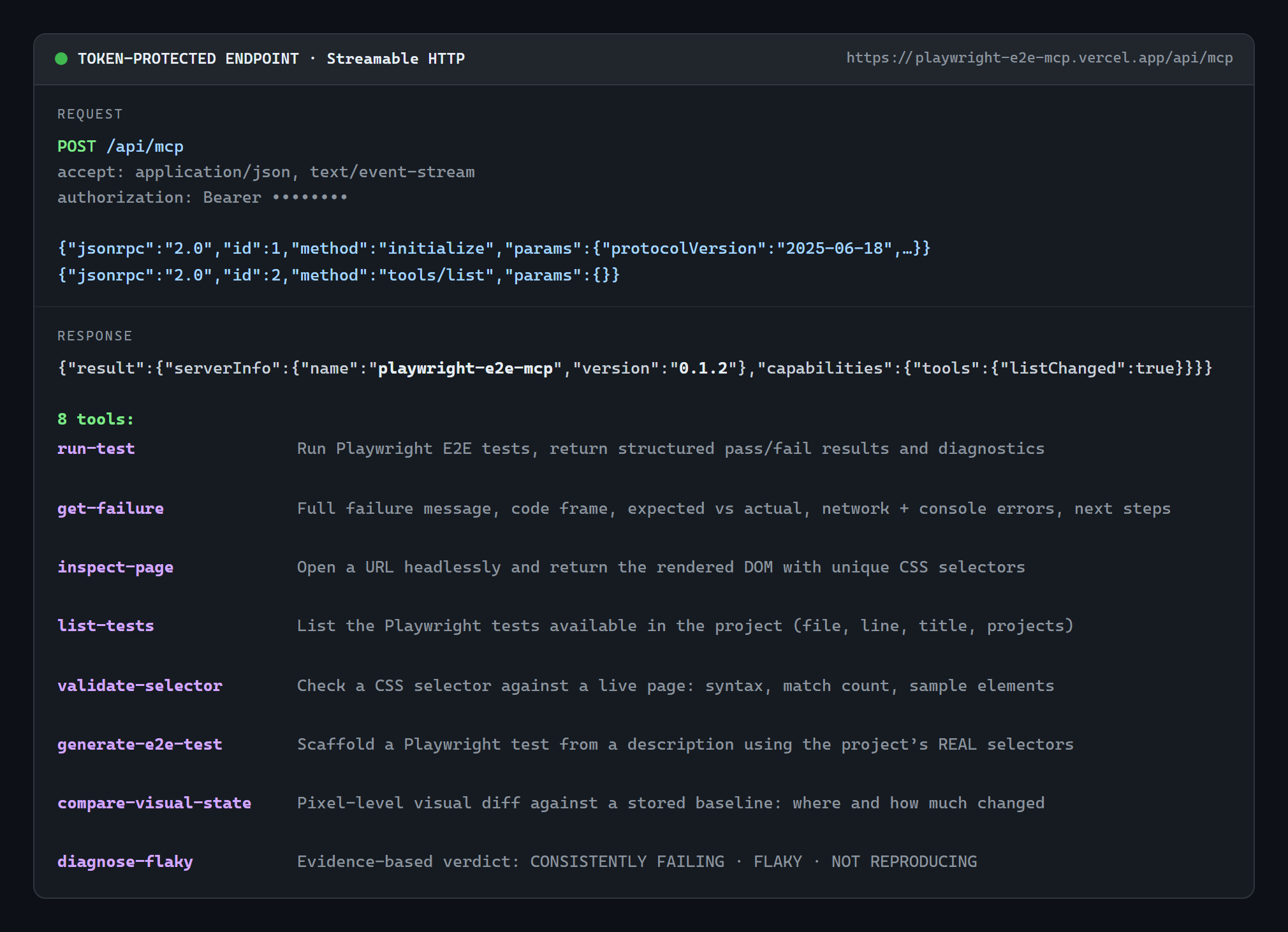 **A real test run** — `run-test` served over stdio by `npx -y playwright-e2e-mcp` against the bundled `examples/sample-test.spec.ts` (actual output, unedited): 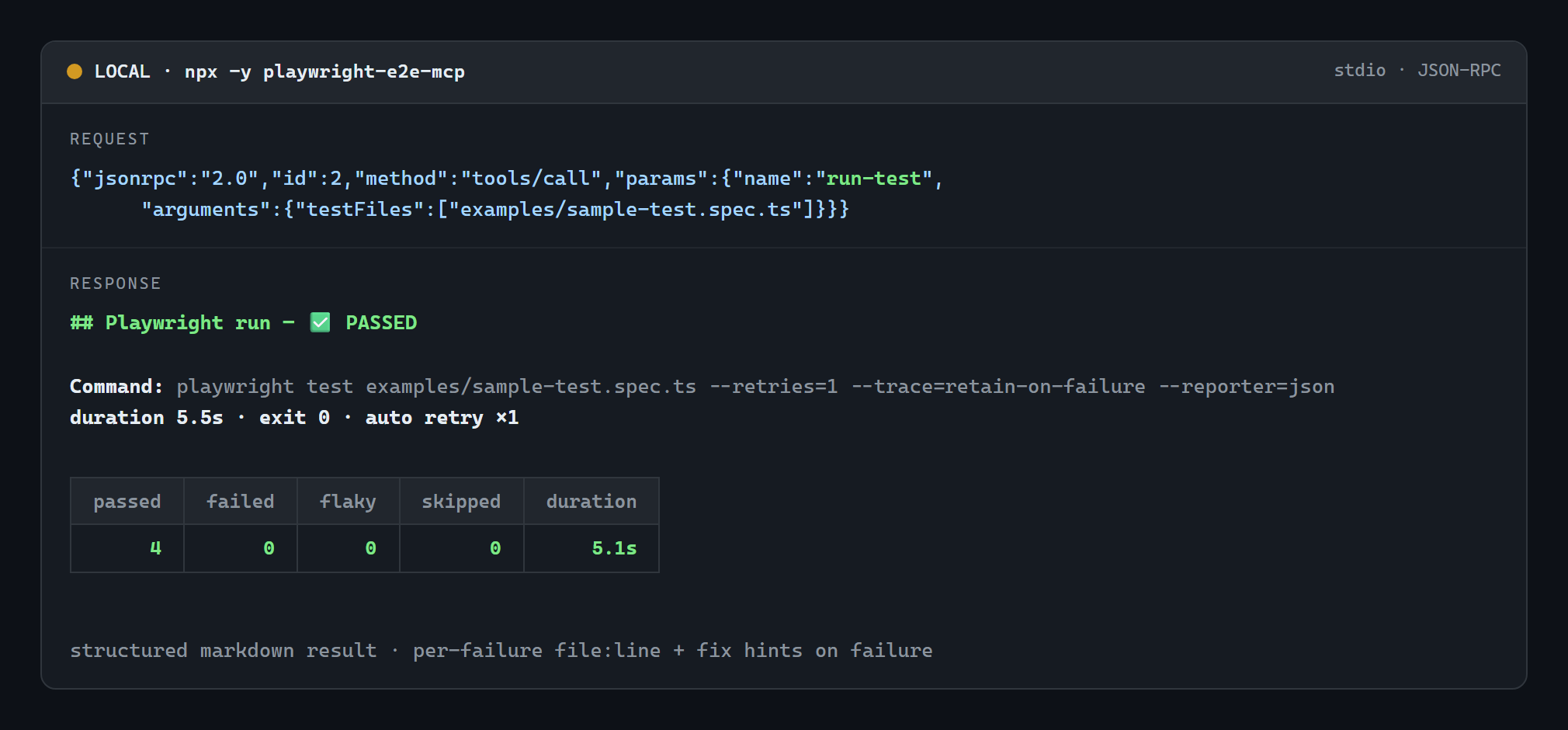 Images are generated from real captured output with `node scripts/gen-demo-images.mjs`. ## Install Works with Claude Desktop, Claude Code, Cursor, Windsurf, Codex, Gemini CLI, Freebuff and every other MCP client — pick whichever route fits: | Route | How | | --- | --- | | **npm (canonical, fastest)** | `npx -y playwright-e2e-mcp` | | **MCP Registry** (registry-aware clients discover it automatically) | `io.github.trajectiq-ai/E2E` — [listing](https://registry.modelcontextprotocol.io/) | | **Any client, no npm account needed** | `npx -y github:trajectiq-ai/E2E` | | **Claude Desktop, zero Node setup** | double-click the [`.mcpb` extension](https://github.com/trajectiq-ai/E2E/releases) | | **Remote-only clients (ChatGPT connectors)** | `https://playwright-e2e-mcp.vercel.app/api/mcp` | Details and per-client config: [Installation](#installation) · [MCP client configuration](#mcp-client-configuration). --- ## Tools | Tool | Purpose | | --- | --- | | `run-test` | Run Playwright tests and return stats, failures, diagnostics and hints | | `get-failure` | Deep analysis of one failure: stack, expected/actual, **DOM snapshot at failure (from the Playwright trace)**, next steps | | `inspect-page` | Open a URL headlessly and return the rendered DOM: selectors, visibility, boxes, text, console output, HTML | | `list-tests` | List available tests (`file`, `line`, full title, projects) with filtering | | `validate-selector` | Check a CSS selector against a live page: validity, match count, sample matches | | `generate-e2e-test` | Scaffold a Playwright test from a description using the project's **real** selectors, discovered from recent file changes | | `compare-visual-state` | Visual regression: screenshot before/after a change and report *what* moved and how colors shifted | | `diagnose-flaky` | Run a failing test 2–10 times **with retries disabled** and return an evidence verdict: `CONSISTENTLY FAILING`, `FLAKY` or `NOT REPRODUCING` | ### `run-test` | Argument | Type | Description | | --- | --- | --- | | `projectRoot` | string | Project directory (default: server working directory) | | `testFiles` | string[] | Files/directories relative to the root; `file:line` supported. Omit to run everything | | `grep` | string | Only run tests whose title matches this regex | | `browser` | `chromium` \| `firefox` \| `webkit` | Playwright project to run (matched against config project names) | | `headed` | boolean | Visible browser window | | `timeoutMs` | number | Hard wall-clock limit for the run (default `120000`); the whole process tree is killed past it and **partial results are returned** | | `testTimeoutMs` | number | Per-test timeout passed to Playwright | | `workers` / `retries` | number | Passed through to Playwright | | `config` | string | `playwright.config` path **or 1-based index** when the project has several | | `retryOnFailure` | boolean | Auto-retry failures **once** before reporting them (default `true`; ignored when `retries` is set) | | `lastFailed` | boolean | Only re-run tests that failed in the previous run (Playwright `--last-failed`) — the fast fix → re-run loop | | `args` | string[] | Extra CLI flags (shell metacharacters are rejected) | Flakiness handling: by default the server injects `--retries=1` (unless the config already sets `retries`), so a test that passes on the retry is reported as **flaky**, not failed. Traces are captured automatically (`--trace=retain-on-failure`) so `get-failure` can show the DOM at the moment of failure. Example result: ```markdown ## Playwright run — ❌ FAILED **Command:** `playwright test --config playwright.config.ts tests/checkout.spec.ts --reporter=json` **duration 4.2s · exit 1 · config `playwright.config.ts`** | passed | failed | flaky | skipped | duration | | ---: | ---: | ---: | ---: | ---: | | 0 | 1 | 0 | 0 | 1.1s | ### ❌ 1 failing test(s) ### 1 of 1. checkout.spec.ts › pays with card **File:** `checkout.spec.ts:5` | **failed · server-unreachable** ### ⚠️ SERVER_NOT_RUNNING Your app (dev server) does not appear to be reachable. Start it in another terminal (e.g. npm run dev / npm start), keep it running, then retry — or configure `webServer` in playwright.config.* so Playwright starts it automatically. ``` ### `get-failure` | Argument | Type | Description | | --- | --- | --- | | `index` | number | 1-based failure index from the last run (default `1`) | | `projectRoot` | string | Only used when re-reading the stored report | Returns the message/code frame, expected vs actual, stack, failure kind with a diagnosis, the test's console output, **the DOM snapshot from the Playwright trace (plus the failed action, its selector, and the action log leading up to it)**, **the network requests that failed** (4xx/5xx, dead endpoints, no-response — with method, URL, status and resource type), **the console errors/warnings the page logged before the failure**, and numbered next steps (re-run this single test by `file:line`, headed/debug mode, `validate-selector` when the message mentions a locator, …). ### `inspect-page` | Argument | Type | Description | | --- | --- | --- | | `url` | string | Full http(s) URL to open (required) | | `projectRoot` | string | Project whose Playwright launches the browser | | `selector` | string | Inspect matches of this CSS selector instead of the whole DOM | | `waitFor` | string | Wait for a selector (CSS or `text=…`) before inspecting | | `waitUntil` | `load` \| `domcontentloaded` \| `networkidle` | Navigation wait condition | | `includeHtml` | boolean | Include the rendered HTML (capped) | | `maxHtmlChars` | number | HTML cap, default `20000` | | `timeoutMs` | number | Overall limit, default `45000` | Returns each element's **unique CSS selector**, tag, visibility, bounding box, text and attributes, plus captured console messages (errors first). ### `list-tests` | Argument | Type | Description | | --- | --- | --- | | `projectRoot` | string | Project directory | | `config` | string | Config path or 1-based index | | `testDir` | string | Restrict scanning to a directory (must stay inside the project) | | `filter` | string | Case-insensitive substring filter on `file › title` | | `limit` | number | Max tests returned, default `500` | Uses `playwright test --list` when Playwright works, and **falls back to a source scan** (keeping the reason) when the install or a spec file is broken. ### `validate-selector` | Argument | Type | Description | | --- | --- | --- | | `url` | string | Live page to test against (required) | | `selector` | string | CSS selector to validate (required) | | `projectRoot` | string | Project whose Playwright launches the browser | | `timeoutMs` | number | Overall limit, default `45000` | Verdicts: `✅ VALID — N matches` (with a sample of matches), `✅ VALID — 0 matches` (with debugging advice), `❌ INVALID` (parse error + fix), or a warning when the input uses a Playwright-only engine (`text=`, `xpath=`, `>>`, `:has-text()`), which is not plain CSS. ### `generate-e2e-test` | Argument | Type | Description | | --- | --- | --- | | `description` | string | What the test should cover (required) | | `pageUrl` | string | Page the test starts on (default: `baseURL` / `webServer.url` from config) | | `testDir` / `file` | string | Where to write the spec (default: detected `testDir` + `generated/<slug>.spec.ts`) | | `write` | boolean | Write the file to disk (default `true`) | | `overwrite` | boolean | Replace an existing file at the target path | | `liveInspect` | boolean | Cross-check selectors against the live page (default on when a URL is known) | | `projectRoot` / `config` | string | As with the other tools | Reads the agent's recent changes (`git status`, falling back to `git diff HEAD~1`, then recent mtimes), extracts the locators those files actually declare (`data-testid`, `getByRole`, `aria-label`, `placeholder`, `id`, `name`, element text), ranks verified-live selectors first, writes a spec built from them, and reports each selector with its source `file:line`. ### `compare-visual-state` | Argum
What people ask about E2E
What is trajectiq-ai/E2E?
+
trajectiq-ai/E2E is mcp servers for the Claude AI ecosystem. Playwright end-to-end testing MCP server — run, debug and inspect E2E tests from any AI agent: failure analysis, live DOM inspection, selector validation, visual diffs, flaky-test diagnosis. It has 0 GitHub stars and its last recorded update is dated 2026-10-06.
How do I install E2E?
+
You can install E2E by cloning the repository (https://github.com/trajectiq-ai/E2E) or following the README instructions on GitHub. ClaudeWave also provides quick install blocks on this page.
Is trajectiq-ai/E2E safe to use?
+
Our security agent has analyzed trajectiq-ai/E2E and assigned a Trust Score of 95/100 (tier: Verified). See the full breakdown of passed checks and flags on this page.
Who maintains trajectiq-ai/E2E?
+
trajectiq-ai/E2E is maintained by trajectiq-ai. The last recorded GitHub activity is dated 2026-10-06, with 0 open issues.
Are there alternatives to E2E?
+
Yes. On ClaudeWave you can browse similar mcp servers at /categories/mcp, sorted by popularity or recent activity.
Deploy E2E to your cloud
Ship this repo to production in minutes. Each platform spins up its own environment with editable env vars.
Maintain this repo? Add a badge to your README
Drop the badge into your GitHub README to show it's tracked on ClaudeWave. Each badge links back to this page and reflects the live Trust Score.
[](https://claudewave.com/repo/trajectiq-ai-e2e)<a href="https://claudewave.com/repo/trajectiq-ai-e2e"><img src="https://claudewave.com/api/badge/trajectiq-ai-e2e" alt="Featured on ClaudeWave: trajectiq-ai/E2E" width="320" height="64" /></a>More MCP Servers

Fair-code workflow automation platform with native AI capabilities. Combine visual building with custom code, self-host or cloud, 400+ integrations.

User-friendly AI Interface (Supports Ollama, OpenAI API, ...)

An open-source AI agent that brings the power of Gemini directly into your terminal.

Real-time global intelligence dashboard. AI-powered news aggregation, geopolitical monitoring, and infrastructure tracking in a unified situational awareness interface

🕷️ An adaptive Web Scraping framework that handles everything from a single request to a full-scale crawl! Don't be shy, join here: https://discord.gg/EMgGbDceNQ and follow here for daily tips and tricks: https://x.com/Scrapling_dev

The fastest path to AI-powered full stack observability, even for lean teams.