

Jikida — the security toolkit for modern and AI-built web apps: pentest, code & repo scanning, a managed WAF, and an MCP server for AI editors.
- ✓Open-source license (Apache-2.0)
- ✓Actively maintained (<30d)
- ✓Clear description
- ✓Documented (README)
claude mcp add jikida -- npx -y @jikida/init{
"mcpServers": {
"jikida": {
"command": "npx",
"args": ["-y", "@jikida/init"]
}
}
}MCP Servers overview
<p align="center">
<img src="https://raw.githubusercontent.com/unesLam/jikida/main/.github/guardian.png" alt="Jikida guardian" width="220">
</p>
<h1 align="center">Jikida.io</h1>
<p align="center"><b>The hosted AI pentester for people who ship — not just security engineers.</b><br>
Pentest your live app, scan your repo, protect it with a WAF, and watch its uptime. One account. No Docker, no LLM key, free tier.</p>
<p align="center">
<a href="https://jikida.io"><img src="https://img.shields.io/badge/site-jikida.io-E01F26" alt="site"></a>
<a href="https://mcp.jikida.io"><img src="https://img.shields.io/badge/MCP-20_AI_tools-A855F7" alt="mcp"></a>
<a href="#sdks--every-language"><img src="https://img.shields.io/badge/SDKs-10_languages-0A0A0A" alt="sdks"></a>
<a href="https://www.npmjs.com/package/@jikida/scan"><img src="https://img.shields.io/npm/v/@jikida/scan?label=%40jikida%2Fscan&color=cb3837" alt="npm scan"></a>
<a href="https://packagist.org/packages/jikida/sdk-php"><img src="https://img.shields.io/packagist/v/jikida/sdk-php?label=jikida%2Fsdk-php&color=777bb4" alt="packagist"></a>
<a href="LICENSE"><img src="https://img.shields.io/badge/license-Apache_2.0-3b82f6" alt="license"></a>
</p>
<p align="center">
<b><a href="#why-jikida-beats-the-other-security-tools">Why it beats Nuclei / Strix / Shannon ↓</a></b> ·
<a href="#quick-install-30-seconds">Install</a> ·
<a href="#mcp-server-for-ai-ides">MCP</a> ·
<a href="#sdks--every-language">SDKs</a> ·
<a href="https://jikida.io/compare">Compare</a>
</p>
**Install it, scan it, or plug it into your AI editor:**
```bash
npx @jikida/init # add the SDK + protection to your app in 30 seconds
npx @jikida/scan # pentest any site or repo from your terminal
npx -y @jikida/mcp # security tools inside Claude Code, Cursor, Windsurf
```
<pre><code><span style="color:#E01F26"> ██ ██ ██ ██ ██ █████ ████
██ ██ ██ ██ ██ ██ ██ ██ ██
██ ██ ████ ██ ██ ██ ██████
██ ██ ██ ██ ██ ██ ██ ██ ██ ██
███ ██ ██ ██ ██ █████ ██ ██</span>
pentest · repo scan · uptime · alerts https://jikida.io
→ scanning example.com …
✓ 41 checks · grade B (88/100)
CRITICAL Exposed .env file /.env CWE-538
CRITICAL Stripe secret key in JS /app.js:1204 CWE-312
HIGH Missing Content-Security-Policy CWE-693
MEDIUM Cookie without Secure flag session CWE-614
Every finding has a fix. Full report: https://app.jikida.io
</code></pre>
## Pentest & scan for developers, AI IDEs & vibe coders
Pentest and scan websites, web apps, code and GitHub for vulnerabilities and exposed keys. Secure vibe-coded apps, monitor uptime, SSL and domains, and rate-limit APIs. One platform.
**Website & app pentest** · **Code & repo scan** · **Deep pentest** · **MCP for AI IDEs** · **Agentic & vibe-coded security** · **SDKs**
---
**Jikida.io** is a developer-first security platform. The core is **pentest and scanning**: it pentests your live website and app, scans your code and connected GitHub/GitLab/Bitbucket repos for exposed secrets and vulnerable dependencies, runs a deeper authenticated pentest, and plugs into your **AI IDE** (Claude Code, Cursor, Windsurf) over **MCP** so it guides agentic and vibe-coded work to write secure code and catches mistakes before they ship. Uptime, SSL & domain monitoring, a managed WAF, and a compliance generator come bundled as complementary extras — installed in **one line** for Node, PHP/Laravel, Python, Go, Ruby, Java, .NET, Rust, Bun, or Deno.
**Your security layer. Shipped in 30 seconds.** One line — `npx @jikida/init` — and every SDK fails open, so if Jikida.io is ever down your app keeps serving.
---
## Why Jikida beats the other security tools
The strongest open-source security tools are **deep but narrow** — pentest-only, self-hosted, bring-your-own-LLM-key. Jikida does the deep work **and** hosts it, runs with no key of your own, and adds a WAF, uptime and repo scan the pentest-only tools skip. ✅ full · ⚠️ partial · ❌ none.
| | Jikida | Nuclei | Strix | Shannon | Snyk | Cloudflare |
| :--- | :---: | :---: | :---: | :---: | :---: | :---: |
| Live-app pentest with real exploit | ✅ | ⚠️ match | ✅ | ✅ | ❌ | ❌ |
| SAST + DAST (code **and** live app) | ✅ | ⚠️ DAST | ✅ | ✅ | ⚠️ SAST | ❌ |
| Repo secret + CVE (OSV) scan | ✅ | ❌ | ⚠️ | ⚠️ | ✅ | ❌ |
| Managed WAF (blocks live attacks) | ✅ | ❌ | ❌ | ❌ | ❌ | ✅ |
| Uptime + SSL / domain monitoring | ✅ | ❌ | ❌ | ❌ | ❌ | ⚠️ |
| **Hosted — no Docker, no self-host** | ✅ | ⚠️ cloud | ❌ | ❌ | ✅ | ✅ |
| **Runs with no LLM key of yours** | ✅ | ✅ | ❌ BYOK | ❌ BYOK | ✅ | ✅ |
| Install: CLI + Docker + `npx` | ✅ all | ⚠️ CLI | ⚠️ Docker | ⚠️ npx | ⚠️ CLI | ⚠️ DNS |
| MCP tools in your AI editor | ✅ | ❌ | ❌ | ⚠️ | ❌ | ❌ |
| Free tier, no card | ✅ | ✅ | ✅ | ✅ | ✅ | ✅ |
The one axis the AI pentesters still go deeper on is raw exploitation — exactly what our [source-to-exploit deep pentest](https://jikida.io/compare) is closing. Everywhere else, the builder who shipped with Cursor last week wins with Jikida: nothing to self-host, no key to buy, the whole stack in one account. Full breakdowns: [nuclei](https://jikida.io/compare/nuclei-alternative) · [strix](https://jikida.io/compare/strix-alternative) · [shannon](https://jikida.io/compare/shannon-alternative) · [snyk](https://jikida.io/compare/snyk-alternative) · [cloudflare](https://jikida.io/compare/cloudflare-alternative).
---
### Get started — pick your entry point
Every command below sits in its own copy box. Lines that start with `!` are notes, not commands — do not copy those.
**Scan a URL or repo** — no account needed.
```bash
npx @jikida/scan https://your-app.com
```
! Scan a local repo for committed secrets:
```bash
npx @jikida/scan ./
```
**Add the WAF + SDK** — auto-detects your framework.
```bash
npx @jikida/init
```
**Install a language SDK** — Node shown; PHP, Python, Go and the rest are in the [SDK table](#sdks--every-language).
```bash
npm install @jikida/sdk-node
```
**MCP server** for Claude Code, Cursor and Windsurf — add this to `~/.claude/mcp.json`:
```json
{ "mcpServers": { "jikida": { "command": "npx", "args": ["-y", "@jikida/mcp"] } } }
```
**Agent skills** — copy the [`skills/`](./skills) folder into your assistant's skills folder (`.claude/skills/`, Cursor rules, and the like). Three skills: **security**, **clean-code**, **UX design** — see [the table below](#anthropic-agent-skills--ship-secure-non-sloppy-apps).
Full details for each are below.
### Where things live
| Folder | What it holds |
| --- | --- |
| [`sdks/`](./sdks) | Ten language SDKs — Node, PHP, Python, Go, Ruby, Java, .NET, Rust, Bun, Deno. |
| [`tools/`](./tools) | The `scan` CLI, the `init` onboarding CLI, and the `mcp` server. |
| [`skills/`](./skills) | The Jikida agent skill for Claude Code, Cursor and Windsurf. |
| [`waf-rules/`](./waf-rules) | Versioned WAF rule packs (OWASP Top 10, API abuse, bot scanners, vibe-coder). |
Get a token at [app.jikida.io/developer](https://app.jikida.io/developer). Set it as `JIKIDA_TOKEN`.
---
## See it in action
One dashboard for a site's whole security posture — protection status, uptime, pentest grade, email security (SPF/DKIM/DMARC) and compliance — with instant alerts to your phone, Slack, Telegram, Discord, email or a webhook.
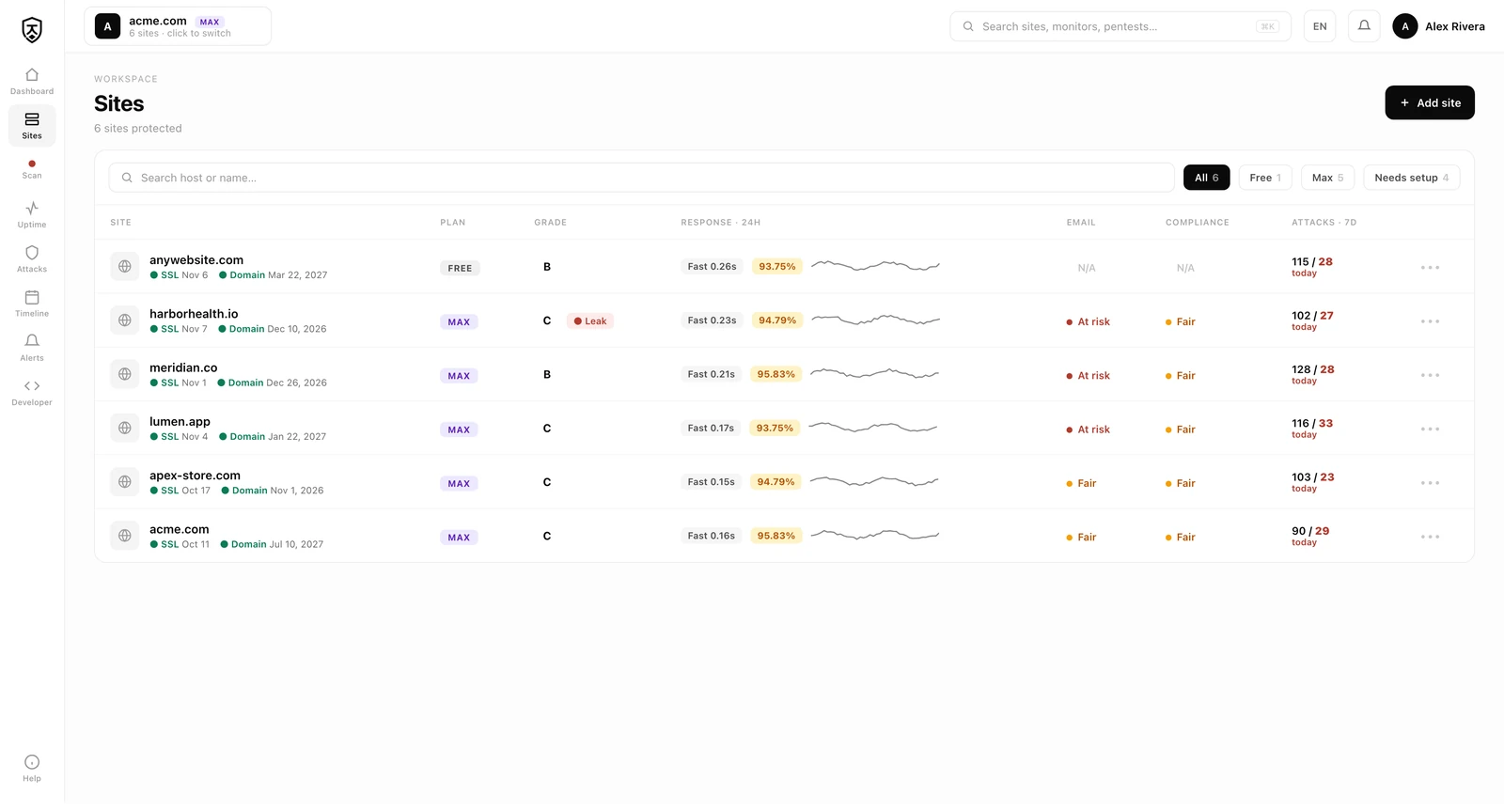
- **Uptime & performance** — response-time trend, uptime %, P95 and an incident timeline for every page and API you watch.
- **API rate-limits & rules** — your SDK auto-detects endpoints from real traffic; approve per-endpoint rate caps and WAF rules, or dismiss the ones you don't need.
---
## Table of contents
- [Why Jikida beats the other security tools](#why-jikida-beats-the-other-security-tools)
- [Why Jikida.io](#why-jikida)
- [How access works](#how-access-works--free-then-account-gated-then-plan-gated)
- [What's inside](#whats-inside)
- [Quick install](#quick-install-30-seconds)
- [Security for your stack](#security-for-your-stack)
- [SDKs — every language](#sdks--every-language)
- [MCP server for AI IDEs](#mcp-server-for-ai-ides)
- [Free tools](#free-tools)
- [Skill for Claude Code](#skill-for-claude-code-cli)
- [Standards & mappings](#standards--mappings)
- [Threats Jikida.io stops](#threats-jikida-stops)
- [Contributing](#contributing)
---
## Why Jikida.io
Most small teams ship without a Web Application Firewall in front of their app. They know they should. They put it on the backlog. Then the free trial ends, or a user reports a slow page, and the WAF ticket rots another quarter.
Jikida.io removes three specific frictions:
1. **Install** — one line, one language, five minutes.
2. **Downside risk** — every SDK is fail-open. If Jikida.io is down, your app keeps serving. You lose protection, not availability.
3. **Cost** — there's a real free tier that protects a hobby project. Plans and current pricing live at [jikida.io](https://jikida.io).
## How access works — free, then account-gated, then plan-gated
Everything in this repo is open source, and a lot of Jikida.io is usable before you ever sign up. The model is three tiers of friction, on purpose:
- **Free, no account.** The SDKs, the WAF rule packs, the CLI scanner and four MCP tools (`scan_domain`, `check_headers`, `guard_code`, `check_s3_bucket`) run with no login at all — rate-limited by IP. You can protect an app or scan a URL in one command and never create an account. This is the open-source, try-it-now surface.
- **Account-gated (still free).** Sign up — no card — and the hosted layer turns on: uptime monitoring, one live-site pentest, one repo scan, a basic managed WAF, mobile push, a public status pageWhat people ask about jikida
What is unesLam/jikida?
+
unesLam/jikida is mcp servers for the Claude AI ecosystem. Jikida — the security toolkit for modern and AI-built web apps: pentest, code & repo scanning, a managed WAF, and an MCP server for AI editors. It has 1 GitHub stars and its last recorded update is dated 2026-09-11.
How do I install jikida?
+
You can install jikida by cloning the repository (https://github.com/unesLam/jikida) or following the README instructions on GitHub. ClaudeWave also provides quick install blocks on this page.
Is unesLam/jikida safe to use?
+
Our security agent has analyzed unesLam/jikida and assigned a Trust Score of 87/100 (tier: Trusted). See the full breakdown of passed checks and flags on this page.
Who maintains unesLam/jikida?
+
unesLam/jikida is maintained by unesLam. The last recorded GitHub activity is dated 2026-09-11, with 0 open issues.
Are there alternatives to jikida?
+
Yes. On ClaudeWave you can browse similar mcp servers at /categories/mcp, sorted by popularity or recent activity.
Deploy jikida to your cloud
Ship this repo to production in minutes. Each platform spins up its own environment with editable env vars.
Maintain this repo? Add a badge to your README
Drop the badge into your GitHub README to show it's tracked on ClaudeWave. Each badge links back to this page and reflects the live Trust Score.
[](https://claudewave.com/repo/uneslam-jikida)<a href="https://claudewave.com/repo/uneslam-jikida"><img src="https://claudewave.com/api/badge/uneslam-jikida" alt="Featured on ClaudeWave: unesLam/jikida" width="320" height="64" /></a>More MCP Servers

Fair-code workflow automation platform with native AI capabilities. Combine visual building with custom code, self-host or cloud, 400+ integrations.

User-friendly AI Interface (Supports Ollama, OpenAI API, ...)

An open-source AI agent that brings the power of Gemini directly into your terminal.

Real-time global intelligence dashboard. AI-powered news aggregation, geopolitical monitoring, and infrastructure tracking in a unified situational awareness interface

🕷️ An adaptive Web Scraping framework that handles everything from a single request to a full-scale crawl! Don't be shy, join here: https://discord.gg/EMgGbDceNQ and follow here for daily tips and tricks: https://x.com/Scrapling_dev

The fastest path to AI-powered full stack observability, even for lean teams.