

Reelpen: browser-based 3D scene building for AI video. Public MCP connection guide, character and camera workflows, and reference exports.
- ✓Actively maintained (<30d)
- ✓Clear description
- ✓Topics declared
- ✓Documented (README)
- !No standard license detected
git clone https://github.com/viscountsparrow-cloud/reelpen-mcp{
"mcpServers": {
"reelpen-mcp": {
"command": "node",
"args": ["/path/to/reelpen-mcp/dist/index.js"]
}
}
}MCP Servers overview
# Reelpen — 3D scene building for AI video, with MCP Build an editable 3D scene, direct character and camera movement, then export references for your AI video workflow. Reelpen runs in a desktop browser and offers an authenticated remote MCP connection for compatible AI assistants. **[Open Reelpen](https://beta.reelpen.ai/) · [Connect your AI](https://beta.reelpen.ai/guides/connect-your-ai) · [Watch the demo](https://www.youtube.com/watch?v=MnRJVpZwn2A)** 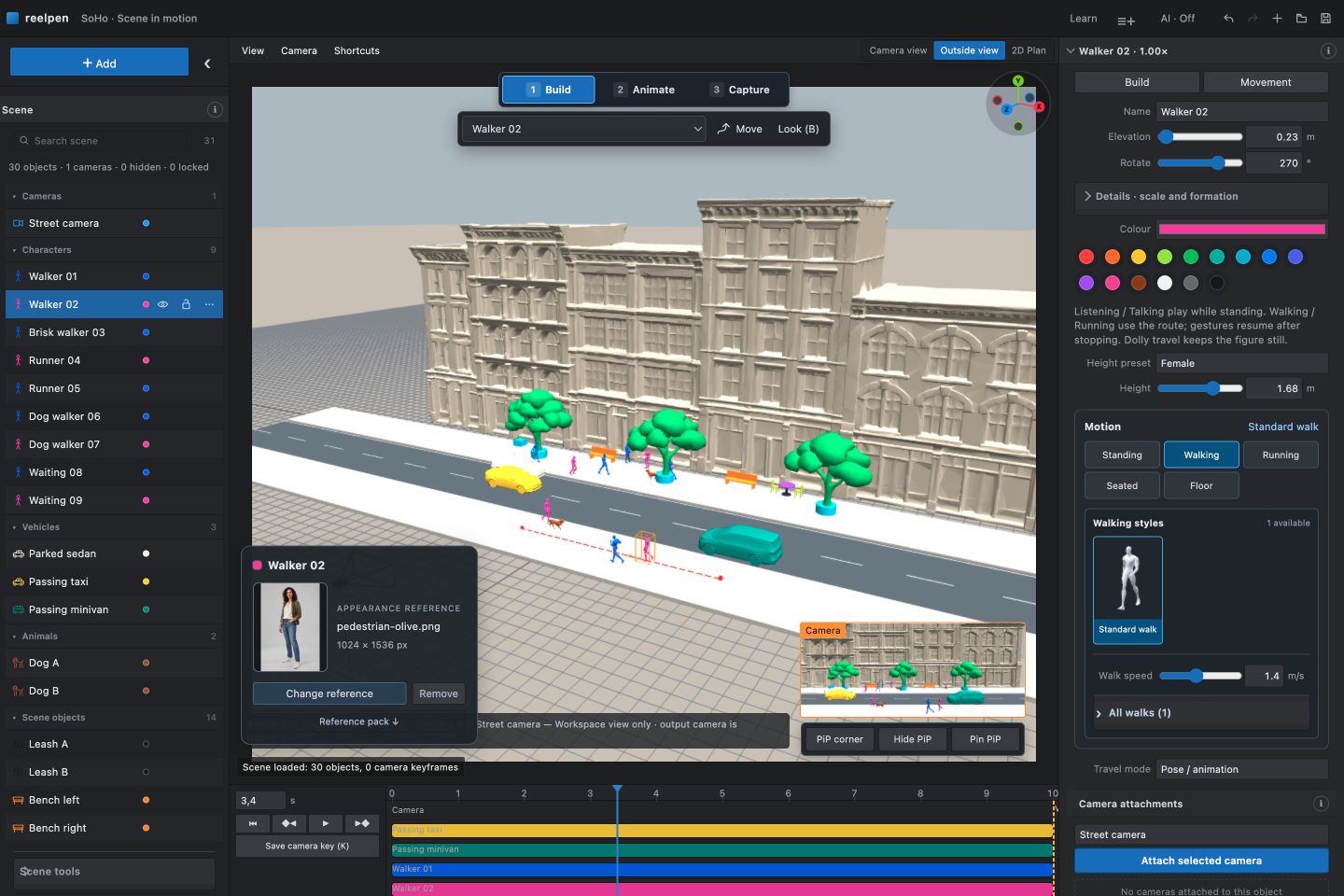 ## What Reelpen does - Arrange characters, props and environments in an editable 3D scene. - Plan walking/running routes, pauses and supported character action sequences. - Position cameras, choose look targets and preview camera movement. - Export reference video and PNG frames using supported browser formats. - Connect a compatible AI assistant to inspect and edit an allowed live scene. - Work with saved projects and film boards through separately granted account permissions. Reelpen is in **free beta; no payment card is required**. Your AI assistant and external video-generation services have their own access rules and charges. Check [current access information](https://beta.reelpen.ai/pricing) for changes. ## Connect through MCP | Setting | Value | | --- | --- | | Server name | Reelpen | | Remote URL | `https://beta.reelpen.ai/mcp` | | Transport | Streamable HTTP | | Authentication | OAuth; sign in to Reelpen with Google | | Live editing | Open the desired project and choose **AI: allow in this tab** | Use an AI client that supports remote MCP and Reelpen's OAuth discovery and registration flow. Add the remote URL in the client's MCP/connector settings, complete sign-in and review the requested permissions. Then open the desired project in Reelpen using the same account and allow that editor tab. **Start with a read-only check:** > Use Reelpen to read my allowed scene. Tell me the project name, the objects and cameras you can see, and whether the scene is live. Do not change anything. Confirm that the reported project and objects match the open editor before making changes. **Try a small edit:** > In my allowed Reelpen scene, keep existing objects. Add one Dolly character with a short walking route and a camera that follows it. Read the current capabilities first, make the change as one batch, then show me a camera preview. Watch the result and play the entire shot. Wait for **Saved** before leaving. [Complete connection instructions and troubleshooting](https://beta.reelpen.ai/guides/connect-your-ai) [Example prompts](docs/EXAMPLES.md) · [Connection and product FAQ](docs/FAQ.md) · [Smithery tool listing](https://smithery.ai/servers/admin-p02g/reelpen) ## Workflows | Task | Guide | | --- | --- | | Build your first moving scene | [AI video scene builder](https://beta.reelpen.ai/guides/ai-video-scene-builder) | | Plan a tracking shot | [Camera motion reference](https://beta.reelpen.ai/guides/camera-motion-reference) | | Block characters and compare angles | [3D storyboarding](https://beta.reelpen.ai/guides/3d-storyboarding) | | Plan sit, wait, stand and other supported actions | [Character motion reference](https://beta.reelpen.ai/guides/character-motion-reference) | | Choose moving versus still references | [Reference video and keyframes](https://beta.reelpen.ai/guides/reference-video-and-keyframes) | ## Permissions and limits Connecting an account and allowing a live editor are separate steps. **Stop** closes live access; it does not revoke separately granted saved-project or film-board access. Remove the connection in **Connected apps** to revoke it. Scene Undo covers editor history, not every saved account operation. AI assistants should read the current capabilities before editing. Builder coverage is evolving; not every Builder control is promised through MCP. Motions are for previsualization. Inspect seat contact, turns, framing and the whole timeline before exporting. Reelpen prepares references. Final generative video is produced by a separate service, and reference fidelity depends on that service. This repository does not claim that a video model will reproduce a shot exactly. A local DWG experiment is not a released DWG importer, BIM system or construction-documentation feature. ## About this repository This is Reelpen's public product and connection documentation. It does not contain the application source, private projects, account data or credentials. The hosted connection guide is the current setup reference. [Website](https://reelpen.ai/) · [YouTube](https://www.youtube.com/@reelpenai) · [X](https://x.com/reelpenai) · [Help](https://beta.reelpen.ai/help) Product facts reviewed: 2026-09-28.
What people ask about reelpen-mcp
What is viscountsparrow-cloud/reelpen-mcp?
+
viscountsparrow-cloud/reelpen-mcp is mcp servers for the Claude AI ecosystem. Reelpen: browser-based 3D scene building for AI video. Public MCP connection guide, character and camera workflows, and reference exports. It has 0 GitHub stars and its last recorded update is dated 2026-09-27.
How do I install reelpen-mcp?
+
You can install reelpen-mcp by cloning the repository (https://github.com/viscountsparrow-cloud/reelpen-mcp) or following the README instructions on GitHub. ClaudeWave also provides quick install blocks on this page.
Is viscountsparrow-cloud/reelpen-mcp safe to use?
+
Our security agent has analyzed viscountsparrow-cloud/reelpen-mcp and assigned a Trust Score of 70/100 (tier: OK). See the full breakdown of passed checks and flags on this page.
Who maintains viscountsparrow-cloud/reelpen-mcp?
+
viscountsparrow-cloud/reelpen-mcp is maintained by viscountsparrow-cloud. The last recorded GitHub activity is dated 2026-09-27, with 0 open issues.
Are there alternatives to reelpen-mcp?
+
Yes. On ClaudeWave you can browse similar mcp servers at /categories/mcp, sorted by popularity or recent activity.
Deploy reelpen-mcp to your cloud
Ship this repo to production in minutes. Each platform spins up its own environment with editable env vars.
Maintain this repo? Add a badge to your README
Drop the badge into your GitHub README to show it's tracked on ClaudeWave. Each badge links back to this page and reflects the live Trust Score.
[](https://claudewave.com/repo/viscountsparrow-cloud-reelpen-mcp)<a href="https://claudewave.com/repo/viscountsparrow-cloud-reelpen-mcp"><img src="https://claudewave.com/api/badge/viscountsparrow-cloud-reelpen-mcp" alt="Featured on ClaudeWave: viscountsparrow-cloud/reelpen-mcp" width="320" height="64" /></a>More MCP Servers

Fair-code workflow automation platform with native AI capabilities. Combine visual building with custom code, self-host or cloud, 400+ integrations.

User-friendly AI Interface (Supports Ollama, OpenAI API, ...)

An open-source AI agent that brings the power of Gemini directly into your terminal.

Real-time global intelligence dashboard. AI-powered news aggregation, geopolitical monitoring, and infrastructure tracking in a unified situational awareness interface

🕷️ An adaptive Web Scraping framework that handles everything from a single request to a full-scale crawl! Don't be shy, join here: https://discord.gg/EMgGbDceNQ and follow here for daily tips and tricks: https://x.com/Scrapling_dev

The fastest path to AI-powered full stack observability, even for lean teams.