

Clone any website with one command using AI coding agents
AI Website Cloner Template is a Next.js boilerplate that automates the reverse-engineering of any website into a modern TypeScript codebase using a single Claude Code slash command, `/clone-website`. The tool runs a five-phase pipeline: it first takes screenshots and extracts design tokens through interaction sweeps (scroll, click, hover, responsive), then downloads assets and updates fonts and globals, generates detailed component spec files under `docs/research/components/` with exact `getComputedStyle()` values and interaction states, dispatches parallel builder agents in separate git worktrees, and finally merges them into a complete page with a visual diff against the original. The output stack is Next.js 16 with App Router, React 19, shadcn/ui on Radix primitives, Tailwind CSS v4 with oklch design tokens, and Lucide React icons replaced by extracted SVGs. While Claude Code with Opus 4.7 is the recommended agent, the template also supports Cursor, Aider, GitHub Copilot, and ten other coding agents via an `AGENTS.md` file. Primary beneficiaries include developers migrating sites from WordPress or Webflow and those recovering code from live sites with lost repositories.
- ✓Open-source license (MIT)
- ✓Actively maintained (<30d)
- ✓Healthy fork ratio
- ✓Clear description
- ✓Topics declared
- ✓Documented (README)
git clone https://github.com/JCodesMore/ai-website-cloner-template && cp ai-website-cloner-template/*.md ~/.claude/agents/1 items in this repository
Reverse-engineer and clone one or more websites in one shot — extracts assets, CSS, and content section-by-section and proactively dispatches parallel builder agents in worktrees as it goes. Use this whenever the user wants to clone, replicate, rebuild, reverse-engineer, or copy any website. Also triggers on phrases like "make a copy of this site", "rebuild this page", "pixel-perfect clone". Provide one or more target URLs as arguments.
Subagents overview
# AI Website Cloner Template
<a href="https://github.com/JCodesMore/ai-website-cloner-template/blob/master/LICENSE"><img src="https://img.shields.io/badge/license-MIT-blue" alt="MIT License" /></a> <a href="https://github.com/JCodesMore/ai-website-cloner-template/stargazers"><img src="https://img.shields.io/github/stars/JCodesMore/ai-website-cloner-template?style=flat" alt="Stars" /></a> <a href="https://discord.gg/hrTSX5yTpB"><img src="https://img.shields.io/discord/1400896964597383279?label=discord" alt="Discord" /></a>
A reusable template for reverse-engineering any website into a clean, modern Next.js codebase using AI coding agents.
**Recommended: [Claude Code](https://docs.anthropic.com/en/docs/claude-code) with Opus 4.8 for best results** — but works with a variety of AI coding agents.
Point it at a URL, run `/clone-website`, and your AI agent will inspect the site, extract design tokens and assets, write component specs, and dispatch parallel builders to reconstruct every section.
## Demo
[](https://youtu.be/O669pVZ_qr0)
> Click the image above to watch the full demo on YouTube.
## Quick Start
> **Important:** Start by making your own copy with GitHub's **Use this template** button. Do not clone this template repository directly for your website project, and do not open pull requests here with your generated website.
1. **Create your own repository from this template**
On the GitHub page for this project, click **Use this template**, then click **Create a new repository**.
Give your new repository a name, choose whether it should be public or private, then click **Create repository**. If GitHub shows an **Include all branches** option, you can leave it off.
This gives you your own separate project to work in, so your website changes stay in your account instead of coming back to the main template.
2. **Open your new repository on your computer**
After GitHub creates your copy, open that new repository. Click **Code** and open or clone your new repository with your preferred coding tool.
If you use the terminal, the command will look like this:
```bash
git clone https://github.com/YOUR-USERNAME/YOUR-NEW-REPOSITORY.git
cd YOUR-NEW-REPOSITORY
```
3. **Install dependencies**
```bash
npm install
```
4. **Start your AI agent** — Claude Code recommended:
```bash
claude --chrome
```
5. **Run the skill**:
```
/clone-website <target-url1> [<target-url2> ...]
```
6. **Customize** (optional) — after the base clone is built, modify as needed
> Using a different agent? Open `AGENTS.md` for project instructions — most agents pick it up automatically.
## Supported Platforms
| Agent | Status |
| ------------------------------------------------------------- | -------------------------- |
| [Claude Code](https://docs.anthropic.com/en/docs/claude-code) | **Recommended** — Opus 4.8 |
| [Codex CLI](https://github.com/openai/codex) | Supported |
| [OpenCode](https://opencode.ai/) | Supported |
| [GitHub Copilot](https://github.com/features/copilot) | Supported |
| [Cursor](https://cursor.com/) | Supported |
| [Windsurf](https://codeium.com/windsurf) | Supported |
| [Gemini CLI](https://github.com/google-gemini/gemini-cli) | Supported |
| [Cline](https://github.com/cline/cline) | Supported |
| [Roo Code](https://github.com/RooCodeInc/Roo-Code) | Supported |
| [Continue](https://continue.dev/) | Supported |
| [Amazon Q](https://aws.amazon.com/q/developer/) | Supported |
| [Augment Code](https://www.augmentcode.com/) | Supported |
| [Aider](https://aider.chat/) | Supported |
## Prerequisites
- [Node.js](https://nodejs.org/) 24+
- An AI coding agent (see [Supported Platforms](#supported-platforms))
## Tech Stack
- **Next.js 16** — App Router, React 19, TypeScript strict
- **shadcn/ui** — Radix primitives + Tailwind CSS v4
- **Tailwind CSS v4** — oklch design tokens
- **Lucide React** — default icons (replaced by extracted SVGs during cloning)
## How It Works
The `/clone-website` skill runs a multi-phase pipeline:
1. **Reconnaissance** — screenshots, design token extraction, interaction sweep (scroll, click, hover, responsive)
2. **Foundation** — updates fonts, colors, globals, downloads all assets
3. **Component Specs** — writes detailed spec files (`docs/research/components/`) with exact computed CSS values, states, behaviors, and content
4. **Parallel Build** — dispatches builder agents in git worktrees, one per section/component
5. **Assembly & QA** — merges worktrees, wires up the page, runs visual diff against the original
Each builder agent receives the full component specification inline — exact `getComputedStyle()` values, interaction models, multi-state content, responsive breakpoints, and asset paths. No guessing.
## Use Cases
- **Platform migration** — rebuild a site you own from WordPress/Webflow/Squarespace into a modern Next.js codebase
- **Lost source code** — your site is live but the repo is gone, the developer left, or the stack is legacy. Get the code back in a modern format
- **Learning** — deconstruct how production sites achieve specific layouts, animations, and responsive behavior by working with real code
## Not Intended For
- **Phishing or impersonation** — this project must not be used for deceptive purposes, impersonation, or any activity that breaks the law.
- **Passing off someone's design as your own** — logos, brand assets, and original copy belong to their owners.
- **Violating terms of service** — some sites explicitly prohibit scraping or reproduction. Check first.
## Project Structure
```
src/
app/ # Next.js routes
components/ # React components
ui/ # shadcn/ui primitives
icons.tsx # Extracted SVG icons
lib/utils.ts # cn() utility
types/ # TypeScript interfaces
hooks/ # Custom React hooks
public/
images/ # Downloaded images from target
videos/ # Downloaded videos from target
seo/ # Favicons, OG images
docs/
research/ # Extraction output & component specs
design-references/ # Screenshots
scripts/
sync-agent-rules.sh # Regenerate agent instruction files
sync-skills.mjs # Regenerate /clone-website for all platforms
AGENTS.md # Agent instructions (single source of truth)
CLAUDE.md # Claude Code config (imports AGENTS.md)
GEMINI.md # Gemini CLI config (imports AGENTS.md)
```
## Commands
```bash
npm run dev # Start dev server
npm run build # Production build
npm run lint # ESLint check
npm run typecheck # TypeScript check
npm run check # Run lint + typecheck + build
```
### If using docker
```bash
docker compose up app --build # build and run the app
docker compose up dev --build # run the app in dev mode on port 3001
```
## Updating for Other Platforms
Two source-of-truth files power all platform support. Edit the source, then run the sync script:
| What | Source of truth | Sync command |
| ---------------------- | --------------------------------------- | ---------------------------------- |
| Project instructions | `AGENTS.md` | `bash scripts/sync-agent-rules.sh` |
| `/clone-website` skill | `.claude/skills/clone-website/SKILL.md` | `node scripts/sync-skills.mjs` |
Each script regenerates the platform-specific copies automatically. Agents that read the source files natively need no regeneration.
## Star History
[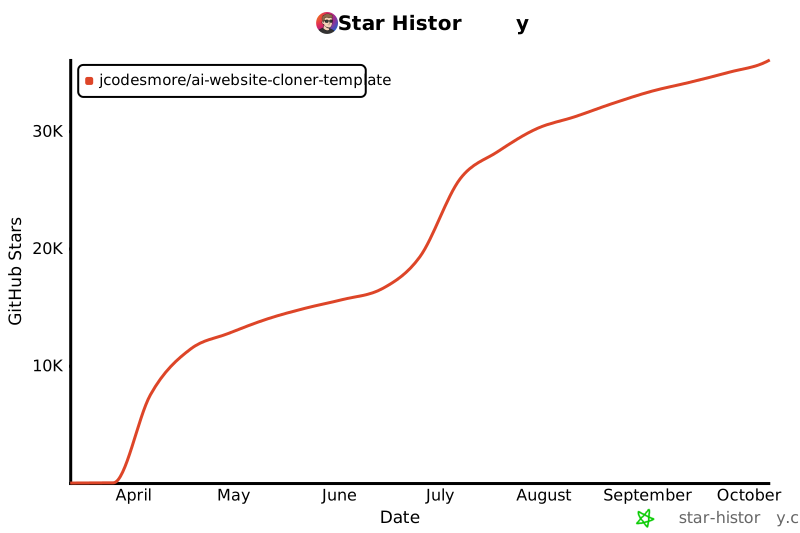](https://star-history.com/#JCodesMore/ai-website-cloner-template&Date)
## License
MIT
What people ask about ai-website-cloner-template
What is JCodesMore/ai-website-cloner-template?
+
JCodesMore/ai-website-cloner-template is subagents for the Claude AI ecosystem. Clone any website with one command using AI coding agents It has 30.4k GitHub stars and was last updated 23d ago.
How do I install ai-website-cloner-template?
+
You can install ai-website-cloner-template by cloning the repository (https://github.com/JCodesMore/ai-website-cloner-template) or following the README instructions on GitHub. ClaudeWave also provides quick install blocks on this page.
Is JCodesMore/ai-website-cloner-template safe to use?
+
Our security agent has analyzed JCodesMore/ai-website-cloner-template and assigned a Trust Score of 100/100 (tier: Verified). See the full breakdown of passed checks and flags on this page.
Who maintains JCodesMore/ai-website-cloner-template?
+
JCodesMore/ai-website-cloner-template is maintained by JCodesMore. The last recorded GitHub activity is from 23d ago, with 29 open issues.
Are there alternatives to ai-website-cloner-template?
+
Yes. On ClaudeWave you can browse similar subagents at /categories/agents, sorted by popularity or recent activity.
Deploy ai-website-cloner-template to your cloud
Ship this repo to production in minutes. Each platform spins up its own environment with editable env vars.
Maintain this repo? Add a badge to your README
Drop the badge into your GitHub README to show it's tracked on ClaudeWave. Each badge links back to this page and reflects the live Trust Score.
[](https://claudewave.com/repo/jcodesmore-ai-website-cloner-template)<a href="https://claudewave.com/repo/jcodesmore-ai-website-cloner-template"><img src="https://claudewave.com/api/badge/jcodesmore-ai-website-cloner-template" alt="Featured on ClaudeWave: JCodesMore/ai-website-cloner-template" width="320" height="64" /></a>More Subagents

The agent harness performance optimization system. Skills, instincts, memory, security, and research-first development for Claude Code, Codex, Opencode, Cursor and beyond.

The agent that grows with you

Java 面试 & 后端通用面试指南,覆盖计算机基础、数据库、分布式、高并发、系统设计与 AI 应用开发

Build Agentic workflows, RAG pipelines, with rich AI model and tool support on one collaborative workspace. Deploy on cloud, VPC, or self-hosted, so teams move from prototype to production without rebuilding the stack.

The agent engineering platform.

Turn any codebase, with its docs, SQL schemas, configs, and PDFs, into a queryable knowledge graph. A /graphify skill for Claude Code, Cursor, Codex, and Gemini CLI: local deterministic AST parsing, every edge explained, no vector store.