

A visual, example-driven guide to Claude Code — from basic concepts to advanced agents, with copy-paste templates that bring immediate value.
Claude-howto is a structured, example-driven learning repository designed to help developers move from basic Claude Code usage to building multi-agent workflows. Organized into 10 tutorial modules, it covers slash commands, CLAUDE.md configuration, hooks, skills, subagent definitions, and MCP server setup, providing copy-paste templates for each. Learners can run `/self-assessment` or `/lesson-quiz [topic]` directly inside Claude Code to identify knowledge gaps and receive a personalized study roadmap. Mermaid diagrams illustrate how features work internally, explaining the mechanics behind hook execution, memory handling, and agent delegation rather than just listing syntax. A concrete standout detail is the guided learning path, which estimates 11 to 13 total hours across beginner, intermediate, and advanced tracks and is kept synchronized with Claude Code releases, with v2.1.160 noted as the current target version. The repository is primarily aimed at developers already using Claude Code who want to combine its features into production pipelines such as automated code review, deployment scripting, and documentation generation.
- ✓Open-source license (MIT)
- ✓Actively maintained (<30d)
- ✓Healthy fork ratio
- ✓Clear description
- ✓Topics declared
- ✓Documented (README)
git clone https://github.com/luongnv89/claude-howto && cp claude-howto/*.md ~/.claude/agents/11 items in this repository
Interactive lesson-level quiz for Claude Code tutorials. Tests understanding of a specific lesson (01-10) with 8-10 questions mixing conceptual and practical knowledge. Use before a lesson to pre-test, during to check progress, or after to verify mastery. Use when asked to "quiz me on hooks", "test my knowledge of lesson 3", "lesson quiz", "practice quiz for MCP", or "do I understand skills".
Comprehensive Claude Code self-assessment and learning path advisor. Runs a multi-category quiz covering 10 feature areas, produces a detailed skill profile with per-topic scores, identifies specific gaps, and generates a personalized learning path with prioritized next steps. Use when asked to "assess my level", "take the quiz", "find my level", "where should I start", "what should I learn next", "check my skills", "skill check", or "level up".
提供全面的代码审查能力,覆盖安全、性能和代码质量分析。适用于用户请求代码审查、代码质量评估、Pull Request 审查,或提到安全分析和性能优化时。
从源代码生成全面且准确的 API 文档。适用于创建或更新 API 文档、生成 OpenAPI 规范,或在用户提到 API 文档、端点或说明时使用。
基于 Martin Fowler 方法论的系统化代码重构 skill。适用于用户请求重构代码、改进代码结构、减少技术债、清理旧代码、消除 code smell 或提升可维护性时。这个 skill 采用分阶段、带研究与计划的安全增量实施方式。
Subagents overview
<picture>
<source media="(prefers-color-scheme: dark)" srcset="resources/logos/claude-howto-logo-dark.svg">
<img alt="Claude How To" src="resources/logos/claude-howto-logo.svg">
</picture>
<p align="center">
<a href="https://github.com/trending">
<img src="https://img.shields.io/badge/GitHub-🔥%20%231%20Trending-purple?style=for-the-badge&logo=github"/>
</a>
</p>
[](https://github.com/luongnv89/claude-howto/stargazers)
[](https://github.com/luongnv89/claude-howto/network/members)
[](LICENSE)
[](CHANGELOG.md)
[](https://code.claude.com)
🌐 **Language / Ngôn ngữ / 语言 / Мова:** [English](README.md) | [Tiếng Việt](vi/README.md) | [中文](zh/README.md) | [Українська](uk/README.md) | [日本語](ja/README.md)
# Master Claude Code in a Weekend
Go from typing `claude` to orchestrating agents, hooks, skills, and MCP servers — with visual tutorials, copy-paste templates, and a guided learning path.
**[Get Started in 15 Minutes](#get-started-in-15-minutes)** | **[Find Your Level](#not-sure-where-to-start)** | **[Browse the Feature Catalog](CATALOG.md)**
---
## Table of Contents
- [The Problem](#the-problem)
- [How Claude How To Fixes This](#how-claude-how-to-fixes-this)
- [How It Works](#how-it-works)
- [Not Sure Where to Start?](#not-sure-where-to-start)
- [Get Started in 15 Minutes](#get-started-in-15-minutes)
- [What Can You Build With This?](#what-can-you-build-with-this)
- [FAQ](#faq)
- [Contributing](#contributing)
- [License](#license)
---
## The Problem
You installed Claude Code. You ran a few prompts. Now what?
- **The official docs describe features — but don't show you how to combine them.** You know slash commands exist, but not how to chain them with hooks, memory, and subagents into a workflow that actually saves hours.
- **There's no clear learning path.** Should you learn MCP before hooks? Skills before subagents? You end up skimming everything and mastering nothing.
- **Examples are too basic.** A "hello world" slash command doesn't help you build a production code review pipeline that uses memory, delegates to specialized agents, and runs security scans automatically.
You're leaving 90% of Claude Code's power on the table — and you don't know what you don't know.
---
## How Claude How To Fixes This
This isn't another feature reference. It's a **structured, visual, example-driven guide** that teaches you to use every Claude Code feature with real-world templates you can copy into your project today.
| | Official Docs | This Guide |
|--|---------------|------------|
| **Format** | Reference documentation | Visual tutorials with Mermaid diagrams |
| **Depth** | Feature descriptions | How it works under the hood |
| **Examples** | Basic snippets | Production-ready templates you use immediately |
| **Structure** | Feature-organized | Progressive learning path (beginner to advanced) |
| **Onboarding** | Self-directed | Guided roadmap with time estimates |
| **Self-Assessment** | None | Interactive quizzes to find your gaps and build a personalized path |
### What you get:
- **10 tutorial modules** covering every Claude Code feature — from slash commands to custom agent teams
- **Copy-paste configs** — slash commands, CLAUDE.md templates, hook scripts, MCP configs, subagent definitions, and full plugin bundles
- **Mermaid diagrams** showing how each feature works internally, so you understand *why*, not just *how*
- **A guided learning path** that takes you from beginner to power user in 11-13 hours
- **Built-in self-assessment** — run `/self-assessment` or `/lesson-quiz hooks` directly in Claude Code to identify gaps
**[Start the Learning Path ->](LEARNING-ROADMAP.md)**
---
## How It Works
### 1. Find your level
Take the [self-assessment quiz](LEARNING-ROADMAP.md#-find-your-level) or run `/self-assessment` in Claude Code. Get a personalized roadmap based on what you already know.
### 2. Follow the guided path
Work through 10 modules in order — each builds on the last. Copy templates directly into your project as you learn.
### 3. Combine features into workflows
The real power is in combining features. Learn to wire slash commands + memory + subagents + hooks into automated pipelines that handle code reviews, deployments, and documentation generation.
### 4. Test your understanding
Run `/lesson-quiz [topic]` after each module. The quiz pinpoints what you missed so you can fill gaps fast.
**[Get Started in 15 Minutes](#get-started-in-15-minutes)**
---
## Trusted by Developers
- **GitHub stars** from developers who use Claude Code daily
- **Forks** from teams adapting this guide for their own workflows
- **Actively maintained** — synced with every Claude Code release (latest: v2.1.217, July 2026)
- **Community-driven** — contributions from developers who share their real-world configurations
[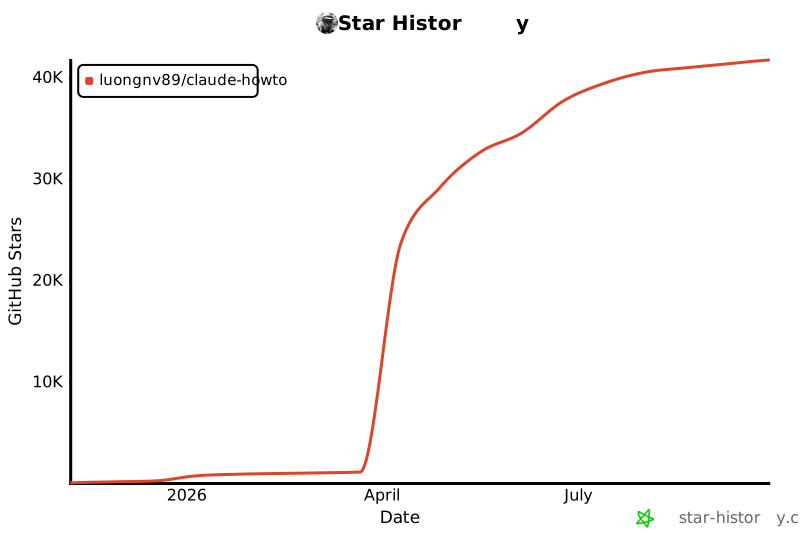](https://star-history.com/#luongnv89/claude-howto&Date)
---
## Not Sure Where to Start?
Take the self-assessment or pick your level:
| Level | You can... | Start here | Time |
|-------|-----------|------------|------|
| **Beginner** | Start Claude Code and chat | [Slash Commands](01-slash-commands/) | ~2.5 hours |
| **Intermediate** | Use CLAUDE.md and custom commands | [Skills](03-skills/) | ~3.5 hours |
| **Advanced** | Configure MCP servers and hooks | [Advanced Features](09-advanced-features/) | ~5 hours |
**Full learning path with all 10 modules:**
| Order | Module | Level | Time |
|-------|--------|-------|------|
| 1 | [Slash Commands](01-slash-commands/) | Beginner | 30 min |
| 2 | [Memory](02-memory/) | Beginner+ | 45 min |
| 3 | [Checkpoints](08-checkpoints/) | Intermediate | 45 min |
| 4 | [CLI Basics](10-cli/) | Beginner+ | 30 min |
| 5 | [Skills](03-skills/) | Intermediate | 1 hour |
| 6 | [Hooks](06-hooks/) | Intermediate | 1 hour |
| 7 | [MCP](05-mcp/) | Intermediate+ | 1 hour |
| 8 | [Subagents](04-subagents/) | Intermediate+ | 1.5 hours |
| 9 | [Advanced Features](09-advanced-features/) | Advanced | 2-3 hours |
| 10 | [Plugins](07-plugins/) | Advanced | 2 hours |
**[Complete Learning Roadmap ->](LEARNING-ROADMAP.md)**
---
## Get Started in 15 Minutes
> **Installation note**: Starting in v2.1.113, Claude Code ships as a native per-platform binary (macOS/Linux/Windows). `npm install -g @anthropic-ai/claude-code` still works — the native binary is downloaded as an optional dep on first use. As of v2.1.116, downloads come from `https://downloads.claude.ai/claude-code-releases` — corporate proxies must allowlist this host.
```bash
# 1. Clone the guide
git clone https://github.com/luongnv89/claude-howto.git
cd claude-howto
# 2. Copy your first slash command
mkdir -p /path/to/your-project/.claude/commands
cp 01-slash-commands/optimize.md /path/to/your-project/.claude/commands/
# 3. Try it — in Claude Code, type:
# /optimize
# 4. Ready for more? Set up project memory:
cp 02-memory/project-CLAUDE.md /path/to/your-project/CLAUDE.md
# 5. Install a skill:
cp -r 03-skills/code-review-specialist ~/.claude/skills/
```
Want the full setup? Here's the **1-hour essential setup**:
```bash
# Slash commands (15 min)
cp 01-slash-commands/*.md .claude/commands/
# Project memory (15 min)
cp 02-memory/project-CLAUDE.md ./CLAUDE.md
# Install a skill (15 min)
cp -r 03-skills/code-review-specialist ~/.claude/skills/
# Weekend goal: add hooks, subagents, MCP, and plugins
# Follow the learning path for guided setup
```
**[View the Full Installation Reference](#get-started-in-15-minutes)**
---
## What Can You Build With This?
| Use Case | Features You'll Combine |
|----------|------------------------|
| **Automated Code Review** | Slash Commands + Subagents + Memory + MCP |
| **Team Onboarding** | Memory + Slash Commands + Plugins |
| **CI/CD Automation** | CLI Reference + Hooks + Background Tasks |
| **Documentation Generation** | Skills + Subagents + Plugins |
| **Security Audits** | Subagents + Skills + Hooks (read-only mode) |
| **DevOps Pipelines** | Plugins + MCP + Hooks + Background Tasks |
| **Complex Refactoring** | Checkpoints + Planning Mode + Hooks |
---
## FAQ
**Is this free?**
Yes. MIT licensed, free forever. Use it in personal projects, at work, in your team — no restrictions beyond including the license notice.
**Is this maintained?**
Actively. The guide is synced with every Claude Code release. Current version: v2.1.217 (July 2026), compatible with Claude Code 2.1+.
**How is this different from the official docs?**
The official docs are a feature reference. This guide is a tutorial with diagrams, production-ready templates, and a progressive learning path. They complement each other — start here to learn, reference the docs when you need specifics.
**How long does it take to go through everything?**
11-13 hours for the full path. But you'll get immediate value in 15 minutes — just copy a slash command template and try it.
**Can I use this with Claude Sonnet / Haiku / Opus?**
Yes. All templates work with Claude Sonnet 5, Claude Sonnet 4.6, Claude Opus 4.8, and Claude Haiku 4.5.
**Can I contribute?**
Absolutely. See [CONTRIBUTING.md](CONTRIBUTING.md) for guidelines. We welcome new examples, bug fixes, documentation improvements, and community templates.
**Can I read this offline?**
Yes. Run `uv run scripts/build_epub.py` to generate an EPUB ebook with all content and rendered diagrams.
---
## Start Mastering Claude Code Today
You already have Claude Code installed. The only thing between you and 10x productivity is knowing how to use it. This guide gives you the structured patWhat people ask about claude-howto
What is luongnv89/claude-howto?
+
luongnv89/claude-howto is subagents for the Claude AI ecosystem. A visual, example-driven guide to Claude Code — from basic concepts to advanced agents, with copy-paste templates that bring immediate value. It has 40.6k GitHub stars and was last updated 5d ago.
How do I install claude-howto?
+
You can install claude-howto by cloning the repository (https://github.com/luongnv89/claude-howto) or following the README instructions on GitHub. ClaudeWave also provides quick install blocks on this page.
Is luongnv89/claude-howto safe to use?
+
Our security agent has analyzed luongnv89/claude-howto and assigned a Trust Score of 100/100 (tier: Verified). See the full breakdown of passed checks and flags on this page.
Who maintains luongnv89/claude-howto?
+
luongnv89/claude-howto is maintained by luongnv89. The last recorded GitHub activity is from 5d ago, with 24 open issues.
Are there alternatives to claude-howto?
+
Yes. On ClaudeWave you can browse similar subagents at /categories/agents, sorted by popularity or recent activity.
Deploy claude-howto to your cloud
Ship this repo to production in minutes. Each platform spins up its own environment with editable env vars.
Maintain this repo? Add a badge to your README
Drop the badge into your GitHub README to show it's tracked on ClaudeWave. Each badge links back to this page and reflects the live Trust Score.
[](https://claudewave.com/repo/luongnv89-claude-howto)<a href="https://claudewave.com/repo/luongnv89-claude-howto"><img src="https://claudewave.com/api/badge/luongnv89-claude-howto" alt="Featured on ClaudeWave: luongnv89/claude-howto" width="320" height="64" /></a>More Subagents

The agent harness performance optimization system. Skills, instincts, memory, security, and research-first development for Claude Code, Codex, Opencode, Cursor and beyond.

The agent that grows with you

Java 面试 & 后端通用面试指南,覆盖计算机基础、数据库、分布式、高并发、系统设计与 AI 应用开发

Build Agentic workflows, RAG pipelines, with rich AI model and tool support on one collaborative workspace. Deploy on cloud, VPC, or self-hosted, so teams move from prototype to production without rebuilding the stack.

The agent engineering platform.

Turn any codebase, with its docs, SQL schemas, configs, and PDFs, into a queryable knowledge graph. A /graphify skill for Claude Code, Cursor, Codex, and Gemini CLI: local deterministic AST parsing, every edge explained, no vector store.