

projectpulse-mcp.private
- ✓Open-source license (MIT)
- ✓Actively maintained (<30d)
- ✓Documented (README)
claude mcp add github-projectpulse-mcp -- npx -y projectpulse-mcp{
"mcpServers": {
"github-projectpulse-mcp": {
"command": "npx",
"args": ["-y", "projectpulse-mcp"]
}
}
}MCP Servers overview
<h1 align="center">ProjectPulse MCP 🏥</h1>
<p align="center">
<em>GitHub repository health monitoring for AI assistants — works with any language, any repo.</em>
</p>
<p align="center">
<a href="https://www.npmjs.com/package/projectpulse-mcp"><img src="https://img.shields.io/npm/v/projectpulse-mcp.svg?color=blue" alt="npm version" /></a>
<a href="https://github.com/alexbypa/github-projectpulse-mcp/blob/main/LICENSE"><img src="https://img.shields.io/github/license/alexbypa/github-projectpulse-mcp" alt="license" /></a>
<a href="https://github.com/alexbypa/github-projectpulse-mcp/actions"><img src="https://img.shields.io/github/actions/workflow/status/alexbypa/github-projectpulse-mcp/ci.yml?label=tests" alt="tests" /></a>
<a href="https://github.com/alexbypa/github-projectpulse-mcp/stargazers"><img src="https://img.shields.io/github/stars/alexbypa/github-projectpulse-mcp" alt="stars" /></a>
<a href="https://www.npmjs.com/package/projectpulse-mcp"><img src="https://img.shields.io/npm/dt/projectpulse-mcp" alt="downloads" /></a>
<a href="https://scorecard.dev/viewer/?uri=github.com/alexbypa/github-projectpulse-mcp"><img src="https://img.shields.io/ossf-scorecard/github.com/alexbypa/github-projectpulse-mcp?label=openssf+scorecard" alt="OpenSSF Scorecard" /></a>
</p>
---
This [Model Context Protocol](https://modelcontextprotocol.io/) (MCP) server gives AI assistants the ability to analyze health, security, CI/CD status, and delivery metrics of any GitHub repository — directly from your conversations.
## ✨ Features
- 🏥 **Health Score** — comprehensive 0-100 score with grade (A-F), category breakdown, and improvement suggestions
- 🔒 **Security** — Dependabot alerts blended with [OpenSSF Scorecard](https://scorecard.dev/) checks (60/40 weighted)
- 📊 **DORA Metrics** — proxy [DORA metrics](https://dora.dev/) from GitHub data: deployment frequency, lead time, change failure rate, MTTR
- 🔍 **Code Scanning** — CodeQL and other code scanning alerts with severity, message, and creation date
- 📦 **Dependency Analysis** — Dependabot alerts with severity filtering
- ⚙️ **CI/CD Status** — recent GitHub Actions workflow runs and conclusions
- 📋 **Repository Info** — stars, forks, language, license, and general metadata
## 📸 Examples
> All screenshots taken live from [MCP Inspector](https://modelcontextprotocol.io/docs/tools/inspector).
<details open>
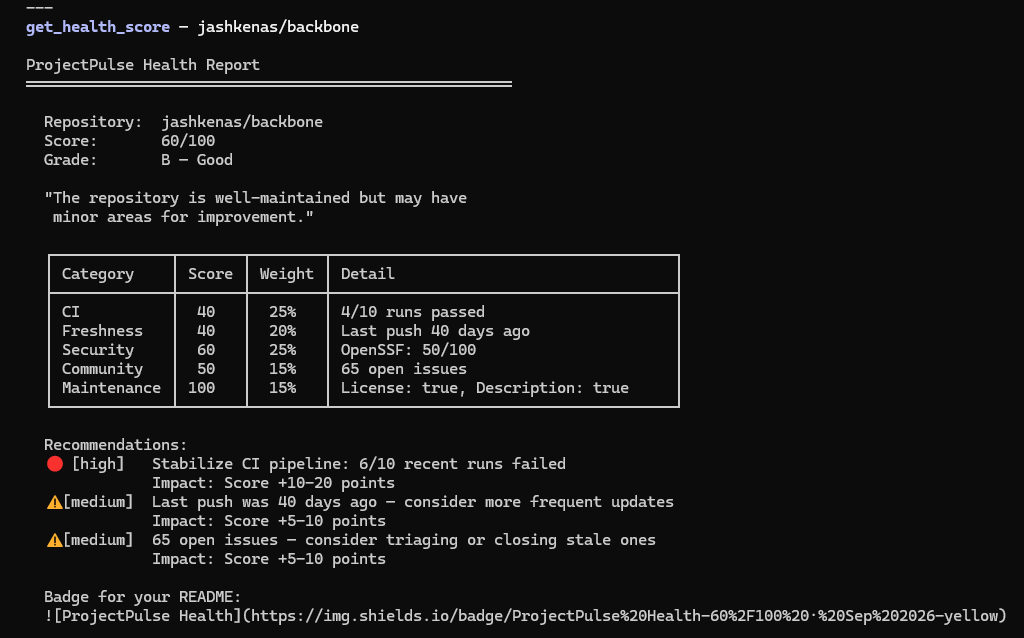
<summary><strong>get_health_score</strong> — A-F grade with category breakdown</summary>
</details>
<details>
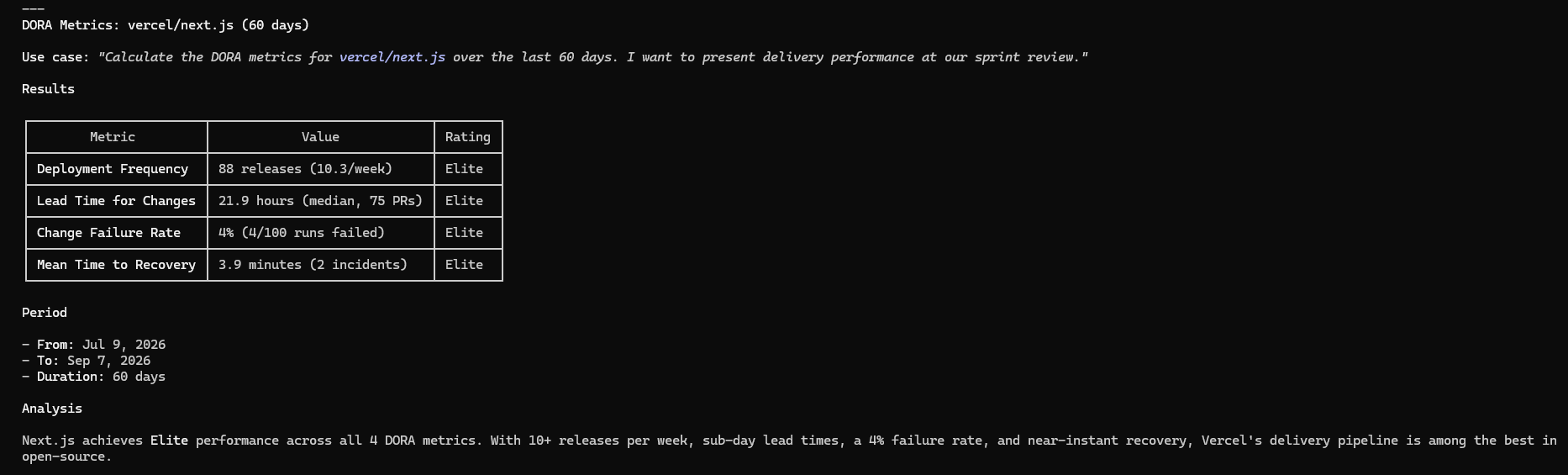
<summary><strong>get_dora_metrics</strong> — DORA delivery metrics from GitHub data</summary>
</details>
<details>
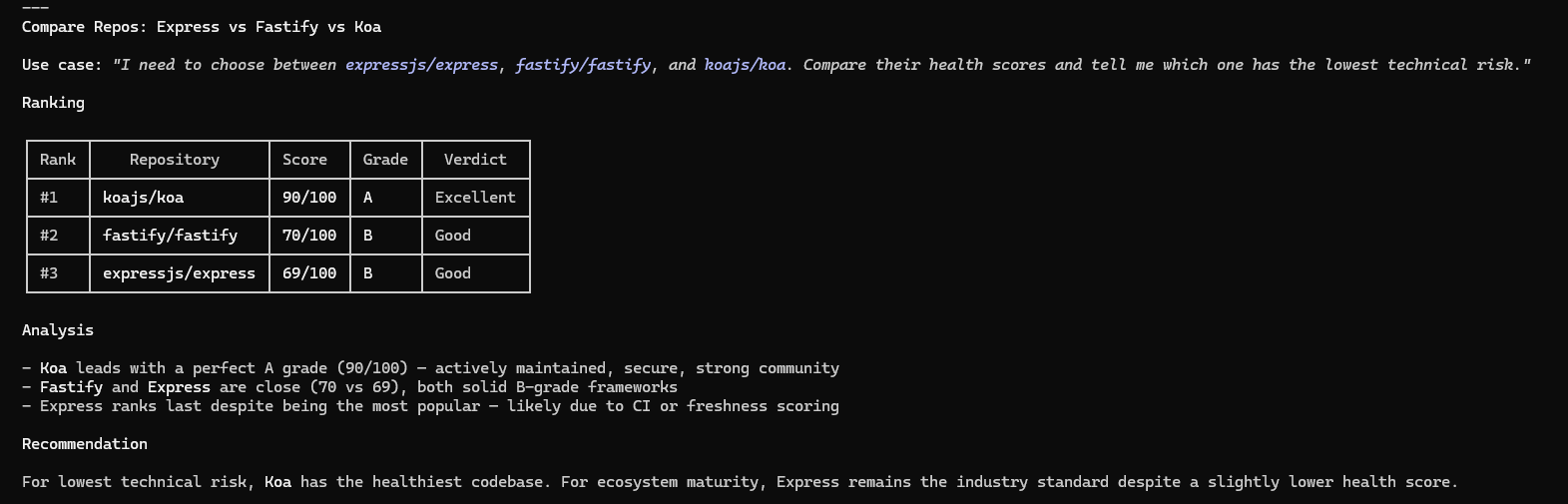
<summary><strong>compare_repos</strong> — Side-by-side health score ranking</summary>
</details>
<details>
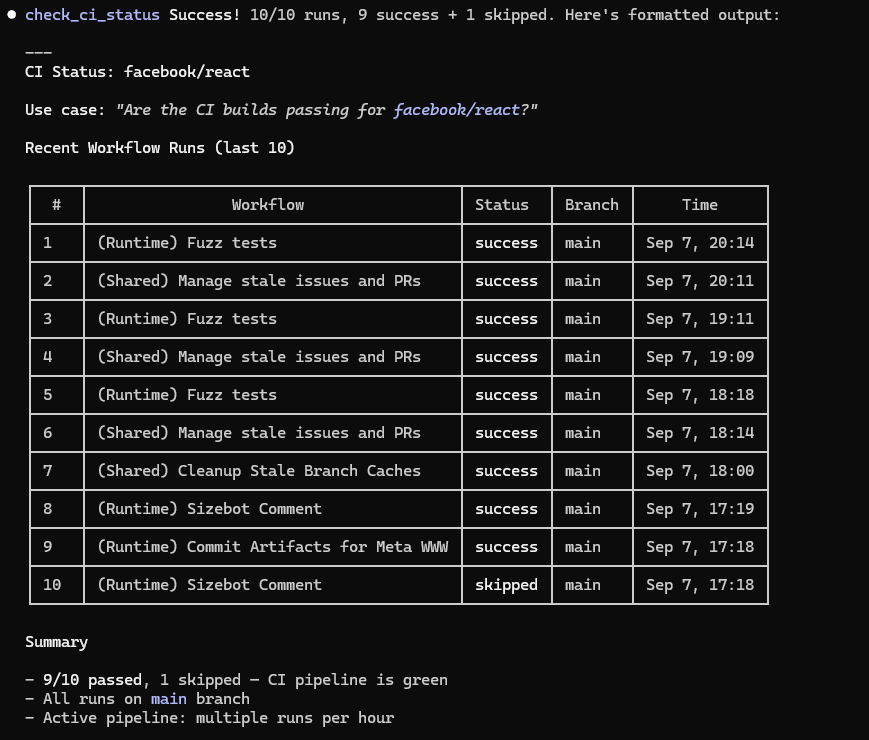
<summary><strong>check_ci_status</strong> — Recent GitHub Actions workflow runs</summary>
</details>
<details>
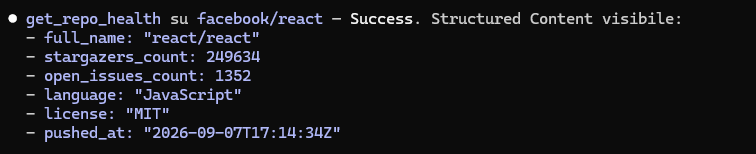
<summary><strong>get_repo_health</strong> — Repository metadata and stats</summary>
</details>
<details>
<summary><strong>analyze_dependencies</strong> — Dependabot vulnerability alerts</summary>

</details>
## 💡 Use Cases
> Copy-paste these prompts into Claude, Cursor, Windsurf, or any MCP-compatible assistant.
### Due Diligence — Library Adoption
> "Evaluate whether `facebook/react` is production-ready. Check the health score, security vulnerabilities (Dependabot and CodeQL), and whether the CI pipeline passes consistently."
*Tools used: `get_health_score`, `analyze_dependencies`, `analyze_code_scanning`, `check_ci_status`*
### Compare Alternatives
> "I need to choose between `expressjs/express`, `fastify/fastify`, and `koajs/koa`. Compare their health scores and tell me which one has the lowest technical risk."
*Tools used: `compare_repos`*
### Sprint Review — DORA Metrics
> "Calculate the DORA metrics for `vercel/next.js` over the last 30 days. I want to present delivery performance at our sprint review."
*Tools used: `get_dora_metrics`*
### Trend Monitoring
> "Check the health score of `microsoft/vscode`. Has it improved or worsened since the last time we checked?"
*Tools used: `get_health_score` (includes trend comparison on repeated calls)*
### Quick Security Audit
> "Run a security audit of `pallets/flask`: Dependabot alerts, CodeQL vulnerabilities, and CI build status. Give me a complete picture."
*Tools used: `analyze_dependencies`, `analyze_code_scanning`, `check_ci_status`*
---
## 🚀 Quick Start
### Claude Code (CLI)
```bash
claude mcp add projectpulse -- npx projectpulse-mcp
```
> **Note:** You need a `.env` file with your `GITHUB_TOKEN` in the directory where you run Claude Code.
### Claude Desktop
#### Step 1: Get a GitHub Token
1. Go to [GitHub Settings > Developer settings > Personal access tokens > Fine-grained tokens](https://github.com/settings/personal-access-tokens/new)
2. Give it a name (e.g., `projectpulse`)
3. Select the repositories you want to monitor (or "All repositories")
4. Under **Permissions**, grant **Read-only** access to:
- `Code scanning alerts`
- `Dependabot alerts`
- `Metadata` (enabled by default)
5. Click **Generate token** and copy it
#### Step 2: Configure Claude Desktop
1. Open Claude Desktop
2. Go to **Settings** (gear icon) > **Developer** > **Edit Config**
3. This opens `claude_desktop_config.json`. Add the `projectpulse` entry inside `"mcpServers"`:
```json
{
"mcpServers": {
"projectpulse": {
"command": "npx",
"args": ["-y", "projectpulse-mcp"],
"env": {
"GITHUB_TOKEN": "ghp_paste_your_token_here"
}
}
}
}
```
4. Save the file and **restart Claude Desktop**
#### Step 3: Verify it works
In a new Claude Desktop conversation, try asking:
> "Check the health score of facebook/react"
Claude should call the `get_health_score` tool and return an A-F grade with a detailed breakdown.
#### Troubleshooting
| Problem | Solution |
| --- | --- |
| Tools not showing up | Restart Claude Desktop after editing the config file |
| "Rate limit exceeded" errors | Make sure `GITHUB_TOKEN` is set correctly in the config |
| Dependabot/CodeQL data missing | Your token needs `Code scanning alerts` and `Dependabot alerts` permissions |
| `npx` not found | Install [Node.js](https://nodejs.org/) (v18 or later) and make sure `npx` is in your PATH |
### Other MCP Clients (Cursor, Windsurf, etc.)
Configure a new MCP server with:
- **Transport**: `stdio`
- **Command**: `npx`
- **Arguments**: `-y projectpulse-mcp`
- **Environment**: `GITHUB_TOKEN` = your GitHub PAT
## 🛠️ Tools
### `get_health_score`
Calculates a **0-100 health score** with an A-F grade. Evaluates 5 weighted categories: CI reliability (25%), code freshness (20%), security posture (25%), community activity (15%), and maintenance quality (15%). Returns actionable improvement suggestions for low-scoring categories. On repeated calls for the same repo, includes a **trend comparison** showing score change since last check. Queries multiple GitHub API endpoints and [OpenSSF Scorecard](https://scorecard.dev/).
**Side effect:** saves a trend snapshot to local disk (`~/.projectpulse/snapshots/`).
**Inputs:** `owner`, `repo`
**Try asking:** *"What's the health score of microsoft/vscode?"*
### `get_dora_metrics`
Calculates proxy [DORA metrics](https://dora.dev/) from public GitHub data: **Deployment Frequency** (from releases), **Lead Time for Changes** (PR created → merged), **Change Failure Rate** (CI failure percentage), and **Mean Time to Recovery** (CI failure → next success). Returns `null` for metrics with insufficient data. Queries multiple GitHub API endpoints (releases, pulls, actions) — heavier API usage than single-endpoint tools.
**Inputs:** `owner`, `repo`, `days` (optional, 7-90, default 30)
**Try asking:** *"Show me the DORA metrics for vercel/next.js over the last 60 days"*
### `compare_repos`
Compares health scores **side-by-side** for 2-5 repositories. Returns each repo's full health breakdown ranked by score. Useful for evaluating alternatives or benchmarking your project against similar ones. API calls are multiplied by the number of repos compared.
**Inputs:** `repos` (array of `{owner, repo}`)
**Try asking:** *"Compare the health of expressjs/express, fastify/fastify, and koajs/koa"*
### `get_repo_health`
Fetches **basic repository metadata**: stars, forks, open issues count, primary language, license, last push date, default branch, and archive status. Use this for a quick overview — for a computed grade, use `get_health_score` instead.
**Inputs:** `owner`, `repo`
**Try asking:** *"Give me general info about torvalds/linux"*
### `analyze_dependencies`
Lists **Dependabot security alerts** for vulnerable package dependencies (npm, pip, Maven, etc.) grouped by severity (critical, high, medium, low). Optionally filter by a specific severity level. Requires a token with `Dependabot alerts` permission.
**Inputs:** `owner`, `repo`, `severity` (optional)
**Try asking:** *"Show me critical dependency vulnerabilities in my-org/my-app"*
### `check_ci_status`
Returns the **most recent CI/CD workflow runs** from GitHub Actions: status (success, failure, in_progress), conclusion, branch, duration, and timestamps. Useful for checking if buildWhat people ask about github-projectpulse-mcp
What is alexbypa/github-projectpulse-mcp?
+
alexbypa/github-projectpulse-mcp is mcp servers for the Claude AI ecosystem. projectpulse-mcp.private It has 1 GitHub stars and its last recorded update is dated 2026-09-08.
How do I install github-projectpulse-mcp?
+
You can install github-projectpulse-mcp by cloning the repository (https://github.com/alexbypa/github-projectpulse-mcp) or following the README instructions on GitHub. ClaudeWave also provides quick install blocks on this page.
Is alexbypa/github-projectpulse-mcp safe to use?
+
Our security agent has analyzed alexbypa/github-projectpulse-mcp and assigned a Trust Score of 82/100 (tier: Trusted). See the full breakdown of passed checks and flags on this page.
Who maintains alexbypa/github-projectpulse-mcp?
+
alexbypa/github-projectpulse-mcp is maintained by alexbypa. The last recorded GitHub activity is dated 2026-09-08, with 8 open issues.
Are there alternatives to github-projectpulse-mcp?
+
Yes. On ClaudeWave you can browse similar mcp servers at /categories/mcp, sorted by popularity or recent activity.
Deploy github-projectpulse-mcp to your cloud
Ship this repo to production in minutes. Each platform spins up its own environment with editable env vars.
Maintain this repo? Add a badge to your README
Drop the badge into your GitHub README to show it's tracked on ClaudeWave. Each badge links back to this page and reflects the live Trust Score.
[](https://claudewave.com/repo/alexbypa-github-projectpulse-mcp)<a href="https://claudewave.com/repo/alexbypa-github-projectpulse-mcp"><img src="https://claudewave.com/api/badge/alexbypa-github-projectpulse-mcp" alt="Featured on ClaudeWave: alexbypa/github-projectpulse-mcp" width="320" height="64" /></a>More MCP Servers

Fair-code workflow automation platform with native AI capabilities. Combine visual building with custom code, self-host or cloud, 400+ integrations.

User-friendly AI Interface (Supports Ollama, OpenAI API, ...)

An open-source AI agent that brings the power of Gemini directly into your terminal.

Real-time global intelligence dashboard. AI-powered news aggregation, geopolitical monitoring, and infrastructure tracking in a unified situational awareness interface

The fastest path to AI-powered full stack observability, even for lean teams.

🕷️ An adaptive Web Scraping framework that handles everything from a single request to a full-scale crawl!