

AI trading brain for crypto perps — composite signals, funding rate arb scanning, and market regime detection via MCP
- ✓Actively maintained (<30d)
- ✓Clear description
- ✓Topics declared
- !No standard license detected
claude mcp add crypto-quant-signal-mcp -- npx -y crypto-quant-signal-mcp{
"mcpServers": {
"crypto-quant-signal-mcp": {
"command": "npx",
"args": ["-y", "crypto-quant-signal-mcp"]
}
}
}MCP Servers overview
<p align="center">
<a href="https://algovault.com">
<img src="https://raw.githubusercontent.com/AlgoVaultLabs/crypto-quant-signal-mcp/main/logo.png" alt="AlgoVault" width="120" />
</a>
</p>
<h1 align="center">crypto-quant-signal-mcp</h1>
<p align="center">
<strong>AlgoVault is the brain layer for AI trading agents — one MCP call returns verdict, confidence, and regime across major crypto perpetual venues.</strong>
</p>
<p align="center">
<span data-tr-field="pfe_wr">91.3</span>% PFE win rate across <span data-tr-field="total_calls">134,276</span>+ verified calls. Merkle-verified on Base L2. Don't trust — verify. <!-- SNAPSHOT-LINE -->
</p>
<p align="center">
<strong>100 free calls/month. HOLDs never cost. Start in 30 seconds.</strong>
</p>
<p align="center">
<a href="https://t.me/algovaultofficialbot"><strong>🤖 Try Free in Telegram</strong></a> ·
<a href="https://algovault.com"><strong>algovault.com</strong></a> ·
<a href="https://algovault.com/track-record"><strong>Live Track Record</strong></a> ·
<a href="https://algovault.com/how-it-works"><strong>How it works</strong></a> ·
<a href="https://api.algovault.com/signup"><strong>Sign Up</strong></a> ·
<a href="https://algovault.com/docs.html"><strong>Docs</strong></a>
</p>
<p align="center">
<a href="https://www.npmjs.com/package/crypto-quant-signal-mcp"><img src="https://img.shields.io/npm/v/crypto-quant-signal-mcp" alt="npm version" /></a>
<a href="https://www.npmjs.com/package/crypto-quant-signal-mcp"><img src="https://img.shields.io/npm/dw/crypto-quant-signal-mcp" alt="npm downloads" /></a>
<a href="https://opensource.org/licenses/MIT"><img src="https://img.shields.io/badge/License-MIT-yellow.svg" alt="MIT" /></a>
<a href="https://basescan.org/address/0x6485396ac981fe0a58540dfbf3e730f6f7bcbf81"><img src="https://img.shields.io/badge/Track_Record-On--Chain_Verified-blue?logo=ethereum" alt="On-Chain Verified" /></a>
<a href="https://basescan.org/token/0x8004A169FB4a3325136EB29fA0ceB6D2e539a432?a=44544"><img src="https://img.shields.io/badge/ERC--8004-Verified_Agent-8A2BE2?logo=ethereum" alt="ERC-8004 Verified Agent" /></a>
<a href="https://github.com/AlgoVaultLabs/crypto-quant-signal-mcp"><img src="https://img.shields.io/github/stars/AlgoVaultLabs/crypto-quant-signal-mcp?style=social" alt="GitHub Repo stars" /></a>
<a href="https://smithery.ai/server/@algovault/crypto-quant-signal-mcp"><img src="https://smithery.ai/badge/algovault/crypto-quant-signal-mcp" alt="Smithery" /></a>
</p>
---
## Quick start (30 seconds)
No code. No API key. No install. The server speaks Streamable HTTP at `https://api.algovault.com/mcp` — any [Model Context Protocol](https://github.com/modelcontextprotocol) client connects directly.
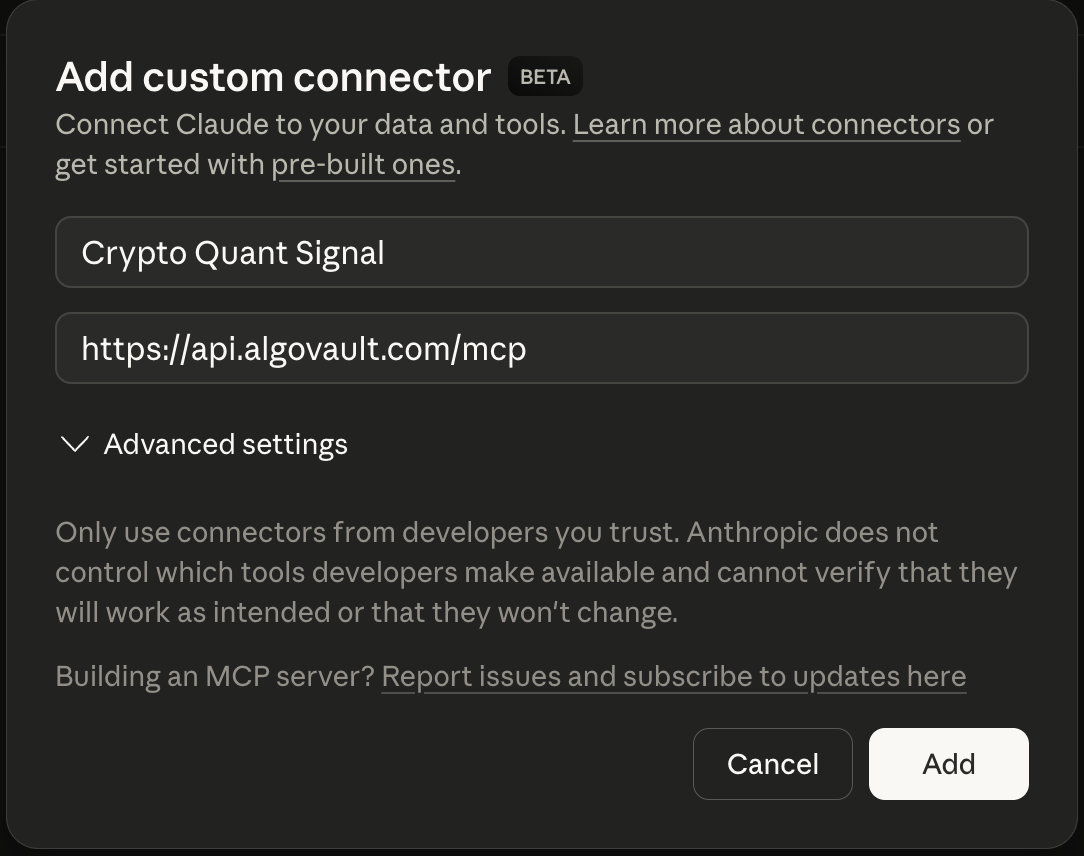
**1. Add the connector.** In Claude → Settings → Integrations → Add custom connector:
| Field | Value |
|---|---|
| Name | `Crypto Quant Signal` |
| URL | `https://api.algovault.com/mcp` |
**2. Ask for a call.** In plain language:
> "Get me a trade call for ETH on the 4h timeframe"
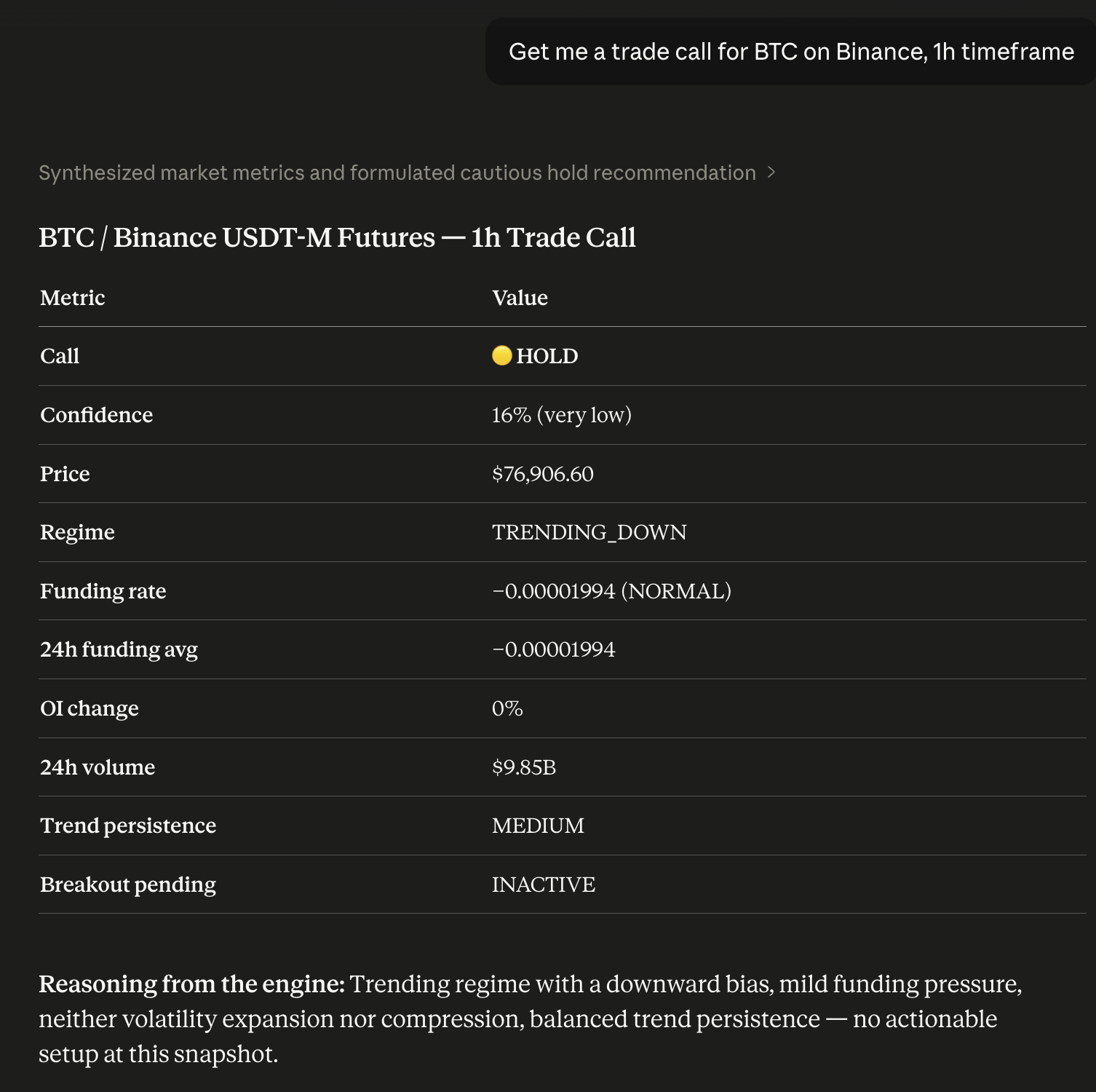
Your Claude now has a quant analyst built in. Prefer local? Run `npx -y crypto-quant-signal-mcp`.
> Running locally on npm 12+? npm v12 disables dependency install scripts by default. AlgoVault's optional local SQLite mode uses the native `better-sqlite3` module — if you install it into a project, run `npm approve-scripts` (or `npm install --allow-scripts`) to build it. The hosted HTTP transport (`api.algovault.com/mcp`) needs no local build.
---
## What one call returns
One API call. One verdict. Not 8 raw indicators. `get_trade_call` returns a directional **BUY / SELL / HOLD** with a confidence score and the detected market regime — a composite verdict, not a data dump for your agent to interpret.
Under the hood, a self-tuning model fuses momentum, trend structure, derivatives positioning, open interest, and volume into one weighted call. Weights are calibrated from live trade outcomes, not textbook defaults. Regime filters suppress low-edge setups, so the engine stays silent unless the signal is clear.
```json
{
"call": "BUY",
"confidence": 78,
"price": 84250.50,
"indicators": {
"funding_rate": 0.0001,
"funding_24h_avg": 0.00008,
"funding_state": "NORMAL",
"oi_change_pct": 2.4,
"volume_24h": 2381602633,
"trend_persistence": "HIGH",
"breakout_pending": "INACTIVE"
},
"regime": "TRENDING_UP",
"reasoning": "Trending regime, upward bias. Funding pressure mild. Volatility neither expanding nor compressed. Trend persistence elevated; momentum structure. Strong conviction from aligned signals.",
"timestamp": 1712764800,
"coin": "BTC",
"timeframe": "1h",
"also_see": [
{ "coin": "ETH", "timeframe": "1h", "confidence": 82 },
{ "coin": "SOL", "timeframe": "15m", "confidence": 73 }
],
"_algovault": {
"version": "1.24.0",
"tool": "get_trade_call",
"compatible_with": ["crypto-quant-risk-mcp", "crypto-quant-backtest-mcp"]
}
}
```
The `_algovault` block makes outputs composable: downstream risk and backtest tools accept the object directly.
---
## Live, verifiable track record
<!-- SoT: this README is the single canonical source. The data-tr-field numbers below are
auto-injected from live /api/performance-public + /api/merkle-batches by
scripts/snapshot-landing-data.mjs at npm-publish + Hetzner-deploy. Do NOT hand-edit the
numbers; edit "What's new" by hand. Wired by OPS-NPM-README-SINGLE-SOT-W1 (2026-05-31). -->
<p align="center">
<strong><span data-tr-field="pfe_wr">91.3</span>% PFE Win Rate</strong> · <strong><span data-tr-field="total_calls">134,276</span> trade calls</strong> · <strong><span data-tr-field="merkle_batches">50</span> on-chain batches</strong> · <strong><span data-tr-field="hold_rate">98.9</span>% HOLD rate</strong> <!-- SNAPSHOT-LINE -->
</p>
<p align="center">
Every call is hashed at emission and anchored on <a href="https://docs.base.org">Base L2</a> in daily Merkle batches. We cannot edit history.
</p>
The full record is public and on-chain — no cherry-picking, no survivorship bias:
- **Live dashboard** — [algovault.com/track-record](https://algovault.com/track-record)
- **Merkle batch verifier** — [algovault.com/verify](https://algovault.com/verify)
- **Anchor contract on Base L2** — [`0x6485…0f81`](https://basescan.org/address/0x6485396ac981fe0a58540dfbf3e730f6f7bcbf81)
- **All batches (raw JSON)** — [api.algovault.com/api/merkle-batches](https://api.algovault.com/api/merkle-batches)
AlgoVault is also a verified agent on the ERC-8004 Identity Registry (Base L2), agentId [`44544`](https://basescan.org/token/0x8004A169FB4a3325136EB29fA0ceB6D2e539a432?a=44544) — a portable, on-chain handle AI orchestrators can resolve.
---
## Works with your stack
AlgoVault is drop-in for every MCP-spec client, every major agent framework, and every official exchange Agent Trade Kit — no SDK, no wrapper. It serves Streamable HTTP at `https://api.algovault.com/mcp`; `tools/list` + `resources/list` is the API surface.
**MCP clients.**
| Client | Config |
|---|---|
| **Claude Desktop** | Settings → Integrations → Add custom connector → `https://api.algovault.com/mcp` |
| **Claude Code** (CLI) | `claude mcp add crypto-quant-signal https://api.algovault.com/mcp` |
| **Cursor** | `~/.cursor/config.json` → `mcpServers` block → `url: "https://api.algovault.com/mcp"` |
| **Cline** | VS Code Cline extension → MCP server settings → add Streamable HTTP server |
| **Codex** (OpenAI CLI) | `~/.codex/config.toml` → `[mcp_servers.algovault]` table + `url = "https://api.algovault.com/mcp"` (or `codex mcp` CLI) |
| **Windsurf** | `~/.codeium/windsurf/mcp_config.json` → `mcpServers.algovault.serverUrl = "https://api.algovault.com/mcp"` |
| **Continue.dev** | `config.yaml` → `mcpServers: [{ name: algovault, type: streamable-http, url: "https://api.algovault.com/mcp" }]` |
| Any other MCP-spec-compliant client | Configure the Streamable HTTP transport with URL `https://api.algovault.com/mcp` |
**Agent frameworks.** First-party tutorials pair AlgoVault with each framework's canonical MCP adapter — copy-pasteable demo code, no SDK.
| Framework | Tutorial | Runnable demo | Mirror |
|---|---|---|---|
| **LangChain** | [`docs/integrations/langchain.md`](https://github.com/AlgoVaultLabs/algovault-skills/blob/main/docs/integrations/langchain.md) | [`examples/langchain/demo.py`](https://github.com/AlgoVaultLabs/algovault-skills/blob/main/examples/langchain/demo.py) | [algovault.com/integrations/langchain](https://algovault.com/integrations/langchain) |
| **LlamaIndex** | [`docs/integrations/llamaindex.md`](https://github.com/AlgoVaultLabs/algovault-skills/blob/main/docs/integrations/llamaindex.md) | [`examples/llamaindex/demo.py`](https://github.com/AlgoVaultLabs/algovault-skills/blob/main/examples/llamaindex/demo.py) | [algovault.com/integrations/llamaindex](https://algovault.com/integrations/llamaindex) |
| **Microsoft Agent Framework** | [`docs/integrations/maf.md`](https://github.com/AlgoVaultLabs/algovault-skills/blob/main/docs/integrations/maf.md) | [`examples/maf/demo.py`](https://github.com/AlgoVaultLabs/algovault-skills/blob/main/examples/maf/demo.py) | [algovault.com/integrations/maf](https://algovault.com/integrations/maf) |
| **CrewAI** | [`docs/integrations/crewai.md`](https://github.com/AlgoVaultLabs/algovault-skills/blob/main/docs/integrations/crewai.md) | [`examples/crewai/demo.py`](https://github.com/AlgoVaultLabs/algovault-skills/blob/main/examples/crewai/demo.py) | [algovault.com/integrations/crewai](https://algovault.com/integrations/crewai) |
Each demo is runnable as `python examples/<framework>/demo.py BTC 4h` — gets a real BUY/SELL/HOLD verWhat people ask about crypto-quant-signal-mcp
What is AlgoVaultLabs/crypto-quant-signal-mcp?
+
AlgoVaultLabs/crypto-quant-signal-mcp is mcp servers for the Claude AI ecosystem. AI trading brain for crypto perps — composite signals, funding rate arb scanning, and market regime detection via MCP It has 5 GitHub stars and was last updated today.
How do I install crypto-quant-signal-mcp?
+
You can install crypto-quant-signal-mcp by cloning the repository (https://github.com/AlgoVaultLabs/crypto-quant-signal-mcp) or following the README instructions on GitHub. ClaudeWave also provides quick install blocks on this page.
Is AlgoVaultLabs/crypto-quant-signal-mcp safe to use?
+
Our security agent has analyzed AlgoVaultLabs/crypto-quant-signal-mcp and assigned a Trust Score of 62/100 (tier: OK). See the full breakdown of passed checks and flags on this page.
Who maintains AlgoVaultLabs/crypto-quant-signal-mcp?
+
AlgoVaultLabs/crypto-quant-signal-mcp is maintained by AlgoVaultLabs. The last recorded GitHub activity is from today, with 0 open issues.
Are there alternatives to crypto-quant-signal-mcp?
+
Yes. On ClaudeWave you can browse similar mcp servers at /categories/mcp, sorted by popularity or recent activity.
Deploy crypto-quant-signal-mcp to your cloud
Ship this repo to production in minutes. Each platform spins up its own environment with editable env vars.
Maintain this repo? Add a badge to your README
Drop the badge into your GitHub README to show it's tracked on ClaudeWave. Each badge links back to this page and reflects the live Trust Score.
[](https://claudewave.com/repo/algovaultlabs-crypto-quant-signal-mcp)<a href="https://claudewave.com/repo/algovaultlabs-crypto-quant-signal-mcp"><img src="https://claudewave.com/api/badge/algovaultlabs-crypto-quant-signal-mcp" alt="Featured on ClaudeWave: AlgoVaultLabs/crypto-quant-signal-mcp" width="320" height="64" /></a>More MCP Servers

Fair-code workflow automation platform with native AI capabilities. Combine visual building with custom code, self-host or cloud, 400+ integrations.

User-friendly AI Interface (Supports Ollama, OpenAI API, ...)

An open-source AI agent that brings the power of Gemini directly into your terminal.

The fastest path to AI-powered full stack observability, even for lean teams.

Real-time global intelligence dashboard. AI-powered news aggregation, geopolitical monitoring, and infrastructure tracking in a unified situational awareness interface

🕷️ An adaptive Web Scraping framework that handles everything from a single request to a full-scale crawl!