

Shared local memory for Claude Code, Cursor, and Codex that stays true to your code.
- ✓Open-source license (MIT)
- ✓Actively maintained (<30d)
- ✓Clear description
- ✓Documented (README)
- !Install pipes a remote script into a shell (curl | sh)
claude mcp add aether-cache-redis-compatible-vector-store -- python -m aether-cache{
"mcpServers": {
"aether-cache-redis-compatible-vector-store": {
"command": "python",
"args": ["-m", "aether-cache"]
}
}
}MCP Servers overview
[](https://anishchugh05.github.io/Aether-Cache-Redis-Compatible-Vector-Store/)
# Aether Cache
**Shared memory for AI coding tools that stays true to your code.**
<!-- mcp-name: io.github.anishchugh05/aether-cache -->
**[Website](https://anishchugh05.github.io/Aether-Cache-Redis-Compatible-Vector-Store/)** · **[PyPI](https://pypi.org/project/aether-cache/)**
Claude Code, Cursor, and other AI tools each forget your project between sessions, and when they do remember things,
nothing checks whether those memories are still correct. Aether Cache gives every tool one shared, local memory, and keeps
it honest:
- **Memories go stale when the code changes.** Each memory is linked to the files it's about, with a snapshot of their
git content hash. When `docker-compose.yml` changes, the memory about it is retired automatically instead of being
fed to your AI forever.
- **Contradictions get replaced, not hoarded.** "We migrated to MySQL" retires "we use Postgres" instead of sitting
next to it and confusing the model. Near-identical repeats are merged.
- **Every memory can explain itself.** Which tool and session saved it, which file versions it was based on, and every
change since: created, seen again, went stale, confirmed, replaced.
- **It works with the files you already use.** Current memories sync into a managed section of `AGENTS.md` and
`CLAUDE.md`, so they're committed, reviewed in PRs, and visible to teammates who don't run Aether Cache.
It runs entirely on your machine, on top of a database engine I wrote from scratch.
## Not a Redis clone
Aether Cache started as a from-scratch rebuild of Redis in Java, then kept going. Every layer here is written from
scratch, and each one does something the layer beneath it can't:
| Layer | What it adds |
|---|---|
| **MCP server** | Claude Code, Cursor, and any MCP tool share one memory |
| **Git awareness** | Memories retire themselves when the code they describe changes |
| **Memory layer** | Status, provenance, full history, duplicate merging, and conflict review, inside the engine |
| **HNSW vector index** | Semantic search: 99.4% recall at 0.84 ms on 100K vectors, 22× faster than exact search |
| **Redis-compatible engine** | RESP protocol, 50+ commands, replication, transactions, and crash-safe persistence (0 acknowledged writes lost across 1,039,890 writes and 8 `kill -9` crashes), at 88–93% of real Redis's throughput |
The bottom layer alone is a working Redis: `redis-cli`, `redis-benchmark`, and `redis-py` talk to it unchanged. The
memory layer, git awareness, and MCP server are things Redis doesn't do at all.
```
Claude Code ─┐ ┌─────────────────────────────────────────────┐
Cursor ──────┼─ MCP ─► aether_cache ─┼─ RESP ─► Java engine (Main.java) │
other tools ─┘ (Python: embeddings,│ memories, HNSW vector index, │
git hashing, sync) │ history, append-only file on disk │
└─────────────────────────────────────────────┘
```
## What it looks like
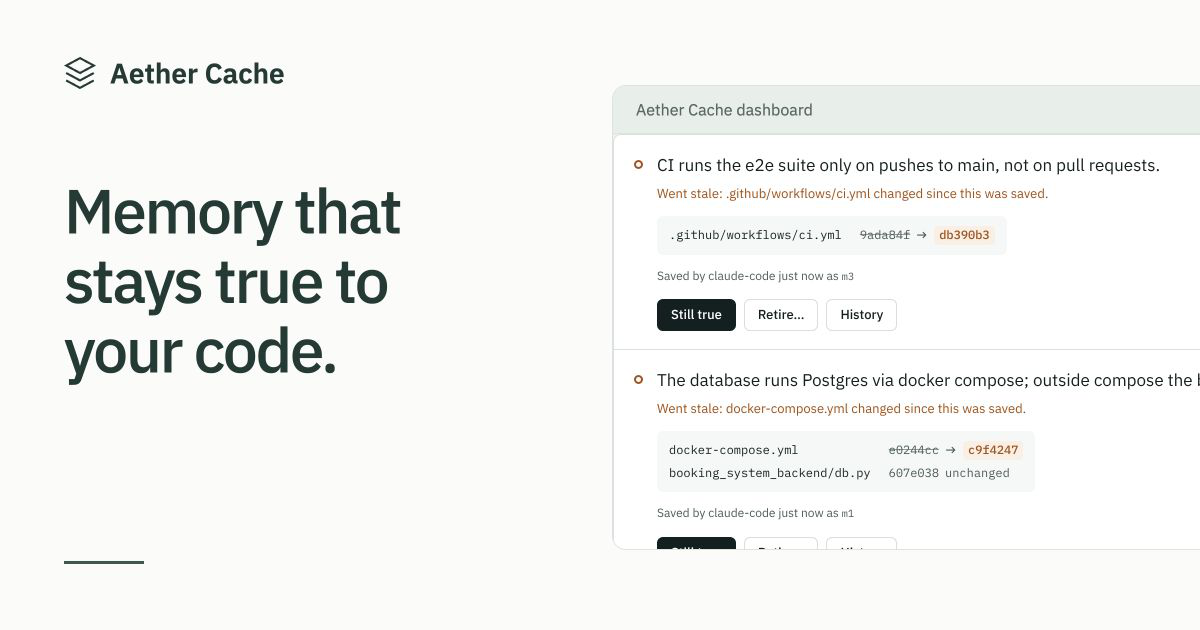
The dashboard (`aether-cache ui`): memories whose files changed wait for a decision, with the file versions side by side.
<picture>
<source media="(prefers-color-scheme: dark)" srcset="https://anishchugh05.github.io/Aether-Cache-Redis-Compatible-Vector-Store/assets/dashboard-dark.png">
<img alt="The Aether Cache dashboard showing stale memories and a possible conflict" src="https://anishchugh05.github.io/Aether-Cache-Redis-Compatible-Vector-Store/assets/dashboard-light.png">
</picture>
And from your AI tool's side, a memory linked to a file, the file changes, and the next lookup catches it:
```
> remember("The database runs Postgres via docker compose", files=["docker-compose.yml"])
Saved as m1.
... someone edits docker-compose.yml ...
> recall("database setup")
These memories were just retired because files they depend on changed. If one is still true,
call confirm_memory; if it's wrong, save the corrected fact with remember:
[m1] "The database runs Postgres via docker compose" is now marked outdated: docker-compose.yml changed.
> confirm_memory("m1") # still true, so re-link it to the new version of the file
Confirmed m1; it's active again and linked to the current file versions.
> explain_memory("m1")
m1: "The database runs Postgres via docker compose"
status: active, project: demo
saved by: claude-code (session eea54b5c)
linked files: docker-compose.yml@02ea346...
history:
19:16 created: by claude-code (session eea54b5c), linked to docker-compose.yml@87da641...
19:16 active -> stale: docker-compose.yml changed since this was saved
19:16 re-linked: to docker-compose.yml@02ea346... (confirmed still true)
19:16 stale -> active: confirmed still true
```
A newer fact replacing an older one:
```
> remember("The API timeout was raised to 60 seconds")
Saved as m3.
Related existing memories:
[m1] (similarity 0.58) The API timeout is 30 seconds
If m3 makes any of these no longer true, call replace_memory(old_id, "m3"). Otherwise do nothing.
> replace_memory("m1", "m3")
m1 retired; m3 replaces it.
```
## Quick start
One line installs everything and runs setup. On macOS or Linux:
```sh
curl -fsSL https://anishchugh05.github.io/Aether-Cache-Redis-Compatible-Vector-Store/install.sh | sh
```
On Windows (PowerShell):
```powershell
powershell -ExecutionPolicy ByPass -c "irm https://raw.githubusercontent.com/anishchugh05/Aether-Cache-Redis-Compatible-Vector-Store/main/docs/install.ps1 | iex"
```
The installer ([install.sh](docs/install.sh), [install.ps1](docs/install.ps1)) gets [uv](https://docs.astral.sh/uv/) if you
don't have it (uv brings Python), installs Aether Cache, and runs `aether-cache setup`. Prefer your own tools? Any of
these works, followed by `aether-cache setup`:
```sh
uv tool install aether-cache
pipx install aether-cache
pip install aether-cache # Python 3.10+
```
`setup` starts the engine in the background, downloads the embedding model once (about 90 MB), and connects every
supported AI tool it finds on your machine: **Claude Code, Cursor, and Codex**. That's it. Open your AI tool in any git
repo and try:
> Remember that our tests need DOCKER_HOST set. It depends on docker-compose.yml.
Then start a new session and ask how to run the tests.
The engine runs on Java 11+. If you have it, it's used. If you don't, Aether Cache downloads a private copy (about
50 MB) into `~/.aether-cache/java`, checks it against its published checksum, and uses it only for Aether Cache;
nothing is installed system-wide, and `aether-cache uninstall` removes it.
Already keep notes for your AI in `CLAUDE.md`, `AGENTS.md`, or Cursor rules? Run `aether-cache import` in the repo
(or use **Import notes** in the dashboard) to turn them into memories, linked to the files they mention.
Memories are kept per project (the git repo's folder name), so projects never mix. Everything stays on your machine:
the engine only accepts connections from it, and your memories live in `~/.aether-cache`.
| Command | What it does |
|---|---|
| `aether-cache setup` | One-time setup: engine, model, and AI tools |
| `aether-cache add` | Adds the repo you're in (or a path) so the dashboard can check its files; the dashboard can also find and add repos for you |
| `aether-cache ui` | Opens the dashboard: see what your AI remembers, and confirm or retire memories whose files changed |
| `aether-cache import` | Turns the notes in `CLAUDE.md`, `AGENTS.md`, and Cursor rules into memories; shows them first and asks |
| `aether-cache export` | Saves memories, with their linked files and history, to a JSON file (`-p` for one project) |
| `aether-cache status` | Is it running, and what's in this project's memory |
| `aether-cache doctor` | Checks everything and tells you how to fix what's wrong |
| `aether-cache list` / `recall "query"` / `explain m1` | Look at memories from the terminal |
| `aether-cache sync` | Writes current memories into `AGENTS.md` / `CLAUDE.md` |
| `aether-cache connect cursor` | Connects one tool (`--print` shows config for any other MCP tool) |
| `aether-cache start` / `stop` | Runs or stops the engine (it also starts on its own when a tool needs it) |
| `aether-cache uninstall` | Disconnects your AI tools, stops the engine, and asks before deleting memories |
If `aether-cache` isn't found after installing, run `uv tool update-shell` and open a new terminal. Port 7380 taken?
Set `AETHER_PORT` and run `setup` again. To uninstall: `aether-cache uninstall`, then `uv tool uninstall aether-cache`.
## Tools the AI can call
| Tool | What it does |
|---|---|
| `remember(fact, files?)` | Saves a durable fact, optionally linked to files. Merges near-identical repeats and shows related memories so the AI can decide whether the new fact replaces one. |
| `recall(query, limit?)` | Searches the project's memories by meaning. Checks linked files first, so it never returns a memory whose code changed underneath it. |
| `explain_memory(id)` | Where a memory came from and its full history. |
| `replace_memory(old, new)` | Retires an older memory that a newer one makes untrue. |
| `mark_outdated(id, reason)` | Retires a memory that turned out to be wrong. |
| `confirm_memory(id)` | Brings back a memory that's still true after its files changed, re-linked to the current versions. |
| `check_stale()` | Runs the file check on demand. |
| `list_conflicts()` / `resolve_conflict(...)` | Reviews pairs of very similar memories that may contradict each other. |
| `sync_to_files()` | Writes current memories into `AGENTS.md` / `CLAUDE.md` (also: `aether-cache sync`). |
## Design decisions, and what the measurements said
### Similarity can't detect contradictions, so the AI judges
The first version flagged a new memory as a possible contradicWhat people ask about Aether-Cache-Redis-Compatible-Vector-Store
What is anishchugh05/Aether-Cache-Redis-Compatible-Vector-Store?
+
anishchugh05/Aether-Cache-Redis-Compatible-Vector-Store is mcp servers for the Claude AI ecosystem. Shared local memory for Claude Code, Cursor, and Codex that stays true to your code. It has 2 GitHub stars and its last recorded update is dated 2026-10-17.
How do I install Aether-Cache-Redis-Compatible-Vector-Store?
+
You can install Aether-Cache-Redis-Compatible-Vector-Store by cloning the repository (https://github.com/anishchugh05/Aether-Cache-Redis-Compatible-Vector-Store) or following the README instructions on GitHub. ClaudeWave also provides quick install blocks on this page.
Is anishchugh05/Aether-Cache-Redis-Compatible-Vector-Store safe to use?
+
Our security agent has analyzed anishchugh05/Aether-Cache-Redis-Compatible-Vector-Store and assigned a Trust Score of 79/100 (tier: Trusted). See the full breakdown of passed checks and flags on this page.
Who maintains anishchugh05/Aether-Cache-Redis-Compatible-Vector-Store?
+
anishchugh05/Aether-Cache-Redis-Compatible-Vector-Store is maintained by anishchugh05. The last recorded GitHub activity is dated 2026-10-17, with 0 open issues.
Are there alternatives to Aether-Cache-Redis-Compatible-Vector-Store?
+
Yes. On ClaudeWave you can browse similar mcp servers at /categories/mcp, sorted by popularity or recent activity.
Deploy Aether-Cache-Redis-Compatible-Vector-Store to your cloud
Ship this repo to production in minutes. Each platform spins up its own environment with editable env vars.
Maintain this repo? Add a badge to your README
Drop the badge into your GitHub README to show it's tracked on ClaudeWave. Each badge links back to this page and reflects the live Trust Score.
[](https://claudewave.com/repo/anishchugh05-aether-cache-redis-compatible-vector-store)<a href="https://claudewave.com/repo/anishchugh05-aether-cache-redis-compatible-vector-store"><img src="https://claudewave.com/api/badge/anishchugh05-aether-cache-redis-compatible-vector-store" alt="Featured on ClaudeWave: anishchugh05/Aether-Cache-Redis-Compatible-Vector-Store" width="320" height="64" /></a>More MCP Servers

Reverse engineer anything with agents, from app behavior down to native binaries.

Fair-code workflow automation platform with native AI capabilities. Combine visual building with custom code, self-host or cloud, 400+ integrations.

User-friendly AI Interface (Supports Ollama, OpenAI API, ...)

An open-source AI agent that brings the power of Gemini directly into your terminal.

Real-time global intelligence dashboard. AI-powered news aggregation, geopolitical monitoring, and infrastructure tracking in a unified situational awareness interface

🕷️ A Web Scraping framework that handles everything from a single request to a full-scale crawl! Don't be shy, join here: https://discord.gg/EMgGbDceNQ and follow here for daily tips and tricks: https://x.com/Scrapling_dev