

Local-first Garmin data warehouse with an analysis-grade MCP server. Sync once, analyze forever - even when the API is down.
- ✓Open-source license (MIT)
- ✓Actively maintained (<30d)
- ✓Clear description
- ✓Topics declared
- ✓Documented (README)
claude mcp add garmin-local-mcp -- uvx garmin-local-mcp{
"mcpServers": {
"garmin-local-mcp": {
"command": "uvx",
"args": ["garmin-local-mcp"]
}
}
}MCP Servers overview
<!-- mcp-name: io.github.anup-shesh/garmin-local-mcp -->
# garmin-local-mcp
**Local-first Garmin data warehouse with an analysis-grade MCP server.**
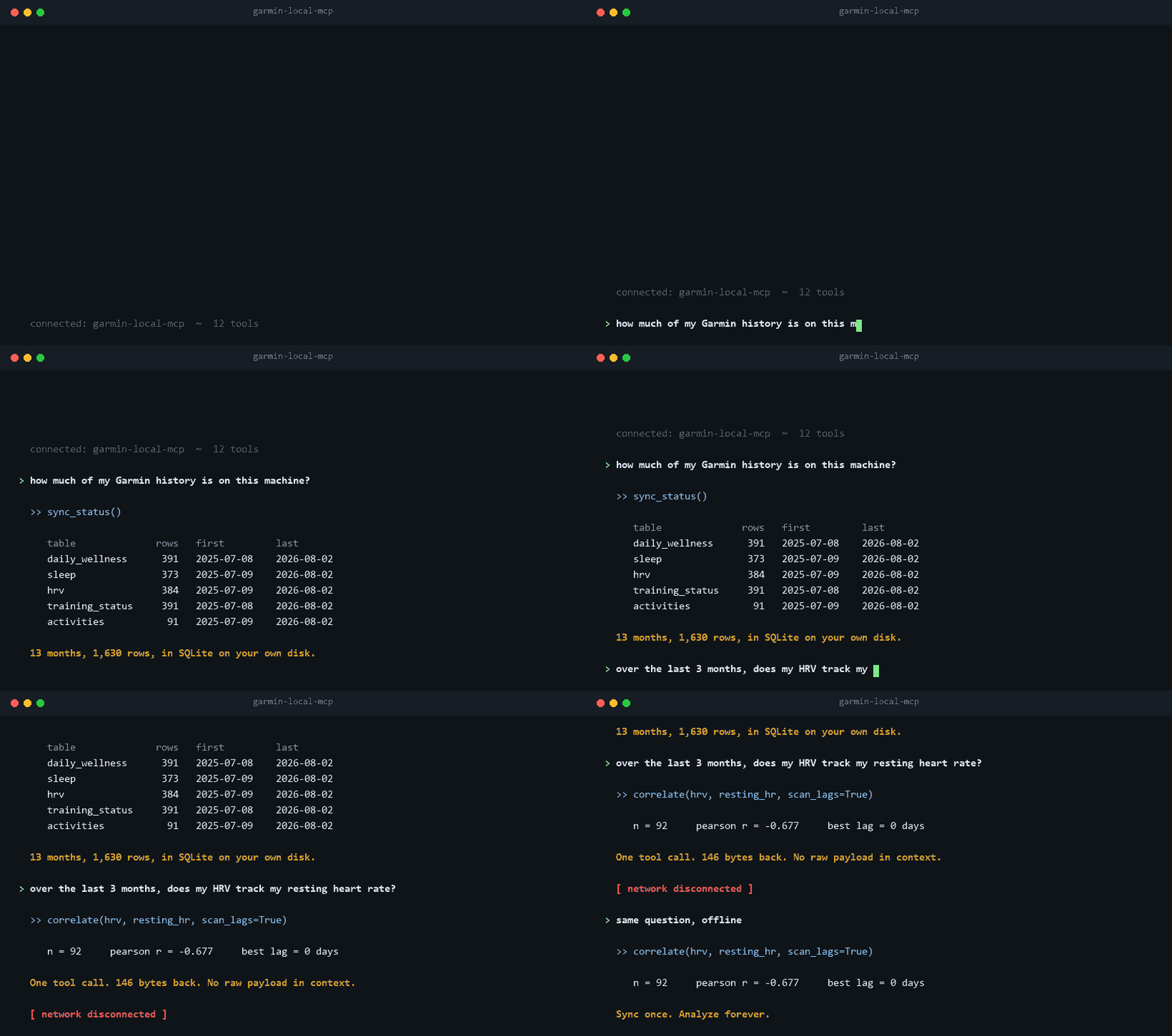
Sync once, analyze forever, even when the API is down.
## Try it without a Garmin account
If you don't own a Garmin, or just want to see what the tools return before
handing over credentials, seed a synthetic store:
```
pip install garmin-local-mcp
garmin-local-mcp --data-dir ~/.garmin-mcp-demo demo
garmin-local-mcp --data-dir ~/.garmin-mcp-demo serve
```
That generates 180 days across every table, then serves them over MCP. No
login, no network, no account.
The data is generated rather than recorded, but it is not random. A latent
recovery factor drives HRV up while resting heart rate goes down, training
load raises the *next* day's resting heart rate, a six-day illness window sits
in the middle of the range, and a few sleep nights are deliberately missing.
Sleep timing carries a planted chronotype (MCTQ MSFsc 03:45, with alarm-pinned
work mornings and later, longer free nights), and the sleep score drops with
distance from that natural wake time. So the analysis tools have something real
to find. Over the full 180 days (exact figures shift a little with the end
date, because training days depend on the weekday):
| Ask | Returns |
|---|---|
| `correlate(hrv, resting_hr)` | −0.4 to −0.6, a genuine inverse relationship |
| `correlate(training_load, resting_hr, scan_lags=True)` | near 0 at lag 0, **+0.4 to +0.65 at lag 1** (90 to 100 training days, significant after correcting for the 15 lags scanned): the effect is next-day |
| `anomalies()` | the illness window, flagged across resting HR, HRV, skin temperature, sleep score and stress at once |
| `gaps()` | the missing sleep nights |
| `circadian()` | MSFsc within 10 minutes of the planted 03:45, a circadian wake around 07:45, and evidence `supportive` (the most that two holdout folds allow) |
The analysis tools default to the last 30 days, which misses the illness
window, so ask about the whole range (`demo` prints it). On a short window a
lag scan has little to work with; `correlate` says so in its `note` when the
strongest lag is not significant once all 15 lags are accounted for.
`sync_status` reports `demo_store: true` on these stores, so an assistant can
never present generated numbers as real measurements. The generator is
deterministic — `--seed` reproduces a store exactly, and `--days` changes the
range. `demo` refuses to overwrite a database it did not generate.
## Why another Garmin MCP?
Most Garmin MCP servers are thin live wrappers around Garmin's unofficial API.
Every question your AI assistant asks becomes one or more live API calls
returning large raw JSON blobs (a single raw sleep response runs around 230 KB),
which makes multi-month questions like "how does my sleep correlate with
training load?" expensive to ask.
That design is no longer universal. Since Garmin's auth change in March 2026
broke the ecosystem for several weeks, a number of projects have added local
storage, and the largest server computes training-load and HRV trends
server-side. Data ownership and server-side analysis are both crowded ground
now. Three things are not:
- **Sleep-timing advice that is tested before it is given.** `circadian`
estimates your chronotype from your watch's sleep times (the Munich
Chronotype Questionnaire's sleep-debt-corrected mid-sleep) and the wake time
that fits it, with an 80% interval on each and a check of how much the answer
moves under other reasonable settings. Then it asks whether waking near that
time actually went with higher Garmin scores on nights the model never saw,
beyond what sleep duration and schedule regularity explain, and says plainly
when it didn't. Chronotype on its own is not new: other tools, including at
least one MCP server, report MCTQ-style chronotype from wearable sleep data.
I have not found another that puts uncertainty on the answer or validates it
out of sample. See [Sleep timing and chronotype](#sleep-timing-and-chronotype).
- **Ingest that needs no login.** A standalone decoder for Garmin's undocumented
wellness FIT messages (sleep score, HRV, skin temperature, sleep stages, naps)
reads manually exported bundles with no credentials at all. Other servers
parse FIT *activity* files; I have not found another that decodes the wellness
export. It is the only ingest path here that keeps working when Garmin auth
breaks.
- **Correlation with lag.** Pearson and Spearman between any two metrics with a
scan over -7 to +7 day lags, so "training load raises my resting HR the next
day" is a question with an answer.
The rest of the design follows from keeping your own copy:
- **Sync once, analyze forever.** Incremental sync into a local warehouse:
immutable raw JSON snapshots plus a SQLite database, in a directory you own.
- **Compact responses.** Trends, correlations, baselines and anomaly detection
are computed locally and returned as small columnar tables. Typical responses
are under 2 KB (`circadian`, the richest, stays under 3 KB), so nothing floods
the model's context.
- **Offline resilience.** An API breakage pauses new syncs only. Every query
over already-synced history keeps working, and FIT import keeps filling gaps.
- **Curated tools.** 13 composable tools, not 110.
| | garmin-local-mcp | Most other Garmin MCPs |
|---|---|---|
| Zero-auth ingest path | Yes (wellness FIT bundle import) | No |
| Lag-aware correlation (-7 to +7 days) | Yes | No |
| Chronotype and wake-time advice, validated on unseen nights | Yes (intervals, stability check, rolling holdout) | A few report chronotype; none found that validate it |
| Response size discipline | Compact columnar tables, typically < 2 KB | Raw payloads; the largest server documents skipping its detail endpoint at 50-500 KB |
| Works offline after an API breakage | Yes, analysis plus FIT ingest | Varies; some keep a local cache |
| Local data store you own | Yes (raw JSON + SQLite) | Several now do this too |
| Tool count | 13 curated | 18 to 148 |
## Quickstart
Requires Python 3.12+.
```
pip install garmin-local-mcp
```
Or run it without installing, via [uv](https://docs.astral.sh/uv/):
```
uvx garmin-local-mcp --help
```
**1. Log in once** (MFA supported; tokens persist locally, so future runs never
ask for a password):
```
garmin-local-mcp login
```
**2. Backfill your history.** The sync is resumable, safe to interrupt, and
throttled to be polite to Garmin's servers. A year of history is roughly 1,800
requests; for long backfills, start it and let it run (overnight works well).
If it gets rate limited or interrupted, re-run the same command and it resumes
where it left off.
```
garmin-local-mcp sync --from 2026-01-01
```
**3. Register the MCP server with your client** (see [Client setup](#client-setup)
for Claude Desktop, Cursor, and other clients):
```
claude mcp add --scope user garmin -- garmin-local-mcp serve
```
**4. Ask questions.** Examples of what Claude can now answer from your local
warehouse in one or two tool calls:
- "How does my sleep score correlate with next-day resting HR?"
- "What were my anomalous HRV days this quarter?"
- "Show weekly training load vs sleep for the last 3 months."
## Client setup
The server speaks stdio, so any MCP client works. `pip install garmin-local-mcp`
first (or use the `uvx` variants below, which need nothing installed beyond
[uv](https://docs.astral.sh/uv/)).
**Claude Code**
```
claude mcp add --scope user garmin -- garmin-local-mcp serve
```
**Claude Desktop, one-click:** download `garmin-local-mcp-x.y.z.mcpb` from the
[latest release](https://github.com/anup-shesh/garmin-local-mcp/releases/latest),
then in Claude Desktop open Settings > Extensions > Advanced settings, click
"Install Extension…", and select the file. Requires
[uv](https://docs.astral.sh/uv/getting-started/installation/) on your PATH;
the extension installs and runs the server from PyPI via uvx, so no manual
Python setup is needed. If the install dialog warns about a missing
`Python >=3.12`, you can ignore it: uv provisions its own interpreter.
**Claude Desktop, manual** (Settings, then Developer, then Edit Config; add to
`claude_desktop_config.json`):
```json
{
"mcpServers": {
"garmin": {
"command": "garmin-local-mcp",
"args": ["serve"]
}
}
}
```
**Cursor** (`~/.cursor/mcp.json`, or `.cursor/mcp.json` in a project):
```json
{
"mcpServers": {
"garmin": {
"command": "garmin-local-mcp",
"args": ["serve"]
}
}
}
```
**Any other stdio client / no local install** (requires uv):
```json
{
"mcpServers": {
"garmin": {
"command": "uvx",
"args": ["garmin-local-mcp", "serve"]
}
}
}
```
Note: `login` and the initial backfill `sync` are CLI steps (see
[Quickstart](#quickstart)); the MCP server itself never prompts for
credentials.
## The 13 tools
| Tool | What it does |
|---|---|
| `auth_status` | Check whether stored Garmin Connect tokens exist (use before sync, or after an auth error). |
| `sync` | Fetch up to 60 days from Garmin Connect into the local store (default: last 30 days ending yesterday; big backfills belong in the CLI). |
| `sync_status` | Local data coverage per table, last sync time, and pending sync errors. |
| `get_day` | One merged view of a single day: wellness, sleep, HRV, training status, performance scores, activities, and data-quality flags. |
| `query_metrics` | Columnar time series for one or more metrics between two dates, with daily/weekly/monthly aggregation and optional stats. |
| `correlate` | Pearson/Spearman correlation between two metrics, with day-lag support and an optional scan over lags -7..+7. |
| `baselines` | Personal mean +/- sd band per metric oveWhat people ask about garmin-local-mcp
What is anup-shesh/garmin-local-mcp?
+
anup-shesh/garmin-local-mcp is mcp servers for the Claude AI ecosystem. Local-first Garmin data warehouse with an analysis-grade MCP server. Sync once, analyze forever - even when the API is down. It has 8 GitHub stars and its last recorded update is dated 2026-10-04.
How do I install garmin-local-mcp?
+
You can install garmin-local-mcp by cloning the repository (https://github.com/anup-shesh/garmin-local-mcp) or following the README instructions on GitHub. ClaudeWave also provides quick install blocks on this page.
Is anup-shesh/garmin-local-mcp safe to use?
+
Our security agent has analyzed anup-shesh/garmin-local-mcp and assigned a Trust Score of 95/100 (tier: Verified). See the full breakdown of passed checks and flags on this page.
Who maintains anup-shesh/garmin-local-mcp?
+
anup-shesh/garmin-local-mcp is maintained by anup-shesh. The last recorded GitHub activity is dated 2026-10-04, with 0 open issues.
Are there alternatives to garmin-local-mcp?
+
Yes. On ClaudeWave you can browse similar mcp servers at /categories/mcp, sorted by popularity or recent activity.
Deploy garmin-local-mcp to your cloud
Ship this repo to production in minutes. Each platform spins up its own environment with editable env vars.
Maintain this repo? Add a badge to your README
Drop the badge into your GitHub README to show it's tracked on ClaudeWave. Each badge links back to this page and reflects the live Trust Score.
[](https://claudewave.com/repo/anup-shesh-garmin-local-mcp)<a href="https://claudewave.com/repo/anup-shesh-garmin-local-mcp"><img src="https://claudewave.com/api/badge/anup-shesh-garmin-local-mcp" alt="Featured on ClaudeWave: anup-shesh/garmin-local-mcp" width="320" height="64" /></a>More MCP Servers

Fair-code workflow automation platform with native AI capabilities. Combine visual building with custom code, self-host or cloud, 400+ integrations.

User-friendly AI Interface (Supports Ollama, OpenAI API, ...)

An open-source AI agent that brings the power of Gemini directly into your terminal.

Real-time global intelligence dashboard. AI-powered news aggregation, geopolitical monitoring, and infrastructure tracking in a unified situational awareness interface

🕷️ An adaptive Web Scraping framework that handles everything from a single request to a full-scale crawl! Don't be shy, join here: https://discord.gg/EMgGbDceNQ and follow here for daily tips and tricks: https://x.com/Scrapling_dev

The fastest path to AI-powered full stack observability, even for lean teams.