

A .NET-native MCP orchestrator: one agent reaches many MCP servers through one server. Progressive tool discovery keeps the agent's context flat as you add servers, with an optional in-process local LLM for natural-language routing.
- ✓Open-source license (MIT)
- ✓Actively maintained (<30d)
- ✓Clear description
- ✓Topics declared
- ✓Documented (README)
git clone https://github.com/Byggarepop/dotnet-mcp-orchestratorMCP Servers overview
<!-- mcp-name: io.github.Byggarepop/dotnet-mcp-orchestrator -->
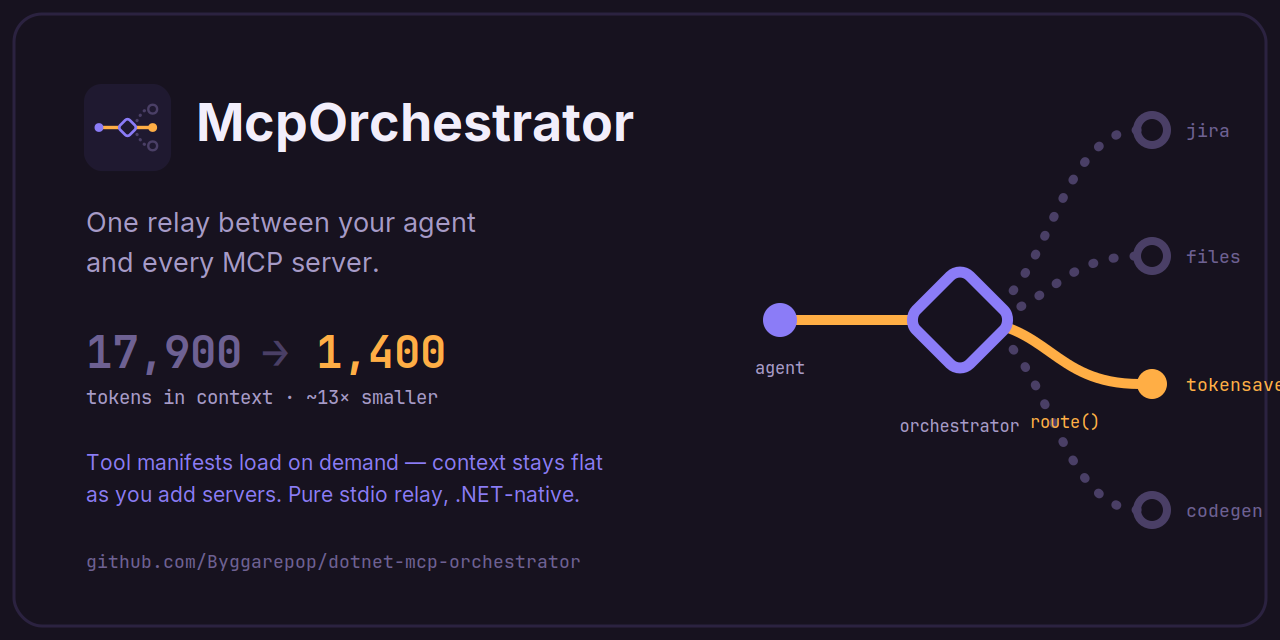
# McpOrchestrator — a .NET-native MCP orchestrator
[](https://www.nuget.org/packages/McpOrchestrator)
[](https://www.nuget.org/packages/McpOrchestrator)
[](https://github.com/Byggarepop/dotnet-mcp-orchestrator/blob/main/LICENSE)
**Every MCP server you connect costs context before the agent does anything — its tool manifests sit in the prompt on every turn.** McpOrchestrator puts one server between your agent and all the others and loads downstream tool manifests **on demand**, so the agent's always-on context stays flat no matter how many servers you add. The agent sees three meta-tools — `list_capabilities` → `discover_tools` → `route` — and the orchestrator is a **pure relay**: it forwards exactly what the agent sends, never interpreting it. It can also serve **[Agent Skills](https://agentskills.io)** with the same on-demand discipline.
## See it in 70 seconds
https://github.com/user-attachments/assets/741c1afa-4bef-4870-9b84-e2c245b8117e
## Measured impact
Against a real workplace MCP setup, measured with the Copilot CLI's `/usage`:
| | Tokens in context |
| --- | --- |
| MCP connected directly (manifests loaded upfront) | **17,900** |
| Same MCP behind McpOrchestrator | **1,400** |
| **Reduction** | **~13x** |
The savings scale with the number of servers. Measure your own setup first — one command, nothing installed, not a single file changed (needs the .NET SDK):
```bash
cd ~/my-project # a folder with a .mcp.json / .vscode/mcp.json / Cursor config
dotnet tool execute McpOrchestrator profile
```
## Quick start
From an existing MCP setup, `cd` to the folder holding your host config (`.mcp.json`, `.vscode/mcp.json`, or a Cursor config) and run:
```bash
dotnet tool execute McpOrchestrator --yes init # dnx McpOrchestrator --yes init works too
```
It lifts your stdio servers into a generated `orchestrator.config.json`, backs up the host config, and rewrites it to launch only the orchestrator. The generated catalog looks like this — one entry per downstream server:
```jsonc
{
"capabilities": [
{
"name": "files",
"summary": "Read and search files under the project root.", // auto-generated
"transport": "stdio",
"command": "npx",
"args": ["-y", "@modelcontextprotocol/server-filesystem", "C:/projects"]
}
// …one entry per server init found
]
}
```
The `summary` line is what the agent routes on — refine any that read poorly. Restart your MCP host and you're done: the agent discovers everything on its own through `list_capabilities` → `discover_tools` → `route`, and every later edit to this file [hot-reloads](https://github.com/Byggarepop/dotnet-mcp-orchestrator/blob/main/McpOrchestrator/README.md#hot-reload) without a restart.
## Add a skill
A skill is a folder with a `SKILL.md` — instructions the agent discovers and follows by itself when a task matches. Create one:
```
my-skills/
└── release-notes/
└── SKILL.md
```
```markdown
---
name: release-notes
description: Writes user-facing release notes from a git commit range. Use when asked for release notes or a changelog entry.
---
1. Collect the commits since the last release tag.
2. Group by user impact; drop internal-only changes.
3. One sentence per change, present tense.
```
Point the orchestrator at the folder in `orchestrator.config.json`:
```jsonc
"skills": {
"sources": [{ "id": "local", "type": "directory", "path": "C:/my-skills" }]
}
```
Save — it hot-reloads. The agent now sees the skill's name + one-line description via `list_skills` and loads the full instructions only when a task calls for it. Skills can also come from a shared git repo or an HTTP index, with allow/deny lists and integrity pinning — see [docs/skills.md](https://github.com/Byggarepop/dotnet-mcp-orchestrator/blob/main/docs/skills.md).
> Note: these skills are **for the agent only** — the model discovers and follows them through tools. They do not become host-native skills (no `/skills` listing or slash command in Claude Code, no IDE skill picker entry).
## Documentation
Everything else lives in **[McpOrchestrator/README.md](https://github.com/Byggarepop/dotnet-mcp-orchestrator/blob/main/McpOrchestrator/README.md)** and **[docs/](https://github.com/Byggarepop/dotnet-mcp-orchestrator/tree/main/docs)**:
- [How it works & the three tools](https://github.com/Byggarepop/dotnet-mcp-orchestrator/blob/main/McpOrchestrator/README.md#how-it-works) — architecture and token scaling
- [Profiling token economics](https://github.com/Byggarepop/dotnet-mcp-orchestrator/blob/main/McpOrchestrator/README.md#profiling-token-economics-profile) — the `profile` command in depth, trace mode, CI gating
- [CLI reference](https://github.com/Byggarepop/dotnet-mcp-orchestrator/blob/main/docs/cli.md) — every command and flag: the server, `init`, and `profile`, plus all environment variables
- [Manual setup](https://github.com/Byggarepop/dotnet-mcp-orchestrator/blob/main/docs/manual-setup.md) — the two config files `init` generates, written by hand
- [Configuration reference](https://github.com/Byggarepop/dotnet-mcp-orchestrator/blob/main/McpOrchestrator/README.md#configuration-reference) — every field, placeholders, [proactive capabilities](https://github.com/Byggarepop/dotnet-mcp-orchestrator/blob/main/McpOrchestrator/README.md#proactive-capabilities-promote), [hot reload](https://github.com/Byggarepop/dotnet-mcp-orchestrator/blob/main/McpOrchestrator/README.md#hot-reload), [central (team) configuration](https://github.com/Byggarepop/dotnet-mcp-orchestrator/blob/main/McpOrchestrator/README.md#central-configuration)
- [Moving to a central catalog with per-project values](https://github.com/Byggarepop/dotnet-mcp-orchestrator/blob/main/docs/central-migration.md) — step-by-step conversion of an existing setup, version compatibility, rollback
- [Agent Skills](https://github.com/Byggarepop/dotnet-mcp-orchestrator/blob/main/docs/skills.md) — sources (directory/git/HTTP), governance, delivery modes, how it works
- [Packaging & Native AOT](https://github.com/Byggarepop/dotnet-mcp-orchestrator/blob/main/McpOrchestrator/README.md#packaging-install-as-a-net-tool) — install as a .NET tool or a self-contained binary from [Releases](https://github.com/Byggarepop/dotnet-mcp-orchestrator/releases)
- [How it compares](https://github.com/Byggarepop/dotnet-mcp-orchestrator/blob/main/McpOrchestrator/README.md#how-it-compares) — vs. mcp-aggregator and gateways, and when *not* to use this
- [Troubleshooting](https://github.com/Byggarepop/dotnet-mcp-orchestrator/blob/main/McpOrchestrator/README.md#troubleshooting--pitfalls)
## License
[MIT](https://github.com/Byggarepop/dotnet-mcp-orchestrator/blob/main/LICENSE)
What people ask about dotnet-mcp-orchestrator
What is Byggarepop/dotnet-mcp-orchestrator?
+
Byggarepop/dotnet-mcp-orchestrator is mcp servers for the Claude AI ecosystem. A .NET-native MCP orchestrator: one agent reaches many MCP servers through one server. Progressive tool discovery keeps the agent's context flat as you add servers, with an optional in-process local LLM for natural-language routing. It has 2 GitHub stars and its last recorded update is dated 2026-10-10.
How do I install dotnet-mcp-orchestrator?
+
You can install dotnet-mcp-orchestrator by cloning the repository (https://github.com/Byggarepop/dotnet-mcp-orchestrator) or following the README instructions on GitHub. ClaudeWave also provides quick install blocks on this page.
Is Byggarepop/dotnet-mcp-orchestrator safe to use?
+
Our security agent has analyzed Byggarepop/dotnet-mcp-orchestrator and assigned a Trust Score of 95/100 (tier: Verified). See the full breakdown of passed checks and flags on this page.
Who maintains Byggarepop/dotnet-mcp-orchestrator?
+
Byggarepop/dotnet-mcp-orchestrator is maintained by Byggarepop. The last recorded GitHub activity is dated 2026-10-10, with 1 open issues.
Are there alternatives to dotnet-mcp-orchestrator?
+
Yes. On ClaudeWave you can browse similar mcp servers at /categories/mcp, sorted by popularity or recent activity.
Deploy dotnet-mcp-orchestrator to your cloud
Ship this repo to production in minutes. Each platform spins up its own environment with editable env vars.
Maintain this repo? Add a badge to your README
Drop the badge into your GitHub README to show it's tracked on ClaudeWave. Each badge links back to this page and reflects the live Trust Score.
[](https://claudewave.com/repo/byggarepop-dotnet-mcp-orchestrator)<a href="https://claudewave.com/repo/byggarepop-dotnet-mcp-orchestrator"><img src="https://claudewave.com/api/badge/byggarepop-dotnet-mcp-orchestrator" alt="Featured on ClaudeWave: Byggarepop/dotnet-mcp-orchestrator" width="320" height="64" /></a>More MCP Servers

Fair-code workflow automation platform with native AI capabilities. Combine visual building with custom code, self-host or cloud, 400+ integrations.

User-friendly AI Interface (Supports Ollama, OpenAI API, ...)

An open-source AI agent that brings the power of Gemini directly into your terminal.

Real-time global intelligence dashboard. AI-powered news aggregation, geopolitical monitoring, and infrastructure tracking in a unified situational awareness interface

🕷️ An adaptive Web Scraping framework that handles everything from a single request to a full-scale crawl! Don't be shy, join here: https://discord.gg/EMgGbDceNQ and follow here for daily tips and tricks: https://x.com/Scrapling_dev

The fastest path to AI-powered full stack observability, even for lean teams.