

Smart hands for your AI agents — write-capable, multi-plane (KVM + BMC + SSH) MCP server for bare-metal control (PiKVM/GLKVM, Redfish/IPMI BMCs): gated, verified, audited. Beta: seeking hardware reports.
claude mcp add kvm-pilot -- python -m kvm-pilot{
"mcpServers": {
"kvm-pilot": {
"command": "python",
"args": ["-m", "kvm-pilot"]
}
}
}MCP Servers overview
<!-- mcp-name: io.github.DustinTrap/kvm-pilot -->
<p align="center">
<img src="https://raw.githubusercontent.com/DustinTrap/kvm-pilot/main/docs/assets/logo.svg" alt="kvm-pilot" width="460">
</p>
<p align="center">
<a href="https://pypi.org/project/kvm-pilot/"><img src="https://img.shields.io/pypi/v/kvm-pilot?color=534ab7" alt="PyPI version"></a>
<a href="https://pypi.org/project/kvm-pilot/"><img src="https://img.shields.io/pypi/pyversions/kvm-pilot" alt="Python versions"></a>
<a href="https://github.com/DustinTrap/kvm-pilot/actions/workflows/ci.yml"><img src="https://github.com/DustinTrap/kvm-pilot/actions/workflows/ci.yml/badge.svg" alt="CI"></a>
<a href="https://github.com/DustinTrap/kvm-pilot/blob/main/LICENSE"><img src="https://img.shields.io/badge/license-Apache--2.0-blue" alt="License: Apache-2.0"></a>
<a href="https://registry.modelcontextprotocol.io/v0/servers?search=kvm-pilot"><img src="https://img.shields.io/badge/MCP_registry-io.github.DustinTrap%2Fkvm--pilot-534ab7" alt="MCP registry"></a>
</p>
# kvm-pilot
**Smart hands for your AI agents.** A write-capable, multi-plane
(KVM + BMC + SSH) MCP server for controlling physical machines —
**gated, verified, audited.**
`kvm-pilot` lets an agent drive a headless box through POST, firmware, the
bootloader, and an OS install **with no agent on the target**: it works at the
pixel level through an IP-KVM (PiKVM, the GL.iNet GLKVM fork GL-RM1 /
GL-RM1PE, BliKVM), at the structured-state level through a BMC (Redfish on
iDRAC/iLO/OpenBMC, IPMI on BMCs that predate Redfish), at the firmware level
through **Intel AMT/vPro** (a BIOS/POST/GRUB screenshot + power + SOL on a
business laptop an HDMI-capture KVM can't see boot on), and over SSH once an OS
is up. A pluggable vision subsystem reads a KVM screenshot and tells you what
boot phase the machine is in — `bios_menu`, `grub_menu`, `installer_progress`,
`login_prompt`, `crash_screen`, and so on — and a safety layer gates every
destructive operation behind operator opt-ins and per-call approvals.
Vision runs on Claude **or** any local OpenAI-compatible VLM (LM Studio,
Ollama, vLLM, llama.cpp). Point it at a model on your own GPU and the
screenshots never leave your network and cost nothing per frame.
## How it works
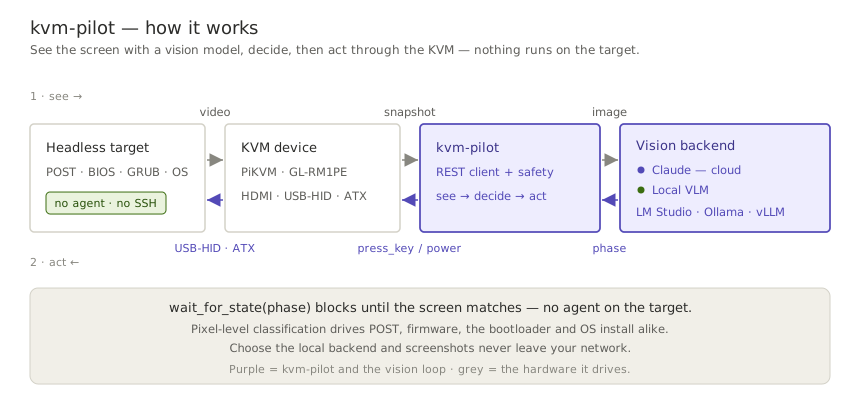
`kvm-pilot` runs a **see → decide → act** loop, and the screen is its only sensor:
it pulls a screenshot from the KVM, a vision model classifies the boot phase, and
`kvm-pilot` acts back through the KVM's keyboard and power. Because it works at the
pixel level, there is **no agent on the target** — the same loop drives POST,
firmware, the bootloader, and an OS install.
A real, unedited run against a GLKVM on the home fleet — an honest preflight,
a headless snapshot (watch it wake the on-demand encoder), a **gated** dry-run
power-cycle, and the boot console the agent actually saw:

## Quickstart
One install gives you the whole product — the **`kvm-pilot` CLI**, the
**`kvm-pilot-mcp` MCP server**, and the bundled **Claude skill** — nothing to
clone. The current release line is a **pre-release**, so `--pre` is required
(a plain `pip install kvm-pilot` deliberately picks up no pre-release;
`0.1.0a1` is yanked and much older than this README — don't use it).
```bash
pip install --pre kvm-pilot # CLI + skill + MCP server + WebSocket events
pip install --pre "kvm-pilot[totp]" # + 2FA / TOTP support (pyotp)
kvm-pilot install-skill # optional: put the bundled skill where Claude Code loads it
```
### Driving a KVM from an AI agent (MCP)
```bash
claude mcp add kvm-pilot -s user \
-e KVM_PILOT_PROFILE=<profile> -e KVM_PILOT_MCP_READ_ONLY=1 -- \
kvm-pilot-mcp
```
`KVM_PILOT_MCP_READ_ONLY=1` is the recommended first rung of the trust ladder
— the agent can see everything and touch nothing until your hardware is
verified. The [Getting started guide](https://github.com/DustinTrap/kvm-pilot/blob/main/docs/getting-started.md)
covers credentials, Claude Desktop JSON config, sample prompts, and climbing
the ladder. The server is published to the official
[MCP registry](https://registry.modelcontextprotocol.io/v0/servers?search=kvm-pilot)
as **`io.github.DustinTrap/kvm-pilot`**, so registry-aware hosts can discover
and install it by name. Agents: the repo root carries an
[`llms.txt`](https://github.com/DustinTrap/kvm-pilot/blob/main/llms.txt) doc map.
### Scripting from Python
```python
from kvm_pilot import KVMClient
from kvm_pilot.vision import ScreenAnalyzer, make_backend
kvm = KVMClient("192.168.8.1", "admin", "secret")
# Classify the current screen with Claude (model auto-resolved at runtime)
analyzer = ScreenAnalyzer(kvm, make_backend("anthropic"))
print(analyzer.classify().phase)
# Or run entirely on a local VLM — nothing leaves your network
local = make_backend("local", base_url="http://127.0.0.1:1234/v1", model="qwen2.5-vl-7b")
analyzer = ScreenAnalyzer(kvm, local)
# Block until the box reaches the GRUB menu, then pick the first entry
analyzer.wait_for_state("grub_menu", timeout=120)
kvm.press_key("Enter")
```
For the latest unreleased tree:
```bash
pip install "kvm-pilot[totp,ws] @ git+https://github.com/DustinTrap/kvm-pilot"
```
### CLI
```bash
kvm-pilot info --host 192.168.8.1 --user admin --ask-passwd # prompt (no echo)
kvm-pilot capabilities --profile homelab # what this driver supports
kvm-pilot snapshot screen.jpg --profile homelab
kvm-pilot --timeout 60 power-cycle --profile homelab --dry-run # log, don't send
kvm-pilot eject --profile homelab # detach virtual media
kvm-pilot events --profile homelab --count 5 # stream events ('ws' extra)
kvm-pilot watch grub_menu --profile homelab \
--backend local --vision-url http://127.0.0.1:1234/v1 --vision-model qwen2.5-vl-7b
```
The CLI prompts for confirmation before any destructive action (power, virtual
media — including uploads — keyboard/mouse injection, GPIO). Use `--yes` to
skip prompts in automation, or `--dry-run` to log intended actions without
sending them — dry-run short-circuits *before* the prompt, so it never blocks
waiting for input. `--timeout` (HTTP per-request timeout) is a global flag and
goes *before* the subcommand; `watch` keeps its own `--timeout` for the vision
wait deadline.
Profiles like `homelab` live in `~/.config/kvm-pilot/config.toml`. See
[docs/cli.md](https://github.com/DustinTrap/kvm-pilot/blob/main/docs/cli.md) for the full command table (every subcommand, the
capability it needs, and its gating), and
[docs/configuration.md](https://github.com/DustinTrap/kvm-pilot/blob/main/docs/configuration.md) for the config-file format,
every `KVM_PILOT_*` environment variable, and the precedence between flags,
env, and profiles.
> **GLKVM setup note:** on GL.iNet firmware the PiKVM REST API is **disabled by
> default** (every `/api/*` call 404s, surfaced as a clear `ApiDisabledError`),
> and a firmware upgrade can re-disable it. Enable it in
> `/etc/kvmd/nginx-kvmd.conf` and pin the driver with `--driver glkvm` /
> `driver = "glkvm"` — full steps in the
> [troubleshooting guide](https://github.com/DustinTrap/kvm-pilot/blob/main/docs/troubleshooting.md#every-api-call-returns-404-glkvm).
## The tool surface, by plane
The same capability protocols span three actuation planes, so one agent
workflow can mix pixels, structured BMC state, and shell access — with every
destructive effect gated per class:
| Plane | Read | Act (operator-gated) |
|---|---|---|
| **KVM — pixels & HID** (PiKVM · GLKVM · BliKVM) | `snapshot` · `classify_screen` · `wait_for_state` · `power_state` · `logs` · `list_virtual_media` | `power` · `type_text` / `press_key` / `send_shortcut` / `mouse` · `calibrate_mouse` · `mount_iso` / `eject` |
| **BMC — structured state** (Redfish · IPMI) | `info` · `boot_options` · `logs` (SEL) · sensors (CLI) | `power` · `set_boot_device` · SOL console (CLI `console`) |
| **Firmware — Intel AMT/vPro** (spans both planes) | `info` · `snapshot` (firmware BIOS/POST/GRUB) · `boot_options` · `power_state` | `power` · `set_boot_device` · `type`/`mouse` · SOL (`console`) · `amt_enable` (open SOL/KVM listeners) |
| **SSH — in-band & appliance** | `ssh_reachable` · `appliance_status` · `access_paths` | `ssh_exec` · `wake` (WoL) · `appliance_reboot` |
| **Meta — evidence & intake** | `capabilities` · `support_matrix` · `healthcheck` | `file_firmware_report` |
The canonical per-tool reference — annotations, effect gates, approval
lifecycle — is the [MCP server README](https://github.com/DustinTrap/kvm-pilot/blob/main/src/kvm_pilot/mcp/README.md);
the CLI covers the full surface in [docs/cli.md](https://github.com/DustinTrap/kvm-pilot/blob/main/docs/cli.md).
## Status & maturity
> **Status: beta — ready for broader testing.** (The exact version lives in the
> [CHANGELOG](https://github.com/DustinTrap/kvm-pilot/blob/main/CHANGELOG.md);
> install with `pip install --pre kvm-pilot`.) The core paths have graduated
> from mocked-only to live-verified: a fleet of GL-RM1PE units has exercised
> `snapshot`/`healthcheck`/`logs`/`power_state`/`virtual_media`/`info` across
> two firmware lines — on V1.9.1 those capabilities sit at **beta** maturity in
> the run ledger that ships in the wheel, derived What people ask about kvm-pilot
What is DustinTrap/kvm-pilot?
+
DustinTrap/kvm-pilot is mcp servers for the Claude AI ecosystem. Smart hands for your AI agents — write-capable, multi-plane (KVM + BMC + SSH) MCP server for bare-metal control (PiKVM/GLKVM, Redfish/IPMI BMCs): gated, verified, audited. Beta: seeking hardware reports. It has 1 GitHub stars and was last updated yesterday.
How do I install kvm-pilot?
+
You can install kvm-pilot by cloning the repository (https://github.com/DustinTrap/kvm-pilot) or following the README instructions on GitHub. ClaudeWave also provides quick install blocks on this page.
Is DustinTrap/kvm-pilot safe to use?
+
DustinTrap/kvm-pilot has not been audited yet by our security agent. Review the original repository on GitHub before using it in production.
Who maintains DustinTrap/kvm-pilot?
+
DustinTrap/kvm-pilot is maintained by DustinTrap. The last recorded GitHub activity is from yesterday, with 61 open issues.
Are there alternatives to kvm-pilot?
+
Yes. On ClaudeWave you can browse similar mcp servers at /categories/mcp, sorted by popularity or recent activity.
Deploy kvm-pilot to your cloud
Ship this repo to production in minutes. Each platform spins up its own environment with editable env vars.
Maintain this repo? Add a badge to your README
Drop the badge into your GitHub README to show it's tracked on ClaudeWave. Each badge links back to this page and reflects the live Trust Score.
[](https://claudewave.com/repo/dustintrap-kvm-pilot)<a href="https://claudewave.com/repo/dustintrap-kvm-pilot"><img src="https://claudewave.com/api/badge/dustintrap-kvm-pilot" alt="Featured on ClaudeWave: DustinTrap/kvm-pilot" width="320" height="64" /></a>More MCP Servers

Fair-code workflow automation platform with native AI capabilities. Combine visual building with custom code, self-host or cloud, 400+ integrations.

User-friendly AI Interface (Supports Ollama, OpenAI API, ...)

An open-source AI agent that brings the power of Gemini directly into your terminal.

The fastest path to AI-powered full stack observability, even for lean teams.

🕷️ An adaptive Web Scraping framework that handles everything from a single request to a full-scale crawl!

Real-time global intelligence dashboard. AI-powered news aggregation, geopolitical monitoring, and infrastructure tracking in a unified situational awareness interface