

🚀Vite+Vue3+Gin拥有AI辅助的基础开发平台,企业级业务AI+开发解决方案,内置mcp辅助服务,内置skills管理,支持TS和JS混用。它集成了JWT鉴权、权限管理、动态路由、显隐可控组件、分页封装、多点登录拦截、资源权限、上传下载、代码生成器、表单生成器和可配置的导入导出等开发必备功能。
Gin-vue-admin is a full-stack development scaffold combining a Go/Gin backend with a Vue 3 and Element Plus frontend, designed to accelerate the construction of admin-style web applications. The platform ships with a code generator and form generator that can produce complete CRUD front-end and back-end code from a schema definition, along with JWT authentication, Casbin role-based access control, dynamic routing, dynamic menus, multi-point login interception, and configurable import/export utilities. It integrates a built-in MCP server that connects directly to AI-assisted editors, enabling developers to instruct Claude or compatible AI tools to scaffold data models, generate CRUD code, and assign permissions in a single automated workflow. A plugin marketplace hosts additional extensions, including a dedicated Claw ecosystem plugin. The project targets Go and Vue developers building internal tools or enterprise admin panels who want a documented, production-oriented starting point rather than building authentication and permission infrastructure from scratch.
- ✓License: NOASSERTION
- ✓Actively maintained (<30d)
- ✓Healthy fork ratio
- ✓Clear description
- ✓Topics declared
- ✓Mature repo (>1y old)
git clone https://github.com/flipped-aurora/gin-vue-admin{
"mcpServers": {
"gin-vue-admin": {
"command": "gin-vue-admin"
}
}
}MCP Servers overview
<div align="center">
<img src="http://qmplusimg.henrongyi.top/gvalogo.jpg" width="300" height="300" />
</div>
<div align="center">
<img src="https://img.shields.io/badge/golang-1.20-blue" />
<img src="https://img.shields.io/badge/gin-1.9.1-lightBlue" />
<img src="https://img.shields.io/badge/vue-3.3.4-brightgreen" />
<img src="https://img.shields.io/badge/element--plus-2.3.8-green" />
<img src="https://img.shields.io/badge/gorm-1.25.2-red" />
<img src="https://gitcode.com/flipped-aurora/gin-vue-admin/star/badge.svg" />
</div>
<br>
<div align="center">
<a href="https://trendshift.io/repositories/3250" target="_blank">
<img src="https://trendshift.io/api/badge/repositories/3250" alt="Trendshift" width="250" height="55" />
</a>
</div>
<p align="center">
<a href="./README-en.md">English</a> | 简体中文
</p>
## 支持 Claw 生态
[🦞 GvaClaw](https://plugin.gin-vue-admin.com/details/159)
## 一分钟生成前后端基础代码
<table>
<tr>
<td width="250">
<p>⭐️ <a href="https://www.bilibili.com/video/BV1B3htzqEf1/?spm_id_from=333.1387.homepage.video_card.click" target="__blank"> 高度适配AI编辑器的MCP </a></p>
<p>📄 创建基础模板</p>
<p>🤖 AI生成结构</p>
<p>⏰ 生成代码</p>
<p>🏷️ 分配权限</p>
<p>🎉 基础CURD生成完成</p>
</td>
<td>
<video src="https://private-user-images.githubusercontent.com/165128580/384700666-4d039215-af29-4f86-bb4f-60dbab38f58e.mp4?jwt=eyJhbGciOiJIUzI1NiIsInR5cCI6IkpXVCJ9.eyJpc3MiOiJnaXRodWIuY29tIiwiYXVkIjoicmF3LmdpdGh1YnVzZXJjb250ZW50LmNvbSIsImtleSI6ImtleTUiLCJleHAiOjE3MzEyNTIxNDYsIm5iZiI6MTczMTI1MTg0NiwicGF0aCI6Ii8xNjUxMjg1ODAvMzg0NzAwNjY2LTRkMDM5MjE1LWFmMjktNGY4Ni1iYjRmLTYwZGJhYjM4ZjU4ZS5tcDQ_WC1BbXotQWxnb3JpdGhtPUFXUzQtSE1BQy1TSEEyNTYmWC1BbXotQ3JlZGVudGlhbD1BS0lBVkNPRFlMU0E1M1BRSzRaQSUyRjIwMjQxMTEwJTJGdXMtZWFzdC0xJTJGczMlMkZhd3M0X3JlcXVlc3QmWC1BbXotRGF0ZT0yMDI0MTExMFQxNTE3MjZaJlgtQW16LUV4cGlyZXM9MzAwJlgtQW16LVNpZ25hdHVyZT00NjJkMDcwZjJkMjAyMmU1N2I2MzQxY2RhODFlNzgzNGRiMDFhMmY2NTYyM2ZmODdhNDVmMWE1NzlhMDdlOTI5JlgtQW16LVNpZ25lZEhlYWRlcnM9aG9zdCJ9.ZJbswpLzF2RHjemcGirKOP0L1fvpl3FUqIiQ_-yjeUo" controls="controls" muted="muted" class="d-block rounded-bottom-2 border-top width-fit" style="max-height:640px; min-height: 200px">
</video>
</td>
</tr>
</table>
## 项目文档
- **在线文档**: [https://www.gin-vue-admin.com](https://www.gin-vue-admin.com)
- **初始化指南**: [点击查看](https://www.gin-vue-admin.com/guide/start-quickly/initialization.html)
- **从环境到部署教学视频**: [bilibili](https://www.bilibili.com/video/BV1Rg411u7xH)
- **开发教学**: [开发教学说明](https://www.gin-vue-admin.com/guide/start-quickly/env.html) (贡献者: <a href="https://github.com/LLemonGreen">LLemonGreen</a> And <a href="https://github.com/fkk0509">Fann</a>)
- **交流社区**: [点击进入](https://support.qq.com/products/371961)
- **插件市场**: [点击进入](https://plugin.gin-vue-admin.com/)
- **软件著作权证书**: [查看证书](https://www.gin-vue-admin.com/copyright.pdf)
## 重要提示
1. 本项目从起步到开发到部署均有文档和详细视频教程。
2. 本项目需要您有一定的 golang 和 vue 基础。
3. 您完全可以通过我们的教程和文档完成一切操作,因此我们不再提供免费的技术服务,如需服务请进行[付费支持](https://www.gin-vue-admin.com/coffee/payment.html)。
4. 本项目采用 BSL 1.1 授权。非商用、学习、评估等用途请遵循仓库许可证;如将此项目用于商用或生产环境,或需要移除版权与署名信息,请[购买授权](https://plugin.gin-vue-admin.com/license)。您需保留仓库、日志和代码中的版权声明信息。
<br>
<div align="center">
<img src="https://qmplusimg.henrongyi.top/openSource/login.jpg" width="49%" alt="登录界面" style="border-radius: 8px;" />
<img src="https://qmplusimg.henrongyi.top/openSource/dashboard.jpg" width="49%" alt="仪表盘" style="border-radius: 8px;" />
</div>
## 1. 基本介绍
### 1.1 项目介绍
> Gin-vue-admin是一个基于 [vue](https://vuejs.org) 和 [gin](https://gin-gonic.com) 开发的全栈前后端分离的开发基础平台,集成jwt鉴权,动态路由,动态菜单,casbin鉴权,表单生成器,代码生成器等功能,提供多种示例文件,让您把更多时间专注在业务开发上。
- **在线预览**: [http://demo.gin-vue-admin.com](http://demo.gin-vue-admin.com)
- **测试用户名**: `admin`
- **测试密码**: `123456`
### 1.2 贡献指南
Hi! 首先感谢你使用 gin-vue-admin。
Gin-vue-admin 是一套为快速研发准备的一整套前后端分离架构式的开源框架,旨在快速搭建中小型项目。
Gin-vue-admin 的成长离不开大家的支持,如果你愿意为 gin-vue-admin 贡献代码或提供建议,请阅读以下内容。
#### 1.2.1 Issue 规范
- issue 仅用于提交 Bug 或 Feature 以及设计相关的内容,其它内容可能会被直接关闭。
- 在提交 issue 之前,请搜索相关内容是否已被提出。
#### 1.2.2 Pull Request 规范
- 请先 fork 一份到自己的项目下,不要直接在仓库下建分支。
- commit 信息要以 `[文件名]: 描述信息` 的形式填写,例如 `README.md: fix xxx bug`。
- 如果是修复 bug,请在 PR 中给出描述信息。
- 合并代码需要两名维护人员参与:一人进行 review 后 approve,另一人再次 review,通过后即可合并。
## 2. 使用说明
- node版本 > v18.16.0
- golang版本 >= v1.22
- IDE推荐:Goland
### 2.1 server项目
使用 `Goland` 等编辑工具,打开server目录,不可以打开 gin-vue-admin 根目录
```bash
# 克隆项目
git clone https://github.com/flipped-aurora/gin-vue-admin.git
# 进入server文件夹
cd server
# 使用 go mod 并安装go依赖包
go generate
# 运行
go run .
```
### 2.2 web项目
```bash
# 进入web文件夹
cd web
# 安装依赖
npm install
# 启动web项目
npm run serve
```
### 2.3 swagger自动化API文档
#### 2.3.1 安装 swagger
```bash
go install github.com/swaggo/swag/cmd/swag@latest
```
#### 2.3.2 生成API文档
```bash
cd server
swag init
```
> 执行上面的命令后,server目录下会出现docs文件夹里的 `docs.go`, `swagger.json`, `swagger.yaml` 三个文件更新,启动go服务之后, 在浏览器输入 [http://localhost:8888/swagger/index.html](http://localhost:8888/swagger/index.html) 即可查看swagger文档
### 2.4 VSCode工作区
#### 2.4.1 开发
使用 `VSCode` 打开根目录下的工作区文件 `gin-vue-admin.code-workspace`,在边栏可以看到三个虚拟目录:`backend`、`frontend`、`root`。
#### 2.4.2 运行/调试
在运行和调试中也可以看到三个 task:`Backend`、`Frontend`、`Both (Backend & Frontend)`。运行 `Both (Backend & Frontend)` 可以同时启动前后端项目。
#### 2.4.3 settings
在工作区配置文件中有 `go.toolsEnvVars` 字段,是用于 `VSCode` 自身的 go 工具环境变量。此外在多 go 版本的系统中,可以通过 `gopath`、`go.goroot` 指定运行版本。
```json
"go.gopath": null,
"go.goroot": null,
```
## 3. 技术选型
- 前端:用基于 [Vue](https://vuejs.org) 的 [Element](https://github.com/ElemeFE/element) 构建基础页面。
- 后端:用 [Gin](https://gin-gonic.com/) 快速搭建基础restful风格API,[Gin](https://gin-gonic.com/) 是一个go语言编写的Web框架。
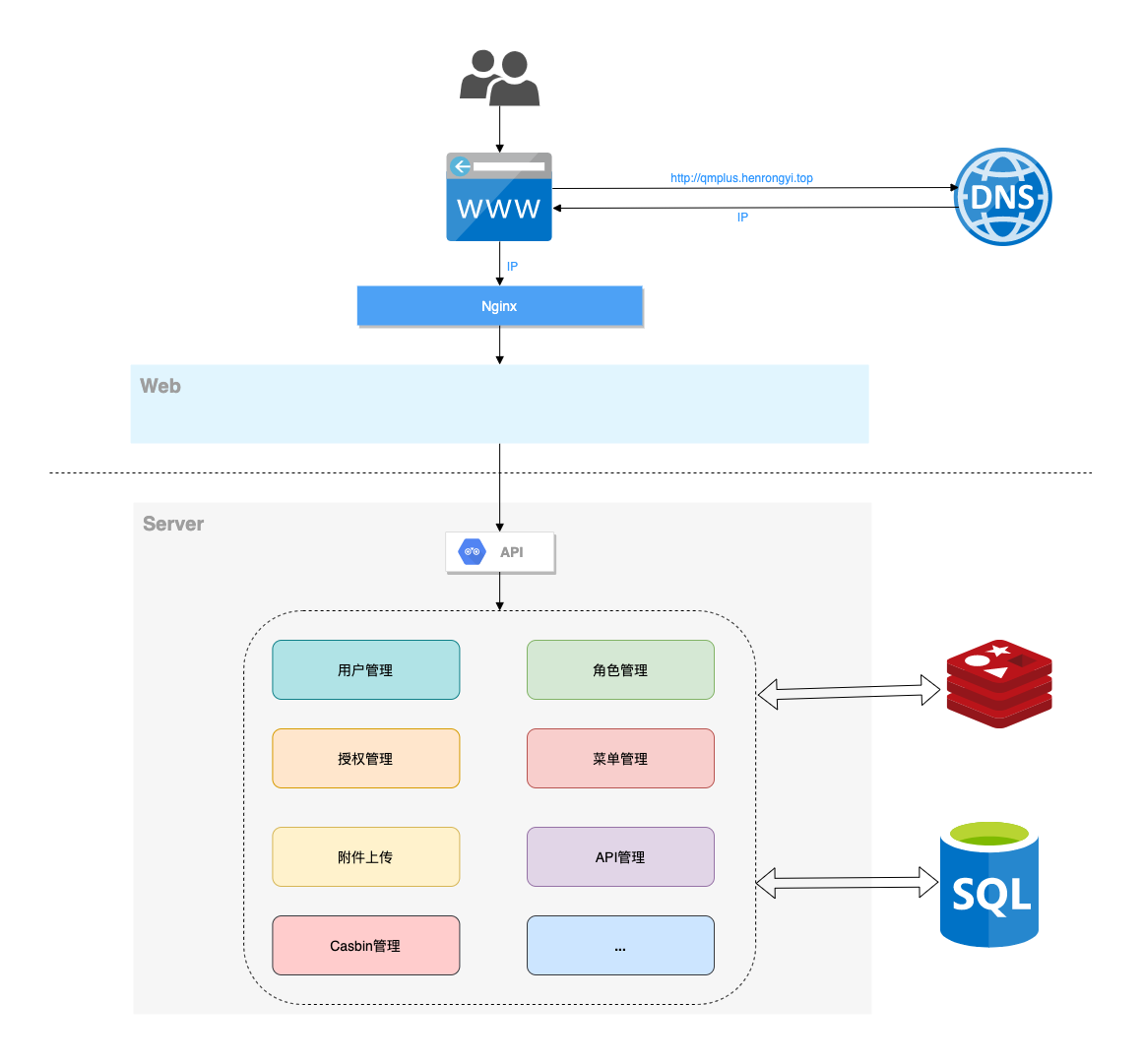
- 数据库:采用 `MySQL` 或 `MariaDB`(5.7+),数据库引擎 InnoDB,使用 [gorm](http://gorm.cn) 实现对数据库的基本操作。
- 缓存:使用 `Redis` 实现记录当前活跃用户的 jwt 令牌并实现多点登录限制。
- API文档:使用 `Swagger` 构建自动化文档。
- 配置文件:使用 [fsnotify](https://github.com/fsnotify/fsnotify) 和 [viper](https://github.com/spf13/viper) 实现 yaml 格式的配置文件。
- 日志:使用 [zap](https://github.com/uber-go/zap) 实现日志记录。
## 4. 项目架构
### 4.1 系统架构图
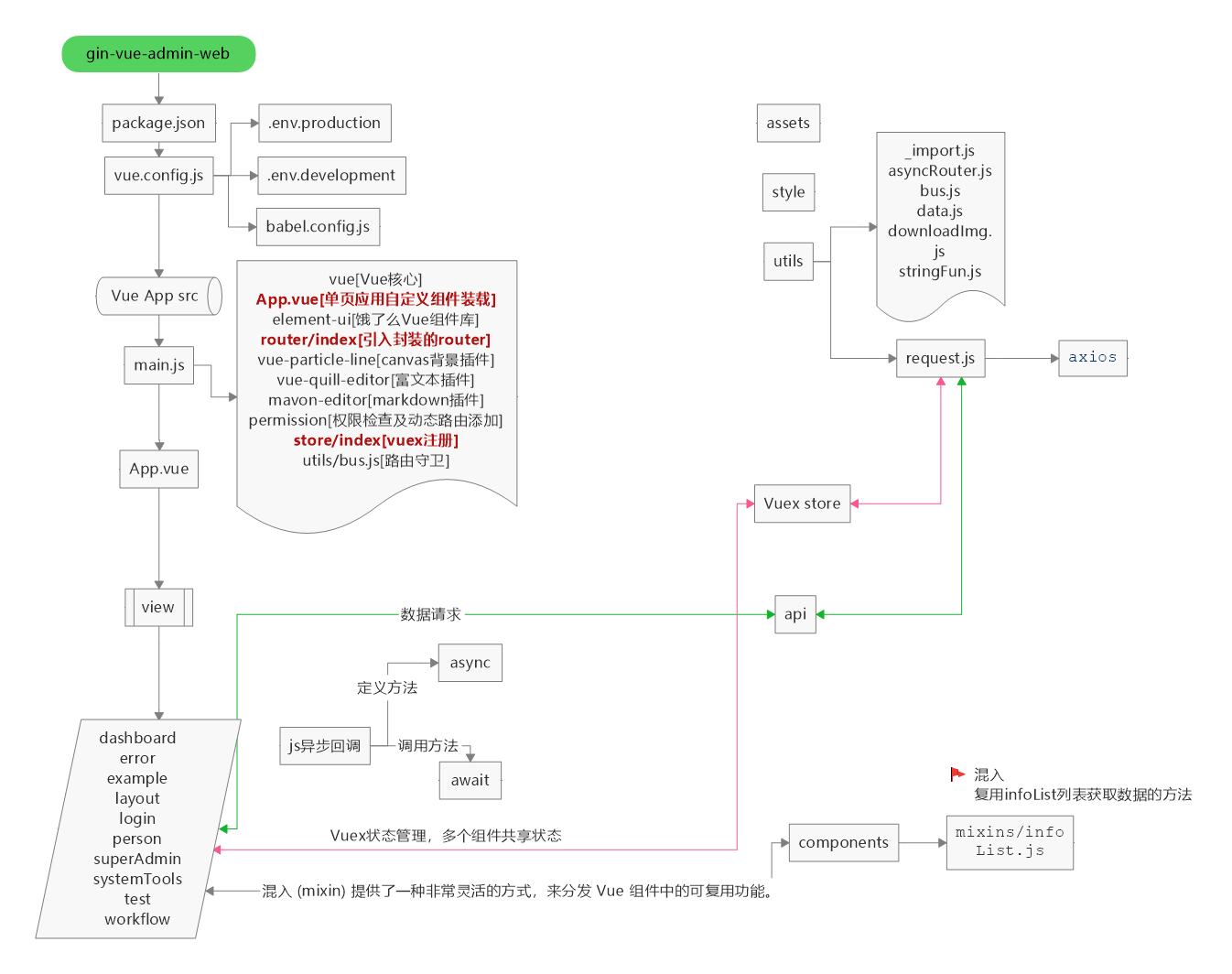
### 4.2 详细设计图 (提供者:<a href="https://github.com/baobeisuper">baobeisuper</a>)
### 4.3 目录结构
*(详细目录结构请见源码...)*
## 5. 主要功能
- 权限管理:基于 `jwt` 和 `casbin` 实现的权限管理。
- 文件上传下载:实现基于 `七牛云`, `阿里云`, `腾讯云` 的文件上传操作。
- 分页封装:前端使用 `mixins` 封装分页,分页方法调用即可。
- 用户管理:系统管理员分配用户角色和角色权限。
- 角色管理:创建权限控制的主要对象,可以给角色分配不同 api 权限和菜单权限。
- 菜单管理:实现用户动态菜单配置,实现不同角色不同菜单。
- api管理:不同用户可调用的 api 接口的权限不同。
- 配置管理:配置文件可前台修改(在线体验站点不开放此功能)。
- 条件搜索:增加条件搜索示例。
- restful示例:可以参考用户管理模块中的示例 API。
- 多点登录限制:借助 Redis 配合对应配置限制多端登录状态。
- 分片上传:提供文件分片上传和大文件分片上传功能示例。
- 表单生成器:表单生成器借助 [@Variant Form](https://github.com/vform666/variant-form)。
- 代码生成器:后台基础逻辑以及简单 curd 的代码生成器。
## 6. 知识库
### 6.1 团队博客
> [https://www.yuque.com/flipped-aurora](https://www.yuque.com/flipped-aurora)
> 内有前端框架教学视频。如果觉得项目对您有所帮助可以添加我的个人微信: shouzi_1994。
### 6.2 教学视频
1. **手把手教学视频**: [https://www.bilibili.com/video/BV1Rg411u7xH/](https://www.bilibili.com/video/BV1Rg411u7xH/)
2. **后端目录结构调整介绍以及使用方法**: [https://www.bilibili.com/video/BV1x44y117TT/](https://www.bilibili.com/video/BV1x44y117TT/)
3. **golang基础教学视频**: [bilibili](https://space.bilibili.com/322210472/channel/detail?cid=108884)
4. **gin框架基础教学**: [bilibili](https://space.bilibili.com/322210472/channel/detail?cid=126418&ctype=0)
5. **gin-vue-admin 版本更新介绍视频**: [bilibili](https://www.bilibili.com/video/BV1kv4y1g7nT)
## 7. 联系方式
- **QQ交流群**: `971857775`
- **[关于我们](https://www.gin-vue-admin.com/about/join.html)**
### 微信交流群
<img width="150" src="http://qmplusimg.henrongyi.top/qrjjz.png">
防止广告进群,添加微信,输入以下代码执行结果(请勿转码为string):
```go
str := "5Yqg5YWlR1ZB5Lqk5rWB576k"
decodeBytes, err := base64.StdEncoding.DecodeString(str)
fmt.Println(decodeBytes, err)
```
## 8. 贡献者
感谢您对gin-vue-admin的贡献!
<a href="https://openomy.app/github/flipped-aurora/gin-vue-admin" target="_blank" style="display: block; width: 100%;" align="center">
<img src="https://openomy.app/svg?repo=flipped-aurora/gin-vue-admin&chart=bubble&latestMonth=3" target="_blank" alt="Contribution Leaderboard" style="display: block; width: 100%;" />
</a>
## 9. 捐赠
如果你觉得这个项目对你有帮助,你可以请作者喝饮料 :tropical_drink: [点我](https://www.gin-vue-admin.com/coffee/index.html)
## 10. 注意事项
请遵守 BSL 1.1 许可证要求并保留作品声明;商用、生产使用或去除版权信息请务必[获取授权](https://plugin.gin-vue-admin.com/license)
未授权超出许可范围使用将依法追究法律责任。
What people ask about gin-vue-admin
What is flipped-aurora/gin-vue-admin?
+
flipped-aurora/gin-vue-admin is mcp servers for the Claude AI ecosystem. 🚀Vite+Vue3+Gin拥有AI辅助的基础开发平台,企业级业务AI+开发解决方案,内置mcp辅助服务,内置skills管理,支持TS和JS混用。它集成了JWT鉴权、权限管理、动态路由、显隐可控组件、分页封装、多点登录拦截、资源权限、上传下载、代码生成器、表单生成器和可配置的导入导出等开发必备功能。 It has 24.9k GitHub stars and was last updated yesterday.
How do I install gin-vue-admin?
+
You can install gin-vue-admin by cloning the repository (https://github.com/flipped-aurora/gin-vue-admin) or following the README instructions on GitHub. ClaudeWave also provides quick install blocks on this page.
Is flipped-aurora/gin-vue-admin safe to use?
+
Our security agent has analyzed flipped-aurora/gin-vue-admin and assigned a Trust Score of 100/100 (tier: Verified). See the full breakdown of passed checks and flags on this page.
Who maintains flipped-aurora/gin-vue-admin?
+
flipped-aurora/gin-vue-admin is maintained by flipped-aurora. The last recorded GitHub activity is from yesterday, with 39 open issues.
Are there alternatives to gin-vue-admin?
+
Yes. On ClaudeWave you can browse similar mcp servers at /categories/mcp, sorted by popularity or recent activity.
Deploy gin-vue-admin to your cloud
Ship this repo to production in minutes. Each platform spins up its own environment with editable env vars.
Maintain this repo? Add a badge to your README
Drop the badge into your GitHub README to show it's tracked on ClaudeWave. Each badge links back to this page and reflects the live Trust Score.
[](https://claudewave.com/repo/flipped-aurora-gin-vue-admin)<a href="https://claudewave.com/repo/flipped-aurora-gin-vue-admin"><img src="https://claudewave.com/api/badge/flipped-aurora-gin-vue-admin" alt="Featured on ClaudeWave: flipped-aurora/gin-vue-admin" width="320" height="64" /></a>More MCP Servers

Fair-code workflow automation platform with native AI capabilities. Combine visual building with custom code, self-host or cloud, 400+ integrations.

User-friendly AI Interface (Supports Ollama, OpenAI API, ...)

An open-source AI agent that brings the power of Gemini directly into your terminal.

The fastest path to AI-powered full stack observability, even for lean teams.

Real-time global intelligence dashboard. AI-powered news aggregation, geopolitical monitoring, and infrastructure tracking in a unified situational awareness interface

🕷️ An adaptive Web Scraping framework that handles everything from a single request to a full-scale crawl!