

Meta Ads MCP server: 41 read tools, 23 opt-in preview-first writes.
- ✓Open-source license (Apache-2.0)
- ✓Actively maintained (<30d)
- ✓Clear description
- ✓Documented (README)
claude mcp add meta-ads -- npx -y @getmcpads/meta-ads-mcp-server{
"mcpServers": {
"meta-ads": {
"command": "npx",
"args": ["-y", "@getmcpads/meta-ads-mcp-server"],
"env": {
"META_ACCESS_TOKEN": "<meta_access_token>"
}
}
}
}META_ACCESS_TOKENMCP Servers overview
<div align="center">
# Meta Ads MCP server
### Ask better questions about your Meta campaigns.
Compare campaign performance, inspect delivery and prepare changes from your MCP client.
[](https://github.com/get-mcp-ads/meta-ads-mcp-server/releases/latest)
[](https://github.com/get-mcp-ads/meta-ads-mcp-server/actions/workflows/ci.yml)
[](https://smithery.ai/servers/hello-6k33/getmcpads-meta-ads)
[](LICENSE)
[](package.json)
[Watch the demo](https://www.getmcpads.com/home/film/get-mcp-ads-film-1080p.mp4) · [What's new](#whats-new) · [Install](#install-this-release) · [Tool reference](#tools) · [Try hosted getmcpads](https://www.getmcpads.com/tools/meta-ads?utm_source=github&utm_medium=readme&utm_campaign=meta-ads)
[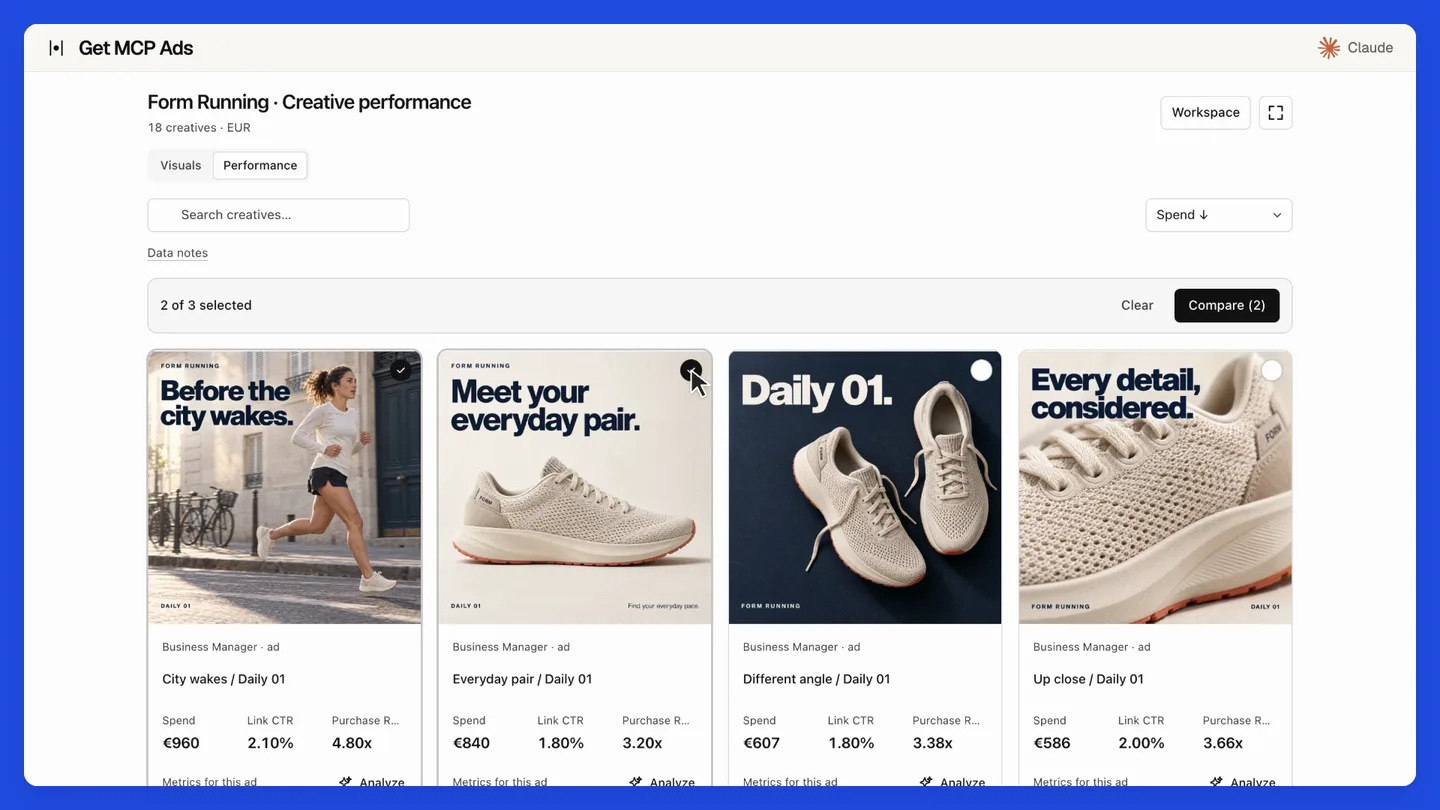](https://www.getmcpads.com/home/film/get-mcp-ads-film-1080p.mp4)
**[Play the 27-second product film](https://www.getmcpads.com/home/film/get-mcp-ads-film-1080p.mp4)**
</div>
The film demonstrates hosted getmcpads with staged data. Its creative galleries and MCP Apps interface belong to the hosted product. This repository provides the standalone native API tools.
**41 read tools** · **23 write tools**, disabled by default.
Run locally with your own platform credentials and a client that supports stdio MCP, such as Claude Desktop, Claude Code or Cursor. Your requests go directly to the platform. For managed connections, including supported ChatGPT setups, use the hosted option.
## What's new
**[v2.0.1: Native tools and security update](https://github.com/get-mcp-ads/meta-ads-mcp-server/releases/tag/v2.0.1) · September 20, 2026**
- Use account-scoped creative reads compatible with Graph v26, including bounded historical fallback and ownership verification.
- Add exact entity configuration and uploaded-video readiness reads.
- Update campaign creation, budget ownership, schedule validation and post-write verification.
- Require Node.js 22.12 or newer and check Node 22/24 in CI.
- Update vulnerable dependencies and regenerate the MCP catalog.
[Full changelog](CHANGELOG.md) · [Source synchronization details](SOURCE_SYNC.md) · [All releases](https://github.com/get-mcp-ads/meta-ads-mcp-server/releases)
### Upgrade notes
Requires **Node.js 22.12 or newer**. CI covers Node 22 and 24. Version 2.0.1 drops Node 18 and 20 support. Read the current tool schemas before reusing saved arguments. Writes remain optional and require explicit confirmation. Hosted creative integrations and MCP Apps UI are outside this release.
## Install this release
This is a GitHub source release. npm and MCP Registry versions are published separately. The commands below select this exact version; unpinned `npx` examples later in this document select the version currently available on npm.
```bash
git clone --branch v2.0.1 --depth 1 https://github.com/get-mcp-ads/meta-ads-mcp-server.git
cd meta-ads-mcp-server
npm ci
npm run build
```
Configure your MCP client to run `node` with the absolute path to `dist/cli.js` and the platform credentials documented below.
> **Prefer a managed connection?** [Use Meta Ads with hosted getmcpads](https://www.getmcpads.com/tools/meta-ads?utm_source=github&utm_medium=readme&utm_campaign=meta-ads). Connect your account, select the data your assistant may access and use the hosted MCP connection. See the site for current features and plans.
## What you get
| | |
|---|---|
| **41 read tools** | Campaigns, ad sets, ads, creatives, audiences, pixels, catalogs, Pages, Instagram, activity logs, A/B tests and lift studies |
| **23 write tools** | Off by default. Status, budgets, schedules, renames, campaign creation. Each one **previews before it applies** |
| **190 metrics** | Including derived ones computed client-side (ROAS, CPA, frequency, hook rate, attribution-window views) |
| **56 breakdowns · 90 dimensions** | With a compatibility matrix that catches invalid combinations *before* they hit the API |
| **7 resources** | Live catalogues the model can read: metrics, breakdowns, compatibility rules, 11 workflow recipes |
| **Forward-compatible reads** | `meta_get_node_fields`, `meta_list_edge_raw`, `meta_get_insights_raw` reach Graph fields this server doesn't model yet |
### The query planner
Meta rejects many metric/breakdown combinations, and the error messages rarely say why.
This server encodes the compatibility matrix, so it **splits an impossible request into
several valid API calls and merges the results** instead of failing.
`meta_validate_query` lets the model check a combination before spending a call on it.
That is the difference between an assistant that reports "the API returned error 100" and
one that returns your numbers.
---
## Getting a token
This is the one step that takes real effort, and it's worth doing properly.
You need a Meta access token with **`ads_read`**. There are three ways to get one; the
second is the one we recommend.
### Recommended: System User token (does not expire)
A System User belongs to your Business, not to a person. Its token survives password
changes and staff departures, and **needs no App Review** to access ad accounts your
Business already owns.
1. Go to [Business Settings](https://business.facebook.com/settings) → **Users → System Users**
2. **Add** a system user. Give it the *Employee* role unless you need more.
3. **Assign Assets** → select your ad accounts → grant **View performance** (add
*Manage campaigns* only if you plan to enable writes).
4. **Generate New Token** → pick your app → select scope **`ads_read`**
(add `ads_management` only for writes).
5. Set the expiry to **Never**.
6. Copy the token. Meta shows it once.
📖 [Meta's System User documentation](https://developers.facebook.com/docs/marketing-api/system-users)
### Quick test: Graph API Explorer (expires in ~1 hour)
Fine for trying the server out, useless for daily work.
[Graph API Explorer](https://developers.facebook.com/tools/explorer/) → select your app →
add `ads_read` → **Generate Access Token**.
### Long-lived user token (~60 days)
Exchange a short-lived token for a 60-day one. You will have to redo this every two months.
📖 [Long-lived tokens](https://developers.facebook.com/docs/facebook-login/guides/access-tokens/get-long-lived)
### Which permissions?
| Permission | When you need it |
|---|---|
| `ads_read` | **Always.** Campaigns, insights, everything read-only |
| `ads_management` | Only if you set `META_ENABLE_WRITES=1` |
| `business_management` | Optional. Business Manager asset discovery |
| `pages_show_list`, `pages_read_engagement` | Optional. Page posts and organic enrichment |
| `instagram_basic` | Optional. Linked Instagram accounts |
| `catalog_management` | Optional. Product catalog reads |
Run **`meta_health_check`** as your first call: it reports which scopes you actually have
and which ones are missing for the tools you tried to use, without printing your token.
---
## Setup
### Claude Desktop
`~/Library/Application Support/Claude/claude_desktop_config.json` (macOS)
or `%APPDATA%\Claude\claude_desktop_config.json` (Windows):
```json
{
"mcpServers": {
"meta-ads": {
"command": "npx",
"args": ["-y", "@getmcpads/meta-ads-mcp-server"],
"env": {
"META_ACCESS_TOKEN": "your-token-here"
}
}
}
}
```
Restart Claude Desktop. Ask it: *"list my Meta ad accounts"*.
### Claude Code
```bash
claude mcp add meta-ads --env META_ACCESS_TOKEN=your-token-here -- npx -y @getmcpads/meta-ads-mcp-server
```
### Cursor
`.cursor/mcp.json` in your project, same shape as the Claude Desktop config above.
### From source
```bash
git clone https://github.com/get-mcp-ads/meta-ads-mcp-server.git
cd meta-ads-mcp-server
npm install && npm run build
cp .env.example .env # then fill in META_ACCESS_TOKEN
npm start
```
### Configuration
| Variable | Default | Meaning |
|---|---|---|
| `META_ACCESS_TOKEN` | none | **Required.** Your Meta access token |
| `META_ENABLE_WRITES` | *unset* | Set to `1` to register the 23 write tools |
| `META_API_VERSION` | `v26.0` | Graph API version. Override to pin another |
| `LOG_LEVEL` | `info` | `debug`, `info`, `warn`, `error` |
Check your setup at any time:
```bash
npm run doctor
```
---
## Writes, and why they preview first
Write tools are **disabled by default**. Enable them with `META_ENABLE_WRITES=1`.
When enabled, every write tool returns a preview and changes nothing:
```jsonc
// meta_update_adset_budget { adSetId: "123", currency: "EUR", dailyBudget: 50 }
{
"applied": false,
"action": "meta_update_adset_budget",
"change": { "adSet": "123", "field": "daily_budget", "amount": 50,
"currency": "EUR", "inMinorUnits": 5000 },
"message": "Preview only, nothing was changed. Repeat the same call with confirm: true to apply this change to the live account."
}
```
Only a second call carrying `confirm: true` touches the live account.
This is deliberate. An assistant composes these calls, and it can pick the wrong account,
the wrong campaign, or the wrong order of magnitude on a budget. A mandatory preview makes
the mistake visible before it costs money, and gives a human the stopping point the
protocol does not guarantee on its own.
Two further guardrails:
- **`meta_create_campaign` always creates the campaign `PAUSED`.** There is no option to
create it active.
- **Budgets are converted to minor units per currency.** The yen, the won and the CFA franc
have no subunit, so sending 1250 for ¥12.50 would multiply the spend by a hWhat people ask about meta-ads-mcp-server
What is get-mcp-ads/meta-ads-mcp-server?
+
get-mcp-ads/meta-ads-mcp-server is mcp servers for the Claude AI ecosystem. Meta Ads MCP server: 41 read tools, 23 opt-in preview-first writes. It has 0 GitHub stars and its last recorded update is dated 2026-09-23.
How do I install meta-ads-mcp-server?
+
You can install meta-ads-mcp-server by cloning the repository (https://github.com/get-mcp-ads/meta-ads-mcp-server) or following the README instructions on GitHub. ClaudeWave also provides quick install blocks on this page.
Is get-mcp-ads/meta-ads-mcp-server safe to use?
+
Our security agent has analyzed get-mcp-ads/meta-ads-mcp-server and assigned a Trust Score of 87/100 (tier: Trusted). See the full breakdown of passed checks and flags on this page.
Who maintains get-mcp-ads/meta-ads-mcp-server?
+
get-mcp-ads/meta-ads-mcp-server is maintained by get-mcp-ads. The last recorded GitHub activity is dated 2026-09-23, with 0 open issues.
Are there alternatives to meta-ads-mcp-server?
+
Yes. On ClaudeWave you can browse similar mcp servers at /categories/mcp, sorted by popularity or recent activity.
Deploy meta-ads-mcp-server to your cloud
Ship this repo to production in minutes. Each platform spins up its own environment with editable env vars.
Maintain this repo? Add a badge to your README
Drop the badge into your GitHub README to show it's tracked on ClaudeWave. Each badge links back to this page and reflects the live Trust Score.
[](https://claudewave.com/repo/get-mcp-ads-meta-ads-mcp-server)<a href="https://claudewave.com/repo/get-mcp-ads-meta-ads-mcp-server"><img src="https://claudewave.com/api/badge/get-mcp-ads-meta-ads-mcp-server" alt="Featured on ClaudeWave: get-mcp-ads/meta-ads-mcp-server" width="320" height="64" /></a>More MCP Servers

Fair-code workflow automation platform with native AI capabilities. Combine visual building with custom code, self-host or cloud, 400+ integrations.

User-friendly AI Interface (Supports Ollama, OpenAI API, ...)

An open-source AI agent that brings the power of Gemini directly into your terminal.

Real-time global intelligence dashboard. AI-powered news aggregation, geopolitical monitoring, and infrastructure tracking in a unified situational awareness interface

🕷️ An adaptive Web Scraping framework that handles everything from a single request to a full-scale crawl! Don't be shy, join here: https://discord.gg/EMgGbDceNQ and follow here for daily tips and tricks: https://x.com/Scrapling_dev

The fastest path to AI-powered full stack observability, even for lean teams.