

An AI-first MCP server for YNAB. Read-only by default, with reversible writes and verification against the live API.
- ✓Open-source license (Apache-2.0)
- ✓Actively maintained (<30d)
- ✓Clear description
- ✓Topics declared
- ✓Documented (README)
- !Install pipes a remote script into a shell (curl | sh)
claude mcp add for-ynab -- uvx mcp-server-for-ynab{
"mcpServers": {
"for-ynab": {
"command": "uvx",
"args": ["mcp-server-for-ynab"],
"env": {
"YNAB_API_KEY": "<ynab_api_key>"
}
}
}
}YNAB_API_KEYMCP Servers overview
<!-- mcp-name: io.github.hs737/mcp-server-for-ynab -->
# MCP Server for YNAB
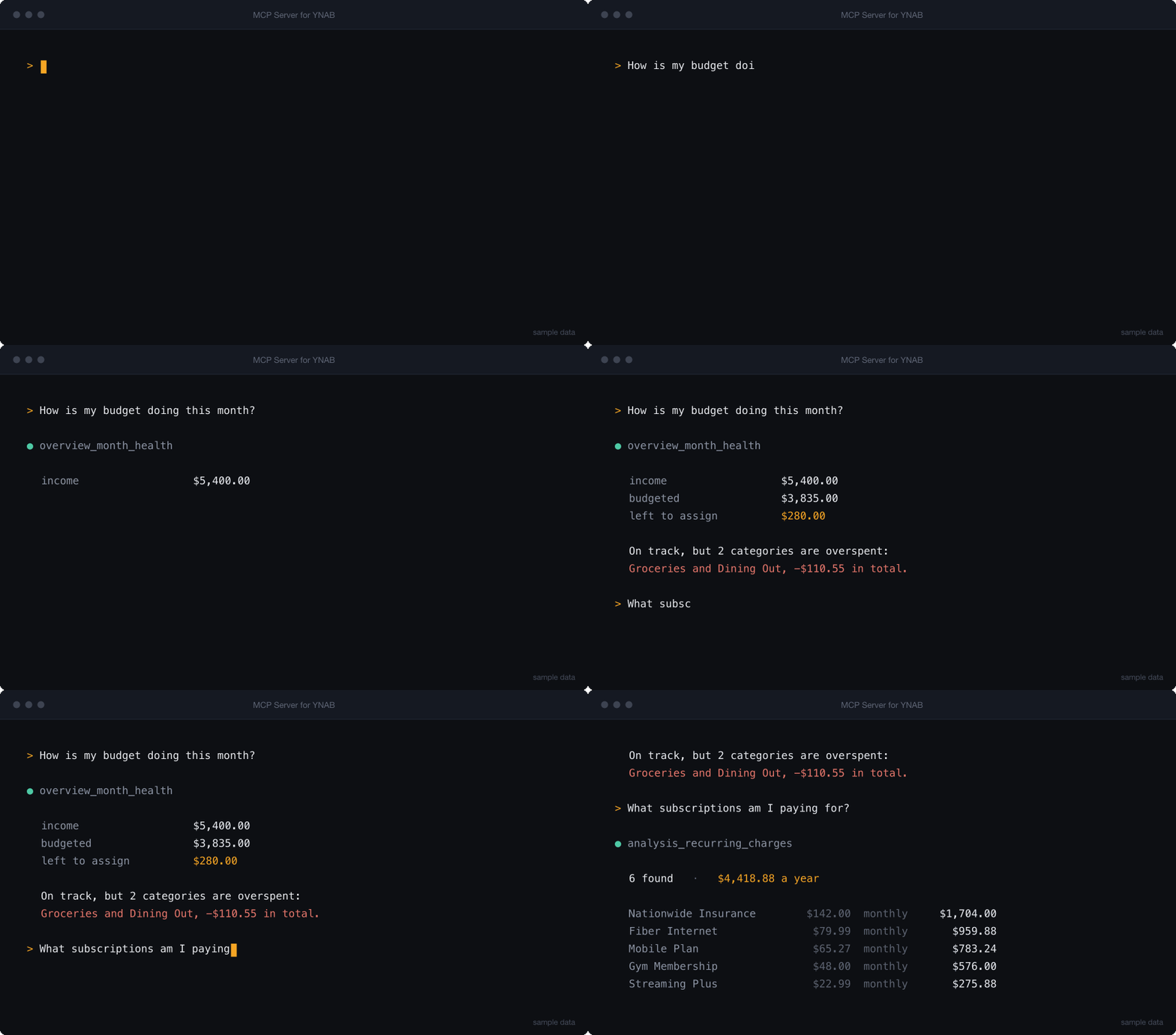
**Ask your budget a question.** Connect Claude, Codex, Cursor, or any MCP client
to [YNAB](https://ynab.com) and get answers about your actual money — how the
month is going, what is overspent, what your subscriptions really cost.
[](https://pypi.org/project/mcp-server-for-ynab/)
[](https://pypi.org/project/mcp-server-for-ynab/)
[](https://github.com/hs737/mcp-server-for-ynab/actions/workflows/ci.yml)
[](https://github.com/hs737/mcp-server-for-ynab/blob/master/LICENSE)
[](https://mcpservers.org/servers/hs737/mcp-server-for-ynab)
<!-- Absolute URL on purpose: this README is also the package description on
PyPI, where a repository-relative image path resolves to nothing. -->
```bash
YNAB_API_KEY=your_token uvx mcp-server-for-ynab smoke
```
**Read-only by default.** The write tools are not registered at all unless you
set `YNAB_ALLOW_WRITES=1`, so they never appear to the assistant and nothing can
change your budget until you say so. When you do enable them, every write
records the state that preceded it and can be undone.
An [MCP](https://modelcontextprotocol.io/) server that exposes the YNAB API as
tools, then adds enriched tools answering questions the raw API cannot answer in
one call — budget health, cleanup queues, spending analysis, recurring charges.
## Quick Start
### 1. Get a YNAB token
Generate a personal access token at
[app.ynab.com/settings/developer](https://app.ynab.com/settings/developer).
You also need [`uv`](https://docs.astral.sh/uv/), which provides `uvx`:
```bash
curl -LsSf https://astral.sh/uv/install.sh | sh # macOS and Linux
brew install uv # macOS with Homebrew
winget install --id=astral-sh.uv -e # Windows
```
Check both work. Nothing to clone — `uvx` fetches the package and runs it in a
throwaway environment:
```bash
YNAB_API_KEY=your_token uvx mcp-server-for-ynab smoke
```
`smoke` validates configuration and tool registration, then exits. It should
print `smoke: app created, 44 tools registered`.
### 2. Add it to your client
| Client | Setup |
|--------|-------|
| [Claude Code](https://claude.com/product/claude-code) | [one command](https://github.com/hs737/mcp-server-for-ynab/blob/master/docs/client-setup.md#claude-code) |
| [Claude Desktop](https://claude.ai/download) | [config file](https://github.com/hs737/mcp-server-for-ynab/blob/master/docs/client-setup.md#claude-desktop) |
| [Cursor](https://cursor.com) | [one-click link](https://github.com/hs737/mcp-server-for-ynab/blob/master/docs/client-setup.md#cursor) |
| [VS Code](https://code.visualstudio.com) (GitHub Copilot) | [one command](https://github.com/hs737/mcp-server-for-ynab/blob/master/docs/client-setup.md#vs-code) |
| [Codex CLI](https://developers.openai.com/codex) | [one command](https://github.com/hs737/mcp-server-for-ynab/blob/master/docs/client-setup.md#codex-cli) |
| [Gemini CLI](https://github.com/google-gemini/gemini-cli) | [one command](https://github.com/hs737/mcp-server-for-ynab/blob/master/docs/client-setup.md#gemini-cli) |
| [Windsurf](https://windsurf.com), [Zed](https://zed.dev), others | [generic stdio config](https://github.com/hs737/mcp-server-for-ynab/blob/master/docs/client-setup.md#other-stdio-clients) |
| [MCP Inspector](https://github.com/modelcontextprotocol/inspector) | [debugging](https://github.com/hs737/mcp-server-for-ynab/blob/master/docs/client-setup.md#mcp-inspector) |
The two most common paths:
**Claude Code** — install the plugin, which brings its own MCP config:
```bash
/plugin marketplace add hs737/mcp-server-for-ynab
/plugin install mcp-server-for-ynab@mcp-server-for-ynab
```
Or register the server directly, if you would rather not use a plugin:
```bash
claude mcp add --env YNAB_API_KEY=your_ynab_token --transport stdio --scope user \
ynab -- uvx mcp-server-for-ynab stdio
```
**Claude Desktop, Cursor, Windsurf, and most others** — paste into the client's
MCP config file:
```json
{
"mcpServers": {
"ynab": {
"command": "uvx",
"args": ["mcp-server-for-ynab", "stdio"],
"env": {
"YNAB_API_KEY": "your_ynab_token",
"YNAB_PLAN_ID": "your_plan_id"
}
}
}
}
```
`YNAB_PLAN_ID` is optional but recommended — with it set, you never have to
name a budget in a request. Full per-client instructions, including where each
config file lives and how to keep the token out of it, are in
[Client Setup](https://github.com/hs737/mcp-server-for-ynab/blob/master/docs/client-setup.md).
**Desktop hosts that accept bundles** — download the `.mcpb` file from the
[latest release](https://github.com/hs737/mcp-server-for-ynab/releases/latest)
and open it. The host asks for your token in a form and stores it in your OS
keychain, so there is no config file to edit and no token sitting in plain text.
A checkbox controls whether writes are enabled.
### Docker
A published image is available for `linux/amd64` and `linux/arm64`. The server
speaks MCP over stdin and stdout, so run it attached with `-i`. There is no
port to publish:
```bash
docker run -i --rm -e YNAB_API_KEY=your_ynab_token \
ghcr.io/hs737/mcp-server-for-ynab
```
Or build it yourself from a clone:
```bash
docker build -t mcp-server-for-ynab .
docker run -i --rm -e YNAB_API_KEY=your_ynab_token mcp-server-for-ynab
```
If you enable writes, mount a volume for the history — otherwise `--rm` discards
the record that makes a revert possible:
```bash
docker run -i --rm -e YNAB_API_KEY=your_ynab_token -e YNAB_ALLOW_WRITES=1 \
-v ynab-mcp-history:/home/app/.mcp-server-for-ynab mcp-server-for-ynab
```
### 3. Ask it something
> What's my cash position across all accounts?
If that works, you're set. If it doesn't, see
[Troubleshooting](https://github.com/hs737/mcp-server-for-ynab/blob/master/docs/client-setup.md#troubleshooting) — the usual cause is
that the client cannot find `uvx` on its `PATH`.
## What You Can Ask
Read-only, works out of the box:
| Ask | Tool it reaches for |
|-----|---------------------|
| "How is this month's budget doing?" | `overview_month_health` |
| "What's my cash position across all accounts?" | `overview_cash_position` |
| "Which transactions still need a category?" | `triage_uncategorized` |
| "What's waiting for me to approve?" | `triage_unapproved` |
| "Which categories are overspent, and by how much?" | `analysis_overspent_categories` |
| "Which targets won't be funded this month?" | `analysis_target_funding_gaps` |
| "Are any scheduled transactions at risk?" | `analysis_upcoming_scheduled_risks` |
| "What have I spent at this payee over the last year?" | `bookkeeping_transaction_history` |
| "What subscriptions am I actually paying for?" | `analysis_recurring_charges` |
With `YNAB_ALLOW_WRITES=1`:
> Categorize last week's uncategorized transactions, then show me what you changed.
The agent categorizes, and `history_list` shows every write with the value that
preceded it. `history_revert` undoes any of them.
Agents work best when they start with `overview_available_tools`, which returns
the current tool catalog grouped by family. See
[Tool Surface](https://github.com/hs737/mcp-server-for-ynab/blob/master/docs/tool-surface.md) for the full map.
### Guided workflows
Six prompts ship with the server, and most clients surface them as slash
commands — a starting point that does not require reading the tool list first:
monthly review, weekly triage, categorize and approve, subscription audit, cash
position, and review-and-undo.
Three resources (`ynab://guide/*`) carry the YNAB method, the write-safety
rules, and guidance on which tool to reach for. They are fetched on demand, so
they cost nothing until a client asks for them.
## Configuration
| Variable | Required | Description |
|----------|----------|-------------|
| `YNAB_API_KEY` | Yes | YNAB personal access token |
| `YNAB_PLAN_ID` | Recommended | Default plan ID, making `plan_id` optional on most tools |
| `YNAB_ALLOW_WRITES` | No | Register write tools. Unset means read-only |
| `YNAB_HISTORY_PATH` | No | Write history file, default `~/.mcp-server-for-ynab/history.jsonl` |
| `YNAB_RATE_LIMIT_PER_HOUR` | No | Client-side request budget, default `190` of YNAB's 200 |
| `YNAB_RATE_WARN_THRESHOLD` | No | Warn when this many requests remain, default `50` |
| `LOG_LEVEL` | No | Logging verbosity, default `INFO` |
Set these in your MCP client's `env` block. For local development, copy
`.env.example` to `.env` and fill it in.
### Rate limits
YNAB allows 200 requests per hour per token, and a single enriched tool can
spend several. The server tracks its own usage in a rolling hour and stops just
below YNAB's ceiling, so the limit you hit is local and clearly reported rather
than a 429 in the middle of a workflow. Call `overview_request_budget` to see
what is left; it costs no API requests.
## Tool Families
56 read-only tools, 77 with writes enabled, plus 7 guided prompts and 4 reference resources.
| Family | Type | Purpose |
|--------|------|---------|
| `overview` | enriched | Budget health snapshots and orientation |
| `triage` | enriched | Transaction cleanup queues |
| `bookkeeping` | enriched | Categorization suggestions, memo help, history |
| `analysis` | enriched | Overspending, funding gaps, scheduled risks, card funding, multi-month auWhat people ask about mcp-server-for-ynab
What is hs737/mcp-server-for-ynab?
+
hs737/mcp-server-for-ynab is mcp servers for the Claude AI ecosystem. An AI-first MCP server for YNAB. Read-only by default, with reversible writes and verification against the live API. It has 1 GitHub stars and its last recorded update is dated 2026-09-03.
How do I install mcp-server-for-ynab?
+
You can install mcp-server-for-ynab by cloning the repository (https://github.com/hs737/mcp-server-for-ynab) or following the README instructions on GitHub. ClaudeWave also provides quick install blocks on this page.
Is hs737/mcp-server-for-ynab safe to use?
+
Our security agent has analyzed hs737/mcp-server-for-ynab and assigned a Trust Score of 87/100 (tier: Trusted). See the full breakdown of passed checks and flags on this page.
Who maintains hs737/mcp-server-for-ynab?
+
hs737/mcp-server-for-ynab is maintained by hs737. The last recorded GitHub activity is dated 2026-09-03, with 0 open issues.
Are there alternatives to mcp-server-for-ynab?
+
Yes. On ClaudeWave you can browse similar mcp servers at /categories/mcp, sorted by popularity or recent activity.
Deploy mcp-server-for-ynab to your cloud
Ship this repo to production in minutes. Each platform spins up its own environment with editable env vars.
Maintain this repo? Add a badge to your README
Drop the badge into your GitHub README to show it's tracked on ClaudeWave. Each badge links back to this page and reflects the live Trust Score.
[](https://claudewave.com/repo/hs737-mcp-server-for-ynab)<a href="https://claudewave.com/repo/hs737-mcp-server-for-ynab"><img src="https://claudewave.com/api/badge/hs737-mcp-server-for-ynab" alt="Featured on ClaudeWave: hs737/mcp-server-for-ynab" width="320" height="64" /></a>More MCP Servers

Fair-code workflow automation platform with native AI capabilities. Combine visual building with custom code, self-host or cloud, 400+ integrations.

User-friendly AI Interface (Supports Ollama, OpenAI API, ...)

An open-source AI agent that brings the power of Gemini directly into your terminal.

Real-time global intelligence dashboard. AI-powered news aggregation, geopolitical monitoring, and infrastructure tracking in a unified situational awareness interface

The fastest path to AI-powered full stack observability, even for lean teams.

🕷️ An adaptive Web Scraping framework that handles everything from a single request to a full-scale crawl!