

An agentic browser extension: an AI side panel in your own logged-in Chrome, Edge, Arc, Brave or even Firefox run by the agent you already use (Claude Code, Codex, Antigravity). Free, open source, no API key. Also an MCP server.
- ✓Open-source license (MIT)
- ✓Actively maintained (<30d)
- ✓Clear description
- ✓Topics declared
- ✓Documented (README)
- !Install pipes a remote script into a shell (curl | sh)
claude mcp add browsentic -- npx -y browsentic{
"mcpServers": {
"browsentic": {
"command": "npx",
"args": ["-y", "browsentic"]
}
}
}MCP Servers overview
https://github.com/user-attachments/assets/307afa62-5fbd-47ac-822c-baee491ddfe3
<div align="center">
# Browsentic – a completely integrated agentic browser extension
<p>
<a href="https://www.npmjs.com/package/browsentic"><img src="https://img.shields.io/npm/v/browsentic?logo=npm" alt="npm version"></a>
<a href="https://www.npmjs.com/package/browsentic"><img src="https://img.shields.io/npm/dm/browsentic?logo=npm" alt="npm downloads"></a>
<a href="https://github.com/imshaikot/browsentic/actions/workflows/ci.yml"><img src="https://img.shields.io/github/actions/workflow/status/imshaikot/browsentic/ci.yml?branch=main&label=CI&logo=githubactions&logoColor=white" alt="CI"></a>
<a href="https://nodejs.org"><img src="https://img.shields.io/node/v/browsentic?logo=nodedotjs&logoColor=white" alt="node"></a>
<a href="LICENSE"><img src="https://img.shields.io/npm/l/browsentic" alt="license"></a>
</p>
<p>
<a href="docs/guide/install.md"><img src="https://img.shields.io/badge/manifest-V3-4285F4?logo=googlechrome&logoColor=white" alt="Manifest V3"></a>
<a href="https://github.com/imshaikot/browsentic/releases/latest"><img src="https://img.shields.io/github/actions/workflow/status/imshaikot/browsentic/release.yml?label=macOS%20build&logo=apple" alt="macOS build"></a>
<a href="https://github.com/imshaikot/browsentic/releases/latest"><img src="https://img.shields.io/github/actions/workflow/status/imshaikot/browsentic/release.yml?label=Windows%20build&logo=data:image/svg%2Bxml;base64,PHN2ZyB4bWxucz0iaHR0cDovL3d3dy53My5vcmcvMjAwMC9zdmciIHZpZXdCb3g9IjAgMCAyNCAyNCI+PHBhdGggZmlsbD0iI2ZmZiIgZD0iTTAgMy40IDkuOCAydjkuNUgwek0xMSAxLjggMjQgMHYxMS41SDExek0wIDEyLjVoOS44VjIyTDAgMjAuNnpNMTEgMTIuNWgxM1YyNGwtMTMtMS44eiIvPjwvc3ZnPg==" alt="Windows build"></a>
<a href="https://github.com/imshaikot/browsentic/releases/latest"><img src="https://img.shields.io/github/actions/workflow/status/imshaikot/browsentic/release.yml?label=Firefox%20build&logo=firefoxbrowser&logoColor=white" alt="Firefox build"></a>
</p>
**No account · No auth · No API key · No cloud · No telemetry · Local first**
Your real, logged-in browser, driven from an AI side panel by the agent CLI you already have.<br>
Also an optional [MCP server](docs/guide/mcp-clients.md), so any MCP client can drive the same browser.
<p>
<strong>Works in</strong><br>
<a href="docs/guide/install.md"><img src="https://browsentic.com/icons/chrome.svg" width="40" height="40" alt="Chrome" title="Chrome"></a> 
<a href="docs/guide/install.md#firefox"><img src="https://browsentic.com/icons/firefox.svg" width="40" height="40" alt="Firefox" title="Firefox"></a> 
<a href="docs/guide/install.md"><img src="https://browsentic.com/icons/edge.svg" width="40" height="40" alt="Edge" title="Edge"></a> 
<a href="docs/guide/install.md"><img src="https://browsentic.com/icons/brave.svg" width="40" height="40" alt="Brave" title="Brave"></a> 
<a href="docs/guide/install.md"><img src="https://browsentic.com/icons/arc.svg" width="40" height="40" alt="Arc" title="Arc"></a>
</p>
<p>
<strong>Runs on</strong><br>
<a href="https://claude.com/claude-code"><img src="https://browsentic.com/icons/claude.svg" width="40" height="40" alt="Claude Code" title="Claude Code"></a> 
<a href="https://developers.openai.com/codex/cli"><picture><source media="(prefers-color-scheme: dark)" srcset="https://browsentic.com/icons/openai-dark.svg"><img src="https://browsentic.com/icons/openai.svg" width="40" height="40" alt="Codex" title="Codex"></picture></a> 
<a href="https://antigravity.google/docs/cli/install"><img src="https://browsentic.com/icons/antigravity.svg" width="40" height="40" alt="Antigravity" title="Antigravity"></a> 
<a href="https://github.com/mistralai/mistral-vibe"><img src="https://browsentic.com/icons/mistral.svg" width="40" height="40" alt="Mistral Vibe (beta)" title="Mistral Vibe (beta)"></a> 
<a href="https://docs.x.ai/build/overview"><picture><source media="(prefers-color-scheme: dark)" srcset="https://browsentic.com/icons/xai-dark.svg"><img src="https://browsentic.com/icons/xai.svg" width="40" height="40" alt="Grok Build (beta)" title="Grok Build (beta)"></picture></a> 
<a href="https://cursor.com/docs/cli/overview"><picture><source media="(prefers-color-scheme: dark)" srcset="https://browsentic.com/icons/cursor-dark.svg"><img src="https://browsentic.com/icons/cursor.svg" width="40" height="40" alt="Cursor CLI (beta)" title="Cursor CLI (beta)"></picture></a> 
<a href="https://qwenlm.github.io/qwen-code-docs/en/"><picture><source media="(prefers-color-scheme: dark)" srcset="https://browsentic.com/icons/qwen-dark.svg"><img src="https://browsentic.com/icons/qwen.svg" width="40" height="40" alt="Qwen Code (beta)" title="Qwen Code (beta)"></picture></a> 
<a href="https://opencode.ai/docs/"><picture><source media="(prefers-color-scheme: dark)" srcset="https://browsentic.com/icons/opencode-dark.svg"><img src="https://browsentic.com/icons/opencode.svg" width="40" height="40" alt="OpenCode (beta)" title="OpenCode (beta)"></picture></a>
</p>
</div>
## Quick Start
**Any platform** — with [Node.js](https://nodejs.org) 20 or newer (Windows is [experimental](docs/guide/limits.md#windows-is-experimental)):
```sh
npx browsentic setup
```
**macOS** — one line installs [Browsentic.app](docs/guide/mac-app.md), which brings Node and everything else:
```sh
curl -fsSL https://browsentic.com/install.sh | sh
```
**Windows** — one line in PowerShell installs [the Windows app](docs/guide/windows-app.md), which brings Node and everything else ([experimental](docs/guide/limits.md#windows-is-experimental)):
```powershell
irm https://browsentic.com/install.ps1 | iex
```
Full install and setup guide, Firefox included: **[browsentic.com/docs/guide/install](https://browsentic.com/docs/guide/install/)**
## Key Capabilities
<table>
<tr>
<td>🧭 <a href="docs/guide/features/conversations.md"><b>Side panel, human in the loop</b></a></td>
<td>🤖 <a href="docs/guide/agents.md"><b>Every major agent CLI</b></a></td>
<td>🎯 <a href="docs/guide/features/page-actions.md"><b>50+ deterministic tools</b></a></td>
</tr>
<tr>
<td>🌐 <a href="docs/guide/install.md"><b>All Chromium + Firefox</b></a></td>
<td>🗺️ <a href="docs/guide/features/page-actions.md#moving-around"><b>Full browser navigation</b></a></td>
<td>🧩 <a href="docs/guide/features/captcha.md"><b>Solves captchas on the way</b></a></td>
</tr>
<tr>
<td>📄 <a href="docs/guide/features/files.md#files-you-hand-it"><b>Reads files, acts on them</b></a></td>
<td>↕️ <a href="docs/guide/features/files.md#download-here-upload-there"><b>Uploads & downloads</b></a></td>
<td>🧠 <a href="docs/guide/features/site-maps.md"><b>Creates its own skills</b></a></td>
</tr>
<tr>
<td>⚡ <a href="docs/guide/features/page-actions.md#repeating-a-job-and-doing-what-no-tool-covers"><b>Writes & runs live tools</b></a></td>
<td>🎙️ <a href="docs/guide/features/recordings.md"><b>Voice, text or show it once</b></a></td>
<td>👁️ <a href="docs/guide/features/a-eye.md"><b>Point at what you mean</b></a></td>
</tr>
<tr>
<td>⏱️ <a href="docs/guide/features/scheduling.md"><b>Monitors & schedules</b></a></td>
<td>🛡️ <a href="docs/guide/approvals.md"><b>Guardrails & approvals</b></a></td>
<td>🔌 <a href="docs/guide/mcp-clients.md"><b>Optional MCP server</b></a></td>
</tr>
</table>
## How It Works
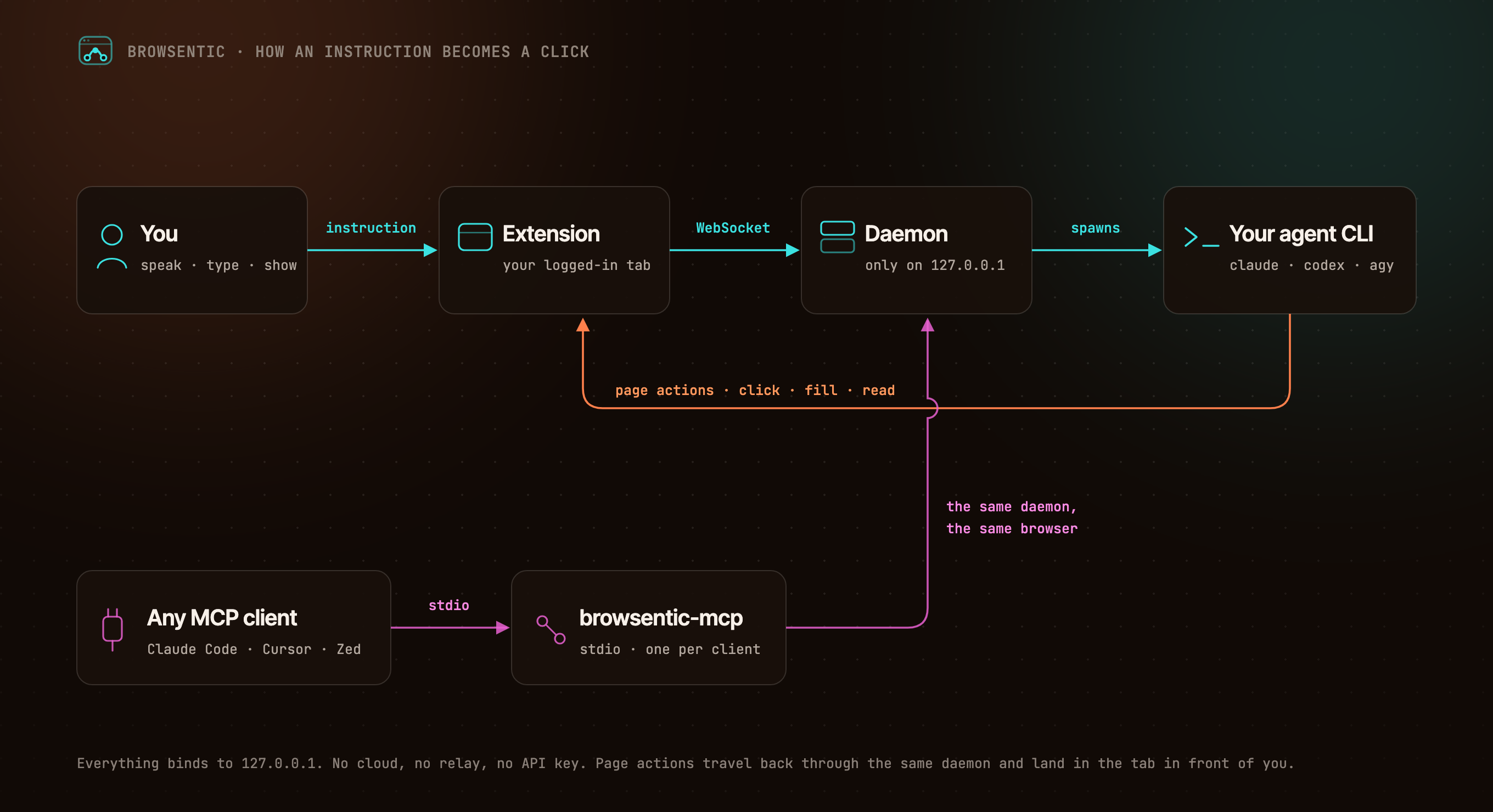
<details>
<summary>The same flow, as text</summary>
```
You ──speak or type──> Extension ──local WebSocket──> Daemon ──spawns──> your agent CLI
▲ (claude │ codex │ agy │ vibe │ grok)
└──────────────── page actions ─────────────────────┘
Any MCP client ──stdio──> browsentic mcp ──> the same daemon ──> the same browser
```
</details>
The extension dials out to the daemon, because a Manifest V3 service worker cannot listen for connections. One daemon owns the browser link, so several MCP clients can share one browser. Everything binds to `127.0.0.1`.
## Resources
- 📚 [Documentation](docs/)
- 🚀 [Install and Pair](docs/guide/install.md)
- ✨ [Features](docs/guide/features/)
- 🧰 [All 52 Page Tools](docs/reference/tools.md)
- 🔌 [Optional: Drive It From Claude Code, Cursor or Zed Over MCP](docs/guide/mcp-clients.md)
- 🛡️ [Approvals and Guardrails](docs/guide/approvals.md)
- 🏗️ [Architecture](docs/internals/)
- 🩺 [Troubleshooting](docs/guide/troubleshooting.md)
## Privacy and Security
Nothing connects until you pair, both ends prove themselves, consequential actions ask first, and credentials on a page are sealed before the agent sees them. The full model is in [SECURITY.md](SECURITY.md), and what it does not cover is in [Limits](docs/guide/limits.md).
## Contributing
Bugs and ideas are welcome — start at [CONTRIBUTING.md](CONTRIBUTING.md).
## License
Browsentic is MIT licensed.
- **Source Available**: Always visible source code
- **Local First**: No cloud component, no telemetry, no account
- **Extensible**: Add your own page capabilities, skills and agent runners
## What does Browsentic mean?
**Short answer:** "Browse" + "agentic".
**Long answer:** Most browser automation asks you to hand the work to a *different* browser — a headless one, in a container, logged in to nothing. Browsentic is the other way round: the agentic part happens in the browser you are already looking at, with the sessions you are already signed in to. The name is the thesis — browsing, made agentic, where you already browse.
What people ask about browsentic
What is imshaikot/browsentic?
+
imshaikot/browsentic is mcp servers for the Claude AI ecosystem. An agentic browser extension: an AI side panel in your own logged-in Chrome, Edge, Arc, Brave or even Firefox run by the agent you already use (Claude Code, Codex, Antigravity). Free, open source, no API key. Also an MCP server. It has 28 GitHub stars and its last recorded update is dated 2026-09-27.
How do I install browsentic?
+
You can install browsentic by cloning the repository (https://github.com/imshaikot/browsentic) or following the README instructions on GitHub. ClaudeWave also provides quick install blocks on this page.
Is imshaikot/browsentic safe to use?
+
Our security agent has analyzed imshaikot/browsentic and assigned a Trust Score of 87/100 (tier: Trusted). See the full breakdown of passed checks and flags on this page.
Who maintains imshaikot/browsentic?
+
imshaikot/browsentic is maintained by imshaikot. The last recorded GitHub activity is dated 2026-09-27, with 2 open issues.
Are there alternatives to browsentic?
+
Yes. On ClaudeWave you can browse similar mcp servers at /categories/mcp, sorted by popularity or recent activity.
Deploy browsentic to your cloud
Ship this repo to production in minutes. Each platform spins up its own environment with editable env vars.
Maintain this repo? Add a badge to your README
Drop the badge into your GitHub README to show it's tracked on ClaudeWave. Each badge links back to this page and reflects the live Trust Score.
[](https://claudewave.com/repo/imshaikot-browsentic)<a href="https://claudewave.com/repo/imshaikot-browsentic"><img src="https://claudewave.com/api/badge/imshaikot-browsentic" alt="Featured on ClaudeWave: imshaikot/browsentic" width="320" height="64" /></a>More MCP Servers

Fair-code workflow automation platform with native AI capabilities. Combine visual building with custom code, self-host or cloud, 400+ integrations.

User-friendly AI Interface (Supports Ollama, OpenAI API, ...)

An open-source AI agent that brings the power of Gemini directly into your terminal.

Real-time global intelligence dashboard. AI-powered news aggregation, geopolitical monitoring, and infrastructure tracking in a unified situational awareness interface

🕷️ An adaptive Web Scraping framework that handles everything from a single request to a full-scale crawl! Don't be shy, join here: https://discord.gg/EMgGbDceNQ and follow here for daily tips and tricks: https://x.com/Scrapling_dev

The fastest path to AI-powered full stack observability, even for lean teams.