

The agent eval standard for MCP — score output quality, catch safety failures, enforce cost budgets
- ✓Open-source license (MIT)
- ✓Actively maintained (<30d)
- ✓Clear description
- ✓Topics declared
- ✓Documented (README)
- !README contains suspicious pattern: eval\s*\(
claude mcp add mcp-server -- npx -y @iris-eval/mcp-server{
"mcpServers": {
"mcp-server": {
"command": "npx",
"args": ["-y", "@iris-eval/mcp-server"]
}
}
}MCP Servers overview
# Iris — stop shipping agents on vibes
[](https://glama.ai/mcp/servers/iris-eval/mcp-server)
[](cursor://anysphere.cursor-deeplink/mcp/install?name=iris-eval&config=eyJjb21tYW5kIjoibnB4IiwiYXJncyI6WyIteSIsIkBpcmlzLWV2YWwvbWNwLXNlcnZlciJdLCJlbnYiOnsiSVJJU19MT0dfTEVWRUwiOiJpbmZvIn19)
[](https://npmjs.com/package/@iris-eval/mcp-server)
[](https://npmjs.com/package/@iris-eval/mcp-server)
[](https://github.com/iris-eval/mcp-server)
[](https://github.com/iris-eval/mcp-server/actions/workflows/ci.yml)
[](https://securityscorecards.dev/viewer/?uri=github.com/iris-eval/mcp-server)
[](https://www.bestpractices.dev/projects/12849)
[](https://github.com/iris-eval/mcp-server/blob/main/LICENSE)
[](https://github.com/iris-eval/mcp-server/pkgs/container/mcp-server)
[](https://www.pulsemcp.com/servers/iris-eval)
[](https://mcp.so/server/iris/iris-eval)
**Iris scores every agent run for quality, safety, and cost — on your machine, with no SDK and no account.** Most agent projects check quality by running a few remembered prompts and eyeballing the output. Iris replaces that with numbers you can audit: your agent's runs land in a SQLite database on your disk, 20 built-in rules score them deterministically — PII, prompt injection, hallucination markers, cost thresholds, and the agent's own tool calls — free, with no LLM calls, and an optional LLM judge with a hard per-eval cost cap handles the semantic questions. Every rule is inspectable and editable, because a judge you can't audit is just vibes with a number on it. MIT licensed, no telemetry; your traces never leave your machine.
**Requires Node.js 20 or later.** Check with `node --version`.
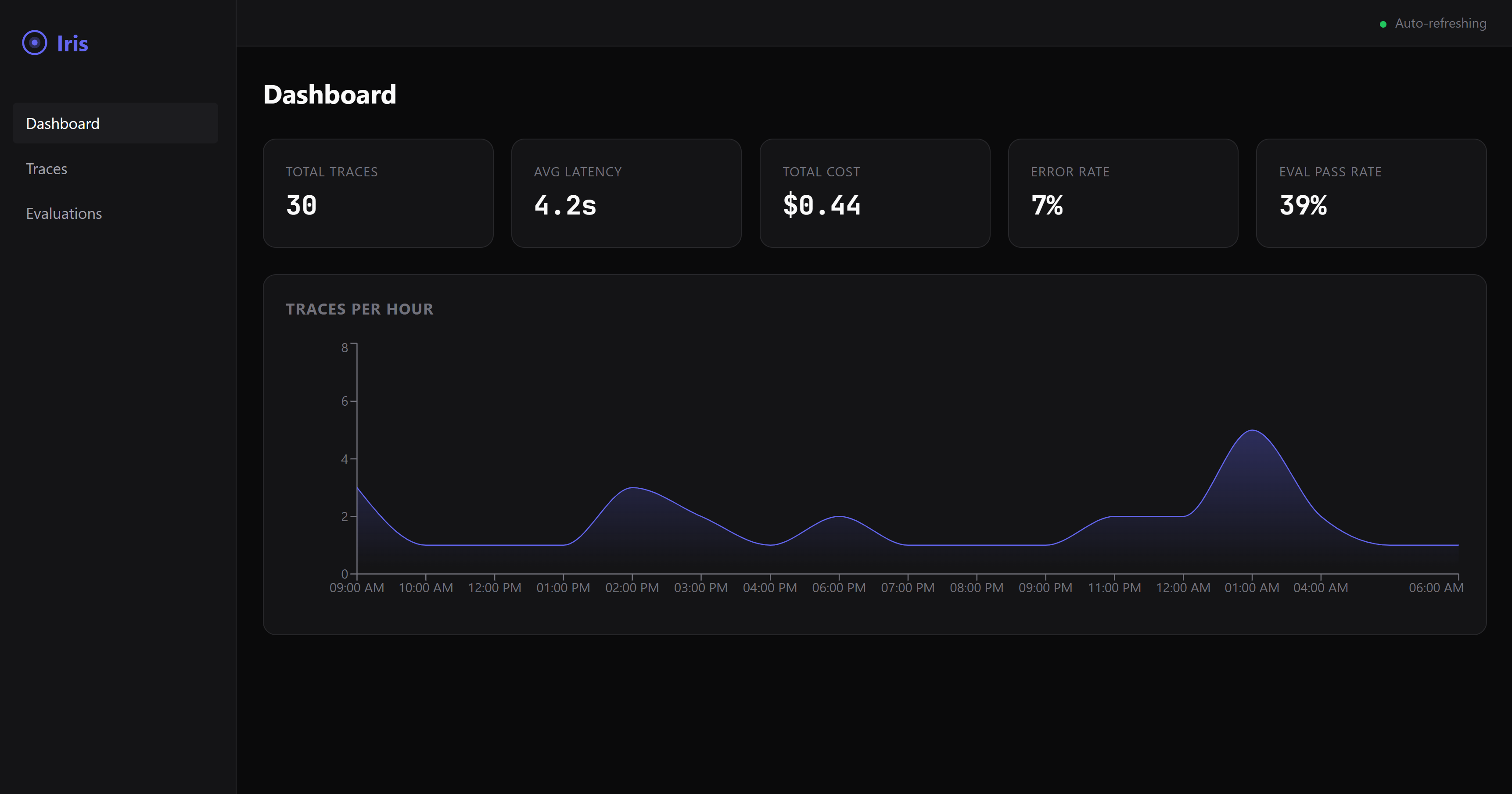
## A failure on screen in 60 seconds
No agent wiring, no config — one command:
```bash
npx @iris-eval/mcp-server --demo
```
This seeds a demo database — a handful of small agents with a week of runs — and serves the dashboard against it at **http://localhost:6920** (your browser opens automatically on first run). The dashboard lands on **Failures**: what failed, worst and newest first. Worth clicking into — a PII leak caught by the safety rules, a flagged prompt-injection attempt, and a failed LLM-judge score with its rationale.
Demo data lives in its own database (`demo.db` in your Iris home directory — `~/.iris` on macOS/Linux, `%USERPROFILE%\.iris` on Windows) and never mixes with your real traces. Remove all of it with one command:
```bash
npx @iris-eval/mcp-server --demo-clear
```
## Hook up your own agent
Add Iris to your MCP config. Works with Claude Desktop, Claude Code, Cursor, Windsurf, Continue, VS Code, Cline, Zed, Codex CLI, Gemini CLI — and any other MCP-compatible agent. One block, dashboard included:
```json
{
"mcpServers": {
"iris-eval": {
"command": "npx",
"args": ["@iris-eval/mcp-server", "--dashboard"]
}
}
}
```
Your agent discovers Iris's nine tools on connect, and the dashboard serves at **http://localhost:6920**. Now paste this to your agent:
> Log that last task to Iris and evaluate the output.
The trace lands on the dashboard with its scores. Prefer the MCP server headless? Drop `--dashboard` from the args — you can open the same dashboard any time with `npx @iris-eval/mcp-server --dashboard`.
**One thing worth knowing up front:** MCP tools are called when the model decides to call them. Iris doesn't intercept your agent, so traces are logged when your agent asks it to log them — either because you told it to, or because your code calls the tools directly. Ask your agent to "log this to Iris and evaluate it" and it will. If you want capture that doesn't depend on the model choosing, `POST /api/v1/traces` does exactly that — your code sends the trace over plain HTTP, no model in the loop (see [docs/http-ingest.md](https://github.com/iris-eval/mcp-server/blob/main/docs/http-ingest.md)). The CLI and SDKs on the [roadmap](https://github.com/iris-eval/mcp-server/blob/main/docs/roadmap.md) will be thin clients over the same endpoint.
### Capture over HTTP (no model in the loop)
The ingest endpoint lives on the **dashboard port** — `6920` by default, not the MCP transport port — and it exists only while the dashboard is running. Pass `--dashboard` (or set `IRIS_DASHBOARD=true`); `--transport http` on its own does **not** start it, and a request to the transport port returns `404`. With the dashboard up, anything that can send an HTTP request can log a trace — and optionally run the deterministic evals in the same request. `GET /api/v1/capabilities` on the same port says what this server can judge, what each rule needs, the judge state with the steps that enable it, and the limits — the same object the MCP resource `iris://capabilities` serves — so an HTTP caller has the frame an MCP client gets at initialize:
```bash
curl -s -X POST "http://127.0.0.1:6920/api/v1/traces" \
-H "Content-Type: application/json" \
-d '{
"agent_name": "support-bot",
"input": "What is the refund policy?",
"output": "Refunds are available within 30 days of purchase.",
"evaluate": true,
"eval_type": "safety"
}'
```
Returns `201` with the stored `trace_id` and the evaluation result (in `--demo` mode the endpoint refuses writes with `403`, so demo data never mixes with yours). The endpoint accepts the same body as the `log_trace` tool and sits behind the same middleware stack as the rest of the dashboard: loopback bind and the DNS-rebinding guard by default, plus Bearer auth when you set one. **Two plain facts about it:** it accepts unauthenticated writes unless Iris was started with `--api-key` (or `IRIS_API_KEY`) — the loopback bind is what keeps it to your machine by default, so set a key before binding beyond loopback; and what it stores is verbatim — `input` and `output` land in `iris.db` exactly as sent, including any text `no_pii` goes on to flag. Full contract, field reference, and error semantics: [docs/http-ingest.md](https://github.com/iris-eval/mcp-server/blob/main/docs/http-ingest.md).
### Verify your install
```bash
npx @iris-eval/mcp-server --self-test # offline diagnostic; exit 0 = healthy, 1 = a check failed
npx @iris-eval/mcp-server --version # prints the bare version, e.g. 0.5.1
```
`--self-test` first creates your Iris home if it is missing and checks that it is writable (exit 1, naming the path, if it is not), then runs its checks — storage round-trip, a planted SSN and a planted injection caught by the safety rules, dashboard boot, the DNS-rebinding guard — inside an isolated temp home, so your real database is never opened. Everything Iris writes lives under one directory, your **Iris home**: `~/.iris` by default (`%USERPROFILE%\.iris` on Windows), or wherever `IRIS_HOME` points. That is where `iris.db`, `config.json`, `custom-rules.json`, `audit.log`, `preferences.json` and the demo files live; point `IRIS_HOME` at a scratch directory to try Iris without touching your real data.
<details>
<summary><strong>Setup by tool</strong></summary>
#### Claude Desktop
Edit your MCP config file:
- **macOS:** `~/Library/Application Support/Claude/claude_desktop_config.json`
- **Windows:** `%APPDATA%\Claude\claude_desktop_config.json`
Add the JSON config above, then restart Claude Desktop.
#### Claude Code
```bash
claude mcp add --transport stdio iris-eval -- npx @iris-eval/mcp-server
```
Then restart the session (`/clear` or relaunch) for tools to load.
> **Windows note:** Do *not* use `cmd /c` wrapper — it causes path parsing issues. The `npx` command works directly.
#### Cursor / Windsurf
Add to your workspace `.cursor/mcp.json` or global MCP settings using the JSON config above.
#### VS Code (native MCP)
Add to `.vscode/mcp.json` in your workspace (note: VS Code uses `servers`, not `mcpServers`):
```json
{
"servers": {
"iris-eval": {
"command": "npx",
"args": ["@iris-eval/mcp-server"]
}
}
}
```
#### Cline
Open Cline's MCP Servers panel → Configure MCP Servers, and add the `mcpServers` JSON config above to `cline_mcp_settings.json`.
#### Zed
Add to Zed `settings.json`:
```json
{
"context_servers": {
"iris-eval": {
"command": {
"path": "npx",
"args": ["@iris-eval/mcp-server"]
}
}
}
}
```
#### OpenAI Codex CLI
Add to `~/.codex/config.toml`:
```toml
[mcp_servers.iris-eval]
command = "npx"
args = ["@iris-eval/mcp-server"]
```
#### Gemini CLI
Add the `mcpServers` JSON config above to `~/.gemini/settings.json`.
#### Anything else that speaks MCP
Iris is a standard stdio MCP server — one `npx @iris-eval/mcp-server` command, no SDK, no code changes. If your client supports MCP, it supports Iris. Client config formats change; when in doubt, check your client's MCP docs and point it at that command.
</details>
### Other Install Methods
```bash
# Global install (recommended for persistent data and faster startup)
npm install -g @iris-eval/mcp-server
iris-mcp --dashboard
# Docker — two servers, two ports: 3What people ask about mcp-server
What is iris-eval/mcp-server?
+
iris-eval/mcp-server is mcp servers for the Claude AI ecosystem. The agent eval standard for MCP — score output quality, catch safety failures, enforce cost budgets It has 9 GitHub stars and its last recorded update is dated 2026-09-08.
How do I install mcp-server?
+
You can install mcp-server by cloning the repository (https://github.com/iris-eval/mcp-server) or following the README instructions on GitHub. ClaudeWave also provides quick install blocks on this page.
Is iris-eval/mcp-server safe to use?
+
Our security agent has analyzed iris-eval/mcp-server and assigned a Trust Score of 85/100 (tier: Trusted). See the full breakdown of passed checks and flags on this page.
Who maintains iris-eval/mcp-server?
+
iris-eval/mcp-server is maintained by iris-eval. The last recorded GitHub activity is dated 2026-09-08, with 50 open issues.
Are there alternatives to mcp-server?
+
Yes. On ClaudeWave you can browse similar mcp servers at /categories/mcp, sorted by popularity or recent activity.
Deploy mcp-server to your cloud
Ship this repo to production in minutes. Each platform spins up its own environment with editable env vars.
Maintain this repo? Add a badge to your README
Drop the badge into your GitHub README to show it's tracked on ClaudeWave. Each badge links back to this page and reflects the live Trust Score.
[](https://claudewave.com/repo/iris-eval-mcp-server)<a href="https://claudewave.com/repo/iris-eval-mcp-server"><img src="https://claudewave.com/api/badge/iris-eval-mcp-server" alt="Featured on ClaudeWave: iris-eval/mcp-server" width="320" height="64" /></a>More MCP Servers

Fair-code workflow automation platform with native AI capabilities. Combine visual building with custom code, self-host or cloud, 400+ integrations.

User-friendly AI Interface (Supports Ollama, OpenAI API, ...)

An open-source AI agent that brings the power of Gemini directly into your terminal.

Real-time global intelligence dashboard. AI-powered news aggregation, geopolitical monitoring, and infrastructure tracking in a unified situational awareness interface

The fastest path to AI-powered full stack observability, even for lean teams.

🕷️ An adaptive Web Scraping framework that handles everything from a single request to a full-scale crawl!