

Local Codex MCP server for scanning repositories and writing tldraw product workflow diagrams.
- ✓Open-source license (MIT)
- ✓Actively maintained (<30d)
- ✓Clear description
- ✓Topics declared
- ✓Documented (README)
claude mcp add codex-tldraw-mcp -- npx -y codex-tldraw-mcp{
"mcpServers": {
"codex-tldraw-mcp": {
"command": "npx",
"args": ["-y", "codex-tldraw-mcp"]
}
}
}MCP Servers overview
# codex-tldraw-mcp
[](https://www.npmjs.com/package/codex-tldraw-mcp)
[](https://github.com/jananadiw/codex-tldraw-mcp/actions/workflows/ci.yml)
[](LICENSE)
A Codex stdio MCP server that generates repo-local tldraw diagrams and checks trackable code graphs for drift.
## Quick Start
Add the server to Codex:
```bash
codex mcp add codex-tldraw -- npx -y codex-tldraw-mcp
```
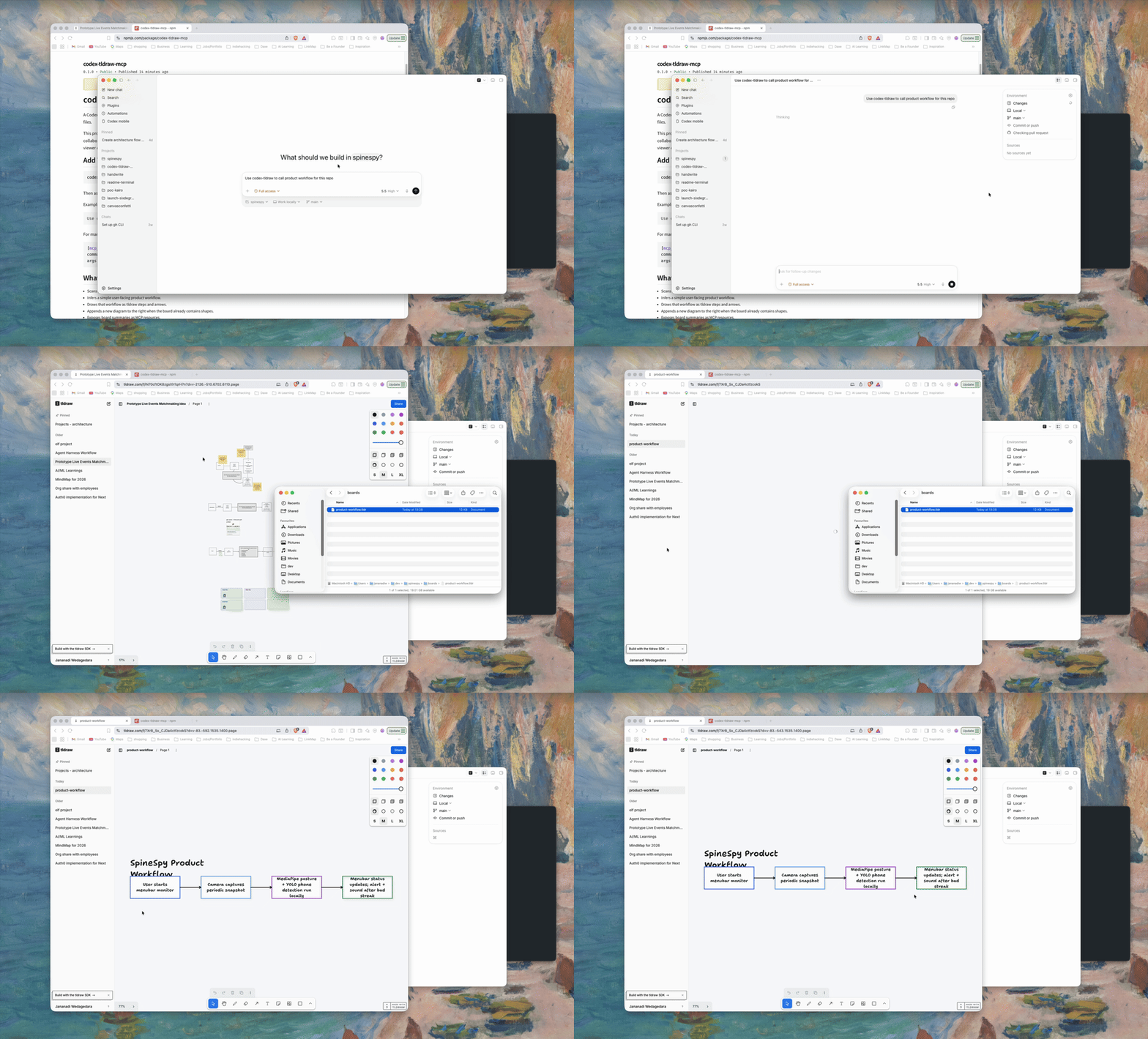
Then ask Codex to diagram the current repo:
```text
Use codex-tldraw to diagram this repo.
```
Reverse-engineer its runtime architecture:
```text
Use codex-tldraw to show how this repo works across its main components.
Show the main flow first, keep short errors inside components, and label each interaction once.
```
Or ask for a diagram directly:
```text
Use codex-tldraw to draw a password reset state machine.
```
Create a trackable JavaScript or TypeScript module graph:
```text
Use codex-tldraw to create a code graph for this repo.
```
After the code changes, compare it with the saved graph:
```text
Use codex-tldraw to preview code graph drift, then mark stale elements.
```
The default output is:
```text
<repo>/boards/main.tldr
```
Open the generated board in a tldraw-compatible viewer.
## What You Get
- A repo-local `.tldr` board that stays with the project it explains.
- A user-facing product workflow inferred from package metadata and source text.
- A prompt-driven offline canvas API for drawing workflows, state machines, plans, and architecture sketches that are not tied to repo scanning.
- Simple architecture diagrams showing the main flow first, with supporting services below it.
- A trackable JavaScript and TypeScript module/import graph with drift detection.
- Red markers for stale nodes and edges, orange markers for changed modules, and a report of new elements.
- tldraw steps and arrows laid out left to right.
- Non-destructive updates: existing boards get the next diagram appended to the right.
- MCP resources for listing boards and reading board summaries.
For a handwriting font app, the workflow may be inferred as:
```text
User writes alphabet on paper -> User takes a photo of the paper -> User uploads the image -> AI generates a font -> User downloads a .ttf file
```
## Manual Configuration
If you prefer editing Codex MCP config directly:
```toml
[mcp_servers.codex-tldraw]
command = "npx"
args = ["-y", "codex-tldraw-mcp"]
```
## Tools
- `diagram_repo`: scans a repo and appends a product workflow diagram to `<repo>/boards/<boardName>.tldr`.
- `draw_canvas`: appends a prompt-provided workflow, state machine, architecture sketch, or plan to `<repo>/boards/<boardName>.tldr`.
- `draw_architecture`: appends a simple codebase architecture view with a main flow, supporting components, actions, calls, and errors.
- `diagram_code_graph`: scans repository-local JavaScript and TypeScript modules and appends a trackable import graph.
- `compare_code_graph`: previews drift or marks changed and stale elements on an existing trackable code graph.
- `list_boards`: lists boards under a repo's `boards/` directory.
- `read_board_summary`: summarizes generated diagrams and shape counts.
Each tool accepts an optional `repoPath`. Relative paths are resolved from the MCP server working directory.
Board resources list and read boards from the most recent `repoPath` used by a tool call. Before any tool call, resources default to the MCP server working directory.
### Code Graph Drift
`diagram_code_graph` stores stable repository-relative identities and fingerprints in MCP-owned shape metadata. Each source module becomes a node. Static imports, dynamic imports, re-exports, and CommonJS `require` calls between repository modules become edges.
Run `compare_code_graph` after the repository changes. Preview mode is the default and does not write the board:
```text
Compare the current code with the newest code graph on boards/main.tldr.
```
To update the board, ask Codex to apply the drift markers or pass `applyMarkers: true`. The comparison uses four states:
- `unchanged`: the stored identity and fingerprint still match.
- `changed`: the module still exists, but its exports or local import relationships changed.
- `stale`: the board contains an element that no longer exists in the current code graph.
- `new`: the current graph contains an element that is absent from the board.
Stale elements become red and dashed. Changed modules become orange and dashed. New elements appear in the tool result; v0.4.0 does not insert or rearrange them. Re-running the comparison restores the original generated style when code matches again.
The comparison changes only MCP-generated graph styling and metadata. It preserves positions, sizes, labels, manual shapes, and other diagrams on the board, and it restores each element's prior color when drift clears. Boards created by `diagram_repo`, `draw_canvas`, or an older release do not contain trackable code-graph metadata; create a graph with `diagram_code_graph` before comparing drift.
The v0.4.0 scanner supports `.js`, `.jsx`, `.mjs`, `.cjs`, `.ts`, `.tsx`, `.mts`, and `.cts` modules. It reports unresolved relative imports and counts external imports without drawing external packages. It models module/import relationships, not runtime call graphs.
### Prompt-Driven Diagrams
`draw_canvas` does not scan source files. The current repository is only the storage location for the generated board.
Example prompts:
```text
Use codex-tldraw to draw the auth flow:
Visitor opens login -> chooses email or SSO -> completes MFA -> lands in dashboard.
```
```text
Use codex-tldraw to make a state machine for password reset:
Idle -> Reset requested -> Email sent -> Token verified -> Password updated.
```
```text
Use codex-tldraw to append an architecture diagram for this plan:
Web app calls API gateway, API gateway calls worker queue, worker writes generated files to object storage.
```
### Simple Architecture
`draw_architecture` helps a new reader understand how work moves across a codebase. Codex inspects the code first, then sends the renderer a small model:
- The main user flow becomes a straight row of boxes.
- Supporting services sit below the component that calls them.
- Each component shows at most three important actions and two short errors.
- Each interaction gets one concise arrow; request and response share that arrow.
- Source evidence is optional metadata and does not clutter the diagram.
Keep libraries and helper modules inside component actions. For example, "validate the response with Zod" belongs inside the API component rather than becoming a separate Zod component. Meaningful arrows have bindings to both endpoint shapes.
See [Architecture Diagrams](docs/architecture-diagrams.md) for the analysis contract and input model.
## Feedback
This project is early and feedback is useful. Please open an issue if:
- The generated workflow misses the real product flow.
- A board does not open in your tldraw-compatible viewer.
- Code graph drift reports an incorrect module or import relationship.
- You have a messy repo where a PM and engineer need a clearer shared map.
Use the GitHub issue templates for bugs, feature requests, and real-world examples.
## Why This Exists
This project is snapshot-only. It does not control a live browser canvas or provide live collaboration. It writes board files to the repository being diagrammed so a tldraw-compatible viewer can open them later.
The official tldraw MCP App is designed for hosts that can render an interactive tldraw canvas inside the chat context. In Codex Desktop, tool discovery worked in testing, and the tldraw `search` tool returned Editor API details, shape types, and helpers. The live `exec` path did not work: every call timed out after 30 seconds, including a read-only call to count the current page shapes.
That failure mode suggested a host compatibility gap, not a tldraw file format problem. Codex can reliably call local stdio MCP tools and inspect generated files, but it does not currently provide the same embedded interactive MCP App canvas path used by hosts such as Cursor.
This server is the Codex-first fallback. Instead of trying to drive a live canvas, it generates `.tldr` snapshots on disk through a normal stdio MCP tool call. The result is less interactive, but it works reliably in Codex and keeps the generated board with the repository it explains.
## Security
This is a local filesystem tool. It reads source files from `repoPath` and writes `.tldr` files under `repoPath/boards`.
To restrict access to specific directories, set `TLDRAW_MCP_ALLOWED_ROOTS` to a path-delimited allowlist:
```toml
[mcp_servers.codex-tldraw]
command = "npx"
args = ["-y", "codex-tldraw-mcp"]
env = { TLDRAW_MCP_ALLOWED_ROOTS = "/Users/me/dev:/Users/me/work" }
```
When the allowlist is set, `repoPath` must resolve inside one of those roots.
Generated `.tldr` files do not store absolute local repository paths in shape metadata. Trackable code graphs store repository-relative source paths.
## Local Development
This repo uses Bun for development:
```bash
bun install
bun run build
bun run smoke
```
Run the server from source:
```bash
bun run dev
```
Use a local build in Codex:
```toml
[mcp_servers.codex-tldraw]
command = "node"
args = ["/absolute/path/to/codex-tldraw-mcp/dist/index.js"]
```
## Publish
Build, test, and inspect the package contents:
```bash
bun install --frozen-lockfile
bun run build
bun run smoke
bun run check:package
```
Publishing is handled by `.github/workflows/publish-npm.yml` when a GitHub Release is published. The npm trusted publisher must allow `jananadiw/codex-tldraw-mcp`, workWhat people ask about codex-tldraw-mcp
What is jananadiw/codex-tldraw-mcp?
+
jananadiw/codex-tldraw-mcp is mcp servers for the Claude AI ecosystem. Local Codex MCP server for scanning repositories and writing tldraw product workflow diagrams. It has 21 GitHub stars and its last recorded update is dated 2026-08-05.
How do I install codex-tldraw-mcp?
+
You can install codex-tldraw-mcp by cloning the repository (https://github.com/jananadiw/codex-tldraw-mcp) or following the README instructions on GitHub. ClaudeWave also provides quick install blocks on this page.
Is jananadiw/codex-tldraw-mcp safe to use?
+
Our security agent has analyzed jananadiw/codex-tldraw-mcp and assigned a Trust Score of 95/100 (tier: Verified). See the full breakdown of passed checks and flags on this page.
Who maintains jananadiw/codex-tldraw-mcp?
+
jananadiw/codex-tldraw-mcp is maintained by jananadiw. The last recorded GitHub activity is dated 2026-08-05, with 0 open issues.
Are there alternatives to codex-tldraw-mcp?
+
Yes. On ClaudeWave you can browse similar mcp servers at /categories/mcp, sorted by popularity or recent activity.
Deploy codex-tldraw-mcp to your cloud
Ship this repo to production in minutes. Each platform spins up its own environment with editable env vars.
Maintain this repo? Add a badge to your README
Drop the badge into your GitHub README to show it's tracked on ClaudeWave. Each badge links back to this page and reflects the live Trust Score.
[](https://claudewave.com/repo/jananadiw-codex-tldraw-mcp)<a href="https://claudewave.com/repo/jananadiw-codex-tldraw-mcp"><img src="https://claudewave.com/api/badge/jananadiw-codex-tldraw-mcp" alt="Featured on ClaudeWave: jananadiw/codex-tldraw-mcp" width="320" height="64" /></a>More MCP Servers

Fair-code workflow automation platform with native AI capabilities. Combine visual building with custom code, self-host or cloud, 400+ integrations.

User-friendly AI Interface (Supports Ollama, OpenAI API, ...)

An open-source AI agent that brings the power of Gemini directly into your terminal.

The fastest path to AI-powered full stack observability, even for lean teams.

Real-time global intelligence dashboard. AI-powered news aggregation, geopolitical monitoring, and infrastructure tracking in a unified situational awareness interface

🕷️ An adaptive Web Scraping framework that handles everything from a single request to a full-scale crawl!