

Hand the browser work off: an MCP server where a decision model drives the page for your agent, so a flow costs one tool call instead of a turn per click. Ref-based element tables, code-checked assertions, zero-model macro replay. Speaks CDP to your Chrome.
- ✓Open-source license (MIT)
- ✓Actively maintained (<30d)
- ✓Clear description
- ✓Topics declared
- ✓Documented (README)
claude mcp add jev-ultrafast-mcp -- uvx jev-ultrafast-mcp{
"mcpServers": {
"jev-ultrafast-mcp": {
"command": "uvx",
"args": ["jev-ultrafast-mcp"]
}
}
}MCP Servers overview
# jev-ultrafast-mcp
[](https://github.com/jiawei686/jev-ultrafast-mcp/actions/workflows/ci.yml)
[](https://github.com/jiawei686/jev-ultrafast-mcp/blob/main/LICENSE)
[](https://github.com/jiawei686/jev-ultrafast-mcp/blob/main/pyproject.toml)
**English** · [简体中文](https://github.com/jiawei686/jev-ultrafast-mcp/blob/main/README.zh-CN.md)
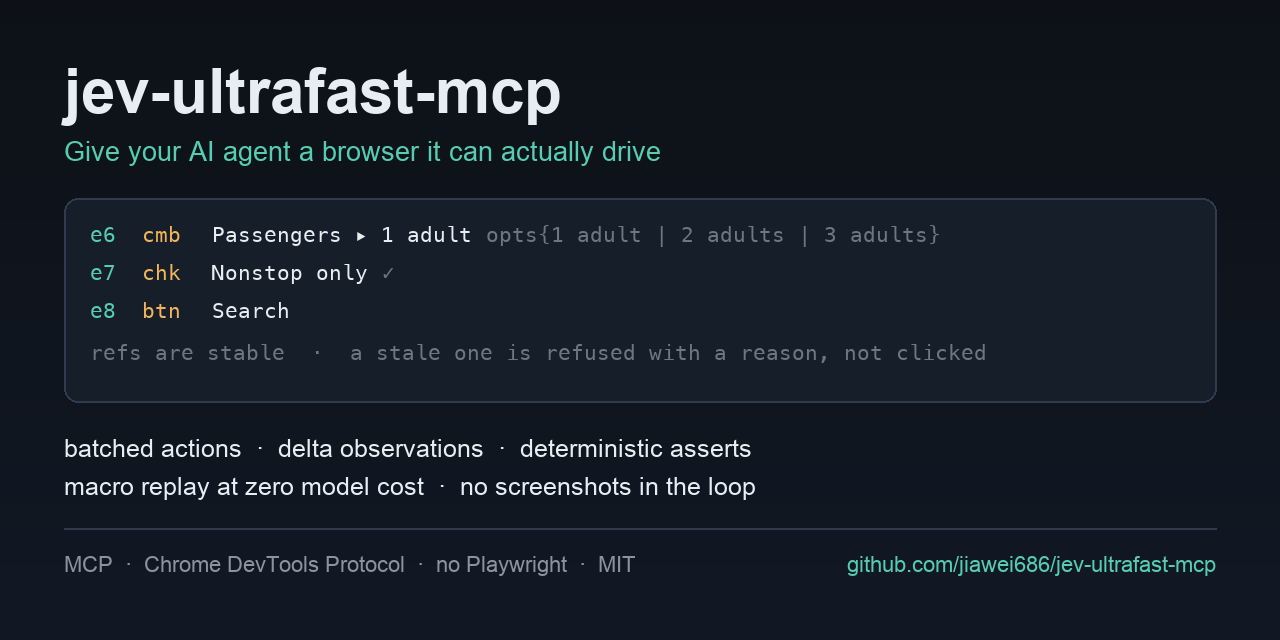
**Hand the browser work off — an MCP server that drives the page for your agent.**
One tool call instead of twenty. Three seconds instead of a minute. A cent instead of a frontier
model's context. And it never invents a target: it picks from what the page actually has, and the
server refuses rather than guesses.
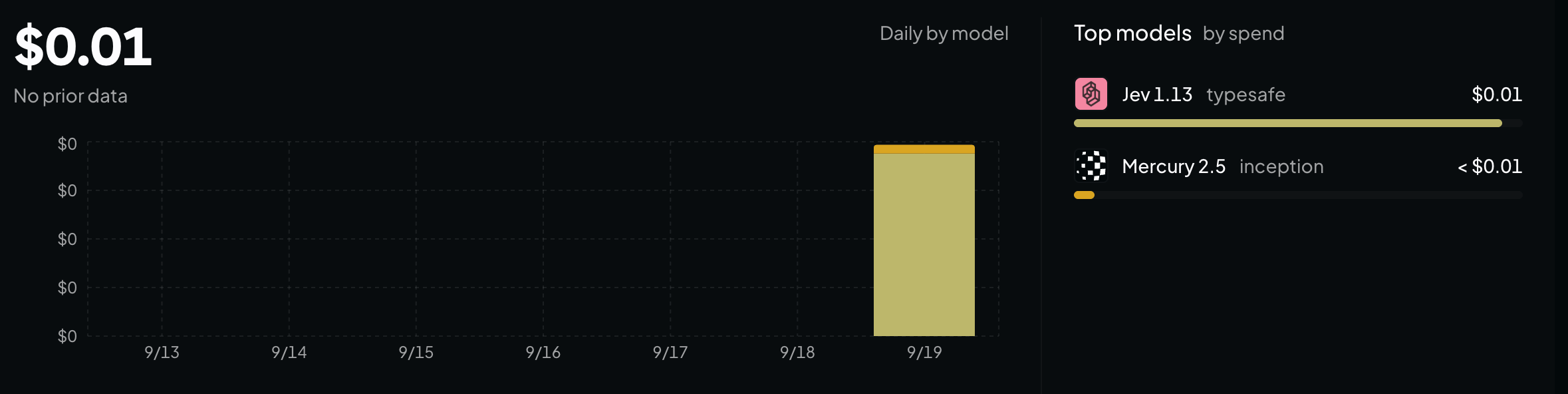
**What it cost.** A cent for the whole day, and a cent is all of it:
## Quick start
Three commands, then restart your client.
```bash
git clone https://github.com/jiawei686/jev-ultrafast-mcp.git
cd jev-ultrafast-mcp
python3 -m venv .venv
.venv/bin/pip install -e . # Windows: .venv\Scripts\pip install -e .
python scripts/install.py # finds your MCP clients and writes their config
```
`install.py` looks for WorkBuddy, Claude Code, Claude Desktop, Codex CLI, Cursor, VS Code, Cline,
Windsurf and Gemini CLI, and writes the format each one expects — **merging** into your existing
config and saving a `.bak` first. Needs Python ≥ 3.10 and any Chromium-family browser.
Restart the client, and then just say what you want:
> **You:** Set this form to 3 adults, tick *Nonstop only*, then submit it.
> **Your agent:** `browser_goal(goal=…, verify=[…])` — **one** call; the loop runs server-side, and
> the page is checked by code afterwards. ([what that costs](#cheap-and-fast-and-here-is-the-bill))
> **You:** Open example.com and tell me what the page says.
> **Your agent:** `browser_open` → reads the element table → answers.
> ([verbatim run](#what-a-session-actually-looks-like))
**Restarted and the tools are not there?** Some clients make you approve the server once. In
WorkBuddy that is *Connectors → Custom connectors → **Trust***. The approval is remembered against
the config itself, so if you later edit the config it asks once more.
---
## Cheap and fast, and here is the bill
A three-step goal on a real page, driven by `browser_goal`. This is everything your agent sent and
everything it got back — **one** turn, and the page never entered its context:
```
browser_goal(
goal="On this flight search form: set Passengers to 3 adults, tick the 'Nonstop only' "
"checkbox, then submit the search. Do not type into any city field.",
verify=[{"type": "text_contains", "text": "3 adults · nonstop"}],
)
goal: On this flight search form: set Passengers to 3 adults, …
status: done
steps: 3
turbo: 4 decisions · 14,626 tokens · 1.8s model + 1.1s page · 3.3s wall
trace:
1. SELECT e6 Passengers → ok (759ms model / 30ms browser)
2. TOGGLE e7 Nonstop only → ok (336ms model / 692ms browser)
3. CLICK e8 Search → ok (370ms model / 410ms browser)
4. DONE (conf 0.93)
verified: PASS
ok text_contains: '3 adults · nonstop' found in page text
```
**What the second time costs.** Nothing. The second time is a recorded macro, and a macro makes no
model calls at all — it does not even need a key.
**How long it took.** 3.3 s wall for the whole goal: 1.8 s of model, 1.1 s of page. Every run prints
that line itself, so the numbers are checkable rather than persuasive.
That run is not a mock-up. `scripts/turbo_check.py` reproduces it against a real Chrome and the real
model, and then **checks the page with code** rather than trusting the model's account of its own
work. The three actions — plus the reading and re-reading between them — all happened on the server.
Your agent spent one turn and never saw an element table.
The division of labour is the whole design decision, so it is yours to make per task:
| | agent drives | `browser_goal` drives |
|---|---|---|
| Tool calls for a 3-step flow | 6+ (observe, act, observe, act…) | **1** |
| Who holds the page in context | your agent | **the decision model, server-side** |
| Per-step cost | one agent turn | one typed request, no screenshot |
| Who names the target | the model writes a selector | **the model picks a `ref` from the page's own table** |
| If it goes wrong | a wrong click, usually silent | **the server refuses, with the reason** |
| Knowing it worked | the model's summary | **code-checked assertion, which wins the disagreement** |
| Second time around | run the model again | **macro replay, zero model calls** |
<details>
<summary><b>Installing it as a package, and the installer's flags</b></summary>
No checkout needed if you would rather install it as a package. It is on PyPI, so the name is
enough:
```bash
uvx jev-ultrafast-mcp # run it straight from PyPI, nothing installed
pip install jev-ultrafast-mcp # or install it yourself
```
A client config wants a stable interpreter path rather than `uvx`'s cache, so:
```bash
python3 -m venv ~/.jev-ultrafast-mcp/venv
~/.jev-ultrafast-mcp/venv/bin/pip install jev-ultrafast-mcp
```
That gives you a `jev-ultrafast-mcp` console script and a stable interpreter path to put in a
client config — verified against the latest `mcp` SDK on Python 3.13, every one of the ten tools
listed.
```bash
python scripts/install.py --list # what is installed, and the file each one reads
python scripts/install.py --print # show the config it would write, change nothing
python scripts/install.py -c cursor,codex # only these two
python scripts/install.py --headed # keep a visible browser window
python scripts/install.py --allow-domains example.com,*.example.org
python scripts/install.py --uninstall # take the entry back out
```
Runtime dependencies: `mcp`, `websockets`, `httpx`. No Playwright, no Selenium, no
`browser-harness`.
</details>
---
## What it is
Browser automation usually makes the *agent* do the driving: read the page, pick one element, act,
read again to see whether that worked. Ten clicks is ten turns, the page passes through the agent's
context every time, and a mis-click rarely announces itself.
This server can take that job instead. `browser_goal` is **one** tool call from your agent; the loop
runs here, server-side, with Jev — TypeSafe's decision model — choosing each step. The model never
writes a selector: it picks among the elements the page actually has, and the server refuses
anything that is not on the page rather than guessing. When it stops, `browser_assert` checks the
page it left behind in code, and a passing assertion outranks the model's own account of what it did.
Four things follow from that:
- **One call, not one per click.** The run above took a 3-step goal on a real page through
**4 decisions, 14,626 tokens, 1.8 s model + 1.1 s page, 3.3 s wall** — for one turn of your
agent's context.
- **Accurate by construction.** A target is a `ref` from a numbered table of what is on the page,
not a selector or a coordinate the model invented, and the action is re-checked against the page
before it runs.
- **Free after the first run.** Record the path once; replay costs zero model calls, works with no
key at all, and refuses to proceed when the page no longer matches.
- **Text, not pixels.** No screenshots, no HTML dumps. It speaks CDP straight to a Chrome you
already have — no Playwright, no Selenium, no screenshot pipeline.
Everything *except* `browser_goal` — `browser_open`, `browser_observe`, `browser_act`,
`browser_assert`, `browser_macro` — needs no key, no account, and no network beyond the page itself,
from any MCP client: WorkBuddy, Claude Code, Codex, Cursor or VS Code. If you would rather keep your
hands on the wheel, that whole surface is still here.
```
browser_open → element table → browser_act [refs] → browser_assert
```
Inspired by [`browser-use/jev-ultrafast`](https://github.com/browser-use/jev-ultrafast) and
TypeSafe's typed-question API. Independent project, not affiliated with either — see
[`docs/DESIGN.md`](https://github.com/jiawei686/jev-ultrafast-mcp/blob/main/docs/DESIGN.md) for what is different and why.
**Contents** ·
[Quick start](#quick-start) ·
[Cheap and fast](#cheap-and-fast-and-here-is-the-bill) ·
[What it is](#what-it-is) ·
[What a session looks like](#what-a-session-actually-looks-like) ·
[Connecting an agent](#connecting-an-agent) ·
[What you can ask it to do](#what-you-can-ask-it-to-do) ·
[What the agent reads](#what-the-agent-actually-reads) ·
[Why another browser MCP?](#why-another-browser-mcp) ·
[Tools](#tools) ·
[Configuration](#configuration) ·
[FAQ](#faq) ·
[Try it without an agent](#try-it-without-an-agent) ·
[See also](#see-also)
---
## What a session actually looks like
You say:
> Open example.com and tell me what the page says.
Your agent does this, and this is everything it sees:
```
browser_open("https://example.com")
[obs#1] https://example.com/ "Example Domain" scroll=0/216 reachable=1/1
e1 lnk More information...
browser_observe()
[delta#2] … 1 element
= no change (1 element)
```
Then it answers. No screenshot was taken, no HTML was dumped, and the page never entered a model's
context: your agent read the table and answered.
A more realistic one — searching a real site, with your agent doing the driving:
```
browser_open("https://duckduckgo.com")
e4 cmb* Search with DuckDuckGo ▸ ""
browser_act([{type, ref: "e4", text: "python asyncio tutorial"},What people ask about jev-ultrafast-mcp
What is jiawei686/jev-ultrafast-mcp?
+
jiawei686/jev-ultrafast-mcp is mcp servers for the Claude AI ecosystem. Hand the browser work off: an MCP server where a decision model drives the page for your agent, so a flow costs one tool call instead of a turn per click. Ref-based element tables, code-checked assertions, zero-model macro replay. Speaks CDP to your Chrome. It has 4 GitHub stars and its last recorded update is dated 2026-09-20.
How do I install jev-ultrafast-mcp?
+
You can install jev-ultrafast-mcp by cloning the repository (https://github.com/jiawei686/jev-ultrafast-mcp) or following the README instructions on GitHub. ClaudeWave also provides quick install blocks on this page.
Is jiawei686/jev-ultrafast-mcp safe to use?
+
Our security agent has analyzed jiawei686/jev-ultrafast-mcp and assigned a Trust Score of 95/100 (tier: Verified). See the full breakdown of passed checks and flags on this page.
Who maintains jiawei686/jev-ultrafast-mcp?
+
jiawei686/jev-ultrafast-mcp is maintained by jiawei686. The last recorded GitHub activity is dated 2026-09-20, with 0 open issues.
Are there alternatives to jev-ultrafast-mcp?
+
Yes. On ClaudeWave you can browse similar mcp servers at /categories/mcp, sorted by popularity or recent activity.
Deploy jev-ultrafast-mcp to your cloud
Ship this repo to production in minutes. Each platform spins up its own environment with editable env vars.
Maintain this repo? Add a badge to your README
Drop the badge into your GitHub README to show it's tracked on ClaudeWave. Each badge links back to this page and reflects the live Trust Score.
[](https://claudewave.com/repo/jiawei686-jev-ultrafast-mcp)<a href="https://claudewave.com/repo/jiawei686-jev-ultrafast-mcp"><img src="https://claudewave.com/api/badge/jiawei686-jev-ultrafast-mcp" alt="Featured on ClaudeWave: jiawei686/jev-ultrafast-mcp" width="320" height="64" /></a>More MCP Servers

Fair-code workflow automation platform with native AI capabilities. Combine visual building with custom code, self-host or cloud, 400+ integrations.

User-friendly AI Interface (Supports Ollama, OpenAI API, ...)

An open-source AI agent that brings the power of Gemini directly into your terminal.

Real-time global intelligence dashboard. AI-powered news aggregation, geopolitical monitoring, and infrastructure tracking in a unified situational awareness interface

🕷️ An adaptive Web Scraping framework that handles everything from a single request to a full-scale crawl! Don't be shy, join here: https://discord.gg/EMgGbDceNQ

The fastest path to AI-powered full stack observability, even for lean teams.