

Agent-first analytics for MCP + web traffic — query, instrument and configure from a terminal or an MCP client.
- ✓Actively maintained (<30d)
- ✓Clear description
- ✓Documented (README)
- !Licence file present but not machine-readable
git clone https://github.com/jyswee/analyga{
"mcpServers": {
"analyga": {
"command": "node",
"args": ["/path/to/analyga/dist/index.js"]
}
}
}MCP Servers overview
# analyga
[](https://www.npmjs.com/package/analyga)
[](#mcp-server)
[](#why-this-exists)
<!-- TODO(smithery): enable once the listing is live.
[](https://smithery.ai/servers/jyswee/analyga)
-->
**Agent-first analytics for MCP + web traffic — query, instrument and configure from a terminal or an MCP client. No browser, no dashboard.**
> **A dashboard for humans. `tga` for your agents.**
One analytics surface for both halves of modern traffic: the **web** visits your site still gets, and the **agent/MCP** calls that increasingly drive it. Analytics tools assume a human staring at a chart — but increasingly the thing that needs the numbers is an agent: it fired the events, it wants to know whether they landed, and it wants five numbers back, not a dashboard to render. `analyga` is the surface the agent drives itself: one install, and it queries stats and funnels across web and MCP, sends server-side events, and reads its own schema — all as structured JSON, none of it screen-scraped.
**Works with:** Claude Code · Cursor · Cline · Windsurf · Aider · Codex · any MCP client
[](https://analyga.com/#demo)
*One agent, one terminal — query to funnel in 60 seconds. [Watch the full demo](https://analyga.com/#demo).*
## See it in action
No mockups — every clip is a live `tga` session against a seeded tenant. Click any GIF for the full-res video.
| Query → funnel | Agent self-signup | Server-side ingest |
|---|---|---|
| [](https://prodmedia.tyga.host/public/tyga.cloud/landing/analyga.com/analyga-demo-1.mp4) | [](https://prodmedia.tyga.host/public/tyga.cloud/landing/analyga.com/analyga-demo-2.mp4) | [](https://prodmedia.tyga.host/public/tyga.cloud/landing/analyga.com/analyga-demo-3.mp4) |
| One agent, one terminal, 60s | Keyless bootstrap — no admin in the loop | Send events with a stable `--id` |
| MCP client | The human dashboard |
|---|---|
| [](https://prodmedia.tyga.host/public/tyga.cloud/landing/analyga.com/analyga-demo-4.mp4) | [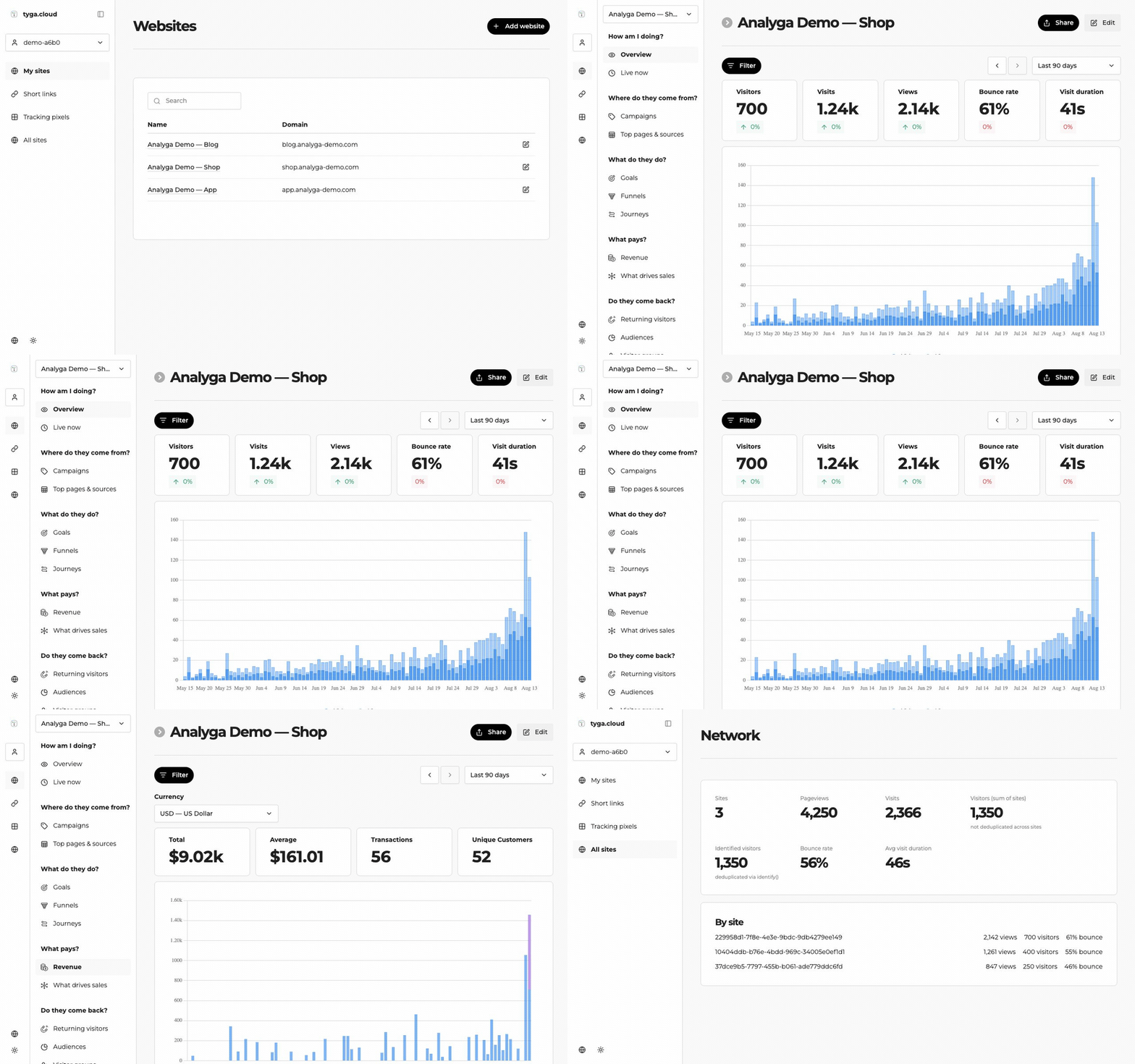](https://prodmedia.tyga.host/public/tyga.cloud/landing/analyga.com/analyga-demo-5.mp4) |
| 13 native tools in Claude Code / Cursor | Everything the agent captures, in one real-time UI |
## Install
```bash
npm install -g analyga
```
The npm package is `analyga`; the command is `tga`.
## Quick Start
```bash
# No account yet? Create a tenant and its first key — no card, no admin in the loop
tga signup --slug acme --name "Acme" --username you --password <8+ chars>
# Point at a tenant
tga login --key <your-api-key> # or set ANALYGA_KEY
# Confirm WHICH tenant you are about to write to (shows tenant + key scope for a tga_ key)
tga whoami
# What can this credential see?
tga websites
# Five numbers, not a dashboard
tga stats <websiteId> --from 7d
# Full reference
tga --help
```
Every command takes `--json` — the machine surface is a first-class citizen, not an afterthought:
```bash
tga stats <websiteId> --from 7d --json
```
## Read the contract, don't guess flags
```bash
tga agent-schema --json
```
That returns every command, argument, flag, type, whether it is read-only, and **the full list of error codes** — generated from the same table that drives the parser, the help text and the MCP tools, so it cannot drift from what the CLI actually does. If it is not in the schema, it does not exist.
## Query — stats, events, funnels
Ask the questions an agent actually asks after it ships: did the events land, and did anyone make it through the flow?
```bash
# Traffic and top-line stats for a window
tga stats <websiteId> --from 7d
tga events <websiteId> --from 24h
# Define a funnel once, then run it whenever
tga funnel define <websiteId> --name signup --steps "/,/pricing,/signup"
tga funnel list <websiteId>
tga funnel run <funnelId> --from 30d
# Cross-site rollup for a team
tga network <teamId> --from 7d
```
All read-only, all `--json`-able — an agent branches on the numbers instead of parsing a chart.
## Identity — pass `--id` or your agents collapse into one visitor
Anonymous identity is derived from IP and user-agent. Agent traffic shares both — one CLI version means one user-agent, and agents often share an egress IP — so **without a stable id every agent behind that IP collapses into a single visitor.** It cannot be backfilled.
```bash
tga send <websiteId> --name cli_signup --id <stable-user-id> --data '{"source":"cli"}'
```
## Sending events server-side
```bash
# Mint a per-website ingest key first (shown ONCE; regenerating rotates it)
tga ingest-key create <websiteId>
tga send <websiteId> --name cli_signup --id <stable-user-id> \
--ingest-key <per-site-key> --data '{"plan":"pro"}'
tga ingest health <websiteId> --from 24h # did anything actually land?
tga ingest-key revoke <websiteId> # kill server-side ingest for this site
```
**A discarded event still answers HTTP 200.** The ingest endpoint returns `{"beep":"boop"}` when it drops an event as a bot. This CLI treats that as a **hard failure with a hint** rather than reporting success — so an agent never believes a dropped event succeeded.
Server-side ingest uses a **separate** per-website key (`ANALYGA_INGEST_KEY` or `--ingest-key`), scoped to one website so it can only ever write that site's traffic. Mint one with `tga ingest-key create <websiteId>` and revoke it with `tga ingest-key revoke <websiteId>` — the plaintext is shown once and only its hash is stored.
## Billing — hand a human a checkout URL
An agent authenticates with its tenant key, names a plan, and gets back a Stripe Checkout URL to pass to a human who completes payment:
```bash
tga billing checkout --plan pro
```
The tenant is pinned server-side from the key. The free plan (and any plan without a configured price) is not purchasable, and internal sister-stack tenants are never billed.
## MCP Server
Prefer tools over a CLI? `analyga` ships an MCP server. Point Claude Code (or any MCP client) at it and your agent gets **13 native tools** covering stats, events, funnels, websites, identity, server-side ingest (including minting/revoking ingest keys) and billing checkout.
```bash
tga mcp-serve # stdio, for Claude Code / Cursor / Cline / Windsurf
```
For clients that use a JSON config, pass your key via `ANALYGA_KEY`. The MCP server runs outside your project directory, so it will not pick up `.analyga/config.json`:
```json
{
"mcpServers": {
"analyga": {
"command": "tga",
"args": ["mcp-serve"],
"env": { "ANALYGA_KEY": "your-key" }
}
}
}
```
Read-only tools are flagged, so a client will not prompt a human to confirm a read. Every tool declares an `outputSchema`, so an agent never parses prose or guesses field names — and a tool result and `--json` output are **the same bytes**, one client across two surfaces. A session with no key sees only the onboarding surface — how to connect, plus `analyga_signup` to bootstrap its own tenant — rather than the full toolset.
<!-- TODO(remote-mcp): publish the hosted SSE endpoint and fill in the real URL.
### Remote MCP — zero install
Claude Web, Claude Desktop, Raycast, or any hosted MCP client can connect straight to the remote server — nothing to install:
URL: https://mcp.analyga.com/sse <- TODO: confirm prod hostname (QA today: https://mcp-qa.analyga.hq.tyga.dev/sse)
Auth: Authorization: Bearer YOUR_API_KEY
-->
## Error codes
Failures carry a stable `code` and a distinct exit code, so an agent can branch on the outcome instead of string-matching a message.
| Exit | Meaning | What to do |
|---|---|---|
| 2 | usage | fix the call, do not retry |
| 3 | auth | fix the credential |
| 4 | permission | do not retry, escalate |
| 5 | not found | check the id |
| 6 | validation | fix the payload |
| 7 | rate limited | back off and retry |
| 8 | network | retry is reasonable |
| 9 | server | retry once, then report |
Exit `1` is reserved for unhandled crashes, so a classified failure is never ambiguous. Where the server can say what to do next, it comes back as a `hint` on its own line.
## Configuration
Resolved highest-priority first:
1. `--key` flag
2. `ANALYGA_KEY` environment variable
3. `.analyga/config.json` in the current directory
`tga whoami` reports **which of these won**. On a multi-tenant platform, "which tenant am I about to write to" is the question that matters most. `.analyga/` holds a live credential — keep it out of version control.
## Features
- **Self-serve signup** — `tga signup` creates a tenant and its first API key with no card and no admin in the loop; keyless, so it works before you have a credential
- **Tenant-aware identity** — `tga whoami` shows the pinned tenant and key scope for a `tga_` key, or the user and teams for a session login
- **Stats & events** — top-line traffic and event counts over any window, all read-only, all `--json`
- **Funnels** — define once, run anytime; step-by-step conversion for a site
- **Network rollup** — cross-site stats for a whole team
- **Server-side ingest** — `tga send` with a scoped per-site key; mint/rotate/revoke keys with `tga ingest-key create|revoke`; dropped-as-bot events fail loWhat people ask about analyga
What is jyswee/analyga?
+
jyswee/analyga is mcp servers for the Claude AI ecosystem. Agent-first analytics for MCP + web traffic — query, instrument and configure from a terminal or an MCP client. It has 0 GitHub stars and its last recorded update is dated 2026-08-14.
How do I install analyga?
+
You can install analyga by cloning the repository (https://github.com/jyswee/analyga) or following the README instructions on GitHub. ClaudeWave also provides quick install blocks on this page.
Is jyswee/analyga safe to use?
+
Our security agent has analyzed jyswee/analyga and assigned a Trust Score of 72/100 (tier: OK). See the full breakdown of passed checks and flags on this page.
Who maintains jyswee/analyga?
+
jyswee/analyga is maintained by jyswee. The last recorded GitHub activity is dated 2026-08-14, with 0 open issues.
Are there alternatives to analyga?
+
Yes. On ClaudeWave you can browse similar mcp servers at /categories/mcp, sorted by popularity or recent activity.
Deploy analyga to your cloud
Ship this repo to production in minutes. Each platform spins up its own environment with editable env vars.
Maintain this repo? Add a badge to your README
Drop the badge into your GitHub README to show it's tracked on ClaudeWave. Each badge links back to this page and reflects the live Trust Score.
[](https://claudewave.com/repo/jyswee-analyga)<a href="https://claudewave.com/repo/jyswee-analyga"><img src="https://claudewave.com/api/badge/jyswee-analyga" alt="Featured on ClaudeWave: jyswee/analyga" width="320" height="64" /></a>More MCP Servers

Fair-code workflow automation platform with native AI capabilities. Combine visual building with custom code, self-host or cloud, 400+ integrations.

User-friendly AI Interface (Supports Ollama, OpenAI API, ...)

An open-source AI agent that brings the power of Gemini directly into your terminal.

Real-time global intelligence dashboard. AI-powered news aggregation, geopolitical monitoring, and infrastructure tracking in a unified situational awareness interface

The fastest path to AI-powered full stack observability, even for lean teams.

🕷️ An adaptive Web Scraping framework that handles everything from a single request to a full-scale crawl!