

MCP server that lets AI agents drive a live, persistent Isaac Sim session: load any robot, set joint targets and poses, tune gains live, run joint range tests, take screenshots, and launch Isaac Lab training runs. Kit stays up between calls, so each experiment costs a frame instead of a full relaunch.
- ✓Open-source license (MIT)
- ✓Actively maintained (<30d)
- ✓Clear description
- ✓Topics declared
- ✓Documented (README)
claude mcp add dex-isaac-mcp -- python -m -e{
"mcpServers": {
"dex-isaac-mcp": {
"command": "python",
"args": ["-m", "dex_isaac_mcp"]
}
}
}MCP Servers overview
# dex-isaac-mcp
<!-- mcp-name: io.github.Milokucia/dex-isaac-mcp -->
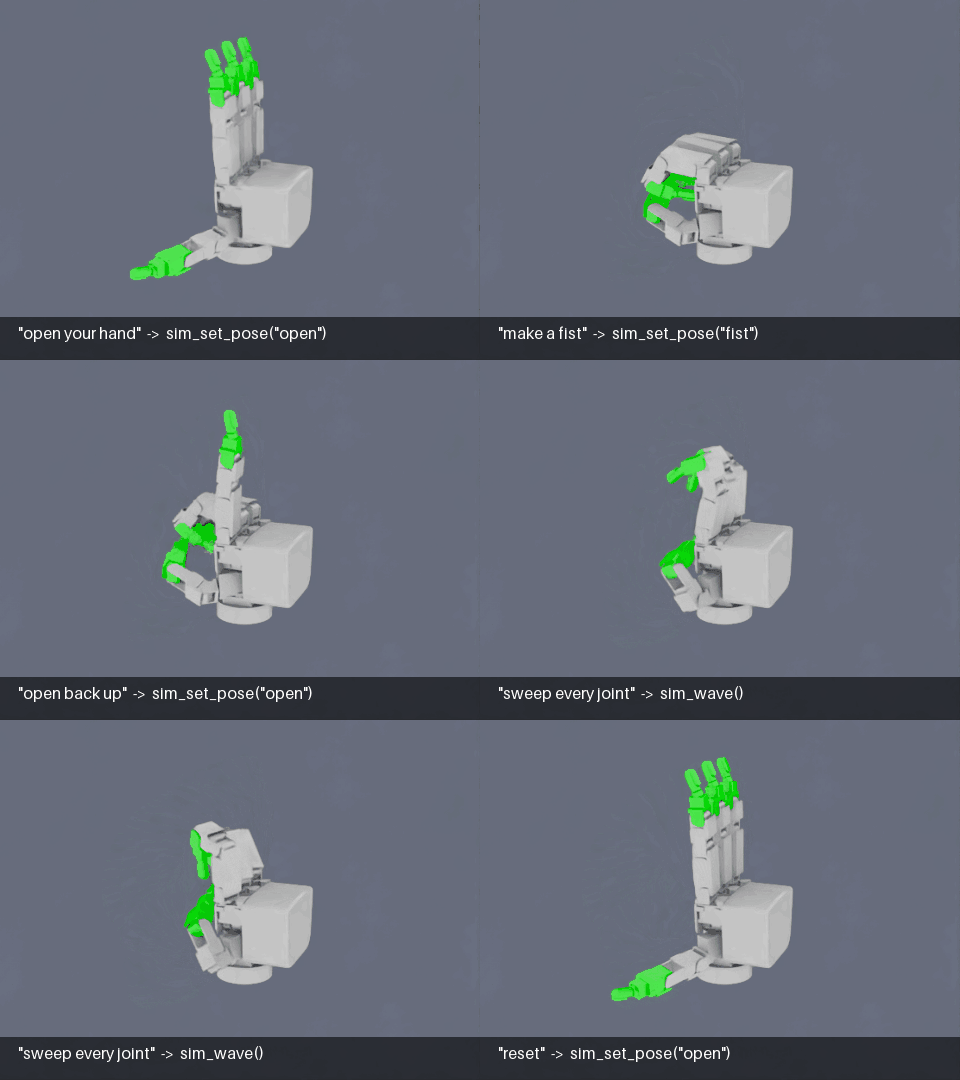
*Recorded headless with the server's own tools (`sim_frame_robot`, `sim_set_backdrop`, `sim_record_start`), driving the Allegro hand example. Each caption is the request and the tool call it became.*
An [MCP](https://modelcontextprotocol.io) server that lets an AI agent (Claude Code, or any MCP client) drive a **live, persistent Isaac Sim session** and launch **Isaac Lab training runs**.
Kit takes tens of seconds to boot. If every experiment is a fresh launch, most of your time goes to waiting. Here Kit starts once inside a daemon and stays up. Each tool call lands in that running session, so changing a gain, stepping physics or taking a screenshot costs a frame, not a relaunch.
```
MCP client ──stdio──▶ dex_isaac_mcp (host, plain python)
│ newline-delimited JSON over a Unix socket
▼
scripts/simd.py (Isaac Lab container, Kit stays up)
└─ one articulation, described by a robot JSON
```
- **Any articulated robot.** Point it at a USD and a small JSON config. Franka and Allegro examples are included.
- **Normalized joint control.** Targets are `0..1`, where 0 is a joint's lower limit and 1 its upper limit, so agents don't need to know radians or meters.
- **Named poses** per robot (`home`, `fist`, …), which can be blended part-way.
- **Headless capture and GIF recording** from an auto-framed camera, with captions. The clip above was made this way.
- **Props:** spawn a table, a ball or a USD into the running scene and read back where they settle.
- **Measurements:** joint state, per-joint travel and tracking error, a range test that finds blocked joints, and parameter sweeps inside one session.
- **Training control:** each run is a detached `docker compose run`. You can poll its status, TensorBoard scalars, checkpoints and logs.
## How it differs from other Isaac Sim MCP servers
[NVIDIA's official Isaac Sim MCP](https://docs.isaacsim.omniverse.nvidia.com/latest/development_tools/isaac_sim_mcp.html) is a documentation search for coding assistants, and works well alongside this one. Servers like [`isaacsim-mcp-server`](https://github.com/InstinctRobotics/isaacsim-mcp-server) and [`omni-mcp/isaac-sim-mcp`](https://github.com/omni-mcp/isaac-sim-mcp) run inside the Isaac Sim GUI and cover scene building broadly. This one runs headless, as a daemon in Docker, and focuses on tuning, measuring and training one robot.
| | NVIDIA Isaac Sim MCP | In-GUI servers (`isaacsim-mcp-server`, `omni-mcp`) | **dex-isaac-mcp** |
|---|---|---|---|
| What it is | Docs and code search | Kit extension inside a running Isaac Sim | External daemon; Kit stays up in a container |
| Controls the simulation | No | Yes | Yes |
| Headless / remote GPU box | n/a | Needs the GUI | Yes: headless capture, Docker, Unix socket |
| Scene building (lights, materials, sensors, asset library) | n/a | Broad | Minimal: primitive and USD props |
| Robot setup | n/a | Built-in robot library | Any USD plus a small JSON config (joints, poses, couplings, gains) |
| Measurement | n/a | Joint and prim state | Range tests that find blocked joints, tracking error, sweeps that restore the original value |
| Live tuning | n/a | Not documented | PD gains, effort, software mimic couplings |
| Isaac Lab training | n/a | Not documented | Launch, poll, TensorBoard metrics, checkpoints, stop |
| Recording | n/a | Camera captures | Captioned GIFs from an auto-framed camera, headless |
| Platform | Any | Wherever Isaac Sim runs | Linux, NVIDIA GPU, Docker, NGC |
**Pick an in-GUI server** to build a scene by talking to it, interactively, with a wide robot and asset library.
**Pick this one** to have an agent tune, debug and train a specific robot (your own, from a USD), unattended or on a remote box, with numbers it can act on instead of only screenshots.
## Requirements
- Linux with an NVIDIA GPU that Isaac Sim supports, plus the NVIDIA Container Toolkit
- Docker with the Compose plugin
- An NGC login to pull the Isaac Lab image: `docker login nvcr.io` (user `$oauthtoken`, password: your NGC API key)
- Python ≥ 3.10 on the host, for the MCP server only
## Quick start
```bash
git clone <this repo> dex-isaac-mcp && cd dex-isaac-mcp
# 1. Build the image (Isaac Lab 2.3.2 base, pinned by digest)
cd docker && docker compose build && cd ..
# 2. Install the host-side server, editable so it finds this clone
pip install -e . # add [metrics] for train_metrics: pip install -e '.[metrics]'
# 3. Register it with Claude Code
claude mcp add isaac -- python -m dex_isaac_mcp
# 4. Allow the container to open windows (once per login; needed for screenshots)
xhost +local:docker
```
Then ask the agent something like *"start the sim with the Franka, move it to ready and show me a screenshot."* It will call `sim_up`, `sim_set_pose`, `sim_step` and `sim_screenshot`.
**From PyPI instead:** `pip install dex-isaac-mcp`. The daemon still runs from a clone (it needs `docker/` and `scripts/simd.py`), so point the server at it:
```bash
claude mcp add isaac -e ISAAC_MCP_HOME=/abs/path/dex-isaac-mcp -- dex-isaac-mcp
```
Other MCP clients can launch `python -m dex_isaac_mcp` (or the `dex-isaac-mcp` script) over stdio.
The first `sim_up` takes several minutes: Kit builds its shader cache and downloads Nucleus assets. Later starts are much faster.
### Running the daemon by hand
`sim_up` deletes its container (`--rm`) when the daemon exits, so a crash on startup takes its traceback with it. To see the error, run the daemon in the foreground:
```bash
cd docker
docker compose run --rm simd scripts/simd.py --gui --robot examples/robots/franka.json
docker compose run --rm simd scripts/simd.py --headless --usd /path/in/container/robot.usd
docker compose run --rm simd scripts/simd.py --sliders --robot examples/robots/allegro_hand.json
```
`--sliders` opens an omni.ui panel with one slider per driven joint. The socket stays live alongside it.
## Tools
### Session
| Tool | What it does |
|---|---|
| `sim_status` | Whether the daemon is up, plus its robot, driven joints, poses, couplings and gains |
| `sim_up` | Start the daemon container (`robot`, `usd`, `gui`, `ground`, `extra_args`) and wait until it answers. Does nothing if it is already up |
| `sim_down` | Stop the daemon |
| `sim_reload` | Restart with a different spawn property: robot, USD, `pos_iters`, self-collision |
### Inspect
| Tool | What it does |
|---|---|
| `sim_inspect_joints` | A USD's articulation DOFs, its loop-closure joints (excluded from the articulation) and its articulation roots. Reads the file, so it shows edits saved from the GUI |
| `sim_get_joint_state` | Positions and velocities, plus driven joints' normalized positions and limits |
| `sim_get_stats` | Per-joint travel and mean tracking error since the last reset |
| `sim_screenshot` | Viewport capture, returned as an image. Needs `gui=True` |
| `sim_set_camera` | Point the viewport camera |
### Drive
| Tool | What it does |
|---|---|
| `sim_set_targets` | Normalized targets, as a full vector or `{joint: value}` |
| `sim_list_poses` / `sim_set_pose` | Named poses from the robot config. `amount` blends toward a pose, starting from the lower limits or from the current targets |
| `sim_step` | Advance N physics steps (default dt 1/120 s) |
| `sim_play` | Run continuously, or pause |
| `sim_wave` | Sweep every driven joint through its range and return travel stats |
| `sim_range_test` | Drive every joint from its lower limit toward a target and report the fraction of travel reached. Below 0.9 counts as blocked (self-collision, a binding linkage, too little effort) |
### Scene
| Tool | What it does |
|---|---|
| `sim_spawn_object` | Add a prop to the live scene: `cuboid`, `sphere`, `cylinder`, `capsule`, `cone` or a USD file, with collision. `static` for a fixed table or wall, `kinematic` for a body contact cannot move |
| `sim_list_objects` | Every prop's current world pose |
| `sim_remove_object` | Delete a prop |
### Capture and record
These work headless, with no GUI or viewport. They use a dedicated camera that is independent of the GUI view.
| Tool | What it does |
|---|---|
| `sim_frame_robot` | Aim the capture camera so the whole robot fills the frame, from a given direction. `raise_frac` leaves room for captions |
| `sim_set_capture_camera` | Place the capture camera by hand |
| `sim_set_backdrop` | A plain colored panel behind the robot. Use it with `ground=False` for clean footage |
| `sim_capture` | One frame, returned as an image |
| `sim_record_start` / `sim_record_caption` / `sim_record_stop` | Record every Nth physics step, with a caption drawn on each frame, to an animated GIF under `.cache/recordings/`. Anything that steps the sim is recorded |
### Tune
| Tool | What it does |
|---|---|
| `sim_set_params` | Live `stiffness` / `damping` / `effort` on the driven joints |
| `sim_set_coupling` | Live software-mimic ratios, keyed by follower joint |
| `sim_sweep` | Try several values of one live parameter (`stiffness`, `damping`, `effort`, `coupling:<follower>`), running `wave` or `range` for each. Restores the original value afterwards. A diverging solver is recorded as a result rather than raised |
### Train
| Tool | What it does |
|---|---|
| `train_start` | Launch a headless training run in its own container and return at once. `extra_args` go to the script verbatim (e.g. Hydra overrides). `device` pins a GPU |
| `train_list` | Running and recent runs, and log directories holding checkpoints |
| `train_status` | Container state, checkpoints and latest scalars |
| `train_logs` | Tail a running container's output |
| `train_metrics` | List TensorBoard tags, or get a downsampled series for one tag |
| `train_checkpoints` | ChWhat people ask about dex-isaac-mcp
What is Milokucia/dex-isaac-mcp?
+
Milokucia/dex-isaac-mcp is mcp servers for the Claude AI ecosystem. MCP server that lets AI agents drive a live, persistent Isaac Sim session: load any robot, set joint targets and poses, tune gains live, run joint range tests, take screenshots, and launch Isaac Lab training runs. Kit stays up between calls, so each experiment costs a frame instead of a full relaunch. It has 0 GitHub stars and its last recorded update is dated 2026-10-03.
How do I install dex-isaac-mcp?
+
You can install dex-isaac-mcp by cloning the repository (https://github.com/Milokucia/dex-isaac-mcp) or following the README instructions on GitHub. ClaudeWave also provides quick install blocks on this page.
Is Milokucia/dex-isaac-mcp safe to use?
+
Our security agent has analyzed Milokucia/dex-isaac-mcp and assigned a Trust Score of 95/100 (tier: Verified). See the full breakdown of passed checks and flags on this page.
Who maintains Milokucia/dex-isaac-mcp?
+
Milokucia/dex-isaac-mcp is maintained by Milokucia. The last recorded GitHub activity is dated 2026-10-03, with 0 open issues.
Are there alternatives to dex-isaac-mcp?
+
Yes. On ClaudeWave you can browse similar mcp servers at /categories/mcp, sorted by popularity or recent activity.
Deploy dex-isaac-mcp to your cloud
Ship this repo to production in minutes. Each platform spins up its own environment with editable env vars.
Maintain this repo? Add a badge to your README
Drop the badge into your GitHub README to show it's tracked on ClaudeWave. Each badge links back to this page and reflects the live Trust Score.
[](https://claudewave.com/repo/milokucia-dex-isaac-mcp)<a href="https://claudewave.com/repo/milokucia-dex-isaac-mcp"><img src="https://claudewave.com/api/badge/milokucia-dex-isaac-mcp" alt="Featured on ClaudeWave: Milokucia/dex-isaac-mcp" width="320" height="64" /></a>More MCP Servers

Fair-code workflow automation platform with native AI capabilities. Combine visual building with custom code, self-host or cloud, 400+ integrations.

User-friendly AI Interface (Supports Ollama, OpenAI API, ...)

An open-source AI agent that brings the power of Gemini directly into your terminal.

Real-time global intelligence dashboard. AI-powered news aggregation, geopolitical monitoring, and infrastructure tracking in a unified situational awareness interface

🕷️ An adaptive Web Scraping framework that handles everything from a single request to a full-scale crawl! Don't be shy, join here: https://discord.gg/EMgGbDceNQ and follow here for daily tips and tricks: https://x.com/Scrapling_dev

The fastest path to AI-powered full stack observability, even for lean teams.