

Ask an AI agent about your Malcolm network traffic. MCP server for Zeek, Suricata, Arkime and NetBox data, read-only until you opt in to writes.
- ✓Open-source license (MIT)
- ✓Actively maintained (<30d)
- ✓Clear description
- ✓Topics declared
- ✓Documented (README)
claude mcp add malcolm -- python -m mcp-server-malcolm{
"mcpServers": {
"malcolm": {
"command": "python",
"args": ["-m", "mcp-server-malcolm"],
"env": {
"MALCOLM_URL": "<malcolm_url>",
"MALCOLM_USERNAME": "<malcolm_username>",
"MALCOLM_PASSWORD": "<malcolm_password>"
}
}
}
}MALCOLM_URLMALCOLM_USERNAMEMALCOLM_PASSWORDMCP Servers overview
# mcp-server-malcolm
<!-- mcp-name: io.github.nagameTW/mcp-server-malcolm -->
[](https://github.com/nagameTW/mcp-server-malcolm/actions/workflows/ci.yml)
[](https://pypi.org/project/mcp-server-malcolm/)
[](https://pypi.org/project/mcp-server-malcolm/)
[](./LICENSE)
[](https://glama.ai/mcp/servers/nagameTW/mcp-server-malcolm)
**English** | [繁體中文](README.zh-TW.md)
[](https://glama.ai/mcp/servers/nagameTW/mcp-server-malcolm)
Ask an AI agent about the traffic in your [Malcolm](https://malcolm.fyi) instance, and it queries Malcolm with the field names and filter syntax Malcolm actually uses instead of guessing them. For example:
- "Show every Suricata alert involving 192.0.2.15 in the last 24 hours, and which NetBox device owns that IP." → `malcolm_alerts`, `malcolm_netbox_lookup`
- "Who were the top talkers by protocol over the last hour?" → `malcolm_aggregate`
- "List the executables Zeek carved out of yesterday's traffic, with their hashes." → `malcolm_file_scans`
- "Upload this PCAP, then hunt the stored packets for this string." → `malcolm_upload_pcap`, `arkime_create_hunt` (write tools, off by default)
**Read-only by default.** The write tools that create alerts, tag sessions, launch hunts or upload PCAP are not registered until you turn on their write class. See [Read-only until you opt in](#read-only-until-you-opt-in).
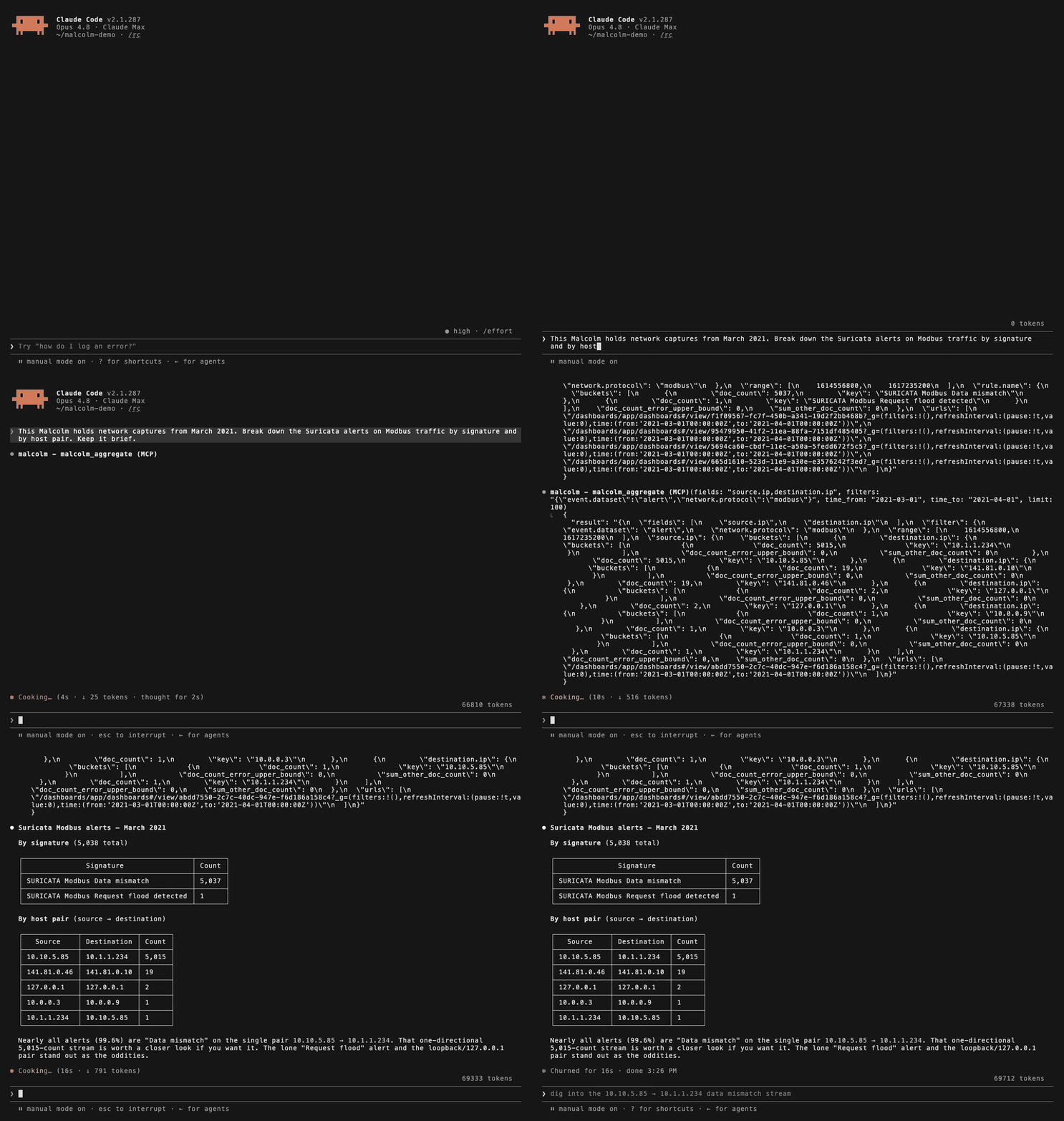
*An unedited Claude Code session against Malcolm's public training instance (training.malcolm.fyi): two `malcolm_aggregate` calls, then the answer. Claude Code ran in `--verbose` mode so each tool call is shown; by default it folds them into one "Calling malcolm" line.*
mcp-server-malcolm is an MCP server for Malcolm, the open-source network traffic analysis platform (Zeek + Suricata + Arkime + OpenSearch, with optional NetBox). It runs under any MCP client, such as Claude Code, Claude Desktop or Cursor.
## Contents
- [Quick start](#quick-start)
- [1. Install](#1-install)
- [2. Register it with your client](#2-register-it-with-your-client)
- [3. Connection settings](#3-connection-settings)
- [4. Enabling write tools (optional)](#4-enabling-write-tools-optional)
- [Other ways to install](#other-ways-to-install)
- [Why an MCP layer](#why-an-mcp-layer)
- [Read-only until you opt in](#read-only-until-you-opt-in)
- [Read tools](#read-tools)
- [Write tools (opt-in)](#write-tools-opt-in)
- [Trimming the read surface](#trimming-the-read-surface)
- [Security model](#security-model)
- [Audit](#audit)
- [Python (direct import)](#python-direct-import)
- [Malcolm filter syntax](#malcolm-filter-syntax)
- [Examples](#examples)
- [Protocol notes](#protocol-notes)
- [Configuration reference](#configuration-reference)
- [Verifying against your own Malcolm](#verifying-against-your-own-malcolm)
- [Malcolm API endpoints used](#malcolm-api-endpoints-used)
- [Non-goals](#non-goals)
- [License](#license)
## Quick start
You don't write any code to use this. An MCP client (Claude Code, Claude Desktop, Cursor, …) launches the server as a subprocess and talks to it over stdio; your job is to tell the client how to launch it and which credentials to inject.
[Where this README was tested](#where-this-readme-was-tested) lists which commands in this chapter were run as printed for this revision, and on what platform. Error text quoted from those runs is verbatim.
### 1. Install
You need Python 3.11 or newer, a Malcolm instance with API access, and an HTTPS route to it.
```bash
pip install mcp-server-malcolm # published release
```
Check the install by starting the server with stdin closed. It prints its write-class banner, reaches EOF, and exits 0:
```bash
$ mcp-server-malcolm < /dev/null
[mcp-server-malcolm] write classes: alerting=off arkime-tag=off hunt-job=off pcap-upload=off arkime-view=off
$ echo $?
0
```
Nothing has to be configured for the process to start. Connection settings are read at startup but not used until a tool calls Malcolm, so a wrong URL or password surfaces as a failing tool call, not a failed launch.
### 2. Register it with your client
**Claude Code** — one command, no config file to find:
```bash
claude mcp add malcolm \
-e MALCOLM_URL=https://malcolm.example \
-e MALCOLM_USERNAME=analyst \
-e MALCOLM_PASSWORD='your-password' \
-e MALCOLM_SSL_VERIFY=/path/to/malcolm-ca.crt \
-- mcp-server-malcolm
```
Everything after `--` is the launch command; each `-e` is an environment variable injected into it. `claude mcp add --help` gives the signature as `claude mcp add [options] <name> <commandOrUrl> [args...]`, with `-e, --env <env...>` and `-s, --scope <scope>`.
Registering, health-checking and removing a server, run end to end:
```bash
$ claude mcp add malcolm-deploy-test -s local \
-e MALCOLM_URL=https://malcolm.example \
-e MALCOLM_USERNAME=analyst \
-e MALCOLM_PASSWORD='your-password' \
-e MALCOLM_SSL_VERIFY=false \
-- /tmp/mcp-malcolm-deploy/venv/bin/mcp-server-malcolm
Added stdio MCP server malcolm-deploy-test with command: … to local config
$ claude mcp list
Checking MCP server health…
malcolm-deploy-test: /tmp/mcp-malcolm-deploy/venv/bin/mcp-server-malcolm - ✔ Connected
$ claude mcp remove malcolm-deploy-test -s local
Removed MCP server malcolm-deploy-test from local config
```
Pick where the entry is stored with `-s`:
| Scope | Stored in | Use for |
| --- | --- | --- |
| `local` (default) | your own settings, this project only | credentials — nothing is committed |
| `user` | your own settings, every project | a Malcolm you use everywhere |
| `project` | `.mcp.json` at the repo root, **committed to git** | sharing with a team — never put a password here |
The password in that command is a literal, so it goes into your shell history, and for as long as `claude mcp add` runs it sits in `ps` where every other process on the host can read it. Read it in first and pass the variable:
```bash
read -rs MALCOLM_PASSWORD && export MALCOLM_PASSWORD
claude mcp add malcolm \
-e MALCOLM_URL=https://malcolm.example \
-e MALCOLM_USERNAME=analyst \
-e MALCOLM_PASSWORD="$MALCOLM_PASSWORD" \
-- mcp-server-malcolm
```
`read -rs` keeps the typing off the screen, and the shell records the unexpanded `"$MALCOLM_PASSWORD"`, so history holds the variable name instead of the secret. The `ps` window during the `add` itself stays open, the same way `docker inspect` keeps a container's copy readable. Either route ends with the password in cleartext in `~/.claude.json`, mode 0600 on the machine this was checked on, so file permissions are the only thing protecting it there.
`claude mcp get malcolm` prints the registered command and environment. Note that it prints `MALCOLM_PASSWORD` in cleartext, unmasked, so don't run it where the terminal is being recorded or shared.
For a `project`-scope entry, keep the secret in each person's shell rather than in the file:
```json
{
"mcpServers": {
"malcolm": {
"command": "mcp-server-malcolm",
"env": { "MALCOLM_PASSWORD": "${MALCOLM_PASSWORD}" }
}
}
}
```
**Other MCP clients** — no equivalent CLI, so edit the client's own JSON config. The block is the same shape:
```json
{
"mcpServers": {
"malcolm": {
"command": "mcp-server-malcolm",
"env": {
"MALCOLM_URL": "https://malcolm.example",
"MALCOLM_USERNAME": "analyst",
"MALCOLM_PASSWORD": "your-password",
"MALCOLM_SSL_VERIFY": "/path/to/malcolm-ca.crt"
}
}
}
}
```
That exact block was verified by driving its `command` and `env` fields through the MCP Python SDK's own `stdio_client` and `ClientSession`, which is what a generic client does with them. No GUI client was launched here: Claude Desktop reads `claude_desktop_config.json` and other clients vary, per their own docs, which this project has not independently confirmed.
If `mcp-server-malcolm` isn't on the `PATH` your client sees (common with a virtualenv), give the absolute path to the executable instead: `/path/to/.venv/bin/mcp-server-malcolm`.
### 3. Connection settings
Defaults below are what `MalcolmClient.from_env` reads (`client.py:327-355`).
| Variable | Default | Notes |
| --- | --- | --- |
| `MALCOLM_URL` | `https://localhost` | Malcolm base URL, e.g. `https://malcolm.example`. When unset, `MALCOLM_BASE_URL` is read before the default |
| `MALCOLM_USERNAME` | `admin` | Basic-auth user |
| `MALCOLM_PASSWORD` | `admin` | Basic-auth password |
| `MALCOLM_SSL_VERIFY` | `true` | `true`, `false`, or a path to a CA bundle (anything that isn't `true`/`false` is passed to httpx as a CA path) |
| `MALCOLM_TIMEOUT` | `30` | HTTP timeout, seconds |
| `MALCOLM_MAX_CONCURRENCY` | `8` | Simultaneous upstream requests |
| `MALCOLM_MAX_REQUESTS_PER_MINUTE` | `600` | Upstream request-rate cap |
These defaults are read from the code (`client.py:340-350`): with all three connection variables unset, the server sends `admin`/`admin` to `https://localhost`. The 30-second timeout is likewise a source read; it was not timed.
On TLS: verification is on by default, and Malcolm ships self-signed certs. Pointing `MALCOLM_SSL_VERIFY` at Malcolm's CA bundle only works if Malcolm's server certificate carries a `subjectAltName` matching the hostname you connect to — the certificate generated by Malcolm's own setup has no SAN exteWhat people ask about mcp-server-malcolm
What is nagameTW/mcp-server-malcolm?
+
nagameTW/mcp-server-malcolm is mcp servers for the Claude AI ecosystem. Ask an AI agent about your Malcolm network traffic. MCP server for Zeek, Suricata, Arkime and NetBox data, read-only until you opt in to writes. It has 1 GitHub stars and its last recorded update is dated 2026-10-13.
How do I install mcp-server-malcolm?
+
You can install mcp-server-malcolm by cloning the repository (https://github.com/nagameTW/mcp-server-malcolm) or following the README instructions on GitHub. ClaudeWave also provides quick install blocks on this page.
Is nagameTW/mcp-server-malcolm safe to use?
+
Our security agent has analyzed nagameTW/mcp-server-malcolm and assigned a Trust Score of 95/100 (tier: Verified). See the full breakdown of passed checks and flags on this page.
Who maintains nagameTW/mcp-server-malcolm?
+
nagameTW/mcp-server-malcolm is maintained by nagameTW. The last recorded GitHub activity is dated 2026-10-13, with 1 open issues.
Are there alternatives to mcp-server-malcolm?
+
Yes. On ClaudeWave you can browse similar mcp servers at /categories/mcp, sorted by popularity or recent activity.
Deploy mcp-server-malcolm to your cloud
Ship this repo to production in minutes. Each platform spins up its own environment with editable env vars.
Maintain this repo? Add a badge to your README
Drop the badge into your GitHub README to show it's tracked on ClaudeWave. Each badge links back to this page and reflects the live Trust Score.
[](https://claudewave.com/repo/nagametw-mcp-server-malcolm)<a href="https://claudewave.com/repo/nagametw-mcp-server-malcolm"><img src="https://claudewave.com/api/badge/nagametw-mcp-server-malcolm" alt="Featured on ClaudeWave: nagameTW/mcp-server-malcolm" width="320" height="64" /></a>More MCP Servers

Fair-code workflow automation platform with native AI capabilities. Combine visual building with custom code, self-host or cloud, 400+ integrations.

Reverse engineer anything with agents, from app behavior down to native binaries.

User-friendly AI Interface (Supports Ollama, OpenAI API, ...)

An open-source AI agent that brings the power of Gemini directly into your terminal.

Real-time global intelligence dashboard. AI-powered news aggregation, geopolitical monitoring, and infrastructure tracking in a unified situational awareness interface

🕷️ An adaptive Web Scraping framework that handles everything from a single request to a full-scale crawl! Don't be shy, join here: https://discord.gg/EMgGbDceNQ and follow here for daily tips and tricks: https://x.com/Scrapling_dev