

MCP server exposing a Neurarch model graph to Claude Code, Cursor, Windsurf, and other MCP-aware AI agents.
- ✓Open-source license (MIT)
- ✓Actively maintained (<30d)
- ✓Clear description
- ✓Topics declared
- ✓Documented (README)
claude mcp add neurarch-mcp -- npx -y neurarch-mcp{
"mcpServers": {
"neurarch-mcp": {
"command": "npx",
"args": ["-y", "neurarch-mcp"]
}
}
}MCP Servers overview
# neurarch-mcp
**Know what a GPU job needs before it takes a reservation, from inside your agent. An MCP server for Claude Code, Cursor, Claude Desktop, VS Code, Windsurf and Codex.**
- **Small jobs:** pack them or move them to a smaller card.
- **Large jobs:** the right card count and sharding the first time.
- **Agent-launched jobs:** a gate before the GPU, because an agent cannot size its own job.
[](https://github.com/neurarch-ai/neurarch-mcp/actions/workflows/ci.yml)
[](https://www.npmjs.com/package/neurarch-mcp)
[](https://www.npmjs.com/package/neurarch-mcp)
[](https://pypi.org/project/neurarch-trace/)
[](./LICENSE)
[](https://modelcontextprotocol.io)
[](https://smithery.ai/servers/neurarch-ai/neurarch-mcp)
[](https://github.com/neurarch-ai/neurarch-mcp/stargazers)
Call `size_training_job` before a job launches and the agent learns, for the model, batch and card in front of it: **the peak memory** (weights and optimizer state, activations, stored attention scores, each shown), **the smallest card that holds it**, **the largest batch each card holds**, a two-card split when one card does not, **what one run costs**, and a one-line verdict such as `will not fit a T4: needs ~30 GB with headroom (peak 26 GB) at batch 32, seq 2048, use L40S or batch <= 12`. `history` adds **what that structure measured the last time it ran** in your organisation. After a CUDA out-of-memory error, `diagnose_oom` reads the message against the same estimate and names the cause (too big for the card, fragmentation, another process, logits over a large vocabulary, growth during the run) with the least invasive fix first. Then whether it forward-passes: the structural checks the CI bot runs (`lint_model`, `check_design`), offline too. It answers the same whether a person or an agent wrote the job, which is the question the person who owns the GPU bill is asking.
## See it
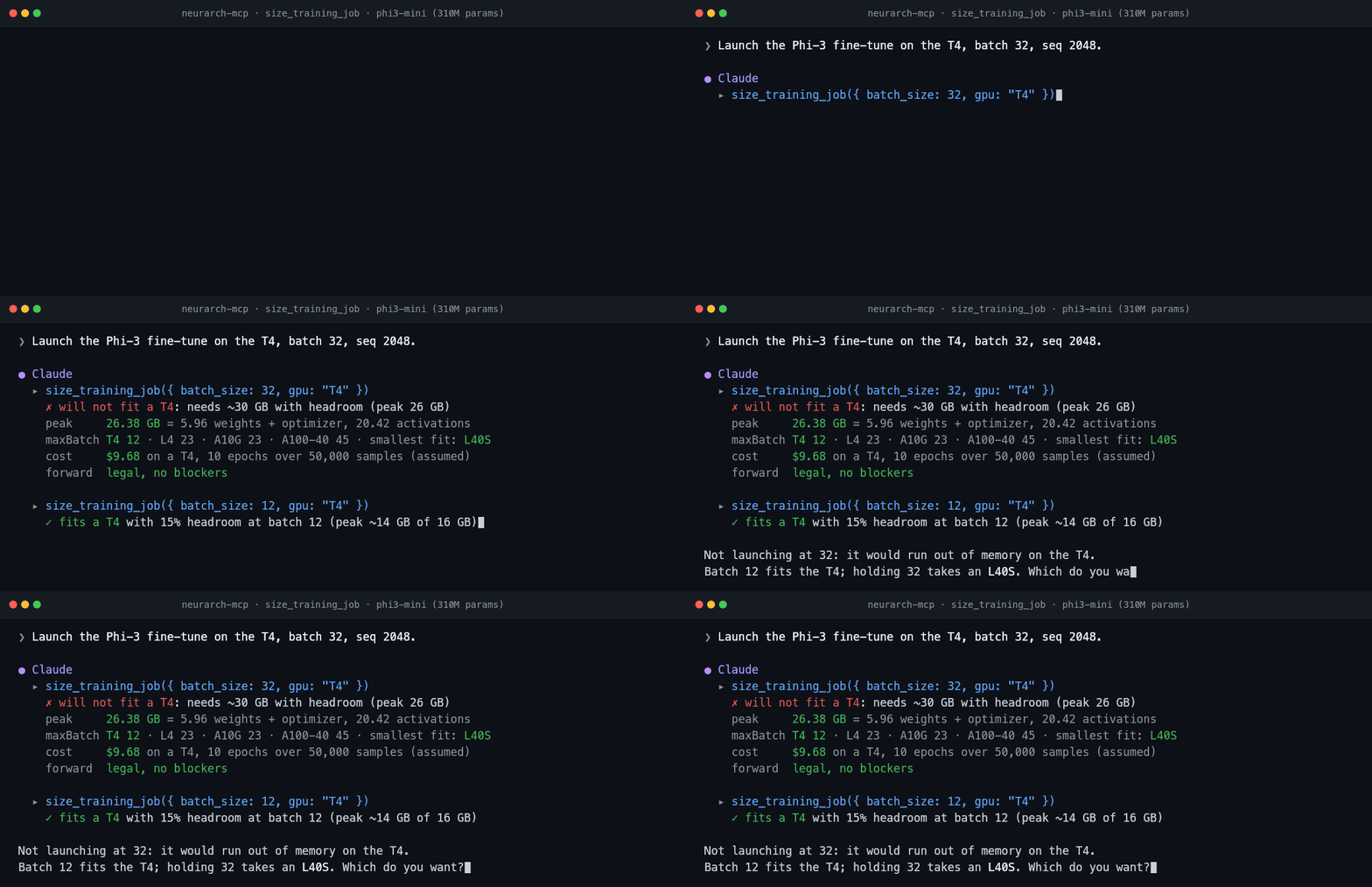
**Before launch.** The job does not fit the card it was about to take, so the agent sizes it again at the batch the tool named:
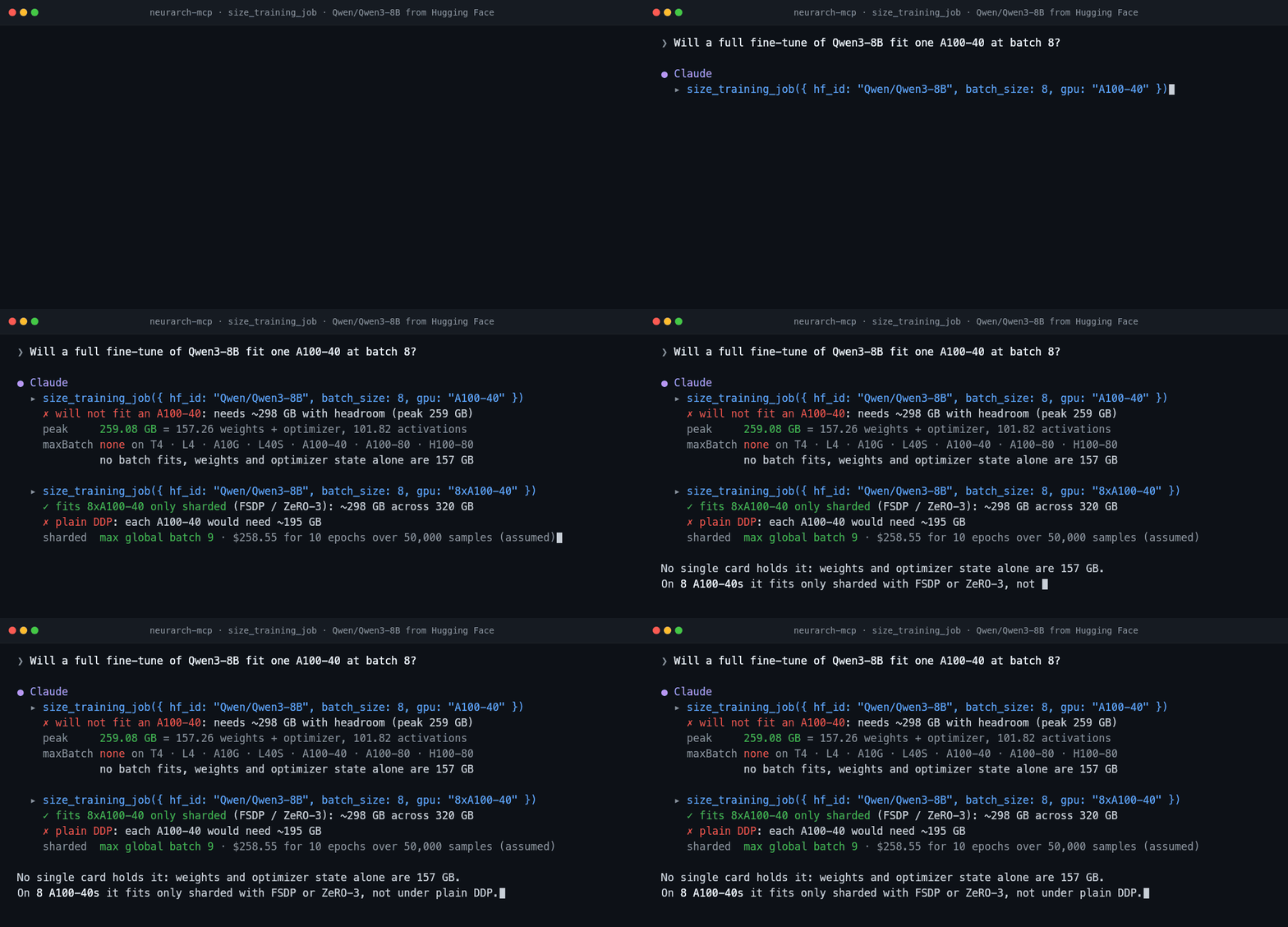
**A model straight from Hugging Face.** Qwen3-8B fits no single card at batch 8, and on eight A100-40s only sharded:
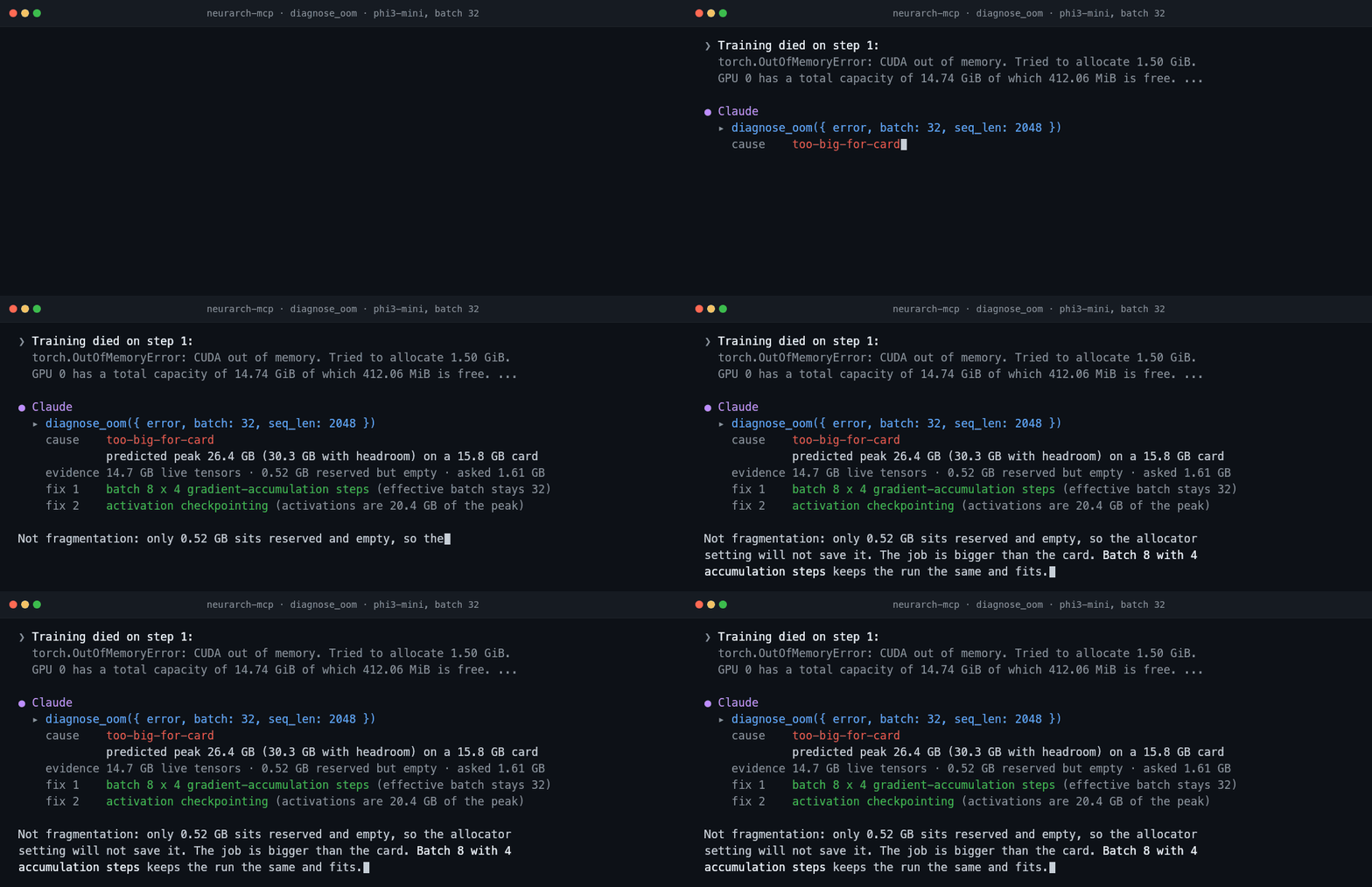
**After a CUDA out-of-memory error.** The message is read against the same estimate, and the cause comes back with the fix that leaves training unchanged listed first:
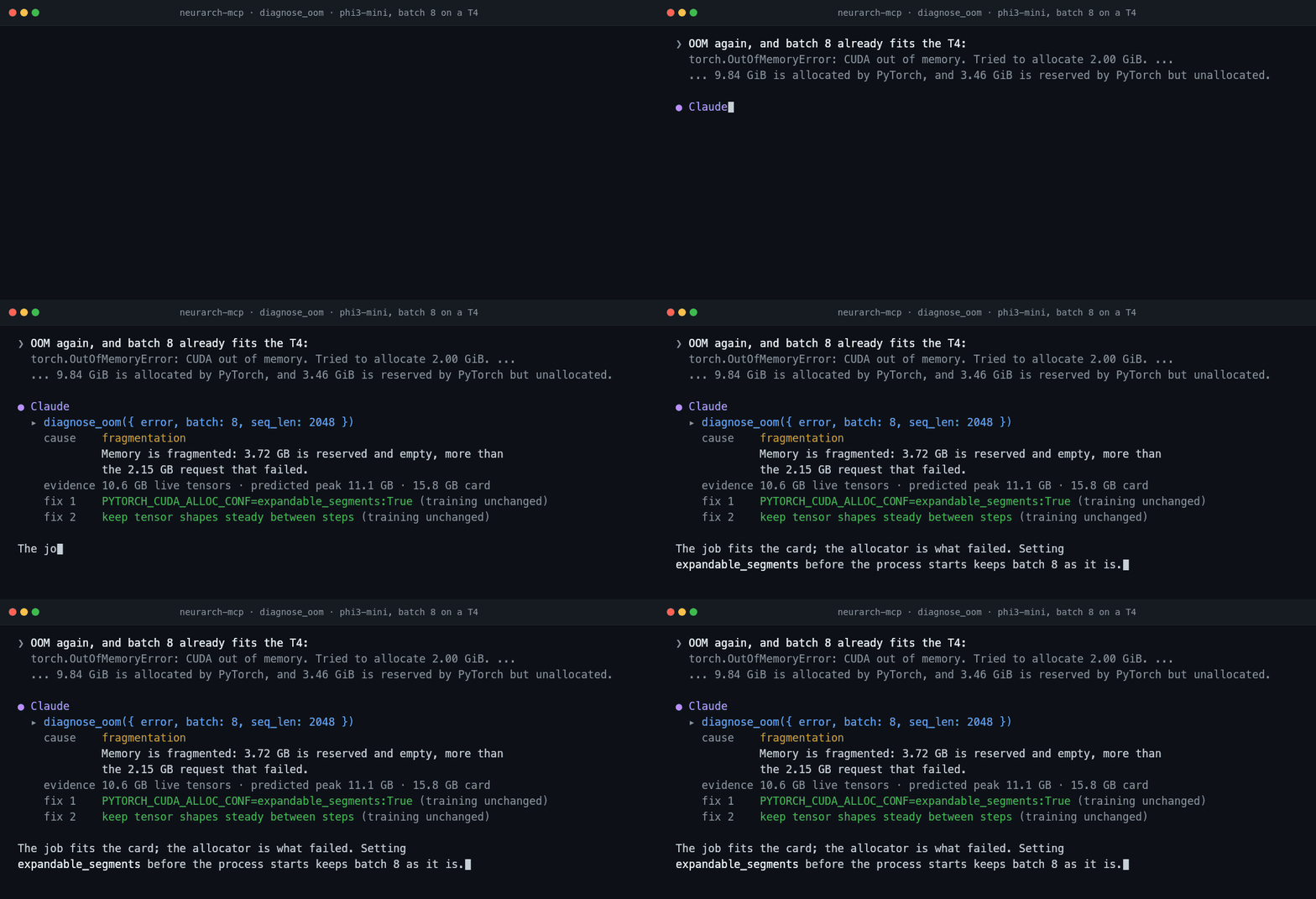
**Not every OOM means a smaller batch.** When the job fits and the allocator does not, the fix leaves training as it is:
**Whether it forward-passes.** The shipped [`examples/tiny-vit.py`](./examples/tiny-vit.py) builds an attention layer its head count does not divide:

**Without the agent asking.** [`neurarch-mcp hook`](#a-claude-code-hook-refuse-the-launch-that-will-not-fit) sizes a `python train.py` launch before the Bash call runs and blocks the one that will not fit:
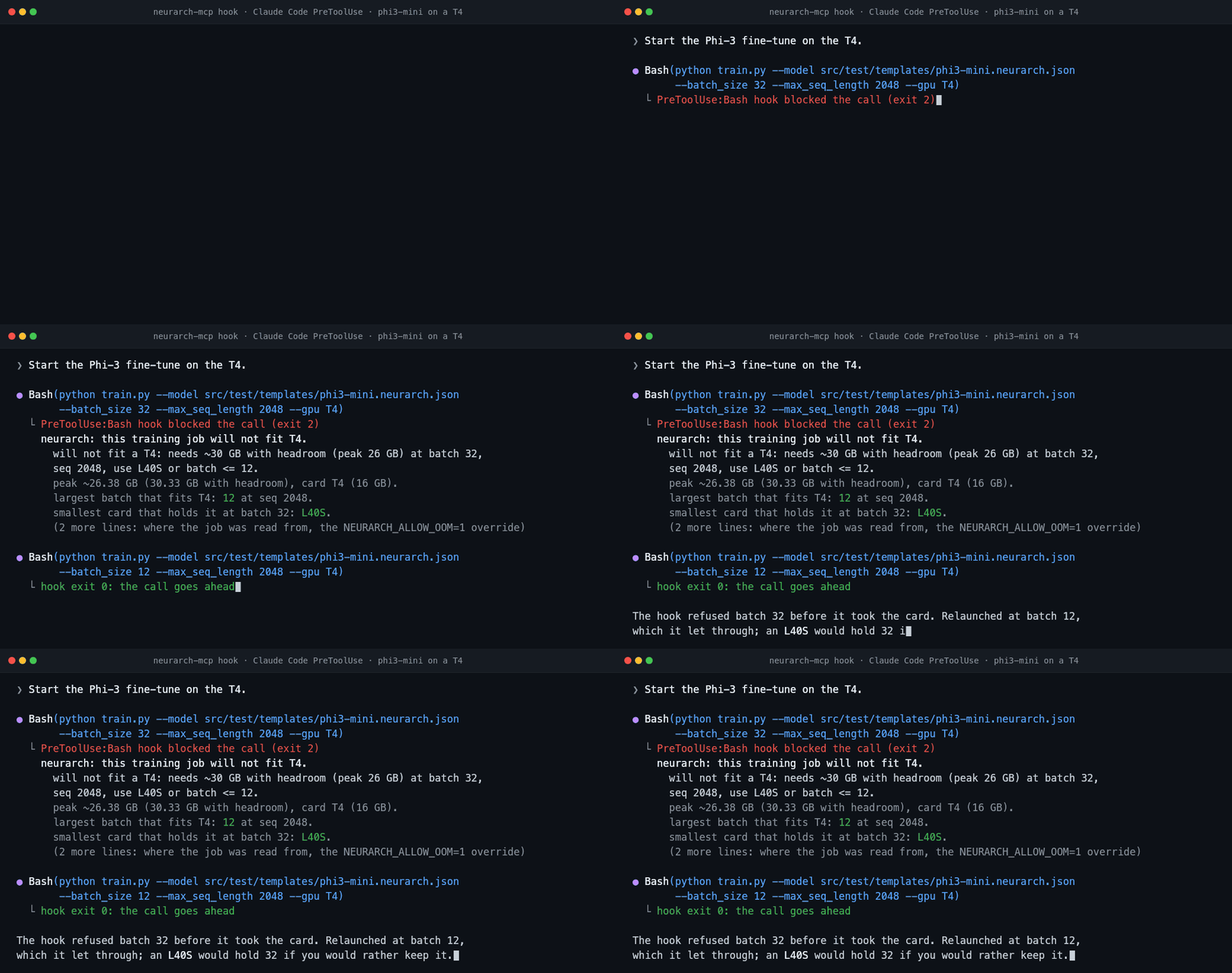
<sub>Every number in these recordings is copied from the tools' real output (0.17.1 and 0.17.2) on [`phi3-mini`](./src/test/templates/phi3-mini.neurarch.json), [`tiny-vit.py`](./examples/tiny-vit.py) and `hf:Qwen/Qwen3-8B`; the error texts are examples and the model's closing sentences are scripted. [`scripts/demo-anim/`](./scripts/demo-anim/) has the calls.</sub>
The memory number is a calibrated estimate of the training peak under AdamW with bf16 autocast, not a measurement: 1.2 x 16 bytes per parameter, plus, per sample in bf16, 0.88 x every layer output, 3.64 x stored attention scores (eager attention only; SDPA and flash keep none), 1.34 x each layer's weight-matrix intermediates, 5.2 x recurrent gate states and 2.02 x the largest single tensor. Fitted on 178 measured runs across 41 architectures, out-of-memory runs included. Held out one architecture at a time, the median error is 7% above 1 GB and it flagged 113 of the 131 times a run did not fit a 16, 24, 40 or 80 GB card, where `accelerate estimate-memory` flagged at most 8. On 25 runs measured after the fit, at the edge of a 24 GB card, the median miss is 14%, so read it as a fit check before a precise number. Every run is public: [neurarch.com/memory-calibration](https://www.neurarch.com/memory-calibration.html).
Get the graph by tracing the model for real shapes, or point the server at a saved graph, a PyTorch `.py`, or a Hugging Face repo. Every tool but two runs on your machine, offline, with no API key and no account. The two that do not, `plan` and `history`, read what a frontier model structurally cannot know: what happened the last time this exact structure trained here. That is not in the weights and not in the repository. They are the only tools in this package that open a socket.
## Install
```bash
claude mcp add neurarch -- npx -y neurarch-mcp /abs/path/to/model.py # Claude Code
```
Or, in Claude Code, the server, the launch hook and the skill in one [plugin](#claude-code-plugin): `/plugin marketplace add neurarch-ai/neurarch-mcp`, then `/plugin install neurarch@neurarch-ai`.
[<img src="https://img.shields.io/badge/Add%20to-Cursor-000000?logo=cursor&logoColor=white" alt="Add to Cursor" height="28">](cursor://anysphere.cursor-deeplink/mcp/install?name=neurarch&config=eyJjb21tYW5kIjoibnB4IiwiYXJncyI6WyIteSIsIm5ldXJhcmNoLW1jcCIsIi4vbW9kZWwucHkiXX0=)
[<img src="https://img.shields.io/badge/Install%20in-VS%20Code-0098FF?logo=visualstudiocode&logoColor=white" alt="Install in VS Code" height="28">](https://vscode.dev/redirect/mcp/install?name=neurarch&config=%7B%22name%22%3A%20%22neurarch%22%2C%20%22command%22%3A%20%22npx%22%2C%20%22args%22%3A%20%5B%22-y%22%2C%20%22neurarch-mcp%22%2C%20%22%24%7BworkspaceFolder%7D%2Fmodel.py%22%5D%7D)
[<img src="https://img.shields.io/badge/Claude%20Desktop-.mcpb-D97757?logo=anthropic&logoColor=white" alt="Claude Desktop bundle" height="28">](https://github.com/neurarch-ai/neurarch-mcp/releases/latest)
Per-client config for Claude Desktop, Cursor, VS Code, Windsurf and Codex is [below](#client-setup). Node 20+ is the only requirement; there is no install step beyond `npx`.
## What it looks like
An agent about to launch a fine-tune on a T4, against [`src/test/templates/phi3-mini.neurarch.json`](./src/test/templates/phi3-mini.neurarch.json) (a 310M-parameter Phi-3 block, one of the Neurarch app's templates). The output is the tool's, trimmed:
```
Agent ▸ (calls size_training_job { batch_size: 32, gpu: "T4" })
verdict will not fit a T4: needs ~30 GB with headroom (peak 26 GB) at batch 32,
seq 2048, use L40S or batch <= 12
memory peak 26.38 GB = 5.96 weights + optimizer state, 20.42 activations
(SDPA: the 40.13 GB of attention scores eager would keep are not counted)
maxBatch T4 12, L4 23, A10G 23, A100-40 45, L40S 56, A100-80 99, H100-80 99
cost $9.68 on a T4, 10 epochs over 50,000 samples (assumed; pass samples)
forwardPasses legal, no blockers
lastRun fingerprint 4e0b97b4: call history for what it measured last time
(same job, attention: "eager", gpu: "A100-40")
verdict will not fit an A100-40: needs ~76 GB with headroom (peak 67 GB) at batch 32,
seq 2048, use A100-80 or batch <= 15
memory peak 66.51 GB = 5.96 weights + optimizer state, 60.55 activations
(40.13 GB of them the attention scores eager keeps)
```
A real exchange against [`examples/tiny-gpt.neurarch.json`](./examples/tiny-gpt.neurarch.json), about where the budget lives:
```
You ▸ Where does the parameter budget live, and is it safe to drop block_1?
Claude ▸ (calls describe_architecture)
tiny-gpt: 8 layers, depth 7, 57.8M params, 8.27 GMACs.
Heaviest by params: token_embedding (25.7M, 44%), lm_head (25.7M), block_0/1 (3.1M each).
Heaviest by compute: lm_head, then the two decoder blocks. Validation: clean.
(calls layer_impact { names: ["block_1"] })
Downstream of block_1: final_norm and lm_head (shape-sensitive, weight-carrying), then output.
The budget is dominated by the embedding + LM head (~89%), not the decoder blocks,
so dropping block_1 frees only ~3.1M params (~5%) while removing one of just two
decoder layers. It is structurally safe (final_norm just re-reads block_0's output),
but it is the wrong lever if your goal is shrinking the model. Quantizing the
embedding/head would do far more.
```
And whether it forward-passes, shown on [`examples/tiny-vit.py`](./examples/tiny-vit.py) in the [recording above](#see-it). That is a ruWhat people ask about neurarch-mcp
What is neurarch-ai/neurarch-mcp?
+
neurarch-ai/neurarch-mcp is mcp servers for the Claude AI ecosystem. MCP server exposing a Neurarch model graph to Claude Code, Cursor, Windsurf, and other MCP-aware AI agents. It has 1 GitHub stars and its last recorded update is dated 2026-10-19.
How do I install neurarch-mcp?
+
You can install neurarch-mcp by cloning the repository (https://github.com/neurarch-ai/neurarch-mcp) or following the README instructions on GitHub. ClaudeWave also provides quick install blocks on this page.
Is neurarch-ai/neurarch-mcp safe to use?
+
Our security agent has analyzed neurarch-ai/neurarch-mcp and assigned a Trust Score of 95/100 (tier: Verified). See the full breakdown of passed checks and flags on this page.
Who maintains neurarch-ai/neurarch-mcp?
+
neurarch-ai/neurarch-mcp is maintained by neurarch-ai. The last recorded GitHub activity is dated 2026-10-19, with 0 open issues.
Are there alternatives to neurarch-mcp?
+
Yes. On ClaudeWave you can browse similar mcp servers at /categories/mcp, sorted by popularity or recent activity.
Deploy neurarch-mcp to your cloud
Ship this repo to production in minutes. Each platform spins up its own environment with editable env vars.
Maintain this repo? Add a badge to your README
Drop the badge into your GitHub README to show it's tracked on ClaudeWave. Each badge links back to this page and reflects the live Trust Score.
[](https://claudewave.com/repo/neurarch-ai-neurarch-mcp)<a href="https://claudewave.com/repo/neurarch-ai-neurarch-mcp"><img src="https://claudewave.com/api/badge/neurarch-ai-neurarch-mcp" alt="Featured on ClaudeWave: neurarch-ai/neurarch-mcp" width="320" height="64" /></a>More MCP Servers

Reverse engineer anything with agents, from app behavior down to native binaries.

Fair-code workflow automation platform with native AI capabilities. Combine visual building with custom code, self-host or cloud, 400+ integrations.

User-friendly AI Interface (Supports Ollama, OpenAI API, ...)

An open-source AI agent that brings the power of Gemini directly into your terminal.

Real-time global intelligence dashboard. AI-powered news aggregation, geopolitical monitoring, and infrastructure tracking in a unified situational awareness interface

🕷️ A Web Scraping framework that handles everything from a single request to a full-scale crawl! Don't be shy, join here: https://discord.gg/EMgGbDceNQ and follow here for daily tips and tricks: https://x.com/Scrapling_dev