

- ✓Open-source license (Apache-2.0)
- ✓Actively maintained (<30d)
- ✓Documented (README)
- !No description
- !Install pipes a remote script into a shell (curl | sh)
git clone https://github.com/nucleusv/linux-mcp-daemon{
"mcpServers": {
"linux-mcp-daemon": {
"command": "linux-mcp-daemon",
"env": {
"MCP_TOKEN": "<mcp_token>"
}
}
}
}MCP_TOKENMCP Servers overview
<div align="center">
</div>
# Linux MCP Daemon
[](https://nucleusv.github.io/linux-mcp-daemon/)
[](https://github.com/nucleusv/linux-mcp-daemon/releases)
[](LICENSE)
[](https://glama.ai/mcp/servers/nucleusv/linux-mcp-daemon)
A high-performance, Go-based Model Context Protocol (MCP) daemon (`mcpd`) designed to securely bridge AI agents directly with the Linux operating system.
## Overview
This project implements a zero-dependency (kernel-first) philosophy. It allows AI agents to introspect and interact with the host Linux system directly via raw syscalls and the Virtual File System (`/proc`, `/sys`) without requiring bloated third-party parsing libraries.
Communication happens directly between the AI agent and the daemon via Server-Sent Events (SSE) and JSON-RPC over HTTPS on port 9091 (TLS is on by default, with a self-signed certificate generated on first start).
## Why
An AI agent that helps run a server needs to see it - load, memory, disks, processes, services, logs, the network - and sometimes to act on it. The usual way is an SSH shell, and a shell is everything at once: any command, any file the account can reach, with `sudo` all of root, and hard to tell afterwards what was done. `mcpd` gives the agent typed tools instead of a shell:
- **Diagnose without a shell.** "Why is the site slow?" - `processes/top`, `memory/usage`, `disks/usage`, `logs/journal-control`, `logs/dmesg`, `network/connections`, `services/list` answer it, with structured output (`json`/`yaml`) the agent doesn't have to scrape from `top` or `df`.
- **Root per tool, not per session.** A user runs every tool as its own OS account; root is granted per tool in `mcp-sudo.yaml` and limited by paths, network destinations and sysctl keys - "may read `/var/log` as root and restart services" rather than "is root".
- **One agent, one account, one token.** Each agent gets its own user, and every call is logged with the user, tool, arguments (secrets redacted) and result - an audit trail of what the agent did.
- **Small and self-contained.** One static Go binary, reading `/proc`, `/sys` and systemd over D-Bus itself; it runs on a bare host, in Docker or in Kubernetes, and `linuxctl` gives people the same tools as a kubectl-like CLI.
> **Grant carefully.** A root grant is root for an agent that follows instructions found in what it reads. Some grants that look narrow are full root (writes to `/etc`, `services/manage`, sysctl writes). Read [Permissions and Risks](https://nucleusv.github.io/linux-mcp-daemon/configuration/permissions-and-risks) before granting anything.
## How It Works
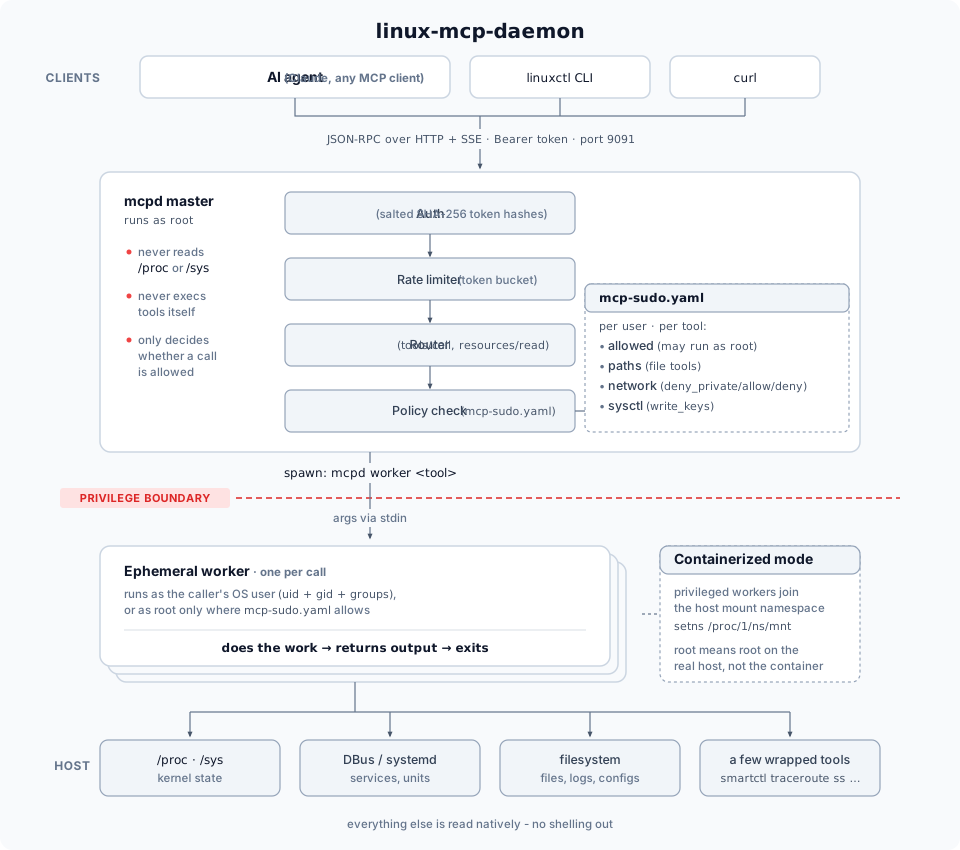
- **Every tool/resource call spawns a fresh worker process and exits.** There's no long-lived state per call - `internal/worker/spawner.go` re-execs the `mcpd` binary itself in `worker` mode (arguments on stdin, never argv), with `syscall.Credential{Uid, Gid, Groups}` set to a real OS account resolved via `user.Lookup()`. This is the actual privilege isolation, not a config flag: an unprivileged user's worker process is a genuinely different Linux UID than a privileged one's.
- **`configs/mcp-sudo.yaml` decides, per user and per tool, whether `privileged: true` is honored.** Two grants exist for resources specifically (see `ARCHITECTURE.md`'s gotcha section) - one for the resource URI itself, one for the internal worker tool name behind it.
- **When `mcpd` runs containerized** (`configs/daemon.yaml`'s `worker.containerized: true`, this project's actual Kubernetes deployment), a privileged worker also joins the real host's mount namespace (`setns(CLONE_NEWNS)` on `/proc/1/ns/mnt`, no external `nsenter` binary) - so `privileged: true` means root on the real host, not just root inside the daemon's own container image.
- **Bearer tokens are salted+hashed** in `users.yaml` (`token_salt` + `token_hash`, `sha256`, constant-time compared; the file is `0600`), not stored in plaintext. Users and grants are edited only locally, on the host, via `linuxctl <verb> mcpd user` and `linuxctl edit mcpd config` (validated like `visudo`) - there is no MCP tool that edits them, so nothing with just a bearer token can grant itself anything. The running daemon applies changes without a restart through `daemon/reload-config`, which only re-reads the files and rejects invalid ones (see [Daemon User Administration](docs/website/docs/linuxctl/mcpd-admin.md)).
- **Every read is schema-driven, not hand-listed.** `linuxctl` fetches `tools/list`/`resources/list`/`resources/templates/list` from the live daemon on every invocation and resolves its `<verb> <group> [keyword]` grammar against that - a new tool added server-side is immediately usable client-side with zero code changes (see [`plan/linuxctl-redesign.md`](plan/linuxctl-redesign.md)).
## Features
- **Direct AI Interaction:** HTTP/SSE transport for immediate agent-to-daemon communication.
- **Strict Security:** Rate limiting, salted+hashed Bearer token authentication, and directory traversal protection.
- **Privilege Separation:** Master daemon runs as root, spinning up ephemeral unprivileged/privileged workers based on rules defined in `configs/mcp-sudo.yaml`.
- **High Performance:** Uses `singleflight` deduplication and TTL caching for efficient system introspection.
- **Docker & Kubernetes Ready:** Fully containerized with a multi-stage Docker build and Kubernetes deployment manifests that allow safe host introspection.
## Get started
### Install on Linux (systemd)
```bash
curl -fsSL https://raw.githubusercontent.com/nucleusv/linux-mcp-daemon/main/scripts/install.sh | sudo bash
```
Needs `sudo` and `curl` on an amd64/arm64 host (in a bare `ubuntu`/`debian` container: `apt update && apt install -y curl ca-certificates`, then pipe to `bash` as root). This downloads the latest release for your architecture (amd64/arm64), **verifies its sha256 checksum**, installs `mcpd` and `linuxctl` to `/usr/local/bin`, writes clean configs to `/etc/mcpd/configs` (no default users or tokens), creates a first user `mcp` and **prints its token once**, and starts the `mcpd` systemd service. Then:
```bash
export MCP_SERVER=https://127.0.0.1:9091
export MCP_TLS_FINGERPRINT=<printed by the installer>
export MCP_TOKEN=<token printed by the installer>
linuxctl get system os-release
linuxctl get processes top
```
- **Upgrade:** run the same command again - configs are kept, the service restarts only if `mcpd` changed. From v0.1.0, grant your first user `daemon/reload-config` once - see [Upgrading](https://nucleusv.github.io/linux-mcp-daemon/installation/#upgrading).
- **Pin a version / name the user:** `... | sudo bash -s -- --version v0.1.0 --user alice`
- **More users:** each needs an OS account of the same name - see [Adding more users](https://nucleusv.github.io/linux-mcp-daemon/installation/#adding-more-users).
- **Uninstall:** `... | sudo bash -s -- --uninstall` (add `--purge` to delete `/etc/mcpd`; the `mcp` OS account stays - `sudo userdel -r mcp`)
- **Packages:** `.deb` and `.rpm` for amd64/arm64 on every [release](https://github.com/nucleusv/linux-mcp-daemon/releases) - `sudo apt install ./linux-mcp-daemon_<version>_amd64.deb` or `sudo dnf install ./linux-mcp-daemon-<version>-1.x86_64.rpm`, then the [next steps](https://nucleusv.github.io/linux-mcp-daemon/installation/#packages-deb-rpm) it prints.
- **Container image:** `ghcr.io/nucleusv/linux-mcp-daemon` (amd64/arm64) - setup steps in the [installation docs](https://nucleusv.github.io/linux-mcp-daemon/installation/).
- **macOS (CLI only):** the same script installs just `linuxctl` - `curl -fsSL .../install.sh | bash -s -- --bin-dir ~/.local/bin`, then `export PATH="$HOME/.local/bin:$PATH"` (not on macOS's default PATH) - to drive a remote mcpd.
> mcpd listens on all interfaces over **TLS** (a self-signed certificate it creates on first start; clients pin its fingerprint). Plain HTTP is off by default - bearer tokens would travel in clear text. Root access for tools is granted per user and per tool in `mcp-sudo.yaml`.
Full guide: [Installation](https://nucleusv.github.io/linux-mcp-daemon/installation/) · [Connect an AI agent](https://nucleusv.github.io/linux-mcp-daemon/ai-agent-configuration/) · [mcp-sudo.yaml](https://nucleusv.github.io/linux-mcp-daemon/configuration/mcp-sudo/)
## Development: build from source
### 1. Build and Deploy the Server (`mcpd`)
1. Build the Docker image:
```bash
./scripts/build.sh
```
2. Deploy to your local Kubernetes cluster:
```bash
./scripts/deploy.sh
```
### 2. Build the Client (`linuxctl`)
You can build the CLI client directly on your host machine (e.g. macOS):
```bash
./scripts/build-cli.sh # writes executables/linuxctl
export PATH="$PWD/executables:$PATH" # so the examples below run as written
```
Installed from a release (`install.sh`, `.deb`/`.rpm`), `linuxctl` is already on your `PATH`.
### 3. Usage (local development)
The daemon runs on port `9091`. You can connect via your AI client using SSE, or use the `linuxctl` CLI tool:
```bash
# Set your token as an environment variable
export MCP_TOKEN="your_token_here"
# Ping the daemon
linuxctl ping
```
`linuxWhat people ask about linux-mcp-daemon
What is nucleusv/linux-mcp-daemon?
+
nucleusv/linux-mcp-daemon is mcp servers for the Claude AI ecosystem with 5 GitHub stars.
How do I install linux-mcp-daemon?
+
You can install linux-mcp-daemon by cloning the repository (https://github.com/nucleusv/linux-mcp-daemon) or following the README instructions on GitHub. ClaudeWave also provides quick install blocks on this page.
Is nucleusv/linux-mcp-daemon safe to use?
+
Our security agent has analyzed nucleusv/linux-mcp-daemon and assigned a Trust Score of 69/100 (tier: OK). See the full breakdown of passed checks and flags on this page.
Who maintains nucleusv/linux-mcp-daemon?
+
nucleusv/linux-mcp-daemon is maintained by nucleusv. The last recorded GitHub activity is dated 2026-09-29, with 0 open issues.
Are there alternatives to linux-mcp-daemon?
+
Yes. On ClaudeWave you can browse similar mcp servers at /categories/mcp, sorted by popularity or recent activity.
Deploy linux-mcp-daemon to your cloud
Ship this repo to production in minutes. Each platform spins up its own environment with editable env vars.
Maintain this repo? Add a badge to your README
Drop the badge into your GitHub README to show it's tracked on ClaudeWave. Each badge links back to this page and reflects the live Trust Score.
[](https://claudewave.com/repo/nucleusv-linux-mcp-daemon)<a href="https://claudewave.com/repo/nucleusv-linux-mcp-daemon"><img src="https://claudewave.com/api/badge/nucleusv-linux-mcp-daemon" alt="Featured on ClaudeWave: nucleusv/linux-mcp-daemon" width="320" height="64" /></a>More MCP Servers

Fair-code workflow automation platform with native AI capabilities. Combine visual building with custom code, self-host or cloud, 400+ integrations.

User-friendly AI Interface (Supports Ollama, OpenAI API, ...)

An open-source AI agent that brings the power of Gemini directly into your terminal.

Real-time global intelligence dashboard. AI-powered news aggregation, geopolitical monitoring, and infrastructure tracking in a unified situational awareness interface

🕷️ An adaptive Web Scraping framework that handles everything from a single request to a full-scale crawl! Don't be shy, join here: https://discord.gg/EMgGbDceNQ and follow here for daily tips and tricks: https://x.com/Scrapling_dev

The fastest path to AI-powered full stack observability, even for lean teams.