

Persistent long-term memory for Agents — an MCP server with an associative memory bank, a canonical-fact cortex, sleep-like dream consolidation, and a web console. Not quite alive.
- ✓Open-source license (Apache-2.0)
- ✓Actively maintained (<30d)
- ✓Clear description
- ✓Topics declared
- ✓Documented (README)
claude mcp add pseudolife-mcp -- uvx pseudolife-mcp{
"mcpServers": {
"pseudolife-mcp": {
"command": "uvx",
"args": ["pseudolife-mcp"],
"env": {
"PSEUDOLIFE_DREAM_BASE_URL": "<pseudolife_dream_base_url>"
}
}
}
}PSEUDOLIFE_DREAM_BASE_URLMCP Servers overview
# Pseudolife-MCP <!-- mcp-name: io.github.Pseudogiant-xr/pseudolife-mcp --> [](https://pypi.org/project/pseudolife-mcp/) [](https://github.com/Pseudogiant-xr/Pseudolife-MCP/actions/workflows/ci.yml) [](LICENSE) [](https://pypi.org/project/pseudolife-mcp/) [简体中文](docs/i18n/README.zh.md) · [日本語](docs/i18n/README.ja.md) · [한국어](docs/i18n/README.ko.md) · [Português (BR)](docs/i18n/README.pt-br.md) · [Español](docs/i18n/README.es.md) **Persistent long-term memory for Claude Code, Codex, and other MCP clients.** An MCP server that gives coding agents a long-term memory that persists across sessions — surviving context compactions and fresh tasks. Your coding agent is the intelligence; this server is its memory on disk. 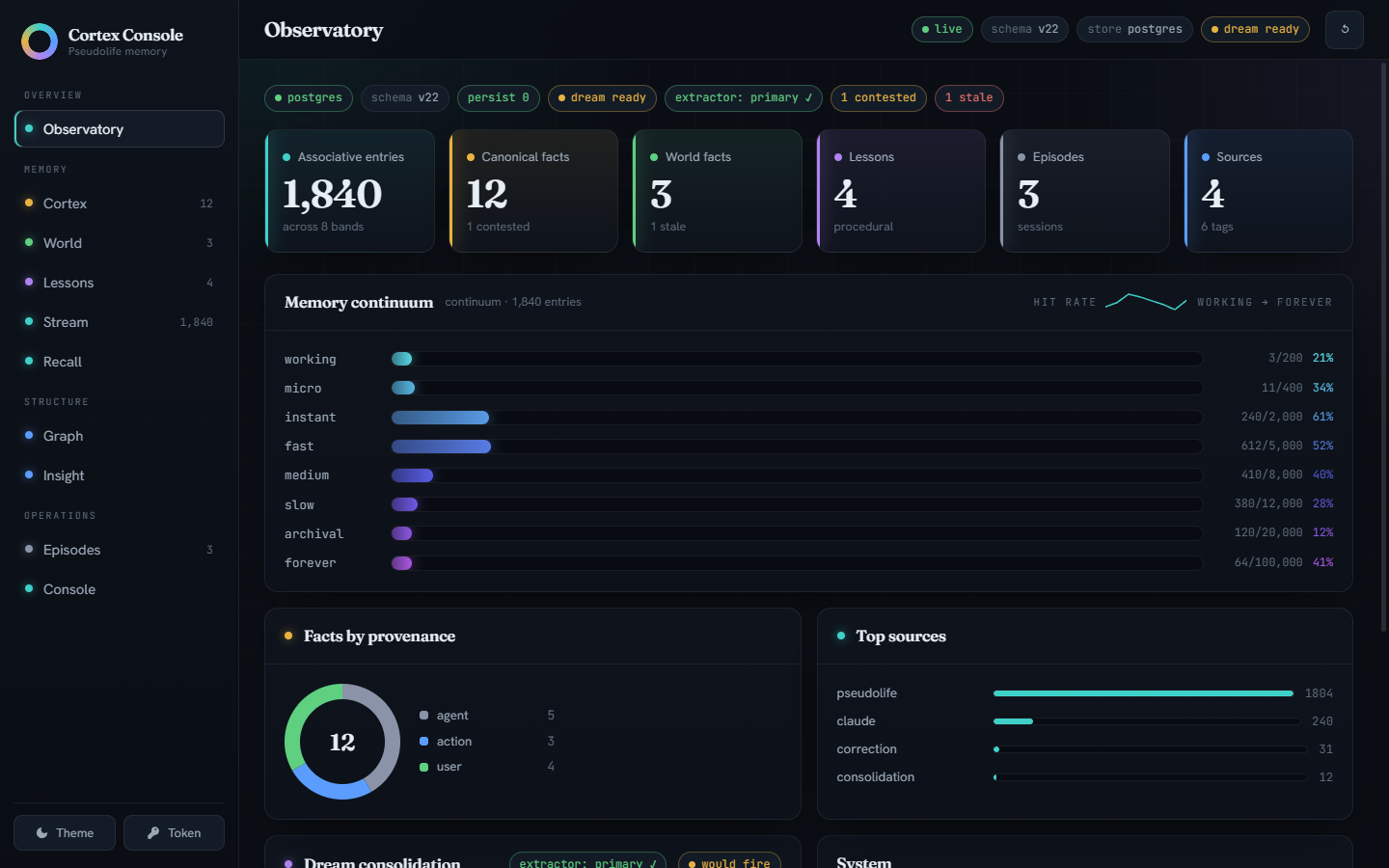 What you get: - **Associative memory with honest forgetting** — a flat similarity store ranked by hybrid dense-plus-lexical retrieval, with conflict detection that admits potential updates while preserving earlier source notes; whole-note replacement is explicit. (The measured verdict: a preregistered ablation campaign found the previous 8-band continuum tied a flat store on every gate, so the simpler structure ships; the continuum remains one config line away.) - **Canonical facts, not vibes** — one *current* value per `entity.attribute` slot (or a member set, for slots that hold many concurrent values); corrections supersede rather than silently overwrite, and the full version history survives. - **Dreams** — a bundled local extractor, or any OpenAI-compatible endpoint (a Claude model on your Max plan, a GPT-5.6 model on a ChatGPT plan, LM Studio, Ollama, vLLM), consolidates the memory stream into facts and a knowledge graph while you're not looking. - **Lessons from its own work** — successes, dead-ends, and your corrections become do/avoid guidance surfaced at the start of every session. - **A web console to watch it think** — the Cortex Console above, plus cited world facts, session episodes, and document RAG. Measured, with receipts — the **full 500-question LongMemEval sweep**, all six question types, and every number ships with its committed run artifact: | LongMemEval oracle, 500 questions | naive RAG | commit-gated cascade | |---|---:|---:| | accuracy, all six question types | 0.688 | 0.690 | | context tokens per question | ~1210 | **~883** | | knowledge-update slice (78 of the 500) | 0.859 | ~~0.936~~ (retired — see below) | Equal accuracy to naive RAG across the whole benchmark on **~73% of the context**, and better calibrated about what it does not know: on BEAM-100K's abstention questions the fact spine scores **0.950** against naive RAG's 0.775, unchanged under two independent judges. Read that as calibration, not recall — in the budget-matched five-arm run of 2026-09-02 (rag 0.725 there; one replicate, local judge) an arm served no memory at all scores 1.000 on the same questions, because refusing is the right answer there and an empty context always refuses. The fact spine loses where an answer has to be aggregated across sessions. The second claim to survive a judge swap is a win rather than a wash: re-run on 2026-09-04 with the hybrid arm **budget-matched** to the control at 6 turns, the same 500 questions give hybrid **0.730** against naive RAG's 0.690 under the local judge and **0.736** against 0.694 under `claude-opus-5` — paired **+0.040 / +0.042**, p 0.015 / 0.013 — bought with *more* context, ~1229 tokens against the control's ~1124, not less, and carried mostly by temporal-reasoning questions. Graded by a local, byte-reproducible judge (the cross-judge check names its second judge) — compare within rows, never against GPT-judged leaderboards. > **Retired 2026-08-25 (#188): the 0.936 knowledge-update headline.** It was > measured on the 2026-07-30 bench stack (Qwen3.6-27B answerer and judge). > Re-running the same 78 questions after the 2026-08-17 migration to > Qwen3.8-27B puts the cascade at **0.846**, below the naive-RAG control — > which lands on 0.859 on both stacks. The cascade serves the fact-spine > answer unless that channel says "I don't know", so it measures the > *answerer's* abstention behaviour as much as the memory: 32/78 abstentions > at 46/46 commit precision on the old stack, 22/78 at 0.839 on the new one. > The 500-question table above is on the older judge and has not been > re-judged, so read its cascade row as an upper bound. Full tables, the per-type breakdown, both stacks side by side, and every artifact: [Benchmarks](docs/guide/benchmarks.md). ## Quickstart Install and register the lite tier. No Docker, no database to set up, no container runtime: ```bash pip install "pseudolife-mcp[lite]" claude mcp add --scope user pseudolife-memory -- pseudolife-mcp ``` Codex instead of Claude Code — same shape: ```bash pip install "pseudolife-mcp[lite]" codex mcp add pseudolife-memory --env PSEUDOLIFE_WRITER_ID=codex -- pseudolife-mcp ``` For Codex, finish setup before starting a fresh task. In the existing `[mcp_servers.pseudolife-memory]` table in `~/.codex/config.toml`, add `startup_timeout_sec = 240`, `tool_timeout_sec = 240`, and `required = true`. The shim can wait up to 180 seconds for a cold daemon; Codex's default startup budget is 10 seconds. `required` makes missing memory visible at startup and waits for its initial catalog. These are starting budgets, not a promise that a first model download fits. The tool budget leaves time for the shim's 180-second deadline to report a failure before the host cancels it; prewarm with `pseudolife-mcp serve` in a terminal if needed. Approve `memory_message` in that table's tool configuration (`[mcp_servers.pseudolife-memory.tools.memory_message] approval_mode = "approve"`, or allow it once and keep the approval); Codex hook setup (`python ops/setup-codex-hooks.py`) sets it when you approve the hooks, and keeps any value you chose. Board mail can wake an idle Codex task by default, and the woken task reads its mail with that tool: without the approval it stalls on a prompt until someone answers it. Set `PSEUDOLIFE_CODEX_DOORBELL = "0"` in the same `env` table to keep the task from being woken (see [Codex doorbell](docs/guide/configuration.md#codex-doorbell)). The agent board (peer awareness and addressed mail between sessions) is on by default, behind bearer authentication. Without `coordination.allowed_principals` in the daemon's `config.yaml`, only the singular `PSEUDOLIFE_MCP_TOKEN` principal is admitted. A Codex bearer from a `PSEUDOLIFE_MCP_TOKENS` map stays off the board until an operator lists it (`allowed_principals: [default, codex]`). Until then a shim on the default setting leaves coordination off without an error; one pinned with `--enable` shows an attach-unavailable hint instead. `python ops/setup-codex-coordination.py --check` reports `ready (default-on)` or names the cause. See [Codex CLI and desktop](docs/guide/configuration.md#codex-cli-and-desktop). The MCP handshake delivers compact recall/capture/reflection instructions. For the complete standing guidance, copy the [bundled memory block](examples/CLAUDE.memory.md) into your project `AGENTS.md` or `~/.codex/AGENTS.md`. For session briefings and per-turn reminders, follow [Codex hooks and verification](docs/guide/providers.md#codex-specifics). Use one MCP registration and one hook source; an installed plugin may already provide either. After the daemon is running, execute `pseudolife-mcp doctor` from the **same environment as the registered command**. It checks the handshake and annotations without calling bank tools. When the shell has no `PSEUDOLIFE_MCP_TOKEN` or `PSEUDOLIFE_MCP_TOKEN_FILE`, doctor takes the token from the Claude Code registration (`~/.claude.json`, or under `CLAUDE_CONFIG_DIR`), else from the Codex one, and names where it came from in `credential_source`; with none and a daemon that requires a token, it reports `BearerMissing`. Then in either coding agent: *"remember that my staging box is haze-02"* → the agent calls `memory_store`; next session, *"which box is staging?"* → `memory_search` finds it. Browse everything at the Cortex Console: <http://127.0.0.1:8765/ui/>. The first session auto-starts the daemon, which provisions an **embedded PostgreSQL 18** (pgvector included, via `pg0-embedded`) under a stable per-user data dir and downloads the embedding model (~1.2 GB, one-time). It is a real Postgres bank, not a cut-down one: `pseudolife-mcp backup` writes a standard owner-free `pg_dump` archive (plus a state archive, 7-day rotation) that restores into any PostgreSQL 18 target regardless of role — the Docker tier included — so outgrowing lite is a dump/restore, not a migration project ([backups](docs/guide/configuration.md#backups)). For a tier- and Postgres-version-independent copy, `pseudolife-mcp export` / `import` move the whole bank as portable JSONL ([logical export / import](docs/guide/configuration.md#logical-export--import)). Windows needs an ASCII-only data path ([`PSEUDOLIFE_MCP_DATA_DIR`](docs/guide/configuration.md#connection--deployment-env-vars)). ### What lite gives you, and the one thing it doesn't | | lite (pip) | durable (Docker) | |---|---|---| | Associative store, hybrid search, supersession, version history | yes | yes | | Cortex facts, knowledge graph, lessons, world facts, episodes | yes | yes | | Cortex Console, document RAG, `pseudolife-mcp backup` | yes | yes | | **Dream consolidation filling the cortex on its own** | **no extractor ships** | yes — bundled local CPU sidecar | | External volumes, health-checked serv
What people ask about Pseudolife-MCP
What is Pseudogiant-xr/Pseudolife-MCP?
+
Pseudogiant-xr/Pseudolife-MCP is mcp servers for the Claude AI ecosystem. Persistent long-term memory for Agents — an MCP server with an associative memory bank, a canonical-fact cortex, sleep-like dream consolidation, and a web console. Not quite alive. It has 5 GitHub stars and its last recorded update is dated 2026-10-04.
How do I install Pseudolife-MCP?
+
You can install Pseudolife-MCP by cloning the repository (https://github.com/Pseudogiant-xr/Pseudolife-MCP) or following the README instructions on GitHub. ClaudeWave also provides quick install blocks on this page.
Is Pseudogiant-xr/Pseudolife-MCP safe to use?
+
Our security agent has analyzed Pseudogiant-xr/Pseudolife-MCP and assigned a Trust Score of 95/100 (tier: Verified). See the full breakdown of passed checks and flags on this page.
Who maintains Pseudogiant-xr/Pseudolife-MCP?
+
Pseudogiant-xr/Pseudolife-MCP is maintained by Pseudogiant-xr. The last recorded GitHub activity is dated 2026-10-04, with 3 open issues.
Are there alternatives to Pseudolife-MCP?
+
Yes. On ClaudeWave you can browse similar mcp servers at /categories/mcp, sorted by popularity or recent activity.
Deploy Pseudolife-MCP to your cloud
Ship this repo to production in minutes. Each platform spins up its own environment with editable env vars.
Maintain this repo? Add a badge to your README
Drop the badge into your GitHub README to show it's tracked on ClaudeWave. Each badge links back to this page and reflects the live Trust Score.
[](https://claudewave.com/repo/pseudogiant-xr-pseudolife-mcp)<a href="https://claudewave.com/repo/pseudogiant-xr-pseudolife-mcp"><img src="https://claudewave.com/api/badge/pseudogiant-xr-pseudolife-mcp" alt="Featured on ClaudeWave: Pseudogiant-xr/Pseudolife-MCP" width="320" height="64" /></a>More MCP Servers

Fair-code workflow automation platform with native AI capabilities. Combine visual building with custom code, self-host or cloud, 400+ integrations.

User-friendly AI Interface (Supports Ollama, OpenAI API, ...)

An open-source AI agent that brings the power of Gemini directly into your terminal.

Real-time global intelligence dashboard. AI-powered news aggregation, geopolitical monitoring, and infrastructure tracking in a unified situational awareness interface

🕷️ An adaptive Web Scraping framework that handles everything from a single request to a full-scale crawl! Don't be shy, join here: https://discord.gg/EMgGbDceNQ and follow here for daily tips and tricks: https://x.com/Scrapling_dev

The fastest path to AI-powered full stack observability, even for lean teams.