

MCP server for spreadsheet analysis and editing. Slim, token-efficient tool surface designed for LLM agents.
- ✓Open-source license (Apache-2.0)
- ✓Actively maintained (<30d)
- ✓Clear description
- ✓Topics declared
- ✓Documented (README)
- !Install pipes a remote script into a shell (curl | sh)
git clone https://github.com/PSU3D0/agent-spreadsheet{
"mcpServers": {
"agent-spreadsheet": {
"command": "agent-spreadsheet"
}
}
}MCP Servers overview
# agent-spreadsheet [](https://github.com/PSU3D0/agent-spreadsheet/actions/workflows/ci.yml) [](https://crates.io/crates/agent-spreadsheet-mcp) [](https://www.npmjs.com/package/agent-spreadsheet) [](https://github.com/PSU3D0/agent-spreadsheet/blob/main/LICENSE) 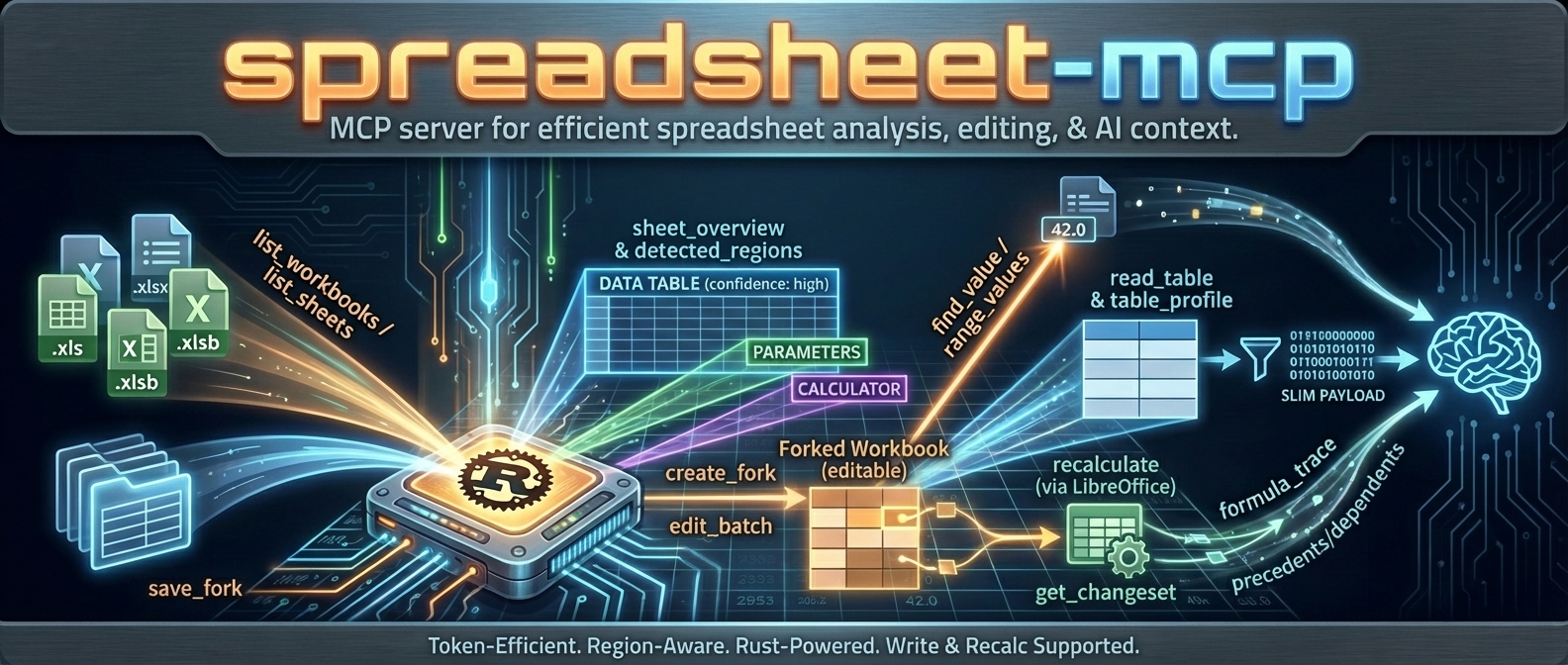 **agent-spreadsheet is the tool interaction service for agent-based spreadsheet usage.** It gives agents a safe, inspectable, token-efficient way to **read, analyze, mutate, verify, and operationalize Excel workbooks** without falling back to brittle UI automation. If you want an agent to work with spreadsheets like a real system instead of a screenshot puppet, this is the stack. --- ## What this project is agent-spreadsheet ships a unified spreadsheet interaction layer across three surfaces: | Surface | Binary / Package | Mode | Best for | | --- | --- | --- | --- | | **CLI** | `agent-spreadsheet` / `asp` | Stateless | One-shot reads, safe edits, pipelines, CI, agent tool calls | | **MCP server** | `agent-spreadsheet-mcp` | Stateful | Multi-turn agent sessions, workbook caching, fork/recalc workflows | | **TypeScript SDK** | `agent-spreadsheet-sdk` | Library | App integrations — drives the server's canonical `/v1` route, or runs fully in-process via the embedded WASM engine (no server required) | The WASM build (`agent-spreadsheet-wasm`) is the SDK's local runtime, not a separate product surface: JS and TypeScript code targets one object model and the execution substrate (server vs embedded engine) is a configuration choice. Supported workbook modes: - `.xlsx` / `.xlsm` — read + write - `.xls` / `.xlsb` — discovery/read-oriented workflows only ## Powered by Formualizer Every computed value in this stack comes from **[Formualizer](https://github.com/PSU3D0/formualizer)** — a permissively licensed (MIT/Apache-2.0) spreadsheet engine written in Rust: formula parsing, dependency-graph recalculation, 400+ Excel functions, dynamic arrays, and deterministic evaluation built for agents. No Excel COM, no headless LibreOffice. That native engine is why this project can offer what most spreadsheet tooling for agents cannot: **recalculate the actual workbook, trace which cells changed and why, and prove it** — not just read cached values or push blind edits. Embedding spreadsheet logic in your own product rather than driving workbooks as an agent? Use [Formualizer](https://github.com/PSU3D0/formualizer) directly (Rust, Python, JS/WASM). --- ## Why agents use agent-spreadsheet ### Built for tool use, not just humans - deterministic JSON contracts - schema and example discovery from the CLI itself - explicit pagination and compact output modes - machine-readable warnings and error envelopes ### Safe mutation, not blind mutation - dry-run first workflows - stateless output modes and overwrite safety - event-sourced session editing - verification surfaces for proving downstream outcomes - structural impact analysis before risky workbook changes ### Spreadsheet-aware, not generic file editing - region detection - table and footer-aware append helpers - template row / row band cloning - formula-specific replace and diagnostics - named range CRUD - recalculation + diff + proof flows ### Good agent ergonomics - nested command groups with legacy alias compatibility - token-efficient reads - exact-cell inspection and layout inspection - workflow helpers for the repetitive parts agents usually get wrong --- ## What is new / what makes this stack different The current surface is much stronger than a plain “read some cells” tool. Major capabilities now include: - **`asp` as the primary CLI** with `agent-spreadsheet` preserved as a compatibility alias - **grouped verification** via `asp verify proof` and `asp verify diff` - **preview-first workflow helpers** for: - `write append` - `write clone-template-row` - `write clone-row-band` - **formula-safe batch workflows** with parse-policy diagnostics - **cell/layout/export/import inspection surfaces** - **named range management** (`write name define|update|delete`) - **formula-only replacement** (`write formulas replace`) - **event-sourced session editing** with log, branch, undo/redo, fork, apply, and materialize - **SheetPort manifest lifecycle + execution** for contract-driven spreadsheet automation --- ## Install ### Shell installer ```bash curl -fsSL https://raw.githubusercontent.com/PSU3D0/agent-spreadsheet/main/install.sh | sh ``` The installer downloads a prebuilt CLI to `~/.local/bin` and creates the `asp` command. Pin a release with `ASP_VERSION=0.15.0`, set `ASP_INSTALL_DIR` to choose another destination, or pass `--mcp` to install the MCP server too: ```bash curl -fsSL https://raw.githubusercontent.com/PSU3D0/agent-spreadsheet/main/install.sh | sh -s -- --mcp ``` ### npm ```bash npm i -g agent-spreadsheet ``` This installs both `asp` (the primary command) and `agent-spreadsheet` (the compatibility alias) from a prebuilt native binary. No Rust toolchain is required. ### cargo-binstall ```bash cargo binstall agent-spreadsheet ``` This installs the prebuilt CLI in seconds. ### Cargo ```bash cargo install agent-spreadsheet --features recalc --bin asp --bin agent-spreadsheet ``` This builds the CLI from source. Formualizer (the native Rust recalc engine) is included by default. ### mise ```bash mise use -g "ubi:PSU3D0/agent-spreadsheet[exe=asp]" # Homebrew brew install psu3d0/tap/agent-spreadsheet ``` ### MCP server ```bash cargo install agent-spreadsheet-mcp ``` ### Docker ```bash # Read-only / slim docker pull ghcr.io/psu3d0/agent-spreadsheet-mcp:latest # Write + recalc + screenshots docker pull ghcr.io/psu3d0/agent-spreadsheet-mcp:latest-full ``` ### JavaScript SDK ```bash npm i agent-spreadsheet-sdk ``` ### Prebuilt binaries Download raw binaries and archives from [GitHub Releases](https://github.com/PSU3D0/agent-spreadsheet/releases). Published native assets include: - Linux x86_64 - Linux arm64 - macOS x86_64 - macOS arm64 - Windows x86_64 --- ## Start here: the core workflows ## 1) Orient the workbook before reading cells ```bash # What sheets are here? asp read sheets data.xlsx # What regions/tables/parameter blocks does this sheet contain? asp read overview data.xlsx "Model" # What named items are available? asp read names data.xlsx # Read a structured region as a table asp read table data.xlsx --sheet "Model" ``` ## 2) Inspect exactly what an agent needs ```bash # Raw values for exact ranges asp read values data.xlsx Model A1:C20 # Detail-view for targeted cells (value / formula / cached / style triage) asp read cells data.xlsx Model B2 D10:F12 # Layout-aware rendering for a bounded range asp read layout data.xlsx Model --range A1:H30 --render both # Export a bounded range to csv or grid json asp read export data.xlsx Model A1:H30 --format csv --output model.csv ``` ## 3) Do a safe stateless edit → recalc → proof → diff loop ```bash asp workbook copy data.xlsx /tmp/draft.xlsx asp write cells /tmp/draft.xlsx Inputs "B2=500" "C2==B2*1.1" asp workbook recalculate /tmp/draft.xlsx asp verify proof data.xlsx /tmp/draft.xlsx --targets Summary!B2,Summary!B3 --named-ranges asp verify diff data.xlsx /tmp/draft.xlsx --details --limit 50 ``` A representative label-mode lookup: ```bash asp analyze find-value data.xlsx "Net Income" --mode label --label-direction below ``` ## 4) Preview structural risk before mutating the workbook ```bash asp analyze ref-impact data.xlsx --ops @structure_ops.json --show-formula-delta ``` This is intentionally read-only. It surfaces shifted spans, absolute-reference warnings, token counts, and optional before/after formula samples. ## 5) Use workflow helpers instead of reinventing row logic ```bash # Stateless batch writes asp write batch transform data.xlsx --ops @ops.json --dry-run asp write batch style data.xlsx --ops @style_ops.json --dry-run # Append rows into a detected region or table, respecting footer rows when present asp write append data.xlsx --sheet Revenue --table-name RevenueTable --from-csv rows.csv --header --dry-run # Clone one template row with preview-first planning asp write clone-template-row data.xlsx --sheet Inputs --source-row 8 --after 8 --count 3 --dry-run # Clone a contiguous row band repeatedly asp write clone-row-band data.xlsx --sheet Forecast --source-rows 12:16 --after 16 --repeat 4 --dry-run ``` ## 6) Use a stateful session when the edit story gets complex ```bash asp session start --base data.xlsx --workspace . asp session op --session <id> --ops @edit.json --workspace . asp session apply --session <id> <staged_id> --workspace . asp session materialize --session <id> --output result.xlsx --workspace . ``` And when you need proper history and branching: ```bash asp session log --session <id> --workspace . asp session fork --session <id> scenario-a --workspace . asp session undo --session <id> --workspace . asp session redo --session <id> --workspace . asp session checkout --session <id> <op_id> --workspace . ``` ## 7) Turn workbook interfaces into contracts with SheetPort ```bash # Discover candidate ports from workbook structure asp sheetport manifest candidates model.xlsx # Validate or normalize a manifest asp sheetport manifest validate manifest.yaml asp sheetport manifest normalize manifest.yaml # Bind-check a workbook against a manifest asp sheetport bind-check model.xlsx manifest.yaml # Execute the manifest with JSON inputs asp sheetport run model.xlsx manifest.yaml --inputs @inputs.json ``` --- ## CLI overview The primary CLI is **`asp`**. `agent-spreadsheet` remains available as a
What people ask about agent-spreadsheet
What is PSU3D0/agent-spreadsheet?
+
PSU3D0/agent-spreadsheet is mcp servers for the Claude AI ecosystem. MCP server for spreadsheet analysis and editing. Slim, token-efficient tool surface designed for LLM agents. It has 54 GitHub stars and its last recorded update is dated 2026-09-02.
How do I install agent-spreadsheet?
+
You can install agent-spreadsheet by cloning the repository (https://github.com/PSU3D0/agent-spreadsheet) or following the README instructions on GitHub. ClaudeWave also provides quick install blocks on this page.
Is PSU3D0/agent-spreadsheet safe to use?
+
Our security agent has analyzed PSU3D0/agent-spreadsheet and assigned a Trust Score of 87/100 (tier: Trusted). See the full breakdown of passed checks and flags on this page.
Who maintains PSU3D0/agent-spreadsheet?
+
PSU3D0/agent-spreadsheet is maintained by PSU3D0. The last recorded GitHub activity is dated 2026-09-02, with 1 open issues.
Are there alternatives to agent-spreadsheet?
+
Yes. On ClaudeWave you can browse similar mcp servers at /categories/mcp, sorted by popularity or recent activity.
Deploy agent-spreadsheet to your cloud
Ship this repo to production in minutes. Each platform spins up its own environment with editable env vars.
Maintain this repo? Add a badge to your README
Drop the badge into your GitHub README to show it's tracked on ClaudeWave. Each badge links back to this page and reflects the live Trust Score.
[](https://claudewave.com/repo/psu3d0-agent-spreadsheet)<a href="https://claudewave.com/repo/psu3d0-agent-spreadsheet"><img src="https://claudewave.com/api/badge/psu3d0-agent-spreadsheet" alt="Featured on ClaudeWave: PSU3D0/agent-spreadsheet" width="320" height="64" /></a>More MCP Servers

Fair-code workflow automation platform with native AI capabilities. Combine visual building with custom code, self-host or cloud, 400+ integrations.

User-friendly AI Interface (Supports Ollama, OpenAI API, ...)

An open-source AI agent that brings the power of Gemini directly into your terminal.

Real-time global intelligence dashboard. AI-powered news aggregation, geopolitical monitoring, and infrastructure tracking in a unified situational awareness interface

The fastest path to AI-powered full stack observability, even for lean teams.

🕷️ An adaptive Web Scraping framework that handles everything from a single request to a full-scale crawl!