

Drag-and-drop email template editor for React. Build emails visually with text, headings, images, buttons, video, socials and columns, insert personalization variables, and export to HTML and JSON. Includes 31 ready-made templates.
- ✓Open-source license (MIT)
- ✓Actively maintained (<30d)
- ✓Clear description
- ✓Topics declared
- ✓Documented (README)
claude mcp add easy-email-builder -- npx -y easy-email-builder-mcp{
"mcpServers": {
"easy-email-builder": {
"command": "npx",
"args": ["-y", "easy-email-builder-mcp"]
}
}
}MCP Servers overview
# Easy Email Builder
A drag-and-drop email template editor for React.
**[Live demo](https://shahkarkhan440.github.io/Easy-Email-Builder/)**
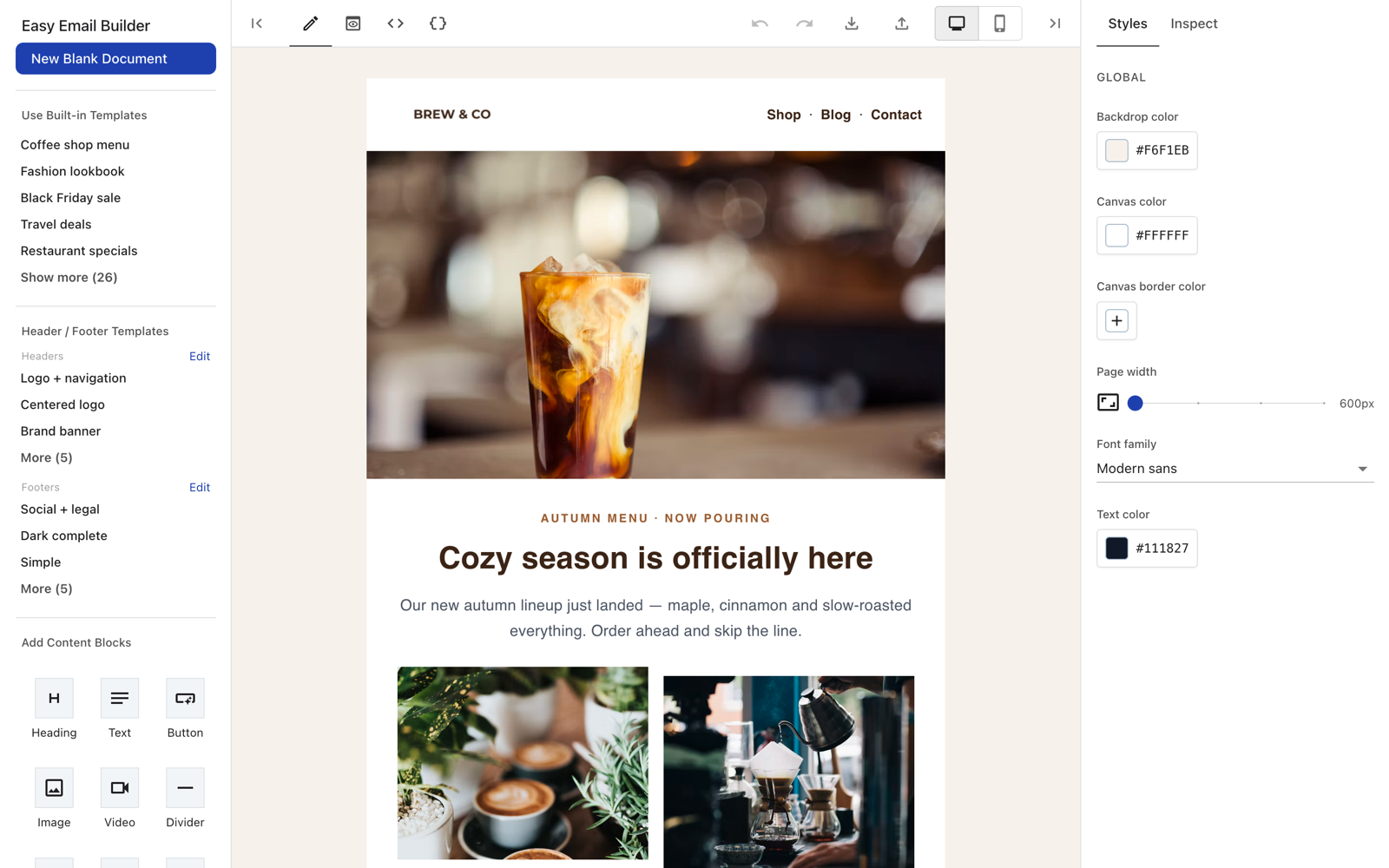
- Visual editor with text, image, button, video, socials, columns and more
- Export to HTML and JSON
- Locked header and footer with ready-made templates
- 31 starter email templates
- Image and video upload hooks
- MCP server: design emails with Claude, Cursor, Codex and other AI agents
## Use with AI agents (MCP)
Add Easy Email Builder to your favorite AI agent as an MCP server, then ask it to design an email. It returns the email HTML and a link that opens the result in the visual editor.
**Claude Desktop**: download the one-click extension **[easy-email-builder.mcpb](https://github.com/Shahkarkhan440/Easy-Email-Builder/releases/latest/download/easy-email-builder.mcpb)**, double-click it and click **Install**.
**Claude Code**
```bash
claude mcp add easy-email-builder --scope user -- npx -y easy-email-builder-mcp
```
**OpenAI Codex**
```bash
codex mcp add easy-email-builder -- npx -y easy-email-builder-mcp
```
**VS Code (GitHub Copilot)**
```bash
code --add-mcp '{"name":"easy-email-builder","command":"npx","args":["-y","easy-email-builder-mcp"]}'
```
**Gemini CLI**
```bash
gemini mcp add easy-email-builder npx -y easy-email-builder-mcp
```
**Cursor, Windsurf, Cline and other MCP clients**: add to the client's MCP config:
```json
{
  "mcpServers": {
    "easy-email-builder": {
      "command": "npx",
      "args": ["-y", "easy-email-builder-mcp"]
    }
  }
}
```
Config file locations and troubleshooting: see the [MCP server README](./mcp/README.md).
## Install
```bash
npm install easy-email-builder
```
Peer dependencies (React 18 and MUI 5):
```bash
npm install react@18 react-dom@18 @mui/material@5 @mui/icons-material@5 @emotion/react @emotion/styled react-syntax-highlighter
```
## Usage
Give the editor a container with a fixed height:
```tsx
import { EmailBuilder } from 'easy-email-builder';
export default function App() {
return (
<div style={{ height: '100vh' }}>
<EmailBuilder
onChange={(json, html) => console.log(json, html)}
imageUploadHandler={async (file) => {
// upload the file and return its URL
return 'https://example.com/image.png';
}}
/>
</div>
);
}
```
## Main props
| Prop | Description |
|------|-------------|
| `initialDocument` | Starting template JSON |
| `onChange(json, html)` | Called on every edit |
| `imageUploadHandler(file)` | Upload an image, return its URL |
| `videoUploadHandler(file)` | Upload a video, return its URL |
| `initialName` / `onNameChange` | Template name |
| `showJsonFeatures` | Show the JSON tab, import and export (default `true`) |
| `theme` | Custom MUI theme |
Use a ref to read the current template:
```tsx
const ref = useRef<EmailBuilderRef>(null);
ref.current?.getData((json, html) => save(json, html));
```
An HTML-only code editor is also available:
```tsx
import { HtmlEditor } from 'easy-email-builder/html-editor';
```
## Development
```bash
pnpm install
pnpm dev # preview app (docs/)
pnpm build:lib # build the library to dist/
```
## License
MIT. Author: shahkar khan.
What people ask about Easy-Email-Builder
What is Shahkarkhan440/Easy-Email-Builder?
+
Shahkarkhan440/Easy-Email-Builder is mcp servers for the Claude AI ecosystem. Drag-and-drop email template editor for React. Build emails visually with text, headings, images, buttons, video, socials and columns, insert personalization variables, and export to HTML and JSON. Includes 31 ready-made templates. It has 0 GitHub stars and its last recorded update is dated 2026-10-09.
How do I install Easy-Email-Builder?
+
You can install Easy-Email-Builder by cloning the repository (https://github.com/Shahkarkhan440/Easy-Email-Builder) or following the README instructions on GitHub. ClaudeWave also provides quick install blocks on this page.
Is Shahkarkhan440/Easy-Email-Builder safe to use?
+
Our security agent has analyzed Shahkarkhan440/Easy-Email-Builder and assigned a Trust Score of 95/100 (tier: Verified). See the full breakdown of passed checks and flags on this page.
Who maintains Shahkarkhan440/Easy-Email-Builder?
+
Shahkarkhan440/Easy-Email-Builder is maintained by Shahkarkhan440. The last recorded GitHub activity is dated 2026-10-09, with 0 open issues.
Are there alternatives to Easy-Email-Builder?
+
Yes. On ClaudeWave you can browse similar mcp servers at /categories/mcp, sorted by popularity or recent activity.
Deploy Easy-Email-Builder to your cloud
Ship this repo to production in minutes. Each platform spins up its own environment with editable env vars.
Maintain this repo? Add a badge to your README
Drop the badge into your GitHub README to show it's tracked on ClaudeWave. Each badge links back to this page and reflects the live Trust Score.
[](https://claudewave.com/repo/shahkarkhan440-easy-email-builder)<a href="https://claudewave.com/repo/shahkarkhan440-easy-email-builder"><img src="https://claudewave.com/api/badge/shahkarkhan440-easy-email-builder" alt="Featured on ClaudeWave: Shahkarkhan440/Easy-Email-Builder" width="320" height="64" /></a>More MCP Servers

Fair-code workflow automation platform with native AI capabilities. Combine visual building with custom code, self-host or cloud, 400+ integrations.

User-friendly AI Interface (Supports Ollama, OpenAI API, ...)

An open-source AI agent that brings the power of Gemini directly into your terminal.

Real-time global intelligence dashboard. AI-powered news aggregation, geopolitical monitoring, and infrastructure tracking in a unified situational awareness interface

🕷️ An adaptive Web Scraping framework that handles everything from a single request to a full-scale crawl! Don't be shy, join here: https://discord.gg/EMgGbDceNQ and follow here for daily tips and tricks: https://x.com/Scrapling_dev

The fastest path to AI-powered full stack observability, even for lean teams.