

The StoryBook for native mobile applications
- ✓Open-source license (MIT)
- ✓Actively maintained (<30d)
- ✓Clear description
- ✓Topics declared
- ✓Documented (README)
claude mcp add phonebook -- npx -y @stag-build/phonebook{
"mcpServers": {
"phonebook": {
"command": "npx",
"args": ["-y", "@stag-build/phonebook"]
}
}
}MCP Servers overview
<div align="center">
<img src="https://raw.githubusercontent.com/stag-build/phonebook/main/assets/phonebook-logo-lockup.svg" alt="Phonebook" width="360" />
<p>A self-hosted, open-source alternative to Emerge Tools Snapshots: harvest your existing Compose <code>@Preview</code>s and SwiftUI <code>#Preview</code>s into a browsable, static HTML gallery — no SaaS account required.</p>

[](https://glama.ai/mcp/servers/stag-build/phonebook)
</div>
Phonebook turns screenshots your team already has into a Storybook-style component gallery. No new test code, no design tokens to maintain by hand — it renders what's already in your codebase into a static site designers can open without installing anything. Each repo runs Phonebook independently; v1 is single-platform, so one Android repo (or one iOS repo) produces one bundle and one site.
## Features
- **Zero new test code** — reuses `@Preview` / `#Preview` you've already written
- **No SaaS account** — self-hosted, runs entirely in your CI or locally
- **MCP-first** — a coding agent can check setup, analyze coverage, add missing previews, and build the gallery for you
- **Smart component grouping** — `component / state` cards inferred from preview names, no required annotation
- **Cross-platform** — Android (Roborazzi + ComposablePreviewScanner, runs on the JVM, no emulator) and iOS (SnapshotPreviews, runs on a simulator)
- **Version-aware setup** — `init`/`doctor` resolve library versions against your project's Kotlin version and catch Kotlin/Roborazzi metadata mismatches before they cause opaque compiler crashes
## Demo
[](https://youtu.be/trHbUaG784w)
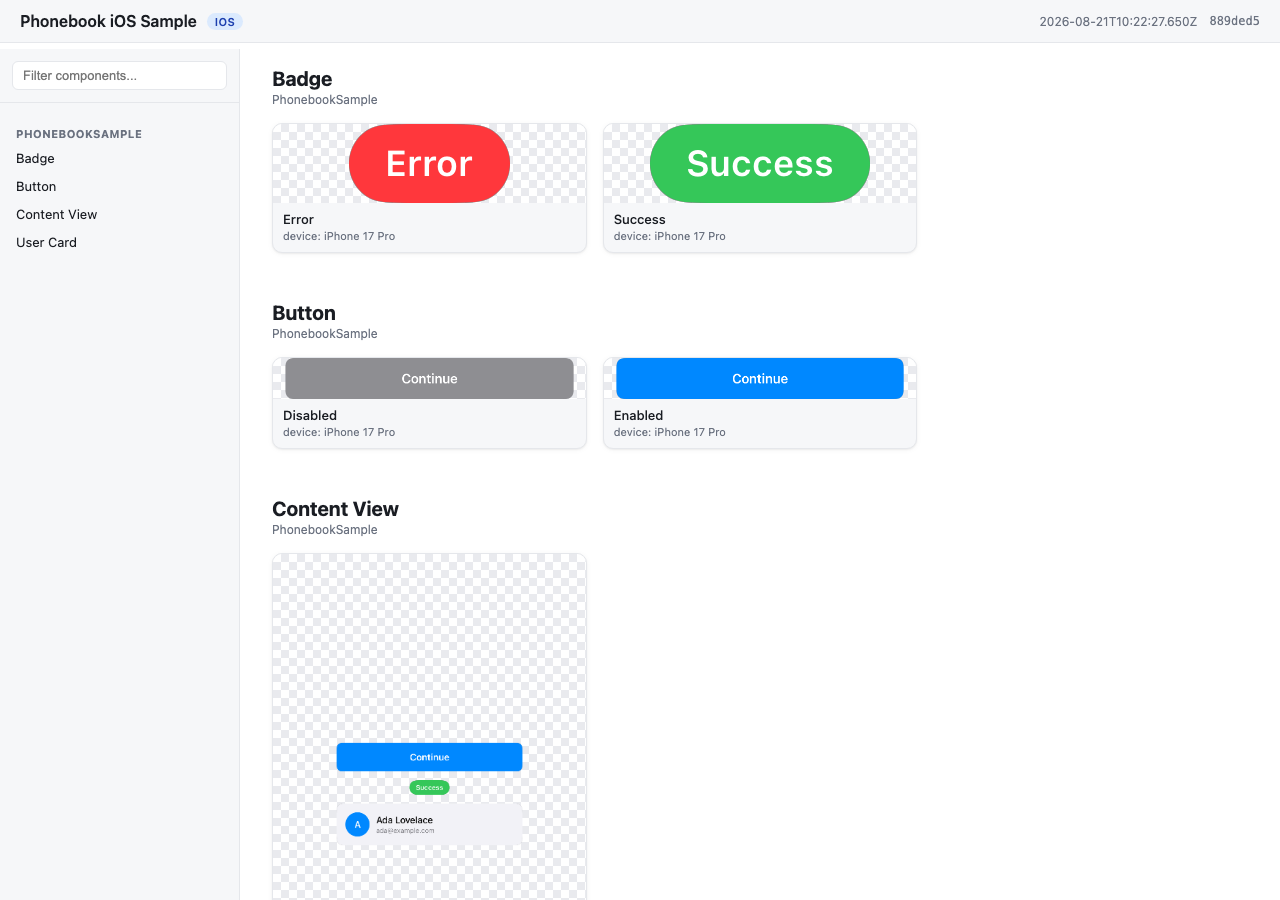
A gallery generated from `samples/ios` — `component / state` cards grouped from the app's own `#Preview`s, no extra annotation.
**[Browse the live gallery →](https://stag-build.github.io/phonebook/)**
## How it works
1. `phonebook generate` runs your platform's preview-rendering engine and harvests the output into a **bundle** (`manifest.json` + `images/`).
- Android: [Roborazzi](https://github.com/takahirom/roborazzi) + [ComposablePreviewScanner](https://github.com/sergio-sastre/ComposablePreviewScanner), run on the JVM via Robolectric. No emulator, works on Linux CI.
- iOS: [SnapshotPreviews](https://github.com/getsentry/SnapshotPreviews), run via `xcodebuild test` on a simulator. Requires macOS.
2. `phonebook build` turns that bundle into a static site — by default it writes `index.html` directly into the bundle directory (reusing the images already there, no copying), so the site lands at `<bundle>/index.html`. Pass `-o <dir>` to instead copy everything into a standalone site directory (for publishing elsewhere, or later merging multiple bundles). Plain HTML/CSS/JS, works from `file://` or any static host.
## Installation
<details>
<summary><strong>npm</strong></summary>
```sh
npm install -g @stag-build/phonebook
```
</details>
<details>
<summary><strong>Homebrew</strong></summary>
```sh
brew install stag-build/phonebook/phonebook
```
Or tap first, then install:
```sh
brew tap stag-build/phonebook
brew install phonebook
```
Formula source: [stag-build/homebrew-phonebook](https://github.com/stag-build/homebrew-phonebook).
</details>
<details>
<summary><strong>No install (npx)</strong></summary>
```sh
npx @stag-build/phonebook <cmd>
```
</details>
## Using it with a coding agent (recommended)
Most people won't run the CLI directly — Phonebook is built to be driven by a coding agent (Claude Code, Codex, etc.) through its MCP server. The agent adds previews, runs setup checks, and generates the gallery for you; the CLI underneath is the engine it calls.
The server runs via `npx @stag-build/phonebook mcp` — no install step needed. Pick your client below.
<details>
<summary><strong>Claude Code</strong></summary>
```sh
claude mcp add phonebook -- npx -y @stag-build/phonebook mcp
```
</details>
<details>
<summary><strong>Codex CLI</strong></summary>
Add to `~/.codex/config.toml`:
```toml
[mcp_servers.phonebook]
command = "npx"
args = ["-y", "@stag-build/phonebook", "mcp"]
```
</details>
<details>
<summary><strong>Claude Desktop</strong></summary>
Add to your Claude Desktop config (`~/Library/Application Support/Claude/claude_desktop_config.json` on macOS):
```json
{
"mcpServers": {
"phonebook": {
"command": "npx",
"args": ["-y", "@stag-build/phonebook", "mcp"]
}
}
}
```
</details>
<details>
<summary><strong>Cursor</strong></summary>
Add to `.cursor/mcp.json` (project) or `~/.cursor/mcp.json` (global):
```json
{
"mcpServers": {
"phonebook": {
"command": "npx",
"args": ["-y", "@stag-build/phonebook", "mcp"]
}
}
}
```
</details>
<details>
<summary><strong>Xcode (Codex Agent)</strong> — Xcode 26.3+</summary>
Add to `.codex/config.toml` at your project's workspace root. Xcode's agent runs with a minimal `PATH`, so the command wraps `npx` in a shell that adds the usual Homebrew/nvm locations first:
```toml
[mcp_servers.phonebook]
command = "/bin/zsh"
args = [
"-lc",
"PATH=/opt/homebrew/bin:/usr/local/bin:/usr/bin:/bin:/usr/sbin:/sbin; npx -y @stag-build/phonebook mcp"
]
enabled = true
```
</details>
<details>
<summary><strong>Xcode (Claude Code Agent)</strong> — Xcode 26.3+</summary>
Add the `mcpServers` block to `~/Library/Developer/Xcode/CodingAssistant/ClaudeAgentConfig/.claude.json`:
```json
{
"mcpServers": {
"phonebook": {
"command": "/bin/zsh",
"args": [
"-lc",
"PATH=/opt/homebrew/bin:/usr/local/bin:/usr/bin:/bin:/usr/sbin:/sbin; npx -y @stag-build/phonebook mcp"
]
}
}
}
```
</details>
**Android Studio (Gemini Agent Mode):** not supported yet — its MCP integration only connects to remote `httpUrl` servers, not local stdio processes like Phonebook's. Use one of the terminal-based clients above (Claude Code, Codex CLI) from the Android repo instead.
Then, from a chat in your Android or iOS repo, just ask:
> "Use the phonebook MCP and create a catalog for my designer."
The agent figures out the rest — checking setup, filling in missing previews, generating, and building the site. For more targeted asks, it also exposes: `check_setup` (setup diagnosis, same as `phonebook doctor`), `analyze_coverage` (components missing previews or dark variants), `get_preview_guidance`, `run_generate`, and `run_build`.
## Quickstart: Android
Run `phonebook init` first — it detects your project's Kotlin version and prints these instructions with **library versions resolved to be compatible with it** (e.g. Kotlin 2.0 projects get Roborazzi 1.60.0; Kotlin 2.2+ gets the latest). The versions below are what a current-Kotlin project gets (see `samples/android/app/build.gradle.kts` for a full working example):
```kotlin
// app/build.gradle.kts
plugins {
id("io.github.takahirom.roborazzi") // root build.gradle.kts: version "1.72.0" apply false
}
roborazzi {
generateComposePreviewRobolectricTests {
enable = true
packages = listOf("dev.stag.phonebook.sample") // your app's package
}
}
dependencies {
testImplementation("org.robolectric:robolectric:4.14.1")
testImplementation("io.github.takahirom.roborazzi:roborazzi:1.72.0")
testImplementation("io.github.takahirom.roborazzi:roborazzi-compose:1.72.0")
testImplementation("io.github.sergio-sastre.ComposablePreviewScanner:android:0.9.3")
testImplementation("io.github.takahirom.roborazzi:roborazzi-compose-preview-scanner-support:1.72.0")
testImplementation("androidx.compose.ui:ui-test-junit4") // version from your Compose BOM, or pin one
}
```
Add a `phonebook.config.json` next to `settings.gradle.kts`:
```json
{
"appName": "My Android App",
"platform": "android",
"android": { "modules": [":app"], "variant": "debug" }
}
```
Then, from the repo containing Phonebook:
```sh
npx @stag-build/phonebook generate -C /path/to/your/android/repo
npx @stag-build/phonebook build -C /path/to/your/android/repo
```
Open `phonebook-out/index.html`.
## Quickstart: iOS
Add the [SnapshotPreviews](https://github.com/getsentry/SnapshotPreviews) SPM package to your project and a small XCTest target that subclasses `SnapshotTest` (see `samples/ios` for a full working example):
```swift
// PhonebookSnapshotTests.swift
import Foundation
import SnapshottingTests
final class PhonebookSnapshotTests: SnapshotTest {
override class func snapshotPreviews() -> [String]? {
guard let raw = ProcessInfo.processInfo.environment["SNAPSHOTS_ONLY_FILTER"], !raw.isEmpty else {
return nil // record every #Preview
}
return raw.components(separatedBy: "\n")
}
}
```
Reading `SNAPSHOTS_ONLY_FILTER` is what lets `phonebook generate --changed` (or `--files A.swift,B.swift`)
render only the previews in the files you just edited; with the variable unset, every `#Preview` is recorded
as before.
Add `phonebook.config.json` next to your `.xcodeproj`:
```json
{
"appName": "My iOS App",
"platform": "ios",
"ios": {
"project": "MyApp.xcodeproj",
"scheme": "MyApp",
"simulator": "iPhone 17 Pro"
}
}
```
Your scheme must build and test the snapshot test target (see `PhonebookSample.xcscheme` in the sample). Then:
```sh
npx @stag-build/phonebook generate -C /path/to/your/ios/repo
npx @stag-build/phonebook build -C /path/to/your/ios/repo
```
Open `phonebook-out/index.html`.
## Naming convention
Phonebook groups screenshots into `component / state` cards from your existing preview names — no required annotation. See [docs/naming-convention.md](docs/naming-convention.md) for the full rules and examples.
## ConfiguratWhat people ask about phonebook
What is stag-build/phonebook?
+
stag-build/phonebook is mcp servers for the Claude AI ecosystem. The StoryBook for native mobile applications It has 10 GitHub stars and its last recorded update is dated 2026-09-17.
How do I install phonebook?
+
You can install phonebook by cloning the repository (https://github.com/stag-build/phonebook) or following the README instructions on GitHub. ClaudeWave also provides quick install blocks on this page.
Is stag-build/phonebook safe to use?
+
Our security agent has analyzed stag-build/phonebook and assigned a Trust Score of 95/100 (tier: Verified). See the full breakdown of passed checks and flags on this page.
Who maintains stag-build/phonebook?
+
stag-build/phonebook is maintained by stag-build. The last recorded GitHub activity is dated 2026-09-17, with 0 open issues.
Are there alternatives to phonebook?
+
Yes. On ClaudeWave you can browse similar mcp servers at /categories/mcp, sorted by popularity or recent activity.
Deploy phonebook to your cloud
Ship this repo to production in minutes. Each platform spins up its own environment with editable env vars.
Maintain this repo? Add a badge to your README
Drop the badge into your GitHub README to show it's tracked on ClaudeWave. Each badge links back to this page and reflects the live Trust Score.
[](https://claudewave.com/repo/stag-build-phonebook)<a href="https://claudewave.com/repo/stag-build-phonebook"><img src="https://claudewave.com/api/badge/stag-build-phonebook" alt="Featured on ClaudeWave: stag-build/phonebook" width="320" height="64" /></a>More MCP Servers

Fair-code workflow automation platform with native AI capabilities. Combine visual building with custom code, self-host or cloud, 400+ integrations.

User-friendly AI Interface (Supports Ollama, OpenAI API, ...)

An open-source AI agent that brings the power of Gemini directly into your terminal.

Real-time global intelligence dashboard. AI-powered news aggregation, geopolitical monitoring, and infrastructure tracking in a unified situational awareness interface

🕷️ An adaptive Web Scraping framework that handles everything from a single request to a full-scale crawl! Don't be shy, join here: https://discord.gg/EMgGbDceNQ

The fastest path to AI-powered full stack observability, even for lean teams.