

An imperative command-line-interface for AI workload orchestration
- ✓Open-source license (Apache-2.0)
- ✓Actively maintained (<30d)
- ✓Clear description
- ✓Topics declared
- ✓Documented (README)
claude mcp add terradev -- uvx terradev{
"mcpServers": {
"terradev": {
"command": "uvx",
"args": ["terradev"]
}
}
}MCP Servers overview
# Terradev-cli v6.2.19
**Cross-cloud GPU orchestration CLI.**
**License: Apache 2.0** - Free and open source for commercial and personal use.
https://terradev.cloud/
<!-- mcp-name: io.github.theoddden/terradev -->
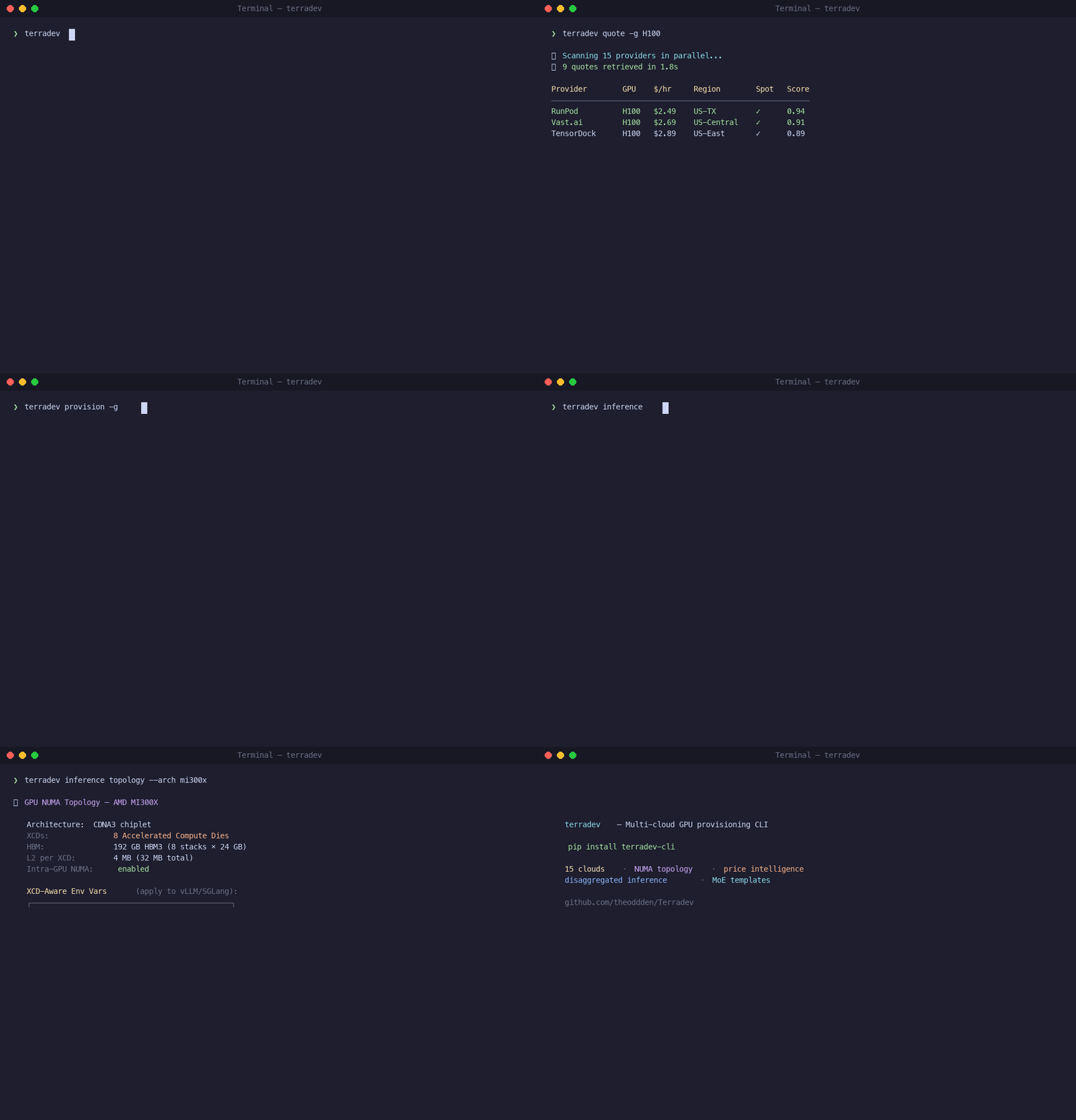
Terradev is a cross-cloud compute control plane for AI workloads, not just a provisioning wrapper.
Combines quoting, provisioning, topology optimization, training orchestration, inference tuning, and cost analytics in one CLI, with an accelerated idempotent runtime underneath.
Continued focus on lower cost, faster provisioning, and topology-aware execution with local credential storage.
Model agnostic. Dataset agnostic. GPU agnostic. Provider agnostic. The only thing Terradev is not agnostic about is correctness: it enforces topology, idempotency, and sequencing.
**NOTES ON v6.2.4**
- Version bumped to **v6.2.4**.
- Provider list consolidated to **17 active GPU cloud and inference providers**:
- `aws` — Amazon Web Services
- `azure` — Microsoft Azure
- `baseten` — Baseten
- `crusoe` — Crusoe Cloud
- `digitalocean` — DigitalOcean
- `e2enetworks` — E2E Networks
- `gcore` — Gcore
- `gcp` — Google Cloud Platform
- `huggingface` — Hugging Face
- `hyperstack` — Hyperstack
- `inferx` — InferX
- `latitude` — Latitude.sh
- `runpod` — RunPod
- `siliconflow` — SiliconFlow
- `tensordock` — TensorDock
- `vastai` — Vast.ai
- `yottalabs` — YottaLabs
- Added Gcore (`gcore`) as a new VM provider with full lifecycle support, API token auth, and drift monitoring.
- Removed OVHcloud from the active provider list.
- Removed Jio Cloud and Oracle Cloud from the active provider list; removed Alibaba Cloud references from the CLI UI.
- Onboarding, `configure`, `setup`, `quote`, `credential_prompt`, and MCP tool schemas now all reflect the 17-provider set.
**NOTES ON Multi-Stage Training Pipeline (v6.1.1)**
- New `terradev train` subcommands for the full post-pretraining lifecycle:
- `terradev train sft --model <id> --data <path> --nodes <ips>`
- `terradev train dpo --base-checkpoint <sft-ckpt> --data <pairs> --algorithm <dpo|simpo|kto|orpo>`
- `terradev train grpo --base-checkpoint <dpo-ckpt> --data <prompts> --framework <unsloth|openrlhf|trl>`
- `terradev train pipeline --config examples/training_pipeline.yaml`
- `terradev_cli/core/training_stages.py` and `terradev_cli/core/training_pipeline.py` provide declarative SFT / DPO / GRPO stage configs, provider-aware quote selection, auto-provisioning, checkpoint handoff, and DAG sequencing via the Python `DAGExecutor`.
- `TrainingOrchestrator` now supports multi-node remote SSH launch and end-to-end completion tracking. Training scripts and embedded configs are staged to every node and the master process is polled until the job finishes.
- Unsloth GRPO uses the native `unsloth.GRPOTrainer` with a default rule-based reward instead of a TRL fallback.
- CLI-style frameworks (`axolotl`, `llama-factory`, `ms-swift`, `trl`, `openrlhf`) are wrapped in self-contained Python scripts that write their embedded config files at runtime, so they are safe to copy to remote nodes.
- See `examples/training_pipeline.yaml` for a SFT → DPO → GRPO pipeline sample.
**NOTES ON 6.0.8**
- **New agent subcommands** — `terradev agent sandbox`, `terradev agent mesh`, and `terradev agent mcp` are now real, dependency-resolving commands instead of placeholders:
- `terradev agent sandbox` runs untrusted payloads with hardware-isolated runtimes (`bwrap`, `runsc`, `firecracker`, and Linux Landlock LSM), all discoverable/downloadable via `DependencyManager`.
- `terradev agent mesh` creates a decentralized peer-to-peer agent mesh using real `libp2p` (`go-libp2p-daemon` + `p2pclient`), A2A HTTP, and `WireGuard` encrypted transports.
- `terradev agent mcp` is a dynamic Model Context Protocol bridge with stdio and HTTP transports and a multi-server bridge.
**NOTES ON 6.0.0**
- **Unsloth** (`terradev train unsloth`): optimized local LLM training, serving, and coding agents with 70% lower VRAM usage and faster training via Triton kernels. Subcommands: `run`, `start`, `stop`.
- `terradev train unsloth run --model unsloth/Llama-3.1-8B`
- `terradev train unsloth run --model unsloth/Qwen3.6-7B-GGUF:Q4_K_M --port 8080`
- `terradev train unsloth start claude --model unsloth/Llama-3.1-8B`
- `terradev train unsloth stop`
- **Weaviate** (`terradev database weaviate`): vector database operations with local, embedded, cloud, and custom environments. Subcommands: `up`, `list-collections`, `create-collection`, `delete-collection`, `insert`, `query`, `hybrid-search`.
- `terradev database weaviate up --environment local`
- `terradev database weaviate create-collection --name Article --vector-size 384`
- `terradev database weaviate insert --collection Article --objects '[{"properties": {"title": "Hello"}, "vector": [0.1, ...]}]'`
- `terradev database weaviate query --collection Article --vector '[0.1, ...]' --top-k 5`
- `terradev database weaviate hybrid-search --collection Article --query "generative AI" --top-k 5`
- **Letta** (`terradev agent letta`): stateful agents with long-horizon memory across sessions. Subcommands: `create`, `list`, `chat`, `status`, `delete`, `remember`.
- `terradev agent letta create --name my-agent --model openai/gpt-4.1`
- `terradev agent letta list`
- `terradev agent letta chat --agent-id <id> --message "hello"`
- `terradev agent letta remember --agent-id <id> --text "Our staging cluster is on us-east-1" --label fact`
- `terradev agent letta status --agent-id <id>`
- `terradev agent letta delete --agent-id <id>`
- **Removed integrations**: `terradev ml databricks` and `terradev ml langsmith` command groups, all related MCP tools, and Jaeger tracing endpoints in the Helm values have been removed.
- Version bumped to **6.0.0** to reflect these breaking changes.
**NOTES ON 5.7.10**
- **Local Ollama integration** (`terradev ml ollama`): list, pull, generate, chat, inspect, and check running models on a local Ollama server (`list`, `pull`, `generate`, `chat`, `info`, `ps`).
- **DeepEval integration** (`terradev ml deepeval`): install, run test suites, list metrics, and evaluate single LLM outputs with metrics like `AnswerRelevancyMetric`, `FaithfulnessMetric`, and `HallucinationMetric` (`install`, `init`, `run`, `metrics`, `evaluate`).
- **MCP tool surface** now at 237 tools, including `ollama_*` and `deepeval_*` tool definitions and handlers.
**NOTES ON 5.7.7**
- **Vault command** (`terradev vault`): store, sync, and use cloud API secrets from environment variables or the encrypted local vault. Designed for GitHub Actions / CI/CD pipelines where secrets are provided as `TERRADEV_<PROVIDER>_<KEY>` env vars.
- `terradev vault sync` imports supported `TERRADEV_<PROVIDER>_<KEY>` secrets into the encrypted `~/.terradev/credentials.json` (use `--all` to also import custom keys).
- `terradev vault run -- <command>` injects vault secrets into a sub-process and zeroizes them afterwards.
- `terradev` now automatically falls back to `TERRADEV_*` environment variables when the local vault file is missing, so `terradev up` works directly from GitHub Secrets without a separate `configure` step.
- **Database command** (`terradev database`): universal database and vector store operations with SQLite, PostgreSQL, Qdrant, and Redis adapters. Subcommands: `terradev database up`, `database down`, `database crud`, `database search`, `database sql`, and `database qdrant` with its own `search`, `scroll`, `upsert`, `create-collection`, and `delete-collection` operations.
**NOTES ON 5.6.0**
Added **API Gateway for inference serving** with OpenAI/Anthropic/custom API entry and exit points:
- **Gateway Service** (`core/gateway_service.py`): FastAPI-based gateway that provides OpenAI-compatible, Anthropic-compatible, and custom workflow API endpoints for inference serving. Integrates with Terradev's inference router and KV cache management for intelligent routing.
- **Gateway CLI command** (`terradev gateway`):
```bash
terradev gateway
terradev gateway --host 0.0.0.0 --port 8080
terradev gateway --no-anthropic --max-concurrent 50
terradev gateway --model meta-llama/Llama-3.1-8B-Instruct
```
- **OpenAI-compatible endpoints**:
- POST /v1/chat/completions
- POST /v1/completions
- **Anthropic-compatible endpoints**:
- POST /v1/messages
- POST /v1/messages/batches
- **Custom workflow endpoints**:
- POST /v1/custom/entry/{workflow_id}
- POST /v1/custom/exit/{workflow_id}
- **Management endpoints**:
- GET /health
- GET /v1/gateway/status
- **Features**:
- Streaming response support
- Configurable CORS, concurrent requests, timeouts
- Integration with inference router for intelligent routing
- Request/response transformation and validation
**NOTES ON 5.3.9**
Added **LoRAX (LoRA eXchange) integration** and **HuggingFace PEFT import** for production-grade multi-LoRA inference serving:
- **LoRAX Service** (`ml_services/lorax_service.py`): Async HTTP client for Predibase LoRAX multi-LoRA inference server that serves thousands of fine-tuned models on a single GPU with dynamic adapter loading, heterogeneous continuous batching, and adapter exchange scheduling.
- **LoRAX CLI commands** (`terradev lora lorax`):
```bash
terradev lora lorax deploy -m mistralai/Mistral-7B-Instruct-v0.1 --docker
terradev lora lorax test --host localhost --port 8080
terradev lora lorax list-adapters
terradev lora lorax load-adapter -a vineetsharma/qlora-adapter-Mistral-7B-Instruct-v0.1-gsm8k
terradev lora lorax unload-adapter -a my-adapter
terradev lora lorax generate -p "What is 2+2?" -a my-adapter
terradev lora lorax sync-registry
```
- **PEFT Import Service** (`ml_services/peft_import_service.py`): Download, validate, and prepare LoRA adapters from HuggingFace using the PEFT library with auto-detecWhat people ask about Terradev
What is theoddden/Terradev?
+
theoddden/Terradev is mcp servers for the Claude AI ecosystem. An imperative command-line-interface for AI workload orchestration It has 25 GitHub stars and its last recorded update is dated 2026-09-08.
How do I install Terradev?
+
You can install Terradev by cloning the repository (https://github.com/theoddden/Terradev) or following the README instructions on GitHub. ClaudeWave also provides quick install blocks on this page.
Is theoddden/Terradev safe to use?
+
Our security agent has analyzed theoddden/Terradev and assigned a Trust Score of 95/100 (tier: Verified). See the full breakdown of passed checks and flags on this page.
Who maintains theoddden/Terradev?
+
theoddden/Terradev is maintained by theoddden. The last recorded GitHub activity is dated 2026-09-08, with 13 open issues.
Are there alternatives to Terradev?
+
Yes. On ClaudeWave you can browse similar mcp servers at /categories/mcp, sorted by popularity or recent activity.
Deploy Terradev to your cloud
Ship this repo to production in minutes. Each platform spins up its own environment with editable env vars.
Maintain this repo? Add a badge to your README
Drop the badge into your GitHub README to show it's tracked on ClaudeWave. Each badge links back to this page and reflects the live Trust Score.
[](https://claudewave.com/repo/theoddden-terradev)<a href="https://claudewave.com/repo/theoddden-terradev"><img src="https://claudewave.com/api/badge/theoddden-terradev" alt="Featured on ClaudeWave: theoddden/Terradev" width="320" height="64" /></a>More MCP Servers

Fair-code workflow automation platform with native AI capabilities. Combine visual building with custom code, self-host or cloud, 400+ integrations.

User-friendly AI Interface (Supports Ollama, OpenAI API, ...)

An open-source AI agent that brings the power of Gemini directly into your terminal.

Real-time global intelligence dashboard. AI-powered news aggregation, geopolitical monitoring, and infrastructure tracking in a unified situational awareness interface

The fastest path to AI-powered full stack observability, even for lean teams.

🕷️ An adaptive Web Scraping framework that handles everything from a single request to a full-scale crawl!