

Agent-native MCP server for Tychi self-custody wallet — fast onboard/create/import tools + policy-gated tyi_chat for OpenClaw, Claude, Cursor.
claude mcp add tyi-mcp -- npx -y @tychilabs/tyi-mcp{
"mcpServers": {
"tyi-mcp": {
"command": "npx",
"args": ["-y", "@tychilabs/tyi-mcp"]
}
}
}MCP Servers overview
# Tychi MCP (`@tychilabs/tyi-mcp`)
[](https://www.npmjs.com/package/@tychilabs/tyi-mcp)
[](https://www.npmjs.com/package/@tychilabs/tyi-mcp)
[](https://nodejs.org)
[](https://modelcontextprotocol.io)
[](https://arbitrum.io)
[](https://tychilabs.com)
[](https://tychilabs.com)
[](https://opensource.org/licenses/Apache-2.0)
**Give your AI agent a wallet — onboard, hold funds, send, and pay under policy.**
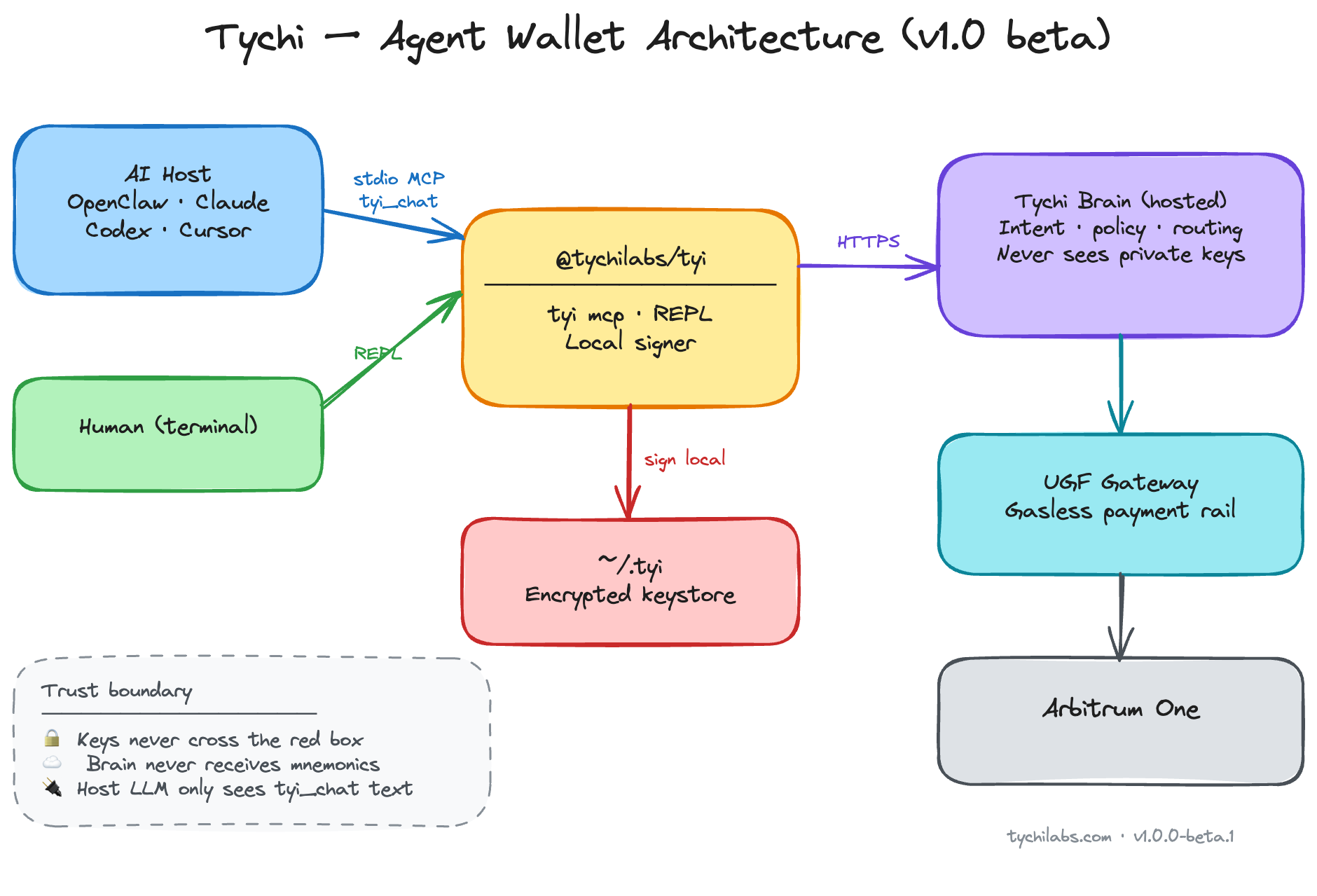
Agent-native MCP server (stdio) for Cursor and other hosts. Nine tools: routing (`tyi_route`), readiness (`tyi_status`), onboarding, fast wallet lifecycle (`create` / `import` / `switch`), and `tyi_chat` for balances, sends, and policy-gated payments on **Arbitrum One**. Private keys encrypted in `~/.tyi` on the operator machine; **signing never leaves the device**. Hosted Tychi brain parses intent and runs the LLM — configure `TYCHI_BRAIN_URL` (HTTPS recommended; see [SECURITY.md](./SECURITY.md)).
**Agents →** `@tychilabs/tyi-mcp@1.0.0-beta.8` · **Humans →** [`@tychilabs/tyi`](https://www.npmjs.com/package/@tychilabs/tyi)
---
## What it does
- **Agent routing** — `tyi_route` maps intent → correct tool (avoids slow misuse of `tyi_chat`)
- **Readiness gate** — `tyi_status` checks mode before any wallet action
- **Onboarding** — `tyi_onboard` + `tyi_onboard_schema` for first-time setup (password, LLM provider, API key)
- **Wallet lifecycle** — `tyi_create_wallet`, `tyi_import_wallet`, `tyi_switch_wallet` (fast, no brain loop)
- **Agent chat** — `tyi_chat` for balances, sends, transfers, payments, policy, limits, history
- **Multi-wallet** — create, import, switch active wallet from one keystore
- **Policy caps** — spend limits enforced before signing
- **Local signing** — private keys in memory on operator machine only
- **Gasless routing** — UGF payment rails for cross-chain gas settlement
- **Audit log** — local activity trail in `~/.tyi`
- **Reset** — `tyi_reset` wipes local data when operator confirms
**Beta ships on Arbitrum One** (chain id `42161`) — EVM balances, sends, and UGF gasless payments. More chains in registry; Solana/Sui import supported.
---
## Arbitrum One
Onchain agent wallet on **Arbitrum One** — self-custody, local signing, UGF gas routing today:
| Roadmap | What it unlocks |
|---------|-----------------|
| **Automation** | Policy-gated agents — recurring sends, triggers, scheduled flows |
| **Trading** | Spot swaps across Arbitrum liquidity — agent quotes, operator confirms |
| **Lending** | Supply on Arbitrum money markets — yield without leaving keystore |
| **Borrowing** | Collateralized borrow — cap-enforced, fully self-custodial |
---
## Agent flow (mandatory)
```
tyi_route → tyi_status
→ direct tool (onboard / create / import / switch / reset) ← FAST
→ tyi_chat (balance / send / pay / policy only) ← SLOW
```
Never call `tyi_chat` when `tyi_status.ready` is false.
Import seed or private key → `tyi_import_wallet` only (never via `tyi_chat`).
---
## Tools
| Tool | Use when |
|------|----------|
| `tyi_route` | **First** — intent → tool map |
| `tyi_status` | Session start — ready? what's missing? |
| `tyi_onboard_schema` | Field schema before onboard |
| `tyi_onboard` | First setup or LLM-only setup |
| `tyi_create_wallet` | New wallet by name |
| `tyi_import_wallet` | Import mnemonic or privkey (EVM / Solana / Sui) |
| `tyi_switch_wallet` | Change active wallet |
| `tyi_reset` | Wipe `~/.tyi` (`confirm: true`) |
| `tyi_chat` | Balance, send, pay, transfer, policy, limits |
---
## Install
Pin the release (do not use floating `@beta` in production):
```bash
npx @tychilabs/tyi-mcp@1.0.0-beta.8
npx @tychilabs/tyi-mcp@1.0.0-beta.8 --tools
```
---
## Security
See **[SECURITY.md](./SECURITY.md)** — trust model, brain transport (HTTP beta endpoint), sensitive tools, supply-chain pinning. No install scripts.
---
## MCP host config
Repo includes [`.mcp.json`](./.mcp.json) (Open Plugins) for Cursor Directory. Set **`TYI_PASSWORD`** and **`TYCHI_BRAIN_URL`** in host env (HTTPS brain recommended).
```json
{
"mcpServers": {
"tychi": {
"command": "npx",
"args": ["@tychilabs/tyi-mcp@1.0.0-beta.8"],
"env": {
"TYI_PASSWORD": "<from tyi_onboard>",
"TYCHI_BRAIN_URL": "<https brain URL — required>"
}
}
}
}
```
Beta default if unset in code: `http://hosted_brain.tychilabs.com` — use HTTPS self-host or trusted network only.
OpenClaw:
```bash
openclaw mcp set tychi '{"command":"npx","args":["@tychilabs/tyi-mcp@1.0.0-beta.8"],"env":{"TYI_PASSWORD":"<password>","TYCHI_BRAIN_URL":"<https brain URL>"}}'
openclaw mcp reload
```
---
## Onboarding modes
| Mode | Meaning |
|------|---------|
| `fresh` | No wallet — run `tyi_onboard` |
| `llm_only` | Wallet exists, no LLM key — onboard LLM fields only |
| `ready` | OK for `tyi_chat` |
**Operator provides (never invent):** keystore password, LLM provider + API key, optional mnemonic for import.
Prefer MCP `env` for `TYI_PASSWORD` over chat after onboard.
| Field | Prompt |
|-------|--------|
| `password` | Keystore password for `~/.tyi` → later `TYI_PASSWORD` in MCP env |
| `agent_name` | Agent name (default `Tychi`) |
| `llm_provider` | `anthropic` \| `gemini` \| `openai` \| `groq` |
| `llm_api_key` | Provider API key (validated, stored encrypted on brain) |
| `mnemonic` | Optional import (fresh only) |
---
## Remove integration + data
1. `tyi_reset` with `{ "confirm": true }` — wipes `~/.tyi`
2. Remove `TYI_PASSWORD` from MCP env
3. OpenClaw: `openclaw mcp unset tychi` then `openclaw mcp reload`
---
## Errors
| Symptom | Action |
|---------|--------|
| `not_ready` on chat | Run onboard flow |
| `TYI_PASSWORD env required` | Set env after onboard; reload host |
| `no_llm_key` / missing `llm_key` | `tyi_onboard` llm_only |
| `partial install` | `tyi_reset` then fresh onboard |
| `fetch failed` on brain | Set `TYCHI_BRAIN_URL` explicitly; use HTTPS self-host or beta `http://hosted_brain.tychilabs.com` |
---
## Environment
| Variable | Required | Default |
|----------|----------|---------|
| `TYI_PASSWORD` | After onboard | — |
| `TYCHI_BRAIN_URL` | Recommended | `http://hosted_brain.tychilabs.com` (beta; prefer HTTPS override) |
| `TYI_DATA_DIR` | No | `~/.tyi` |
| `KEYSTORE_PASSWORD` | Alias | same as `TYI_PASSWORD` |
---
## Links
- Website: https://tychilabs.com
- npm: https://www.npmjs.com/package/@tychilabs/tyi-mcp
- GitHub: https://github.com/TychiWallet/tyi-mcp
- Human CLI: https://www.npmjs.com/package/@tychilabs/tyi
---
## License
Apache License 2.0 — see [LICENSE](./LICENSE). Runtime dependency: `@tychilabs/tyi`.
What people ask about tyi-mcp
What is TychiWallet/tyi-mcp?
+
TychiWallet/tyi-mcp is mcp servers for the Claude AI ecosystem. Agent-native MCP server for Tychi self-custody wallet — fast onboard/create/import tools + policy-gated tyi_chat for OpenClaw, Claude, Cursor. It has 3 GitHub stars and was last updated 2d ago.
How do I install tyi-mcp?
+
You can install tyi-mcp by cloning the repository (https://github.com/TychiWallet/tyi-mcp) or following the README instructions on GitHub. ClaudeWave also provides quick install blocks on this page.
Is TychiWallet/tyi-mcp safe to use?
+
TychiWallet/tyi-mcp has not been audited yet by our security agent. Review the original repository on GitHub before using it in production.
Who maintains TychiWallet/tyi-mcp?
+
TychiWallet/tyi-mcp is maintained by TychiWallet. The last recorded GitHub activity is from 2d ago, with 0 open issues.
Are there alternatives to tyi-mcp?
+
Yes. On ClaudeWave you can browse similar mcp servers at /categories/mcp, sorted by popularity or recent activity.
Deploy tyi-mcp to your cloud
Ship this repo to production in minutes. Each platform spins up its own environment with editable env vars.
Maintain this repo? Add a badge to your README
Drop the badge into your GitHub README to show it's tracked on ClaudeWave. Each badge links back to this page and reflects the live Trust Score.
[](https://claudewave.com/repo/tychiwallet-tyi-mcp)<a href="https://claudewave.com/repo/tychiwallet-tyi-mcp"><img src="https://claudewave.com/api/badge/tychiwallet-tyi-mcp" alt="Featured on ClaudeWave: TychiWallet/tyi-mcp" width="320" height="64" /></a>More MCP Servers

Fair-code workflow automation platform with native AI capabilities. Combine visual building with custom code, self-host or cloud, 400+ integrations.

User-friendly AI Interface (Supports Ollama, OpenAI API, ...)

An open-source AI agent that brings the power of Gemini directly into your terminal.

The fastest path to AI-powered full stack observability, even for lean teams.

🕷️ An adaptive Web Scraping framework that handles everything from a single request to a full-scale crawl!

⭐AI-driven public opinion & trend monitor with multi-platform aggregation, RSS, and smart alerts.🎯 告别信息过载,你的 AI 舆情监控助手与热点筛选工具!聚合多平台热点 + RSS 订阅,支持关键词精准筛选。AI 智能筛选新闻 + AI 翻译 + AI 分析简报直推手机,也支持接入 MCP 架构,赋能 AI 自然语言对话分析、情感洞察与趋势预测等。支持 Docker ,数据本地/云端自持。集成微信/飞书/钉钉/Telegram/邮件/ntfy/bark/slack 等渠道智能推送。