

Watch company job boards (Greenhouse, Lever, Ashby, Workable, Workday, Eightfold, Rippling), get a ranked digest of new matches, track every application, and use it from Claude via MCP. Never auto-applies.
- ✓Open-source license (MIT)
- ✓Actively maintained (<30d)
- ✓Clear description
- ✓Topics declared
- ✓Documented (README)
claude mcp add jobwatch -- python -m jobwatch{
"mcpServers": {
"jobwatch": {
"command": "python",
"args": ["-m", "jobwatch"]
}
}
}MCP Servers overview
# jobwatch
<!-- mcp-name: io.github.vinayvobbili/jobwatch -->
[](https://m8ven.ai/mcp/vinayvobbili-jobwatch-1cvk7w?s=readme)
[](https://glama.ai/mcp/servers/vinayvobbili/jobwatch)
[](https://mcpservers.org/servers/vinayvobbili/jobwatch)
[](https://aiagentslisting.com/mcp/jobwatch)
Watch the job boards of the companies you care about and get a short, ranked digest of **new** roles that
match you, optionally fit-scored against your resume. jobwatch finds and ranks. It never applies for you.
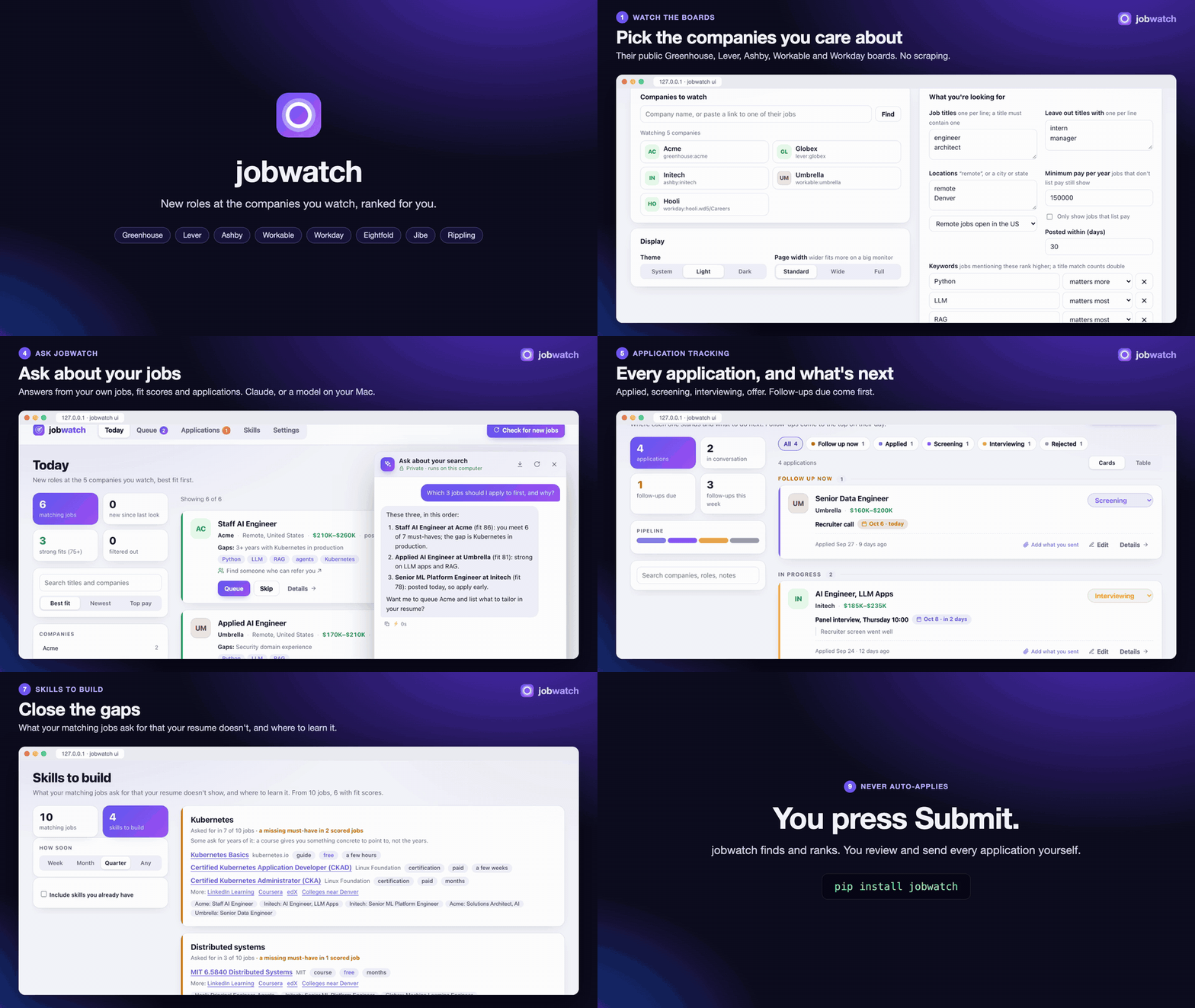
[Watch it with sound](https://github.com/vinayvobbili/jobwatch/blob/main/docs/jobwatch-demo.mp4) (1½ minutes,
made from made-up data).
```
$ jobwatch run
Checked 48 board(s): 9,412 open roles, 37 new.
# jobwatch digest
6 matching job(s). Filtered out: 22 by location, 4 by pay, 5 by title.
### [Staff AI Engineer](https://jobs.ashbyhq.com/initech/c1)
Initech · Denver, CO, United States; Remote · $230K–$300K · posted today
**Fit 81/100**, must-haves 6/7. Gaps: 3+ years with Kubernetes in production
Keywords: Python, RAG, agents
`ashby:initech:c1`
...
```
## Why company boards
Most tech companies post jobs through Greenhouse, Lever, Ashby or Workable, and most large employers through
Workday (some through Eightfold, Oracle Recruiting Cloud, SmartRecruiters or a Jibe careers site), and many
small companies through Rippling. Each publishes open roles as public JSON so anyone can build a careers page, with
no API key or scraping; Google publishes its own (with YouTube's and DeepMind's) as an XML feed for job sites,
Amazon's careers site (amazon.jobs, with AWS) answers its own search in JSON, and Avature careers portals
(Lenovo's, for one) list every posting in a sitemap for search engines.
jobwatch reads those feeds for the companies on your watchlist:
- **Complete and fresh:** a role appears as soon as the company posts it, not when an aggregator picks it up.
- **Pay ranges:** read from the board's structured fields where they exist (Lever, Ashby), otherwise from
the posting text. An hourly wage counts as the yearly pay it comes to (2,080 hours), so `$75–$80/hr` is
held to `min_salary` as $156K–$166K.
- **Polite:** one request per company per run on Greenhouse, Lever, Ashby and Workable (a Jibe site: one per 100
roles). A Workday, Eightfold or Oracle board can
list thousands of roles, most of them nothing like yours, so jobwatch searches it for your
`filters.titles` words and reads a posting in full only when its title passes your title filters, once:
after that, a run costs a few searches per company. Titles written as regexes can't be searched for, so
keep a plain word or two ("engineer", "forward deployed") among them. A board that answers "too many
requests" (HTTP 429) is asked again after a pause; a posting it still won't serve is kept without its text
and read on the next run. Eightfold boards are read one request at a time. Google's feed is every role it
has, one request (about 20 MB) a run; jobwatch keeps the ones whose titles have your `filters.titles` words,
in the US unless the board is `google/any`. Amazon is searched like a Workday board, newest roles first and
100 a request, one request at a time; each result has the role's full text, so nothing more is read. It keeps
US roles unless the board is `amazon/any`. A SmartRecruiters board is searched the same way, 24 titles a
page, and each posting it reads is one page. An Avature portal's sitemap is one request a run; a posting
whose title has your `filters.titles` words and passes your title filters is read from its page, once, two at
a time.
- **Within the rules:** it reads public APIs meant for this, and follows robots.txt. SmartRecruiters' own API
host asks crawlers to stay away, so jobwatch doesn't use it: it reads the company's public careers site
(careers.smartrecruiters.com, and each posting's page on jobs.smartrecruiters.com), which robots.txt leaves
open. On an Avature portal it reads only the public pages its robots.txt lets robots read (never a link with
`qtvc=`, never anything behind a sign-in). It doesn't scrape LinkedIn or Indeed, which forbid it.
## Install
```
pip install jobwatch # discovery, filters, digest
pip install 'jobwatch[score]' # + fit scores with shortlist-ai (Claude API)
pip install 'jobwatch[local]' # + fit scores on-device (Apple Silicon, MLX)
pip install 'jobwatch[mcp]' # + MCP server for Claude and other assistants
```
## Quick start
### In your browser
```
pipx install jobwatch # or: pip install jobwatch
jobwatch ui
```
A page opens on your computer. Add the companies you want to watch (type a name or paste a link to one of
their jobs), say what you're looking for, and press **Check for new jobs**. From there:
- **Today:** new matching jobs, with pay, how long ago they were posted, keywords, and who you know there.
**Queue** the ones worth applying to, **Skip** the rest.
- **Queue:** your short list. Apply on the company's site, then press **I applied**.
- Long lists come in pages (12, 24, 48 or 96 at a time, kept per browser).
- **Applications:** every job you applied to and where it stands (applied, screening, interviewing, offer,
rejected, withdrawn), with the next step and a follow-up day. Those due come first. Filter by status with
the chips over the list (or click the pipeline bar), and switch between **Cards** and a sortable **Table**.
**Add an application** covers jobs you found elsewhere, such as a referral or a recruiter.
- **Settings:** companies, filters, keywords, your resume (for fit scores), your LinkedIn connections, and the
page's theme (system, light or dark) and width (standard, wide or full, for a big monitor).
- **Ask jobwatch:** a chat on Today (about all of today's jobs and your applications) and beside each job's
details (about that posting). See [Chat](#chat).
The page only talks to jobwatch on your own machine. The one exception is a model you choose: with
`scoring.backend: claude`, fit scores and chat send the posting and your resume to Anthropic. It's the same
watchlist file and history as the command line, so you can switch between the two.
To have the page always there, even after a restart, on a Mac:
```
jobwatch service install # starts jobwatch ui when you log in, and again if it stops
jobwatch service status # running? where's the log?
jobwatch service uninstall
```
A login item doesn't see variables set in your shell profile, so with `scoring.backend: claude` the page's
chat and scores need `ANTHROPIC_API_KEY` given to launchd (`launchctl setenv ANTHROPIC_API_KEY ...`), or
run `jobwatch ui` from a terminal instead. The local backend needs nothing.
### On the command line
```
jobwatch init # writes an example jobwatch.yaml
jobwatch find "Anthropic" "Scale AI" # find each company's board
jobwatch find https://jobs.lever.co/spotify/4f1c2a9e-... # or paste any job link
```
`find` prints a line like `Anthropic: greenhouse:anthropic (627 open roles)`. For a Workday company it tries
the usual site names; if that finds nothing, paste a job link from their careers site (it has
`myworkdayjobs.com` in it) and `find` reads the board from it: `workday:nvidia.wd5/NVIDIAExternalCareerSite`.
An Oracle Recruiting Cloud site is found the same way, from a job link with `oraclecloud.com/hcmUI/CandidateExperience`
in it: `oracle:eeho.fa.us2/CX_45001`.
A company's own careers page works too (`jobwatch find https://careers.acme.com/jobs`): `find` reads it for
links to a board, which is how a board under a name nobody would guess turns up. Add those
entries under `companies:`, adjust the filters, then:
```
jobwatch run # fetch every board, then show the digest
```
Run it daily, for example from cron: `0 8 * * * jobwatch run -o ~/jobs-today.md`.
## The watchlist
```yaml
companies:
- greenhouse:anthropic
- lever:spotify
- {source: ashby, board: openai, name: OpenAI}
- workable:acme # apply.workable.com/acme
- {source: workday, board: nvidia.wd5/NVIDIAExternalCareerSite, name: NVIDIA} # tenant.wdN/site
- {source: eightfold, board: acme, name: Acme} # tenant (or tenant/domain), from a link
- {source: jibe, board: careers.acme.com, name: Acme} # a Jibe site's host (job links: /careers-home/jobs/...)
- rippling:acme # ats.rippling.com/acme/jobs
- google:google # Google, YouTube, DeepMind in the US (google/any: all)
- amazon:amazon # Amazon and AWS in the US (amazon/any: all)
- {source: oracle, board: eeho.fa.us2/CX_45001, name: Oracle} # pod.fa.region/site, from a job link
- smartrecruiters:ServiceNow # careers.smartrecruiters.com/ServiceNow
- {source: avature, board: jobs.lenovo.com/careers, name: Lenovo} # an Avature portal: host/portal
filters:
titles: ["engineer", "architect"] # regexes; the title must match one
exclude_titles: ["intern", "manager"]
exclude_departments: ["sales"]
locations: ["remote", "Denver", "Boulder, CO"]
remote_country: US # remote roles must be open in the US ("any" to allow all)
home_state: CO # leave out remote roles open only in other states (or "Colorado")
min_salary: 200000 What people ask about jobwatch
What is vinayvobbili/jobwatch?
+
vinayvobbili/jobwatch is mcp servers for the Claude AI ecosystem. Watch company job boards (Greenhouse, Lever, Ashby, Workable, Workday, Eightfold, Rippling), get a ranked digest of new matches, track every application, and use it from Claude via MCP. Never auto-applies. It has 0 GitHub stars and its last recorded update is dated 2026-10-09.
How do I install jobwatch?
+
You can install jobwatch by cloning the repository (https://github.com/vinayvobbili/jobwatch) or following the README instructions on GitHub. ClaudeWave also provides quick install blocks on this page.
Is vinayvobbili/jobwatch safe to use?
+
Our security agent has analyzed vinayvobbili/jobwatch and assigned a Trust Score of 95/100 (tier: Verified). See the full breakdown of passed checks and flags on this page.
Who maintains vinayvobbili/jobwatch?
+
vinayvobbili/jobwatch is maintained by vinayvobbili. The last recorded GitHub activity is dated 2026-10-09, with 0 open issues.
Are there alternatives to jobwatch?
+
Yes. On ClaudeWave you can browse similar mcp servers at /categories/mcp, sorted by popularity or recent activity.
Deploy jobwatch to your cloud
Ship this repo to production in minutes. Each platform spins up its own environment with editable env vars.
Maintain this repo? Add a badge to your README
Drop the badge into your GitHub README to show it's tracked on ClaudeWave. Each badge links back to this page and reflects the live Trust Score.
[](https://claudewave.com/repo/vinayvobbili-jobwatch)<a href="https://claudewave.com/repo/vinayvobbili-jobwatch"><img src="https://claudewave.com/api/badge/vinayvobbili-jobwatch" alt="Featured on ClaudeWave: vinayvobbili/jobwatch" width="320" height="64" /></a>More MCP Servers

Fair-code workflow automation platform with native AI capabilities. Combine visual building with custom code, self-host or cloud, 400+ integrations.

User-friendly AI Interface (Supports Ollama, OpenAI API, ...)

An open-source AI agent that brings the power of Gemini directly into your terminal.

Real-time global intelligence dashboard. AI-powered news aggregation, geopolitical monitoring, and infrastructure tracking in a unified situational awareness interface

🕷️ An adaptive Web Scraping framework that handles everything from a single request to a full-scale crawl! Don't be shy, join here: https://discord.gg/EMgGbDceNQ and follow here for daily tips and tricks: https://x.com/Scrapling_dev

The fastest path to AI-powered full stack observability, even for lean teams.