

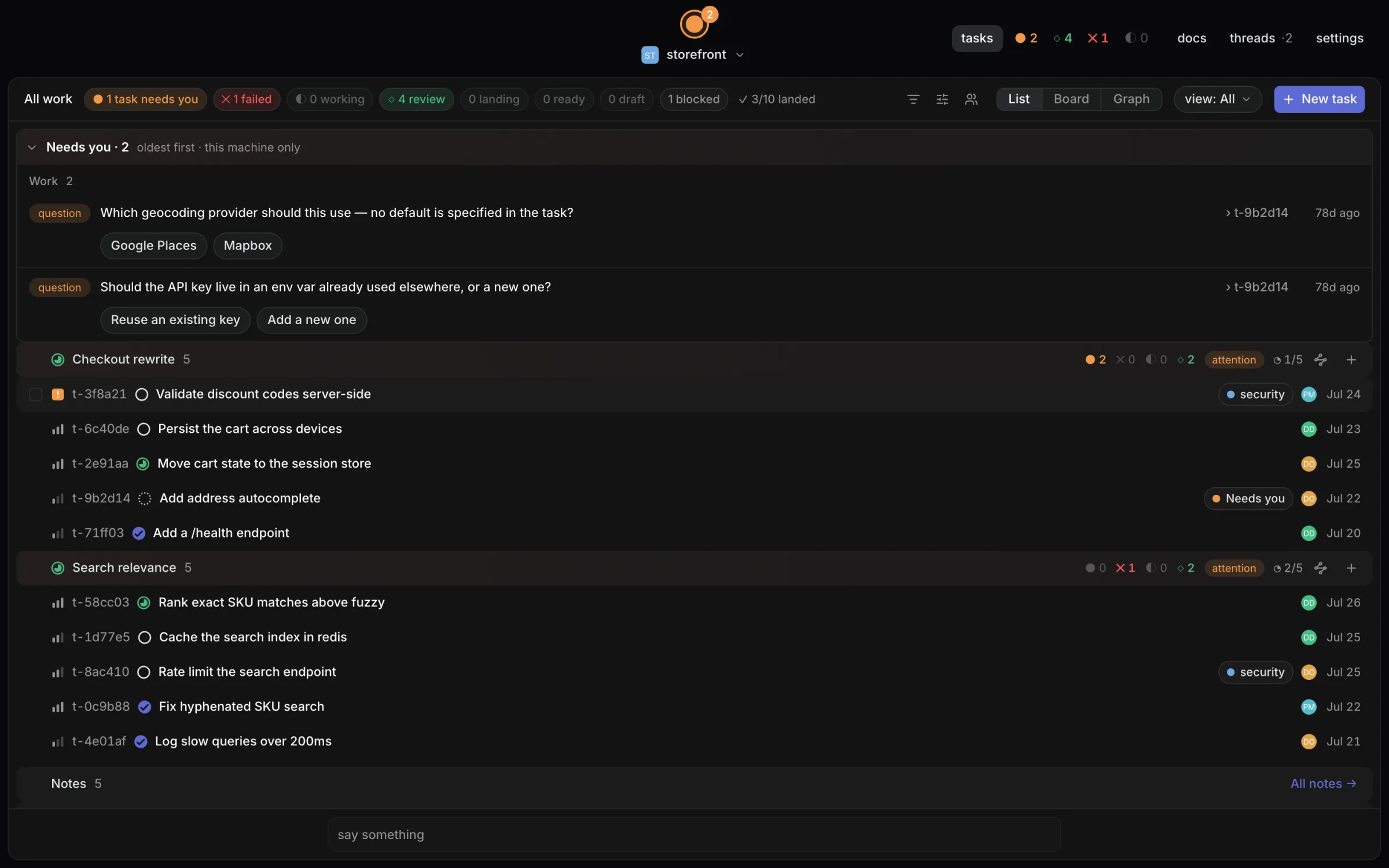
The shared board your team's coding agents work from, on your own machines. Tasks, not chats: Claude Code, Codex or any MCP agent, scoped worktrees, review and a merge queue.
- ✓Actively maintained (<30d)
- ✓Clear description
- ✓Topics declared
- ✓Documented (README)
- !Licence file present but not machine-readable
git clone https://github.com/wsoule/dispatch{
"mcpServers": {
"dispatch": {
"command": "node",
"args": ["/path/to/dispatch/dist/index.js"]
}
}
}MCP Servers overview
# Dispatch
The shared board your team's coding agents work from, on your own machines. Give
agents tasks, not chats: Claude Code, Codex or any MCP agent claims work from
one board, runs it in its own worktree inside the files it declared, and lands
it through review and a merge queue. [dispatch.foo](https://dispatch.foo)
**Licensing:** open core. The integration packages (core, client, CLI, MCP
server) are MIT; the desktop app and daemon are source-available under
FSL-1.1-ALv2 and each release becomes Apache-2.0 two years after it ships; the
team features are Elastic-2.0. Free for up to three people with every feature.
See [LICENSING.md](LICENSING.md) and [pricing](https://dispatch.foo/pricing).
- **Your repo stays yours.** `.dispatch/` holds config you would want to commit
anyway. Point a project at the daemon's database (`dispatch init --db`) and
`dispatchd` owns the tasks, findings and history outright, writing them to a
git-versioned receipt log _outside_ your repo — a full audit trail with no
churn in your own diffs. Or keep the default and have every task be a markdown
file in `.dispatch/tasks/*.md`, synced by git.
- **Agents run with guardrails.** A task declares the paths it may write before
the agent starts; runs carry budget and turn caps, verify gates, and
human-gated scope escalation.
- **Everything is on the record.** Findings, decisions, evidence, and
transcripts from every run are kept — reviewable, not scrolled past.
- **Local-first.** Runs on your machine, against your checkout, with your API
key. No account, no server, nothing uploaded.
## Install
Desktop app for macOS via Homebrew:
brew install --cask wsoule/tap/dispatch
Or grab an installer from the
[latest release](https://github.com/wsoule/dispatch/releases/latest): macOS DMGs
(Apple Silicon and Intel) and Linux `.deb`/`.rpm`/`.AppImage`. macOS builds are
signed and notarized (Developer ID).
On macOS, installing the app also puts the `dispatch` CLI on your `PATH` (the
cask links the binary bundled inside `Dispatch.app`).
## Quickstart
In any git repo:
dispatch init
dispatch task create "My first task" --priority high
dispatch task list
dispatch task next
dispatch doctor
To keep the tasks in the daemon's database instead of markdown files, use
`dispatch init --db` (and start `dispatch serve` before creating tasks — only
the daemon may open the database). See [How it works](#how-it-works).
Then open the Dispatch app and point it at the repo: the board shows your tasks,
and dispatching one hands it to a coding agent in an isolated git worktree —
live output, review, and merge all happen in the app.
Every read command accepts `--json` for agent/script consumption.
`dispatch init` also registers Dispatch's MCP server in the project's
`.mcp.json`, so tools like Claude Code can read and write the same tasks — see
[MCP server](#mcp-server).
## How it works
A task carries frontmatter — status, priority, `blocked-by`, declared `writes`
paths, and more — and a human-readable body. The CLI, the desktop app, the MCP
server and the orchestrator all reach the same task through `dispatchd`, which
is the single writer.
Where that state lives is a per-project choice, recorded in
`.dispatch/storage.json`:
- **Files** (the default) keeps every task as markdown in
`.dispatch/tasks/*.md`, committed to your repo. Git is both the sync layer and
the history, and the CLI can read the board with no daemon running.
- **Database** (`dispatch init --db`, or `dispatch migrate` for a project you
already have) keeps them in a SQLite database only `dispatchd` may open. Your
`.dispatch/` shrinks to `config.yml`, `team.yml` and the marker; the database
is gitignored, and the audit trail reaches git as a _receipt log_ — a
standalone repository under `~/.dispatch/projects/<id>/receipts` that the
daemon commits to as things change. Because that log is laid out exactly like
a file-backed project, restoring it needs no special tooling: copy its
`.dispatch/` into a repo and it is a working board again.
On this backend `dispatch task` commands go through the daemon, so start one
(`dispatch serve`) before creating tasks.
Dispatching a task runs a coding agent in an isolated git worktree, scoped to
the task's declared `writes`. Touching anything else requires a human-gated
scope request at runtime; runs carry budget (`maxBudgetUsd`) and turn caps, and
verify gates check exit criteria before review. Findings, rulings, evidence, and
decisions from each run are recorded alongside the tasks.
`dispatchd`, a local daemon, watches the repo and feeds the app live runs,
review, and merge. It is local HTTP only — nothing leaves the machine.
### Moving a project to the database
An existing project moves in two deliberate steps, with the daemon stopped:
dispatch migrate --dry-run # rehearse: report what would move, write nothing
dispatch migrate # import tasks, findings and ledger into the database
The import is additive — it copies, never moves, so it is safe to re-run and
your markdown is untouched if anything goes wrong. Once the daemon has been up
long enough to export a receipt log, retire the copies it left behind:
dispatch migrate --retire --dry-run
dispatch migrate --retire
`--retire` deletes only what the receipt log already contains, checked record by
record, and reports anything it kept and why. Three files stay behind on
purpose: `fix-loops.jsonl`, `notes.json` and `inbox/` have no table in the
database yet, so the daemon still writes them as ordinary files and the receipt
log does not carry them. On the database backend they are gitignored rather than
committed.
## Working in the app
Beyond the board and review, the app carries the surfaces you would otherwise
leave it for.
**Terminals.** Shells on the repo or on a run's worktree, split any number of
ways. The child runs under a real pty, so prompts, colour and full-screen
programs behave normally, and scrollback is kept on disk — closing the window,
or restarting `dispatchd`, does not lose what a session printed. A session the
daemon inherits from a previous process comes back readable but not writable.
**Files.** Browse and edit a checkout — the project's, or one run's worktree —
with an editor that saves as you type and previews for Markdown, images, PDFs,
audio and video. `⌘P` is fuzzy quick open across everything `git ls-files` knows
about, so build output and dependencies stay out of the results.
**Design.** Open your app in a browser Dispatch drives, click the element that
is wrong, and get its selector, markup, computed styles and a cropped screenshot
as text to hand an agent. Needs a Chromium-based browser (Chrome, Chromium, Edge
or Brave) on the machine; set `CHROME_PATH` if it is somewhere unusual.
dispatch browser open http://localhost:5173
dispatch browser pick <id> --out element.png
dispatch browser snapshot <id> --out page.png
**Worktrees and remotes.**
dispatch worktree create feature/login
dispatch worktree list --json
dispatch remote list
dispatch remote exec build-box -- pnpm test
dispatch remote forward build-box 5173
Remotes are declared in `.dispatch/config.yml`; everything else about the
connection comes from your own `~/.ssh/config`:
remotes:
build-box:
host: build-box
path: /srv/repo
Terminals can be opened on a remote. Agent runs cannot — the orchestrator works
in local worktree paths throughout.
## Running more than one agent
Dispatch ships native executors for Claude and Codex. Any other coding agent
that takes a prompt on the command line can be declared and dispatched:
executors:
gemini:
command:
run: [gemini, '-p', '{prompt}']
`{prompt}` and `{model}` are substituted before the process starts; an argv with
no `{prompt}` gets the prompt on stdin instead. Well-known agents already on
your `PATH` are offered without any config at all. A CLI agent has no approval
protocol, so runs on one are refused under permission modes that imply a human
gate, and neither cost nor turns are reported.
To try the same work several ways at once:
dispatch fanout <taskId> --executors claude,codex,gemini
Each agent gets its own clone of the task, its own worktree and its own branch,
so comparing them is the review you already do — one diff each — and merging the
winner is merging that task.
## Sharing a run
dispatch share r-abc123
dispatch share r-abc123 --out review.html
Writes a self-contained HTML page of one run — summary, diff, findings,
decisions, evidence and transcript — with no scripts, no remote assets and no
link back to the project. It is a file you can attach to a ticket, hand to a
reviewer who has never installed Dispatch, or keep as the receipt for what an
agent did. `--json` prints the assembled data instead, for feeding a different
template.
## Previewing a run
A run's work is a diff until you can look at it. `dispatch serve` will start a
dev server inside a finished run's own worktree and proxy it at
`/preview/<runId>/`, which the desktop app shows in the task's **Preview** tab.
The command is detected from the worktree's `package.json` (`dev`, else
`start`); set `preview.command` in `.dispatch/config.yml` to name one yourself,
and `preview.installCommand` for a fresh worktree that needs dependencies first:
preview:
enabled: true
command: pnpm run dev
installCommand: pnpm install
readyTimeoutSec: 180
idleTimeoutSec: 900
Previews start only when asked for, stop with the daemon, and are swept once
they have had no request for `idleTimeoutSec`.
## Working as a team on one daemon
A daemon is yours by default: it binds `127.0.0.1` and nothing else can reach
it. Team-local mode lets teammates on your network use the same board from aWhat people ask about dispatch
What is wsoule/dispatch?
+
wsoule/dispatch is mcp servers for the Claude AI ecosystem. The shared board your team's coding agents work from, on your own machines. Tasks, not chats: Claude Code, Codex or any MCP agent, scoped worktrees, review and a merge queue. It has 2 GitHub stars and its last recorded update is dated 2026-10-11.
How do I install dispatch?
+
You can install dispatch by cloning the repository (https://github.com/wsoule/dispatch) or following the README instructions on GitHub. ClaudeWave also provides quick install blocks on this page.
Is wsoule/dispatch safe to use?
+
Our security agent has analyzed wsoule/dispatch and assigned a Trust Score of 80/100 (tier: Trusted). See the full breakdown of passed checks and flags on this page.
Who maintains wsoule/dispatch?
+
wsoule/dispatch is maintained by wsoule. The last recorded GitHub activity is dated 2026-10-11, with 0 open issues.
Are there alternatives to dispatch?
+
Yes. On ClaudeWave you can browse similar mcp servers at /categories/mcp, sorted by popularity or recent activity.
Deploy dispatch to your cloud
Ship this repo to production in minutes. Each platform spins up its own environment with editable env vars.
Maintain this repo? Add a badge to your README
Drop the badge into your GitHub README to show it's tracked on ClaudeWave. Each badge links back to this page and reflects the live Trust Score.
[](https://claudewave.com/repo/wsoule-dispatch)<a href="https://claudewave.com/repo/wsoule-dispatch"><img src="https://claudewave.com/api/badge/wsoule-dispatch" alt="Featured on ClaudeWave: wsoule/dispatch" width="320" height="64" /></a>More MCP Servers

Fair-code workflow automation platform with native AI capabilities. Combine visual building with custom code, self-host or cloud, 400+ integrations.

User-friendly AI Interface (Supports Ollama, OpenAI API, ...)

Reverse engineer anything with agents, from app behavior down to native binaries.

An open-source AI agent that brings the power of Gemini directly into your terminal.

Real-time global intelligence dashboard. AI-powered news aggregation, geopolitical monitoring, and infrastructure tracking in a unified situational awareness interface

🕷️ An adaptive Web Scraping framework that handles everything from a single request to a full-scale crawl! Don't be shy, join here: https://discord.gg/EMgGbDceNQ and follow here for daily tips and tricks: https://x.com/Scrapling_dev